CM Hyper 212 Plus One(push) OR Two(push-pull) fans?

Un4GiVeN78

Banned
Local time
7:01 AM
Messages
55
Location
Cairo, Egypt
Hello,
I have AMD Phenom II X4 955 BE with CM Hyper 212 Plus cooler with 1 push fan I also have a SickleFlow case fan 120mm running @2000 RPM. Does it make difference to add another pull fan to become push-pull system?

Rear case fan<<<<<Pull<<<<<heatsink<<<<<Push
OR
Rear case fan<<<<<heatsink<<<<<Push

And if yes how much is that difference in temp?

P.S my CPU temperature is 50 °C (122 °F) while Idle moreover it's Winter on my country.

Thank you
 
Last edited:

My Computer

OS
MS Windows 7 Ultimate 64-bit
CPU
AMD Phenom II X4 Black Edition 955
Motherboard
Gigabyte GA-MA770T-UD3P
Memory
KingSton 8GB BUS1333 DDR3
Graphics Card(s)
SAPPHIRE HD 5850 1GB GDDR5 PCIE (Game Edition)
Sound Card
Realtek High Definition Audio
Monitor(s) Displays
DELL M993s Flat screen 19inch
Screen Resolution
1280x1024
Hard Drives
WD Caviar Green 1 TB, 5400 RPM, 64 MB Cache
PSU
Gamma-HEC 500 Watt
Case
Gamma
Cooling
Cooler Master hyper 212 plus
Keyboard
A4TECH
Mouse
A4TECH
Internet Speed
ADSL 2048 Kbps
In all machines I've built even with only 1 fan I'd come to around ~44-45C with Prime95 and Furmark.


I'd go for this example and maybe changing out the thermal compound to MX-4 or the Artic Silver (99.9%)
This will give you temperatures around 40-45 AT MAX with the '955 (got it myself)
Used to have 212+, it's the best.


EXHAUST (BLOW OUT) hot air at the REAR and at the TOP.
and INTAKES from FRONT and BOTTOM.


My Computer

Computer Manufacturer/Model Number
My own
OS
Windows 7 PROFESSIONAL x64
CPU
AMD Phenom II 955
Motherboard
Asus M5A87
Memory
Kingston 4+4GB HyperX 1600MHz
Graphics Card(s)
Gigabyte HD6870OC
Screen Resolution
1920x1080
PSU
Coolermaster SilentPRO 600W 80+ Bronze
Case
NZXT Guardian Gen 1.0
Keyboard
Logitech G15 U.S. Layout
Mouse
Steelseries XAI Laser
Internet Speed
60/15 VDSL2+
Other Info
It works :]
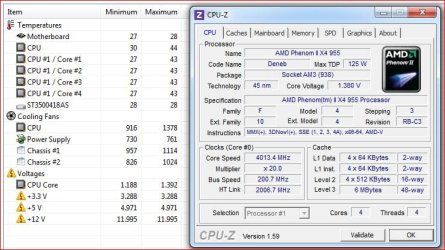
Here is my 955 overclocked to 4.0 GHz with a CM 212 EVO (full specs below) after about 10 minutes of the AIDA64 stress test,

cm212evo.JPG

and it idles around 26-28°C with a room temperature of 23°C.

If you're idling at 50°C then I would be looking at what kind of airflow you're getting through the case, adding a second fan to the heatsink or changing the thermal paste isn't going to lower it by much if the airflow isn't there to begin with. Also what kind of room temps is the computer being run in?

P.S. Have a link to the case you're using? What you have listed isn't much to go on.

P.P.S. To give an idea as to how much the case and what it has for airflow can do for cooling, I just recently changed my case from an Antec Sonata III to the Antec Three Hundred and both idle and load temps went down by ~10°C (same with my video card). I also added a 120 mm 1300 RPM PWM fan to the back and moved the fan that came with the case (Antec TriCool) to the front, and left the other two fan mounts (one more on the front and one on the side) empty for now. Not only did all the temps go down, but now when gaming I can barely here the fan on my video card where in the old case it tended to get rather loud.
 

My Computer

Computer type
PC/Desktop
Computer Manufacturer/Model Number
Me
OS
Win 7 Ultimate x64
CPU
FX-8350 @ 4.6 GHz so far
Motherboard
Asus M5A97 EVO
Memory
ADATA XPG V1 Series Black 8GB DDR3 1600
Graphics Card(s)
Sapphire R9 270x Dual-X
Sound Card
Xonar DGX w/ Corsair Vengence 1300
Monitor(s) Displays
Acer S232HL Abid
Screen Resolution
1920x1080
Hard Drives
120 GB OCZ Vertex 3
500 GB Seagate 7200.12
PSU
Antec Earthwatts 650W Green
Case
Antec Three Hundred
Cooling
Cooler Master 212 EVO
Keyboard
Logitech G510
Mouse
Logitech G500s
Internet Speed
35000/3000
I have a Hyper 212 EVO and it felt like less ait passing over the radiator with a push-pull arrangement with 2 Noctua 120MM fans. I only did the test by noting how much air was hitting my hands. There is a lot of leakage around the push fan and some tape to seal the edges might help it.

You would have to try it both ways with stress tests and compare your temps with each setup.
 

My Computer

Computer type
PC/Desktop
Computer Manufacturer/Model Number
Home Built Desktop By DataTech
OS
Windows 7 Ultimate X64 SP1
CPU
Intel i5-2550K, Differing ~4.4-4.8GHz No built in GPU
Motherboard
ASUS P8Z68-V PRO/GEN3
Memory
16GB G.Skill Sniper 1866MHz @ 2133MHz 2x8GB
Graphics Card(s)
ASUS GTX650TIB-DC2OC-2GD5, (650TI Boost)
Sound Card
Onboard Realtek 5-1
Monitor(s) Displays
Samsung P2570HD
Screen Resolution
1920x1080
Hard Drives
Samsung 840 Pro 256GB SSD for OS, 500GB Seagate Constellation (Enterprise drive) for Data
PSU
Corsair HX650W
Case
Inwin Dragon Rider
Cooling
Hyper 212 EVO w/two Noctua fans, push-pull, @1300 RPM
Keyboard
E-Z Eyes, bright yellow keys with large characters
Mouse
steelseries SENSEI Laser Pro Gaming
Internet Speed
48-51Mbs Mbs down, 11 Mbs up Xfinity Cable
Antivirus
Norton Internet Security 2013
Browser
IE 10, Opera, Pale Moon if needed
Other Info
4 case fans, LG BluRay-RE, ASUS DVD-RW, Mr. Fusion power supply, 1.21 gigawatts.
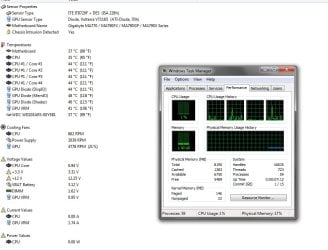
Sorry i made a mistake. Explorer.exe was consuming my CPU process at Idle.
Anyway this my temp Now..
Would it help anyway to add another fan on my 212+?
P.S Power Supply Fan = my case fan ( I mounted Case Fan in Power Supply Fan port )
thanks guys
 

Attachments

  • Untitled-2.jpg
    Untitled-2.jpg
    114.3 KB · Views: 152

My Computer

OS
MS Windows 7 Ultimate 64-bit
CPU
AMD Phenom II X4 Black Edition 955
Motherboard
Gigabyte GA-MA770T-UD3P
Memory
KingSton 8GB BUS1333 DDR3
Graphics Card(s)
SAPPHIRE HD 5850 1GB GDDR5 PCIE (Game Edition)
Sound Card
Realtek High Definition Audio
Monitor(s) Displays
DELL M993s Flat screen 19inch
Screen Resolution
1280x1024
Hard Drives
WD Caviar Green 1 TB, 5400 RPM, 64 MB Cache
PSU
Gamma-HEC 500 Watt
Case
Gamma
Cooling
Cooler Master hyper 212 plus
Keyboard
A4TECH
Mouse
A4TECH
Internet Speed
ADSL 2048 Kbps
Those are high temps even for a Phenom. You need to try a second fan or make sure the Hyper 212 is mounted properly and the thermal compound is applied right.
 

My Computer

Computer type
PC/Desktop
Computer Manufacturer/Model Number
Home Built Desktop By DataTech
OS
Windows 7 Ultimate X64 SP1
CPU
Intel i5-2550K, Differing ~4.4-4.8GHz No built in GPU
Motherboard
ASUS P8Z68-V PRO/GEN3
Memory
16GB G.Skill Sniper 1866MHz @ 2133MHz 2x8GB
Graphics Card(s)
ASUS GTX650TIB-DC2OC-2GD5, (650TI Boost)
Sound Card
Onboard Realtek 5-1
Monitor(s) Displays
Samsung P2570HD
Screen Resolution
1920x1080
Hard Drives
Samsung 840 Pro 256GB SSD for OS, 500GB Seagate Constellation (Enterprise drive) for Data
PSU
Corsair HX650W
Case
Inwin Dragon Rider
Cooling
Hyper 212 EVO w/two Noctua fans, push-pull, @1300 RPM
Keyboard
E-Z Eyes, bright yellow keys with large characters
Mouse
steelseries SENSEI Laser Pro Gaming
Internet Speed
48-51Mbs Mbs down, 11 Mbs up Xfinity Cable
Antivirus
Norton Internet Security 2013
Browser
IE 10, Opera, Pale Moon if needed
Other Info
4 case fans, LG BluRay-RE, ASUS DVD-RW, Mr. Fusion power supply, 1.21 gigawatts.
Back
Top