Cooler Master hyper 212 plus?

Un4GiVeN78

Banned
Local time
3:31 PM
Messages
55
Location
Cairo, Egypt
Hello, i have AMD phenom II x4 955 BE processor. i have replaced the stock fan because of the huge noise and the bad cooling with a new Cooler Master hyper 212 plus(Hyper 212 Plus - Cooler Master - Leading Provider of Computer Case | Cooler | Power Supply) i noticed that it is a bit better for cooling but the noise is too high.
it is allowed to have 2 fans on both sides, i have only one fan now i bought it that way so if i buy the other fan and plug it in the other side will increase the cooling and lower the noise or make it worse noise?!
thank you
 

My Computer

OS
MS Windows 7 Ultimate 64-bit
CPU
AMD Phenom II X4 Black Edition 955
Motherboard
Gigabyte GA-MA770T-UD3P
Memory
KingSton 8GB BUS1333 DDR3
Graphics Card(s)
SAPPHIRE HD 5850 1GB GDDR5 PCIE (Game Edition)
Sound Card
Realtek High Definition Audio
Monitor(s) Displays
DELL M993s Flat screen 19inch
Screen Resolution
1280x1024
Hard Drives
WD Caviar Green 1 TB, 5400 RPM, 64 MB Cache
PSU
Gamma-HEC 500 Watt
Case
Gamma
Cooling
Cooler Master hyper 212 plus
Keyboard
A4TECH
Mouse
A4TECH
Internet Speed
ADSL 2048 Kbps
Two identical fans is going to make more noise than 1 fan.

You should use a single fan that blows air THROUGH the heatsink fins and TOWARD the rear of the case, where you probably have an exhaust fan.

That heatsink is generally well-regarded for cooling purposes, but I'm not sure about how quiet it is.

You may have just had bad luck and got a noisy example of the fan.

Or that particular fan may just be noisier than you like.

My advice: replace with another fan KNOWN to be quiet: low to medium speed Nexus, Yate Loon, or Scythe, for example.

Make sure you have mounted the heatsink and fan to blow air as I described above.
 

My Computer

Computer type
PC/Desktop
Computer Manufacturer/Model Number
Ignatz Special; 4 speed manual gearbox; factory air conditioning; one of one
OS
Windows 7 Home Premium SP1, 64-bit
CPU
Intel Skylake i5-6600K, not overclocked
Motherboard
AsRock Z170M Extreme 4, micro ATX
Memory
8 GB HyperX DDR4-2666 (2 x 4 GB)
Graphics Card(s)
none; graphics are integrated on CPU
Sound Card
onboard: Realtek ALC1150; external: USB Behringer UF0-202
Monitor(s) Displays
Dell S2340M 23 inch IPS
Screen Resolution
1600 x 900
Hard Drives
System: Crucial MX100 series SSD, 128 GB;
Data: Samsung Spinpoint 103SJ, 1 TB;
Backup: WD Caviar Green WD30EZRX-00D8PB0, 3 TB
PSU
Rosewill SilentNight 500 watt fanless, semi-modular
Case
Antec Solo II
Cooling
Noctua NH-U12S; Noctua F12 intake, Noctua S12A exhaust
Keyboard
Microsoft 200 6JH-00001 USB
Mouse
Dell or Microsoft optical wired; USB
Antivirus
Microsoft Security Essentials and Malwarebytes Premium
Browser
Pale Moon
Other Info
All fans PWM; speeds at idle: CPU circa 500 rpm; intake circa 600 rpm; exhaust circa 600 rpm; CPU temps 27 idle and 47 C load in a warm room (27 C/81 F) when running Intel Extreme Tuning Utility stress test.
If nothing else you can pick up some higher quality fans or fan and replace the one that comes with the cooler. I have 2 mounted to mine now and have them set at 75% and they are barely noticeable.
 

My Computer

Computer type
PC/Desktop
OS
Win8.1 Pro x64
CPU
Intel Core i7 2700K
Motherboard
Asus Maximus IV Extreme-Z
Memory
Silicon Power 2400@2133 16gb
Graphics Card(s)
Diamond R9 290X
Sound Card
onboard
Monitor(s) Displays
AOC 23"
Screen Resolution
1920x1080
Hard Drives
2-Intel 520 120Gb RAID0 (OS and Games)
2 OCZ Solid 3 60gb RAID0 (Apps)
2-WD Caviar Black 500Gb (Storage)
PSU
Thermaltake TR2 RX 750W
Case
corsair 750D
Cooling
Corsair H100i
Keyboard
Gigabyte Force K7
Mouse
Cyborg R.A.T. 5
The FAN on the right side to PUSH the air through the heatsink, I thought another FAN on the left side to PULL the air will be perfect. I run my PC 24 hours and consume high processing rate and all i think about is noise level cause my bed next to the pc and i can't sleep lol. I'm afraid i can't replace this heatsink cause i've been using it for 2 weeks.
besides this heatsind is too way expensive to the processor the seller thought i have X6 CPU or something.
i'm starting to hate the whole AMD because of heat and noise.
 

My Computer

OS
MS Windows 7 Ultimate 64-bit
CPU
AMD Phenom II X4 Black Edition 955
Motherboard
Gigabyte GA-MA770T-UD3P
Memory
KingSton 8GB BUS1333 DDR3
Graphics Card(s)
SAPPHIRE HD 5850 1GB GDDR5 PCIE (Game Edition)
Sound Card
Realtek High Definition Audio
Monitor(s) Displays
DELL M993s Flat screen 19inch
Screen Resolution
1280x1024
Hard Drives
WD Caviar Green 1 TB, 5400 RPM, 64 MB Cache
PSU
Gamma-HEC 500 Watt
Case
Gamma
Cooling
Cooler Master hyper 212 plus
Keyboard
A4TECH
Mouse
A4TECH
Internet Speed
ADSL 2048 Kbps
ignatzatsonic did u mean to replace the entire heatsink or just the single fan?! sry i'm confused
 

My Computer

OS
MS Windows 7 Ultimate 64-bit
CPU
AMD Phenom II X4 Black Edition 955
Motherboard
Gigabyte GA-MA770T-UD3P
Memory
KingSton 8GB BUS1333 DDR3
Graphics Card(s)
SAPPHIRE HD 5850 1GB GDDR5 PCIE (Game Edition)
Sound Card
Realtek High Definition Audio
Monitor(s) Displays
DELL M993s Flat screen 19inch
Screen Resolution
1280x1024
Hard Drives
WD Caviar Green 1 TB, 5400 RPM, 64 MB Cache
PSU
Gamma-HEC 500 Watt
Case
Gamma
Cooling
Cooler Master hyper 212 plus
Keyboard
A4TECH
Mouse
A4TECH
Internet Speed
ADSL 2048 Kbps
If nothing else you can pick up some higher quality fans or fan and replace the one that comes with the cooler. I have 2 mounted to mine now and have them set at 75% and they are barely noticeable.
I got it.
thank you
 

My Computer

OS
MS Windows 7 Ultimate 64-bit
CPU
AMD Phenom II X4 Black Edition 955
Motherboard
Gigabyte GA-MA770T-UD3P
Memory
KingSton 8GB BUS1333 DDR3
Graphics Card(s)
SAPPHIRE HD 5850 1GB GDDR5 PCIE (Game Edition)
Sound Card
Realtek High Definition Audio
Monitor(s) Displays
DELL M993s Flat screen 19inch
Screen Resolution
1280x1024
Hard Drives
WD Caviar Green 1 TB, 5400 RPM, 64 MB Cache
PSU
Gamma-HEC 500 Watt
Case
Gamma
Cooling
Cooler Master hyper 212 plus
Keyboard
A4TECH
Mouse
A4TECH
Internet Speed
ADSL 2048 Kbps
I meant change only the fan to a known quiet fan, low or medium speed.

Two fans of a certain type will always be noisier than 1 fan of the same type.

Fans are a tradeoff between noise and cooling power.

If noise is a bigger problem than cooling power, go with 1 good low to medium speed fan that blows THROUGH the fins and TOWARD the rear of the case.

Scythe Slipstream is good.

Nexus

Yate Loon.

Make sure it is fairly low RPM--800 or 1200.

What is the RPM of your current fan?

What brand and model is your current fan?
 

My Computer

Computer type
PC/Desktop
Computer Manufacturer/Model Number
Ignatz Special; 4 speed manual gearbox; factory air conditioning; one of one
OS
Windows 7 Home Premium SP1, 64-bit
CPU
Intel Skylake i5-6600K, not overclocked
Motherboard
AsRock Z170M Extreme 4, micro ATX
Memory
8 GB HyperX DDR4-2666 (2 x 4 GB)
Graphics Card(s)
none; graphics are integrated on CPU
Sound Card
onboard: Realtek ALC1150; external: USB Behringer UF0-202
Monitor(s) Displays
Dell S2340M 23 inch IPS
Screen Resolution
1600 x 900
Hard Drives
System: Crucial MX100 series SSD, 128 GB;
Data: Samsung Spinpoint 103SJ, 1 TB;
Backup: WD Caviar Green WD30EZRX-00D8PB0, 3 TB
PSU
Rosewill SilentNight 500 watt fanless, semi-modular
Case
Antec Solo II
Cooling
Noctua NH-U12S; Noctua F12 intake, Noctua S12A exhaust
Keyboard
Microsoft 200 6JH-00001 USB
Mouse
Dell or Microsoft optical wired; USB
Antivirus
Microsoft Security Essentials and Malwarebytes Premium
Browser
Pale Moon
Other Info
All fans PWM; speeds at idle: CPU circa 500 rpm; intake circa 600 rpm; exhaust circa 600 rpm; CPU temps 27 idle and 47 C load in a warm room (27 C/81 F) when running Intel Extreme Tuning Utility stress test.
I meant change only the fan to a known quiet fan, low or medium speed.

Two fans of a certain type will always be noisier than 1 fan of the same type.

Fans are a tradeoff between noise and cooling power.

If noise is a bigger problem than cooling power, go with 1 good low to medium speed fan that blows THROUGH the fins and TOWARD the rear of the case.

Scythe Slipstream is good.

Nexus

Yate Loon.

Make sure it is fairly low RPM--800 or 1200.

What is the RPM of your current fan?

What brand and model is your current fan?


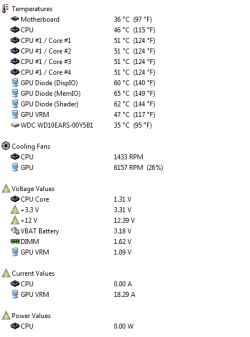
This picture shows the RPM and the temp.
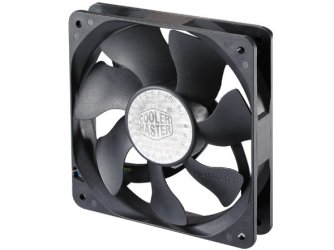
I use the original FAN that comes with the heatsink
 

Attachments

  • Untitled.png
    Untitled.png
    9.8 KB · Views: 147
  • top5.jpg
    top5.jpg
    21.9 KB · Views: 54

My Computer

OS
MS Windows 7 Ultimate 64-bit
CPU
AMD Phenom II X4 Black Edition 955
Motherboard
Gigabyte GA-MA770T-UD3P
Memory
KingSton 8GB BUS1333 DDR3
Graphics Card(s)
SAPPHIRE HD 5850 1GB GDDR5 PCIE (Game Edition)
Sound Card
Realtek High Definition Audio
Monitor(s) Displays
DELL M993s Flat screen 19inch
Screen Resolution
1280x1024
Hard Drives
WD Caviar Green 1 TB, 5400 RPM, 64 MB Cache
PSU
Gamma-HEC 500 Watt
Case
Gamma
Cooling
Cooler Master hyper 212 plus
Keyboard
A4TECH
Mouse
A4TECH
Internet Speed
ADSL 2048 Kbps
If you run your PC under load all the time, you may have to live with the noise.

All you can do is experiment with fans. A low speed fan may be very quiet but may not cool enough if the processor is under a good load.

Also consider:

Do you know that the heatsink is properly mounted with good thermal paste? If it is not mounted properly, temps will rise.

Ambient temperature of your room. If you reduce the ambient temp by 5 degrees, the temps inside your PC will drop a similar amount and may let you use a quieter fan.

There is nothing wrong with that heatsink if it is mounted correctly.
 

My Computer

Computer type
PC/Desktop
Computer Manufacturer/Model Number
Ignatz Special; 4 speed manual gearbox; factory air conditioning; one of one
OS
Windows 7 Home Premium SP1, 64-bit
CPU
Intel Skylake i5-6600K, not overclocked
Motherboard
AsRock Z170M Extreme 4, micro ATX
Memory
8 GB HyperX DDR4-2666 (2 x 4 GB)
Graphics Card(s)
none; graphics are integrated on CPU
Sound Card
onboard: Realtek ALC1150; external: USB Behringer UF0-202
Monitor(s) Displays
Dell S2340M 23 inch IPS
Screen Resolution
1600 x 900
Hard Drives
System: Crucial MX100 series SSD, 128 GB;
Data: Samsung Spinpoint 103SJ, 1 TB;
Backup: WD Caviar Green WD30EZRX-00D8PB0, 3 TB
PSU
Rosewill SilentNight 500 watt fanless, semi-modular
Case
Antec Solo II
Cooling
Noctua NH-U12S; Noctua F12 intake, Noctua S12A exhaust
Keyboard
Microsoft 200 6JH-00001 USB
Mouse
Dell or Microsoft optical wired; USB
Antivirus
Microsoft Security Essentials and Malwarebytes Premium
Browser
Pale Moon
Other Info
All fans PWM; speeds at idle: CPU circa 500 rpm; intake circa 600 rpm; exhaust circa 600 rpm; CPU temps 27 idle and 47 C load in a warm room (27 C/81 F) when running Intel Extreme Tuning Utility stress test.
If you run your PC under load all the time, you may have to live with the noise.

All you can do is experiment with fans. A low speed fan may be very quiet but may not cool enough if the processor is under a good load.

Also consider:

Do you know that the heatsink is properly mounted with good thermal paste? If it is not mounted properly, temps will rise.

Ambient temperature of your room. If you reduce the ambient temp by 5 degrees, the temps inside your PC will drop a similar amount and may let you use a quieter fan.

There is nothing wrong with that heatsink if it is mounted correctly.


I took long time to mount the heatsink into my motherboard coz it was really difficult. i'm afraid the thermal paste was not enough cause i kept mount and remove the heatsink few times. it was a MESS
 

My Computer

OS
MS Windows 7 Ultimate 64-bit
CPU
AMD Phenom II X4 Black Edition 955
Motherboard
Gigabyte GA-MA770T-UD3P
Memory
KingSton 8GB BUS1333 DDR3
Graphics Card(s)
SAPPHIRE HD 5850 1GB GDDR5 PCIE (Game Edition)
Sound Card
Realtek High Definition Audio
Monitor(s) Displays
DELL M993s Flat screen 19inch
Screen Resolution
1280x1024
Hard Drives
WD Caviar Green 1 TB, 5400 RPM, 64 MB Cache
PSU
Gamma-HEC 500 Watt
Case
Gamma
Cooling
Cooler Master hyper 212 plus
Keyboard
A4TECH
Mouse
A4TECH
Internet Speed
ADSL 2048 Kbps
Your CPU temps look high UNLESS the processor is under load.

My CPU temps at idle are about 10 degrees above ambient with a stock heatsink and fan much less efficient than yours.

You don't need much thermal paste. But getting a solid mount can be difficult.

On an Intel machine, you typically would use a spot of thermal paste about the size of a grain of rice. Don't cover the entire surface. Go to Arcticsilver.com and look at the instructions for your processor.
 

My Computer

Computer type
PC/Desktop
Computer Manufacturer/Model Number
Ignatz Special; 4 speed manual gearbox; factory air conditioning; one of one
OS
Windows 7 Home Premium SP1, 64-bit
CPU
Intel Skylake i5-6600K, not overclocked
Motherboard
AsRock Z170M Extreme 4, micro ATX
Memory
8 GB HyperX DDR4-2666 (2 x 4 GB)
Graphics Card(s)
none; graphics are integrated on CPU
Sound Card
onboard: Realtek ALC1150; external: USB Behringer UF0-202
Monitor(s) Displays
Dell S2340M 23 inch IPS
Screen Resolution
1600 x 900
Hard Drives
System: Crucial MX100 series SSD, 128 GB;
Data: Samsung Spinpoint 103SJ, 1 TB;
Backup: WD Caviar Green WD30EZRX-00D8PB0, 3 TB
PSU
Rosewill SilentNight 500 watt fanless, semi-modular
Case
Antec Solo II
Cooling
Noctua NH-U12S; Noctua F12 intake, Noctua S12A exhaust
Keyboard
Microsoft 200 6JH-00001 USB
Mouse
Dell or Microsoft optical wired; USB
Antivirus
Microsoft Security Essentials and Malwarebytes Premium
Browser
Pale Moon
Other Info
All fans PWM; speeds at idle: CPU circa 500 rpm; intake circa 600 rpm; exhaust circa 600 rpm; CPU temps 27 idle and 47 C load in a warm room (27 C/81 F) when running Intel Extreme Tuning Utility stress test.
yea the processor is under load all the time.. Is there any heatsink that doesn't use fans i think i saw one heatsink on Lenovo original PC with no fans. that would be the one i buy.
i can still buy one of the low noise fan u recommended
 

My Computer

OS
MS Windows 7 Ultimate 64-bit
CPU
AMD Phenom II X4 Black Edition 955
Motherboard
Gigabyte GA-MA770T-UD3P
Memory
KingSton 8GB BUS1333 DDR3
Graphics Card(s)
SAPPHIRE HD 5850 1GB GDDR5 PCIE (Game Edition)
Sound Card
Realtek High Definition Audio
Monitor(s) Displays
DELL M993s Flat screen 19inch
Screen Resolution
1280x1024
Hard Drives
WD Caviar Green 1 TB, 5400 RPM, 64 MB Cache
PSU
Gamma-HEC 500 Watt
Case
Gamma
Cooling
Cooler Master hyper 212 plus
Keyboard
A4TECH
Mouse
A4TECH
Internet Speed
ADSL 2048 Kbps
hehe.. i used the entire thermal paste the whole package :D
was a mess
 

My Computer

OS
MS Windows 7 Ultimate 64-bit
CPU
AMD Phenom II X4 Black Edition 955
Motherboard
Gigabyte GA-MA770T-UD3P
Memory
KingSton 8GB BUS1333 DDR3
Graphics Card(s)
SAPPHIRE HD 5850 1GB GDDR5 PCIE (Game Edition)
Sound Card
Realtek High Definition Audio
Monitor(s) Displays
DELL M993s Flat screen 19inch
Screen Resolution
1280x1024
Hard Drives
WD Caviar Green 1 TB, 5400 RPM, 64 MB Cache
PSU
Gamma-HEC 500 Watt
Case
Gamma
Cooling
Cooler Master hyper 212 plus
Keyboard
A4TECH
Mouse
A4TECH
Internet Speed
ADSL 2048 Kbps
You can use your existing heatsink without a fan if your processor temp is still tolerable. Try it.

Do you know for SURE which fans in the PC are noisy?

It may be your intake or exhaust fans, rather than the heat sink fan.

You can stick your finger in the fans to stop them momentarily to see how much noise they really make.
 

My Computer

Computer type
PC/Desktop
Computer Manufacturer/Model Number
Ignatz Special; 4 speed manual gearbox; factory air conditioning; one of one
OS
Windows 7 Home Premium SP1, 64-bit
CPU
Intel Skylake i5-6600K, not overclocked
Motherboard
AsRock Z170M Extreme 4, micro ATX
Memory
8 GB HyperX DDR4-2666 (2 x 4 GB)
Graphics Card(s)
none; graphics are integrated on CPU
Sound Card
onboard: Realtek ALC1150; external: USB Behringer UF0-202
Monitor(s) Displays
Dell S2340M 23 inch IPS
Screen Resolution
1600 x 900
Hard Drives
System: Crucial MX100 series SSD, 128 GB;
Data: Samsung Spinpoint 103SJ, 1 TB;
Backup: WD Caviar Green WD30EZRX-00D8PB0, 3 TB
PSU
Rosewill SilentNight 500 watt fanless, semi-modular
Case
Antec Solo II
Cooling
Noctua NH-U12S; Noctua F12 intake, Noctua S12A exhaust
Keyboard
Microsoft 200 6JH-00001 USB
Mouse
Dell or Microsoft optical wired; USB
Antivirus
Microsoft Security Essentials and Malwarebytes Premium
Browser
Pale Moon
Other Info
All fans PWM; speeds at idle: CPU circa 500 rpm; intake circa 600 rpm; exhaust circa 600 rpm; CPU temps 27 idle and 47 C load in a warm room (27 C/81 F) when running Intel Extreme Tuning Utility stress test.
You can use your existing heatsink without a fan if your processor temp is still tolerable. Try it.

Do you know for SURE which fans in the PC are noisy?

It may be your intake or exhaust fans, rather than the heat sink fan.

You can stick your finger in the fans to stop them momentarily to see how much noise they really make.

I have only 2 fans on my case.. 1 for CPU and 1 for GPU i have HD 5850 you can check the pic i send earlier to see the RPM of the GPU. i will try the heatsink without a fan.
the PC with shutdown if i touch the CPU fan :D
 

My Computer

OS
MS Windows 7 Ultimate 64-bit
CPU
AMD Phenom II X4 Black Edition 955
Motherboard
Gigabyte GA-MA770T-UD3P
Memory
KingSton 8GB BUS1333 DDR3
Graphics Card(s)
SAPPHIRE HD 5850 1GB GDDR5 PCIE (Game Edition)
Sound Card
Realtek High Definition Audio
Monitor(s) Displays
DELL M993s Flat screen 19inch
Screen Resolution
1280x1024
Hard Drives
WD Caviar Green 1 TB, 5400 RPM, 64 MB Cache
PSU
Gamma-HEC 500 Watt
Case
Gamma
Cooling
Cooler Master hyper 212 plus
Keyboard
A4TECH
Mouse
A4TECH
Internet Speed
ADSL 2048 Kbps
Get an exhaust fan on the back side. That will cool the interior down and allow you to run a quieter fan on the heatsink.

It's been a long time since I saw a desktop PC with no exhaust fan. No wonder it's hot inside.

Ideally:

Slow intake fan on the front, sucking cool air in.

Slow exhaust fan on the rear, sucking hot air out.

Slow to mid speed heatsink fan.

Your lack of exhaust fan is causing heat buildup inside.

They make graphics cards with no fans. I own and use one on another PC.
 

My Computer

Computer type
PC/Desktop
Computer Manufacturer/Model Number
Ignatz Special; 4 speed manual gearbox; factory air conditioning; one of one
OS
Windows 7 Home Premium SP1, 64-bit
CPU
Intel Skylake i5-6600K, not overclocked
Motherboard
AsRock Z170M Extreme 4, micro ATX
Memory
8 GB HyperX DDR4-2666 (2 x 4 GB)
Graphics Card(s)
none; graphics are integrated on CPU
Sound Card
onboard: Realtek ALC1150; external: USB Behringer UF0-202
Monitor(s) Displays
Dell S2340M 23 inch IPS
Screen Resolution
1600 x 900
Hard Drives
System: Crucial MX100 series SSD, 128 GB;
Data: Samsung Spinpoint 103SJ, 1 TB;
Backup: WD Caviar Green WD30EZRX-00D8PB0, 3 TB
PSU
Rosewill SilentNight 500 watt fanless, semi-modular
Case
Antec Solo II
Cooling
Noctua NH-U12S; Noctua F12 intake, Noctua S12A exhaust
Keyboard
Microsoft 200 6JH-00001 USB
Mouse
Dell or Microsoft optical wired; USB
Antivirus
Microsoft Security Essentials and Malwarebytes Premium
Browser
Pale Moon
Other Info
All fans PWM; speeds at idle: CPU circa 500 rpm; intake circa 600 rpm; exhaust circa 600 rpm; CPU temps 27 idle and 47 C load in a warm room (27 C/81 F) when running Intel Extreme Tuning Utility stress test.
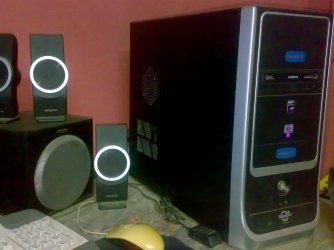
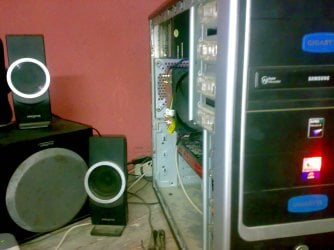
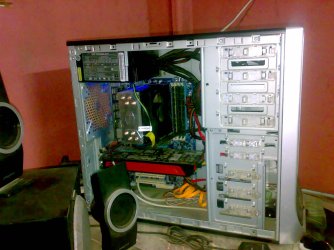
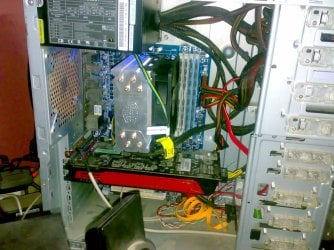
I took some photos of my case to show u my fans.. and sry there is a 3rd fan on my power supply and my graphic card(Sapphire HD 5850) has a fan i'm sure.
I removed the case rear fan to reduce the noise and i can't mount a front fan because the CPU heatsink almost touch the case door.
anyway, i will try first to with out CPU fan or i may buy one of the good fans u recommended.
 

Attachments

  • 20110318100.jpg
    20110318100.jpg
    221.7 KB · Views: 8
  • 20110318103.jpg
    20110318103.jpg
    278.3 KB · Views: 10
  • 20110318102.jpg
    20110318102.jpg
    359.9 KB · Views: 28
  • 20110318101.jpg
    20110318101.jpg
    447.8 KB · Views: 42
Last edited:

My Computer

OS
MS Windows 7 Ultimate 64-bit
CPU
AMD Phenom II X4 Black Edition 955
Motherboard
Gigabyte GA-MA770T-UD3P
Memory
KingSton 8GB BUS1333 DDR3
Graphics Card(s)
SAPPHIRE HD 5850 1GB GDDR5 PCIE (Game Edition)
Sound Card
Realtek High Definition Audio
Monitor(s) Displays
DELL M993s Flat screen 19inch
Screen Resolution
1280x1024
Hard Drives
WD Caviar Green 1 TB, 5400 RPM, 64 MB Cache
PSU
Gamma-HEC 500 Watt
Case
Gamma
Cooling
Cooler Master hyper 212 plus
Keyboard
A4TECH
Mouse
A4TECH
Internet Speed
ADSL 2048 Kbps
You have to confirm WHICH fans are making noise and then act accordingly.

If you have a slow processor, it may have to work very hard to process the work load you give it.

You have to determine the maximum temp your CPU was designed for and stay under that temp.

I don't know much about AMD.

You can throw blankets over the case to muffle the sound as long as the blanket does not block fans or cause temps to go too high.

It's much better to build a quiet PC than to build a noisy one and then try to make it quiet.

You might consider a form of ear plugs for sleeping.

You can move the case farther away from you.

Etc.

But concentrate on getting good fans, heatsink remounting, and a proper application of thermal paste.
 

My Computer

Computer type
PC/Desktop
Computer Manufacturer/Model Number
Ignatz Special; 4 speed manual gearbox; factory air conditioning; one of one
OS
Windows 7 Home Premium SP1, 64-bit
CPU
Intel Skylake i5-6600K, not overclocked
Motherboard
AsRock Z170M Extreme 4, micro ATX
Memory
8 GB HyperX DDR4-2666 (2 x 4 GB)
Graphics Card(s)
none; graphics are integrated on CPU
Sound Card
onboard: Realtek ALC1150; external: USB Behringer UF0-202
Monitor(s) Displays
Dell S2340M 23 inch IPS
Screen Resolution
1600 x 900
Hard Drives
System: Crucial MX100 series SSD, 128 GB;
Data: Samsung Spinpoint 103SJ, 1 TB;
Backup: WD Caviar Green WD30EZRX-00D8PB0, 3 TB
PSU
Rosewill SilentNight 500 watt fanless, semi-modular
Case
Antec Solo II
Cooling
Noctua NH-U12S; Noctua F12 intake, Noctua S12A exhaust
Keyboard
Microsoft 200 6JH-00001 USB
Mouse
Dell or Microsoft optical wired; USB
Antivirus
Microsoft Security Essentials and Malwarebytes Premium
Browser
Pale Moon
Other Info
All fans PWM; speeds at idle: CPU circa 500 rpm; intake circa 600 rpm; exhaust circa 600 rpm; CPU temps 27 idle and 47 C load in a warm room (27 C/81 F) when running Intel Extreme Tuning Utility stress test.
You have to confirm WHICH fans are making noise and then act accordingly.

If you have a slow processor, it may have to work very hard to process the work load you give it.

You have to determine the maximum temp your CPU was designed for and stay under that temp.

I don't know much about AMD.

You can throw blankets over the case to muffle the sound as long as the blanket does not block fans or cause temps to go too high.

It's much better to build a quiet PC than to build a noisy one and then try to make it quiet.

You might consider a form of ear plugs for sleeping.

You can move the case farther away from you.

Etc.

But concentrate on getting good fans, heatsink remounting, and a proper application of thermal paste.


alright..
Thank you very much for ur help. I appreciate it man
cheers
 

My Computer

OS
MS Windows 7 Ultimate 64-bit
CPU
AMD Phenom II X4 Black Edition 955
Motherboard
Gigabyte GA-MA770T-UD3P
Memory
KingSton 8GB BUS1333 DDR3
Graphics Card(s)
SAPPHIRE HD 5850 1GB GDDR5 PCIE (Game Edition)
Sound Card
Realtek High Definition Audio
Monitor(s) Displays
DELL M993s Flat screen 19inch
Screen Resolution
1280x1024
Hard Drives
WD Caviar Green 1 TB, 5400 RPM, 64 MB Cache
PSU
Gamma-HEC 500 Watt
Case
Gamma
Cooling
Cooler Master hyper 212 plus
Keyboard
A4TECH
Mouse
A4TECH
Internet Speed
ADSL 2048 Kbps

My Computer

Computer Manufacturer/Model Number
Desktop
OS
Windows 7 Professional x64
CPU
Intel i5-2500k @ 3.3Ghz
Motherboard
Gigabyte GA-Z77X-UD5H
Memory
4GB DDR3
Graphics Card(s)
Nvidia GTS250 1GB
Monitor(s) Displays
Sony SDM S95A
Screen Resolution
1280x1024
Hard Drives
1x 1TB, 2x 250GB HDDs
PSU
Corsair HX850W
Case
Cooler Master 690 II
Cooling
Thermalright True Spirit 140mm & 3x 120mm & 3x 140mm Fans
Keyboard
Logitech Media Keyboard
Mouse
Microsoft Intellimouse
Internet Speed
8MB
Back
Top