freakmoister
New member
- Local time
- 12:52 PM
- Messages
- 6
Hi Guys,
I'm currently having problems with cmd prompt.
The issue happened like this.
Yesterday I was trying to create a shortcut to cmd prompt so after typing 'cmd' in the search bar after pressing start, I dragged the 'cmd.exe' that search found out onto the desktop.
I didn't use 'cmd.exe' on the desktop it straight away, as I was doing other stuff, but the computer was later restarted.
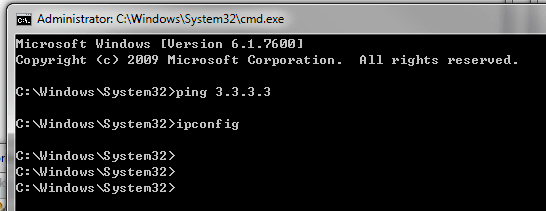
I tried using 'cmd.exe' from the desktop today but issuing 'ping' and 'ipconfig' did nothing. See below I've typed out what I see when I issue the commands, nothing happens, it just goes back to the prompt again. I also noticed that the start location is different from usual, it's "C:\Users\***>" as opposed to the default start directory.
C:\Users\*****>ipconfig
C:\Users\*****>ping 4.4.4.4
C:\Users\*****>
I then checked C:\Windows\Systems32 and found that the cmd.exe had been actually pulled out and is the 'cmd.exe' on the desktop, I put it back in but now the two commands still doesn't work. ipconfig.exe and ping.exe are all in the folder.
I tried changing my environment variables but they've not helped. I'm not sure what could be the problem and if anyone can help it'd be much appreciated.
Thanks
I'm currently having problems with cmd prompt.
The issue happened like this.
Yesterday I was trying to create a shortcut to cmd prompt so after typing 'cmd' in the search bar after pressing start, I dragged the 'cmd.exe' that search found out onto the desktop.
I didn't use 'cmd.exe' on the desktop it straight away, as I was doing other stuff, but the computer was later restarted.
I tried using 'cmd.exe' from the desktop today but issuing 'ping' and 'ipconfig' did nothing. See below I've typed out what I see when I issue the commands, nothing happens, it just goes back to the prompt again. I also noticed that the start location is different from usual, it's "C:\Users\***>" as opposed to the default start directory.
C:\Users\*****>ipconfig
C:\Users\*****>ping 4.4.4.4
C:\Users\*****>
I then checked C:\Windows\Systems32 and found that the cmd.exe had been actually pulled out and is the 'cmd.exe' on the desktop, I put it back in but now the two commands still doesn't work. ipconfig.exe and ping.exe are all in the folder.
I tried changing my environment variables but they've not helped. I'm not sure what could be the problem and if anyone can help it'd be much appreciated.
Thanks
My Computer
- OS
- windows 7 64bit