
Solved Cmd Regedit missing from run menu

dx7bc

New member
Local time
11:11 PM
Messages
10
So i run some batch file from this website: I want to reserve my free copy of Windows 10, but I don?t see - Microsoft Community

to reserve a free copy of windows 10 (it worked) but now if i type in cmd or regedit in the run field (windows 7 start menu) i get nothing found....i checked my windows folder and cmd.exe as well as regedit.exe are there and i can open them...but how can i fix it so i can run/open it from start menu like it was before?
 

My Computer

Computer type
Laptop
Computer Manufacturer/Model Number
Acer
OS
Windows 7 64bit
CPU
Core i3 1.5ghz
Motherboard
Phoenix SecureCore Tiano
Memory
8GB
Graphics Card(s)
Nvidia GT 620m 1GB
Sound Card
Realtek
Monitor(s) Displays
Acer
Screen Resolution
1366x768
Hard Drives
500GB Toshiba 5200RPM
Internet Speed
1mb
Antivirus
Microsoft Security
Browser
Chrome
Other Info
That's pretty much it ;)
Do they work if you open a Command Prompt or Elevated Command Prompt?
 

My Computer

Computer type
PC/Desktop
Computer Manufacturer/Model Number
Lenovo IdeaCenter 450
OS
Windows 10 Pro X64
CPU
Intel Quad Core i7-4770 @ 3.4Ghz
Memory
16.0GB PC3-12800 DDR3 SDRAM 1600 MHz
Graphics Card(s)
Intel Integrated HD Graphics
Sound Card
Realtek HD Audio
Monitor(s) Displays
HP 22" LCD
Screen Resolution
1680 x 1050
Hard Drives
250GB Samsung EVO SATA-3 SSD
2TB Seagate ST2000DM001 SATA-2
1.5TB Seagate ST3150041AS SATA
Keyboard
Dell USB
Mouse
Lenovo USB
Internet Speed
Cable via Road Runner 3MB Upload, 30MB Download
Antivirus
Windows Defender, MBAM Pro, MBAE
Browser
Seamonkey
Other Info
UEFI/GPT
PLDS DVD-RW DH16AERSH
It opens only if I open it from /windows folder..
Nothing appears in the search/run field
 

My Computer

Computer type
Laptop
Computer Manufacturer/Model Number
Acer
OS
Windows 7 64bit
CPU
Core i3 1.5ghz
Motherboard
Phoenix SecureCore Tiano
Memory
8GB
Graphics Card(s)
Nvidia GT 620m 1GB
Sound Card
Realtek
Monitor(s) Displays
Acer
Screen Resolution
1366x768
Hard Drives
500GB Toshiba 5200RPM
Internet Speed
1mb
Antivirus
Microsoft Security
Browser
Chrome
Other Info
That's pretty much it ;)
Sorry i misspell there!
I meant regedit.exe
I just checked location of my CMD.exe and its somewhere else!
Please check the attached pics


Pic1: cmd is not found in the run/search field

cmd2.jpg


Pic2: location of cmd.exe

cmd.jpg


Pic4: registry editor is not found...same goes for msconfig and few other programs

regedit.jpg


Pic5: location of registry editor .exe file

regedit2.jpg
 

My Computer

Computer type
Laptop
Computer Manufacturer/Model Number
Acer
OS
Windows 7 64bit
CPU
Core i3 1.5ghz
Motherboard
Phoenix SecureCore Tiano
Memory
8GB
Graphics Card(s)
Nvidia GT 620m 1GB
Sound Card
Realtek
Monitor(s) Displays
Acer
Screen Resolution
1366x768
Hard Drives
500GB Toshiba 5200RPM
Internet Speed
1mb
Antivirus
Microsoft Security
Browser
Chrome
Other Info
That's pretty much it ;)
@Pic2 Wha? Could you verify your Cmd.exe's location by running a Where command on it,
E.g.
Code:
where cmd.exe


While I can suggest you rebuild Explorer's index, I'm not too familiar with Windows' search functionality and don't know why your searches are yielding blanks.
 

My Computer

Computer type
PC/Desktop
OS
Windows 10, Windows 8.1 Pro, Windows 7 Professional, OS X El Capitan
:sarc:

cmdmess.jpg


i let the search for cmd.exe run a bit longer (more than 2 min) and i got 4 cmd.exe files found
i think something went wrong after i run that batch file....I hope someone here who understands it can read it and see what it changed XD

Code:
REG QUERY "HKLM\SOFTWARE\Microsoft\Windows NT\CurrentVersion\AppCompatFlags\UpgradeExperienceIndicators" /v UpgEx | findstr UpgEx
if "%errorlevel%" == "0" GOTO RunGWX
reg add "HKLM\SOFTWARE\Microsoft\Windows NT\CurrentVersion\AppCompatFlags\Appraiser" /v UtcOnetimeSend /t REG_DWORD /d 1 /f
schtasks /run /TN "\Microsoft\Windows\Application Experience\Microsoft Compatibility Appraiser"
:CompatCheckRunning
schtasks /query /TN "\Microsoft\Windows\Application Experience\Microsoft Compatibility Appraiser"
schtasks /query /TN "\Microsoft\Windows\Application Experience\Microsoft Compatibility Appraiser" | findstr Ready
if NOT "%errorlevel%" == "0" ping localhost >nul &goto :CompatCheckRunning
:RunGWX
schtasks /run /TN "\Microsoft\Windows\Setup\gwx\refreshgwxconfig"


Code:
REG QUERY "HKLM\SOFTWARE\Microsoft\Windows NT\CurrentVersion\AppCompatFlags\UpgradeExperienceIndicators" /v UpgEx | findstr UpgEx
if "%errorlevel%" == "1" GOTO RunGWX
reg add "HKLM\SOFTWARE\Microsoft\Windows NT\CurrentVersion\AppCompatFlags\Appraiser" /v UtcOnetimeSend /t REG_DWORD /d 1 /f
schtasks /run /TN "\Microsoft\Windows\Application Experience\Microsoft Compatibility Appraiser"
:CompatCheckRunning
schtasks /query /TN "\Microsoft\Windows\Application Experience\Microsoft Compatibility Appraiser"
schtasks /query /TN "\Microsoft\Windows\Application Experience\Microsoft Compatibility Appraiser" | findstr Ready
if NOT "%errorlevel%" == "1" ping localhost >nul &goto :CompatCheckRunning
:RunGWX
schtasks /run /TN "\Microsoft\Windows\Setup\gwx\refreshgwxconfig"

including these 2 batch files
 

Attachments

My Computer

Computer type
Laptop
Computer Manufacturer/Model Number
Acer
OS
Windows 7 64bit
CPU
Core i3 1.5ghz
Motherboard
Phoenix SecureCore Tiano
Memory
8GB
Graphics Card(s)
Nvidia GT 620m 1GB
Sound Card
Realtek
Monitor(s) Displays
Acer
Screen Resolution
1366x768
Hard Drives
500GB Toshiba 5200RPM
Internet Speed
1mb
Antivirus
Microsoft Security
Browser
Chrome
Other Info
That's pretty much it ;)
i let the search for cmd.exe run a bit longer (more than 2 min) and i got 4 cmd.exe files found
Pick your favourite. I personally prefer the C:\Windows\System32\cmd.exe one.


Those batch files don't reveal anything out of the ordinary. They should not have affected your searches.
 

My Computer

Computer type
PC/Desktop
OS
Windows 10, Windows 8.1 Pro, Windows 7 Professional, OS X El Capitan
I'm rebuilding my index..will post the updates when its done,probably will take couple of hours
 

My Computer

Computer type
Laptop
Computer Manufacturer/Model Number
Acer
OS
Windows 7 64bit
CPU
Core i3 1.5ghz
Motherboard
Phoenix SecureCore Tiano
Memory
8GB
Graphics Card(s)
Nvidia GT 620m 1GB
Sound Card
Realtek
Monitor(s) Displays
Acer
Screen Resolution
1366x768
Hard Drives
500GB Toshiba 5200RPM
Internet Speed
1mb
Antivirus
Microsoft Security
Browser
Chrome
Other Info
That's pretty much it ;)
i let the search for cmd.exe run a bit longer (more than 2 min) and i got 4 cmd.exe files found
Wait, 4 minutes? How could a Where search take 4 minutes?? The Where search only searches for files that reside in each of the directories defined by your Path variable. That shouldn't be much.

The command,
Code:
echo %PATH:;=&echo.%
will list out all the paths defined in your Path variable. How many entries are in this list?
 

My Computer

Computer type
PC/Desktop
OS
Windows 10, Windows 8.1 Pro, Windows 7 Professional, OS X El Capitan
no,no,not the *where* search....the search for cmd.exe file.
since i couldn't start it from the search/run menu i was looking for it in the windows folder...and the search found 1 cmd.exe (the one in the weird location) but after i let it run longer,it found more cmd.exe files (including the one in system32/ folder

Heres the results after i run that command

cmdweirness.jpg


Also i run sfc/ scannow command and it fixed some stuff...i want to open the log file it created which is almost 1GB!! But it wont let me open... says "access denied" im going to restart pc once my index will finish rebuilding..i hope it will start up :sarc:

sfcscananow.jpg


edit: still did not restart the pc...but i tried to search again for cmd.exe in windows folder (after sfc/ scannow) to see in which other locations it would show up and it showed me only 1 file! in system32/ folder. well at least that was fixed...
 

My Computer

Computer type
Laptop
Computer Manufacturer/Model Number
Acer
OS
Windows 7 64bit
CPU
Core i3 1.5ghz
Motherboard
Phoenix SecureCore Tiano
Memory
8GB
Graphics Card(s)
Nvidia GT 620m 1GB
Sound Card
Realtek
Monitor(s) Displays
Acer
Screen Resolution
1366x768
Hard Drives
500GB Toshiba 5200RPM
Internet Speed
1mb
Antivirus
Microsoft Security
Browser
Chrome
Other Info
That's pretty much it ;)
From an Elevated Command Prompt, where cmd should respond immediately as follows:

C:\WINDOWS\system32>where cmd
C:\Windows\System32\cmd.exe


If the response is anything other than that you may have picked up some malware.
 

My Computer

Computer type
PC/Desktop
Computer Manufacturer/Model Number
Lenovo IdeaCenter 450
OS
Windows 10 Pro X64
CPU
Intel Quad Core i7-4770 @ 3.4Ghz
Memory
16.0GB PC3-12800 DDR3 SDRAM 1600 MHz
Graphics Card(s)
Intel Integrated HD Graphics
Sound Card
Realtek HD Audio
Monitor(s) Displays
HP 22" LCD
Screen Resolution
1680 x 1050
Hard Drives
250GB Samsung EVO SATA-3 SSD
2TB Seagate ST2000DM001 SATA-2
1.5TB Seagate ST3150041AS SATA
Keyboard
Dell USB
Mouse
Lenovo USB
Internet Speed
Cable via Road Runner 3MB Upload, 30MB Download
Antivirus
Windows Defender, MBAM Pro, MBAE
Browser
Seamonkey
Other Info
UEFI/GPT
PLDS DVD-RW DH16AERSH
It seems that cmd.exe location has been fixed..
But I'm still unable to run anything from the start menu
 

My Computer

Computer type
Laptop
Computer Manufacturer/Model Number
Acer
OS
Windows 7 64bit
CPU
Core i3 1.5ghz
Motherboard
Phoenix SecureCore Tiano
Memory
8GB
Graphics Card(s)
Nvidia GT 620m 1GB
Sound Card
Realtek
Monitor(s) Displays
Acer
Screen Resolution
1366x768
Hard Drives
500GB Toshiba 5200RPM
Internet Speed
1mb
Antivirus
Microsoft Security
Browser
Chrome
Other Info
That's pretty much it ;)
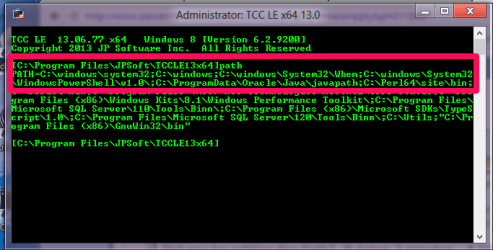
Please type
path <enter>

in a command prompt and post the results
 

My Computer

Computer Manufacturer/Model Number
HP Media Center
OS
Windows 7 32 bit
CPU
AMD 5200+ dual core
Memory
2 GB
Graphics Card(s)
NVidia GeForce 6150SE 128 MB
Monitor(s) Displays
CRT
Screen Resolution
1280x1024
Hard Drives
500 GB Sata internal :

SIIG USB 3.0 docking stations w/WD Caviar Black 6 Gb/s drives
Keyboard
PS/2
Mouse
PS/2 Wheel Mouse
Other Info
SIIG USB 3.0 PCIexpress card.
cfv.jpg
 

My Computer

Computer type
Laptop
Computer Manufacturer/Model Number
Acer
OS
Windows 7 64bit
CPU
Core i3 1.5ghz
Motherboard
Phoenix SecureCore Tiano
Memory
8GB
Graphics Card(s)
Nvidia GT 620m 1GB
Sound Card
Realtek
Monitor(s) Displays
Acer
Screen Resolution
1366x768
Hard Drives
500GB Toshiba 5200RPM
Internet Speed
1mb
Antivirus
Microsoft Security
Browser
Chrome
Other Info
That's pretty much it ;)
Try running in cmd:
Code:
findstr /c:"[SR]" %windir%\logs\cbs\cbs.log >"%userprofile%\desktop\sfcdetails.txt"

Check the created file to make sure it is not empty. If it is, perhaps you don't have permission to read the file? Try adding yourself with Full Control explicitly on the Security tab of file properties. And re-run the command.
 

My Computer

Computer type
PC/Desktop
Computer Manufacturer/Model Number
Custom Build
OS
Windows 7 Ultimate x64 SP1
CPU
AMD Phenom 2 1090T
Motherboard
Gigabyte GA-890FXA-UD5
Memory
2x8GB Kingston HyperX Fury Black 1600Mhz Unganged
Graphics Card(s)
MSI GTX 970 Gaming 4G
Sound Card
Realtek On-Board HD 7.1 Audio / Logitech G35
Monitor(s) Displays
3xAcer GD245HQ
Screen Resolution
1920x1080
Hard Drives
Samsung 850 Pro 512GB SSD - OS /
WD Caviar Black SATA 3 - 1 TBx2 - Dynamic RAID 0 /
WD Caviar Green SATA 2 - 640GBx2 - Dynamic RAID 0 /
WD Caviar Green SATA 2 - 640GB - Internal Backup /
Seagate Barracude SATA 3 - 3TB - External Backup/ Sync
PSU
HighPower 1000W
Case
Cooler Master HAF 932
Cooling
Noctua NH-D14
Keyboard
Logitech G19
Mouse
Logitech G500
Internet Speed
100/4 Mbit Cable (100GB quota)
Antivirus
ZoneAlarm Extreme Security / MBAM Pro / MBAE Free / SAS Free
Browser
IE 11 - Firefox - Chrome
Other Info
Logitech F710/ G27/ G940/ Z5500 // TrackIR 5 // Nvidia 3D Surround Vision
Well, C:\Windows\System32 is in there. But it is behind all that database lookup stuff. I would copy the path to notepad and edit it to put c:\Windows;C:\Windows\System32 at the beginning. Supposedly the Path is limited to 4095 characters. Maybe it ends up being longer than that when that stuff up front is expanded. Try it up front. Make a copy so you can put it back the way it was if it is worse than before. Should not take long to try. :)
 

My Computer

Computer Manufacturer/Model Number
HP Media Center
OS
Windows 7 32 bit
CPU
AMD 5200+ dual core
Memory
2 GB
Graphics Card(s)
NVidia GeForce 6150SE 128 MB
Monitor(s) Displays
CRT
Screen Resolution
1280x1024
Hard Drives
500 GB Sata internal :

SIIG USB 3.0 docking stations w/WD Caviar Black 6 Gb/s drives
Keyboard
PS/2
Mouse
PS/2 Wheel Mouse
Other Info
SIIG USB 3.0 PCIexpress card.
i deleted the log file since i was unable to open it and it was really big...
I think im going to reinstall full windows :confused: i tried everything to solve the problem...but nothing helped... i really hate doing that...
 

My Computer

Computer type
Laptop
Computer Manufacturer/Model Number
Acer
OS
Windows 7 64bit
CPU
Core i3 1.5ghz
Motherboard
Phoenix SecureCore Tiano
Memory
8GB
Graphics Card(s)
Nvidia GT 620m 1GB
Sound Card
Realtek
Monitor(s) Displays
Acer
Screen Resolution
1366x768
Hard Drives
500GB Toshiba 5200RPM
Internet Speed
1mb
Antivirus
Microsoft Security
Browser
Chrome
Other Info
That's pretty much it ;)
i deleted the log file since i was unable to open it and it was really big...
I think im going to reinstall full windows :confused: i tried everything to solve the problem...but nothing helped... i really hate doing that...

Did you try editing the Path? It takes 2 minutes. A lot faster than reinstalling.

Right click on Computer, click Properties, press the Environment Variables Button. The one you want is down the bottom. The System environment variables. I just did mine for grins.

snap1.png
 

My Computer

Computer Manufacturer/Model Number
HP Media Center
OS
Windows 7 32 bit
CPU
AMD 5200+ dual core
Memory
2 GB
Graphics Card(s)
NVidia GeForce 6150SE 128 MB
Monitor(s) Displays
CRT
Screen Resolution
1280x1024
Hard Drives
500 GB Sata internal :

SIIG USB 3.0 docking stations w/WD Caviar Black 6 Gb/s drives
Keyboard
PS/2
Mouse
PS/2 Wheel Mouse
Other Info
SIIG USB 3.0 PCIexpress card.

My Computer

Computer type
PC/Desktop
Computer Manufacturer/Model Number
Custom Build
OS
Windows 7 Ultimate x64 SP1
CPU
AMD Phenom 2 1090T
Motherboard
Gigabyte GA-890FXA-UD5
Memory
2x8GB Kingston HyperX Fury Black 1600Mhz Unganged
Graphics Card(s)
MSI GTX 970 Gaming 4G
Sound Card
Realtek On-Board HD 7.1 Audio / Logitech G35
Monitor(s) Displays
3xAcer GD245HQ
Screen Resolution
1920x1080
Hard Drives
Samsung 850 Pro 512GB SSD - OS /
WD Caviar Black SATA 3 - 1 TBx2 - Dynamic RAID 0 /
WD Caviar Green SATA 2 - 640GBx2 - Dynamic RAID 0 /
WD Caviar Green SATA 2 - 640GB - Internal Backup /
Seagate Barracude SATA 3 - 3TB - External Backup/ Sync
PSU
HighPower 1000W
Case
Cooler Master HAF 932
Cooling
Noctua NH-D14
Keyboard
Logitech G19
Mouse
Logitech G500
Internet Speed
100/4 Mbit Cable (100GB quota)
Antivirus
ZoneAlarm Extreme Security / MBAM Pro / MBAE Free / SAS Free
Browser
IE 11 - Firefox - Chrome
Other Info
Logitech F710/ G27/ G940/ Z5500 // TrackIR 5 // Nvidia 3D Surround Vision
Back
Top