
COD2 Multiplayer Won't Launch

Catfisher

New member
Local time
4:51 PM
Messages
8
:cry:

I am running 64 bit Windows 7 Home Premium, upgraded from Vista. My system is basically an upgraded HP Pavillion, 4 GB ram, Athlon 64 X2 Dual Core Processor 5200+ 2.60 GHz. My video card is from my previous build, an NVidia GeForce 7900GT.

I have been running all of the Half Life 2 Ultimate Expedition games with no issues.

Last night I decided to install COD2, which I had on my last build, but had not installed on the HP. The first problem I encountered was trying to bring up the installation program from the autorun prompt. When I clicked on the COD2 icon from the autorun, I got a box saying "Couldn't Load Library". So I opened the first cd files in Explorer, clicked on Setup.exe and successfully installed the game from the 6 cd's. The game is patched to version 1.3.

The game installed to: C:\Program Files (x86)\Activision..., so it installed as a 32 bit program.

I can play the Single player version of the game just fine, but if I switch to Multiplayer or launch the game from the Multiplayer icon it begins the launch, then fails. Here is a snapshot of what I get.

On my previous pc this never occurred, Multiplayer was fine. I bought the game for online play, I don't want to run single campaigns.

Any and all help with this problem is appreciated.
 

Attachments
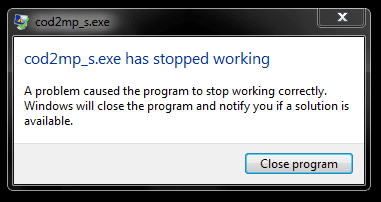
  • COD2.PNG
    COD2.PNG
    19 KB · Views: 38

My Computer

Computer type
PC/Desktop
Computer Manufacturer/Model Number
Customized HP Pavillion
OS
Windows 7 Home Premium
CPU
Athlon 64 x 2 dual core 5200
Motherboard
ECS MCP61PM-HM
Memory
4 x 1 GB
Graphics Card(s)
GeForce 9800GT
Sound Card
Realtek HD Audio Integrated
Monitor(s) Displays
21" Multisync P1150 CRT
Screen Resolution
1280 x 1024
Hard Drives
WD 250 GB
Seagate 250 GB
WD 320 GB
PSU
Rosewill CAPSTONE-650
Mouse
Logitech Laser Gaming
Internet Speed
Comcast Cable
  1. first , you can try run it in compatibility mode. Right click on the launcher>properties>run in XP compatibility and Tick Run as administrator
  2. second try running in safemode.you can find it under the startmenu or you can use command line (command line, cod2mp_s.exe +safe)
  3. third,get the latest patch of the CODMW2
  4. or check and update your graphic and sound card. COD has been known of having issues with sound since cod4
feel free to ask :)
 

My Computer

OS
window's 7
CPU
core 2 quad
Motherboard
gigabyte
Memory
2gb corsair
Graphics Card(s)
ati hd4850
Monitor(s) Displays
lg
Screen Resolution
1600 X 900
Case
power logic
Other Info
none of the spec above is accurate
I know I tried the compatability modes before I patched it to ver. 1.3, also marked Run as Admin. I will try again after work. This is not a CODMW2 game, just COD2; are you sure about that patch?

Thanks
 

My Computer

Computer type
PC/Desktop
Computer Manufacturer/Model Number
Customized HP Pavillion
OS
Windows 7 Home Premium
CPU
Athlon 64 x 2 dual core 5200
Motherboard
ECS MCP61PM-HM
Memory
4 x 1 GB
Graphics Card(s)
GeForce 9800GT
Sound Card
Realtek HD Audio Integrated
Monitor(s) Displays
21" Multisync P1150 CRT
Screen Resolution
1280 x 1024
Hard Drives
WD 250 GB
Seagate 250 GB
WD 320 GB
PSU
Rosewill CAPSTONE-650
Mouse
Logitech Laser Gaming
Internet Speed
Comcast Cable
I know I tried the compatability modes before I patched it to ver. 1.3, also marked Run as Admin. I will try again after work. This is not a CODMW2 game, just COD2; are you sure about that patch?

Thanks

you should try since many old games had compatibility issue with seven
 

My Computer

OS
window's 7
CPU
core 2 quad
Motherboard
gigabyte
Memory
2gb corsair
Graphics Card(s)
ati hd4850
Monitor(s) Displays
lg
Screen Resolution
1600 X 900
Case
power logic
Other Info
none of the spec above is accurate
Make sure you have stereo mix enabled in the recording tab of the sound properties.
 

My Computer

Computer Manufacturer/Model Number
HP Compaq Presario/SR5113WM
OS
Windows 7 Ultimate x64/ Windows Vista Ultimate x64
CPU
AMD Athlon 64 X2 3600+ 1.9Ghz
Motherboard
Asus M2N68-LA
Memory
PNY Optima Memory DDR2 2GB 2x1 kit
Graphics Card(s)
PNY Nvidia 8400 GS 256MB
Sound Card
On board RealTek
Monitor(s) Displays
Acer X163W LCD
Screen Resolution
1366x768
Hard Drives
Western Digital 160 GB SATA 3G (3.0Gb/sec)
7200 rpm
Western Digital 160 GB IDE
PSU
Dynex 400w
Case
Nothin Special
Cooling
Stock
Keyboard
Standard 102 key with volume and sleep buttons
Mouse
Wireless Logitech LX7
Internet Speed
Comcrap 10mb cable
Other Info
Insignia 2.1 speakers, wireless Xbox 360 controller w/plug n play charger, Belkin wireless G + mimo usb network adapter.
works here

i got call of duty 2 and windows 7 and it works for me try doing a full reinstall of the game some tiimes it wood do the same to me with some mods from some server some times i find compadlbility mode makes it worse but do full reinstall with the game
 

My Computer

Computer Manufacturer/Model Number
asrock is the mother bord its costem made as well
OS
windows 7
CPU
amd dual core
Motherboard
asrock
Memory
2 gb
Graphics Card(s)
nvidia some bilt in 7 seres
Sound Card
creative sound blaster
Monitor(s) Displays
its just sys low radiation
Hard Drives
maxtor sata 20 gb and a nother 20 gb thats ide
Case
i think star light
Cooling
cool master fans even sky fan is the same
Thanks katesmart, I should have postwd that I did a full uninstall and a second full install. It made no difference.

Can someone explain to me how a Modern Warfare patrch would work with COD made before MW?

Thanks
 

My Computer

Computer type
PC/Desktop
Computer Manufacturer/Model Number
Customized HP Pavillion
OS
Windows 7 Home Premium
CPU
Athlon 64 x 2 dual core 5200
Motherboard
ECS MCP61PM-HM
Memory
4 x 1 GB
Graphics Card(s)
GeForce 9800GT
Sound Card
Realtek HD Audio Integrated
Monitor(s) Displays
21" Multisync P1150 CRT
Screen Resolution
1280 x 1024
Hard Drives
WD 250 GB
Seagate 250 GB
WD 320 GB
PSU
Rosewill CAPSTONE-650
Mouse
Logitech Laser Gaming
Internet Speed
Comcast Cable
when you reinstall did you right click the installer at launcher and set it to compatibility mode,this should be done before installing
 

My Computer

OS
window's 7
CPU
core 2 quad
Motherboard
gigabyte
Memory
2gb corsair
Graphics Card(s)
ati hd4850
Monitor(s) Displays
lg
Screen Resolution
1600 X 900
Case
power logic
Other Info
none of the spec above is accurate
I know I used to play the game successfully in Vista 32 bit, but if I boot into Vista 32 bit now (which I can by booting from a different HD) COD2 MP fails just like it does in Win 7. Let me make this clear, the Vista installation of COD2 is on the same drive as Vista, from my old PC. When I added this HD to the HP Pavillion with my old NVidia card and booted up with the HP motherboard, Windows made the changes, and now says my Vista is not genuine, but that is another issue. What I'm saying is I newly installed COD2 on a different HD containing and booting in Windows 7. Single player is fine, MP fails to launch with the error I pictured above. I shut down and rebooted from a different HD into Vista. The original installation of COD2 on the drive with Vista used to play fine in Single and MP. Now it does the same as the new installation on the Win 7 HD. Even in Vista, now the old installation plays in Single, fails to launch in MP.

when you reinstall did you right click the installer at launcher and set it to compatibility mode,this should be done before installing

So lets say I completely uninstall COD2 again, including removing the folders. I open the first cd of 6 in Explorer and find the Setup.exe file. Then I should right click on Setup.exe, and select Properties? In Properties I should check the box for compatability and select which? Windows XP Service Pack 2, 3 or Vista? Do you also check the box to Run as Administrator?

If this is the wrong way, please correct me.

Thanks
 

My Computer

Computer type
PC/Desktop
Computer Manufacturer/Model Number
Customized HP Pavillion
OS
Windows 7 Home Premium
CPU
Athlon 64 x 2 dual core 5200
Motherboard
ECS MCP61PM-HM
Memory
4 x 1 GB
Graphics Card(s)
GeForce 9800GT
Sound Card
Realtek HD Audio Integrated
Monitor(s) Displays
21" Multisync P1150 CRT
Screen Resolution
1280 x 1024
Hard Drives
WD 250 GB
Seagate 250 GB
WD 320 GB
PSU
Rosewill CAPSTONE-650
Mouse
Logitech Laser Gaming
Internet Speed
Comcast Cable
So lets say I completely uninstall COD2 again, including removing the folders. I open the first cd of 6 in Explorer and find the Setup.exe file. Then I should right click on Setup.exe, and select Properties? In Properties I should check the box for compatability and select which? Windows XP Service Pack 2, 3 or Vista? Do you also check the box to Run as Administrator?

If this is the wrong way, please correct me.

Thanks

that's right. Feel free to ask :)
 

My Computer

OS
window's 7
CPU
core 2 quad
Motherboard
gigabyte
Memory
2gb corsair
Graphics Card(s)
ati hd4850
Monitor(s) Displays
lg
Screen Resolution
1600 X 900
Case
power logic
Other Info
none of the spec above is accurate
I have the same problem!!, I uninstalled it and re installed it and put it as admin and everything but it STILL DOESNT WORK!!!!!! someone help please, and also, how would u completely uninstall something?
 

My Computer

OS
Windows 7
plug a microphone in and try to launch the game again.............i know it sounds odd but thats the only way i can get COD2 multiplayer to run in win 7.............
 

My Computer

Computer type
PC/Desktop
Computer Manufacturer/Model Number
Custom
OS
Win 10 Home Premium 64 Bit
CPU
I7 5930K @ 4.5
Motherboard
Asus X99 s
Memory
16GB Kingston Hyper X Fury DDR4
Graphics Card(s)
EVGA 980ti SC + ACX 2.0
Sound Card
Onboard
Monitor(s) Displays
ROG Swift PG278Q
Screen Resolution
2560x1440
Hard Drives
Kingston Hyper X 250gb SSD
Samsung 2TB mechanical
PSU
Corsair RM 850
Case
NZXT H440 Red
Cooling
Corsair H100i GTX
Keyboard
Razer Reclusa
Mouse
Logitech G5 Gamer
Internet Speed
34mb
Antivirus
Eset Smart Security
Browser
Firefox
Good job Archie.
The cure all for COD2 error when trying to start the Multi player is to plug your Mic in first...lol Of all things that would cause this error.. 2 funny..lol
 

My Computer

OS
Window7 pro 64bit
I installed cod2 on my computer and installed patch 1.3 an cod2 just wont open sp and mp!!!i tried run with compatibility xp sp3 an sp2 and run as admin..... just doesnt works please help
 

My Computer

OS
Windows 7 Ultimate
I installed cod2 on my computer and installed patch 1.3 an cod2 just wont open sp and mp!!!i tried run with compatibility xp sp3 an sp2 and run as admin..... just doesnt works please help


With Windows7 you must plug in a Mic into the 8mm jack for COD2 to work/load.
Sounds strange but that will work,
 

My Computer

OS
Window7 pro 64bit
If you still have a copy of windows xp i would duo boot it with windows 7 lol that's what i had to do to make the first gears of war and saints row 2 work properly since they don't work on win 7 but if you got a mic and plug it in like they told you then it's all good.
 

My Computer

Computer type
PC/Desktop
Computer Manufacturer/Model Number
custom build
OS
Windows 10 64bit
CPU
AMD Phenom II X4 925 (Deneb)(2.8GHz) OC 3.4GHz
Motherboard
M5A78L-MLX Plus
Memory
Corsair Vengeance DDR3 4GBX2 (8192MB)
Graphics Card(s)
XFX HD 6870 1GB (OC)- 940MHz core, mem 1150MHz
Monitor(s) Displays
Vizio 26' 1920x1080 / Acer 1336x768
Screen Resolution
1920x1080 60Hz /1336x768
Hard Drives
Kingston Digital 60GB SSDNow V300/500gb HDD Western Digital 7200rpm (/WD 160GB HDD 7200rpm
PSU
CORSAIR CX600 600w
Case
AZZA Orion 202 EVO
Cooling
cooler master hyper TX3 cpu cooler
Keyboard
Razer DeathStalker
Mouse
Logitech Optical Gaming Mouse G400
Antivirus
Defualt on win 10
Browser
Firefox
Other Info
cpu is overclocked in bios
Wow, plugging the microphone in worked!!

Interestingly, it doesn't even need to be a microphone, just a plug in the microphone socket!!!!

SlamminSam, thanks for the info!!!
 

My Computer

OS
Windows 7 Home Premium
Back
Top