Code 38 with Asus USB-BT400 Bluetooth Dongle

Catalpa

New member
Local time
9:27 AM
Messages
7
Hello, I just got an Asus Bluetooth USB dongle and I went through the installation process, restarted, plugged it in and now I'm getting a Code 38 in the device manager. It told me to remove any Bluetooth software I already installed, I checked for it and there wasn't any.

I have no idea what to do at this point and I really want this to work so I don't have look for another one.

Thanks in advanced.

- Nolan
 

My Computer My Computer

Computer type
Laptop
Computer Manufacturer/Model Number
Acer, HP
OS
Windows 7 Ultimate 32bit
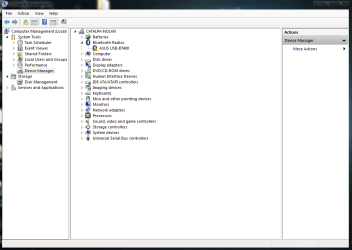
Did you have a BT device before or is there one included (built-in) in your laptop? The code indicates there is a BT driver already in memory. The normal procedure is to remove the old driver then reboot before installing a new device driver, However; Windows will install a generic BT driver when the device is first plugged in so a new driver shouldn't be needed. Post an image of your Hardware Manager with the BT device plugged in and Bluetooth Radios expanded.
 

My Computer My Computer

Computer type
PC/Desktop
Computer Manufacturer/Model Number
Built 2/11/2011
OS
Windows 7 Pro-x64
CPU
i7-2600 3.4GHz - 3.8GHz Turbo
Motherboard
Intel DH67BL-B3
Memory
8Gb - 2x4GB, Muskin 991770 PC3-1333
Graphics Card(s)
Integrated Intel HD 2000
Sound Card
Integrated Intel 10.1 HD, RealTek ALC892
Monitor(s) Displays
Asus LCD VH222H, Haier HL24XSL2a
Screen Resolution
1920x1080, 1920x1080
Hard Drives
Crucial SSD C300-128Gb,
Western Digital WD5002AALX - 500Gb,
Western Digital WD7501AALS - 750Gb
PSU
Seasonic 650W 80+ Gold Modular
Case
Rosewill Defender
Cooling
Stock CPU, Four 120mm case fans, PCH fan added
Keyboard
Logitech EX100 Y-RBH94 Wireless
Mouse
Logitech EX100 M-RCE95 Wireless
Internet Speed
3.0/1.5 Mbs
Antivirus
Microsoft Security Essentials
Browser
Microsoft Internet Explorer 11
Other Info
Antec Veris Premier-Multimedia IR Station,
Cyber Accoustics-3602 Speakers,
AFT XM-5U Card Reader,
Hauppauge TV-HVR-2250,
Sony LX300 USB Turntable
Did you have a BT device before or is there one included (built-in) in your laptop? The code indicates there is a BT driver already in memory. The normal procedure is to remove the old driver then reboot before installing a new device driver, However; Windows will install a generic BT driver when the device is first plugged in so a new driver shouldn't be needed. Post an image of your Hardware Manager with the BT device plugged in and Bluetooth Radios expanded.

Ya, I had another crappy USB dongle that wasn't working, that's why I bought this new one. The laptop does not have one built into it.
 

Attachments

  • Capture.PNG
    Capture.PNG
    29.3 KB · Views: 0

My Computer My Computer

Computer type
Laptop
Computer Manufacturer/Model Number
Acer, HP
OS
Windows 7 Ultimate 32bit
Back
Top