Color Callibration Issue.

Eyeballs

New member
Local time
11:25 PM
Messages
3
Hey everyone. The issue I'm having is when I login in to my computer or loading specific applications it is color swapping from a default color configuration to a custom color profile calibration I made within the Intel Graphics and Media Control Panel. I'm wondering if there are any solutions to avoid the color swapping by maybe loading the Intel integrated graphics driver before startup(if that's possible)?

My Computer system is an Acer 5755g Laptop.
 

My Computer

OS
Windows 7 Home Premium 64bit
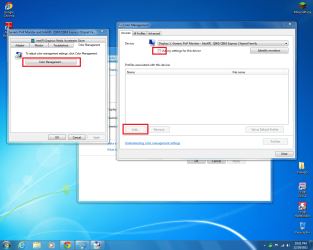
Right click on your desktop and select "Screen Resolution" and then click on "Advanced Settings". A new window should come up and you can select the "Color Management" tab and then use your own color configuration directly from windows
Capture.PNG
 

My Computer

Computer type
PC/Desktop
Computer Manufacturer/Model Number
HP Pavilion g7-1350dx
OS
Windows 7 Ultimate SP1 x64
CPU
AMD A6-3420M APU
Memory
4.0 Gb DDR3 838 MHz
Graphics Card(s)
AMD Radeon HD 6520G
Sound Card
IDT HD Audio
Screen Resolution
1600x 900
Hard Drives
500GB Hitachi HTS547550A9E384
Thanks for the help Ionbasa, but I'm not sure which color profile to select within the Associate Color Profile window.
Color.png
 

My Computer

OS
Windows 7 Home Premium 64bit
Thanks for the help Ionbasa, but I'm not sure which color profile to select within the Associate Color Profile window.
Color.png
If you click "advanced" there will be an option to calibrate the display. Just follow through the instructions and it should set it up for you afterwards.
Capture.PNG
 

My Computer

Computer type
PC/Desktop
Computer Manufacturer/Model Number
HP Pavilion g7-1350dx
OS
Windows 7 Ultimate SP1 x64
CPU
AMD A6-3420M APU
Memory
4.0 Gb DDR3 838 MHz
Graphics Card(s)
AMD Radeon HD 6520G
Sound Card
IDT HD Audio
Screen Resolution
1600x 900
Hard Drives
500GB Hitachi HTS547550A9E384
Unfortunately, Windows calibration doesn't offer an option to calibrate saturation leaving me to rely back on Intel's Graphics and Media Control Panel for calibration :(
 

My Computer

OS
Windows 7 Home Premium 64bit
Unfortunately, Windows calibration doesn't offer an option to calibrate saturation leaving me to rely back on Intel's Graphics and Media Control Panel for calibration :(
Unfortunately you are going to have to rely on the Intel Control Panel for that.

Or you could manually adjust your monitor if it supported that.
 

My Computer

Computer type
PC/Desktop
Computer Manufacturer/Model Number
HP Pavilion g7-1350dx
OS
Windows 7 Ultimate SP1 x64
CPU
AMD A6-3420M APU
Memory
4.0 Gb DDR3 838 MHz
Graphics Card(s)
AMD Radeon HD 6520G
Sound Card
IDT HD Audio
Screen Resolution
1600x 900
Hard Drives
500GB Hitachi HTS547550A9E384
Back
Top