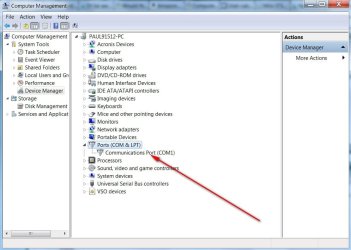
COM PORT missing in Device Manager

Alexie

Banned
Local time
4:32 PM
Messages
12
hello. Today I wanted to configure something in the COM PORT so I checked the device manager and I noticed that the COM PORT is not present. But it's always there before. Please help, how do I get it back? I'm using a laptop so I cannot open it...
 

My Computer

Computer type
Laptop
Computer Manufacturer/Model Number
Sony Corporation VGN-CR35S_L
OS
Windows 7 Ultimate x86
CPU
Intel Core 2 Duo T8100 @2.10GHz
Motherboard
Phoenix Technologies LTD
Memory
2GB
Graphics Card(s)
ATI Radeon x2300
Sound Card
Realtek HD Audio
Screen Resolution
1280x800
Hard Drives
Seagate 320GB
Last edited:

My Computer

OS
Windows 7 pro 64bits
CPU
Intel core i5 750
Motherboard
Asus
Memory
2x2Go DDR3 RIPJAWS
Graphics Card(s)
Sapphire HD5770
Monitor(s) Displays
Samsung full HD
Hard Drives
5400
7200
Case
big ugly black steel box
Cooling
fan

Attachments

  • COM PORT PIC.jpg
    COM PORT PIC.jpg
    69.5 KB · Views: 13

My Computer

Computer type
PC/Desktop
Computer Manufacturer/Model Number
Self-Built
OS
Windows 7 Professional X64
CPU
Core i7 (2nd gen) i7-2600K / 3.40GHz
Motherboard
ASUS P8Z77-V Intel 7 Series Motherboard
Memory
DDR3 2400MHz (OC) 16gb
Graphics Card(s)
Intel(R) HD Graphics 3000, -1988 Mb
Sound Card
8 ChannelsAudio Chipset Realtek ALC892
Monitor(s) Displays
LG 29UM65 Black 29"
Screen Resolution
2560 x 1080
Hard Drives
840 EVO 250 GB SSD ;2tb (2);Seagate;1tb Seagate; 750 gb Seagate; wd ext (2) 750 gb,WD 2tb X 2;WD 3TB Black
PSU
750 watt
Case
Thermaltake RX -1
Cooling
2120mm Fans Included 1Other Fan Ports 5x 200mm Fan Ports
Keyboard
Microsoft Digital Media Pro
Mouse
Microsoft Wireless 6000
Internet Speed
U-verse 18 mbps
Antivirus
MSE
Browser
Firefox, Chrome and my favorite: Pale Moon
Other Info
HdHomerun Dual Tuner.
SRS Audio Lab,
Pioneer BDR 208-DBK
PS3-What a difference in my Surround Sound Receiver!
HP 4540s - My new Toy.
Epson R280 Printer- To personalize my Dvds.
Canon MP 560 - For scanning.
Could it be disabled in the BIOS? Those that have a com port usually have an option in the BIOS to enable/disable.

I have a new Gigabyte Z77 motherboard and it has a com port on the board. I don't have any I/O interface unit connected but its there if I ever wanted to use it. I also have another PC with a new ASUS Z77 motherboard and it too has the port.
 

My Computer

Computer type
PC/Desktop
Computer Manufacturer/Model Number
My Own Build
OS
Windows 10 64 bit
CPU
Intel i7 6700K
Motherboard
ASUS ROG Maximus VIII Hero
Memory
16GB Corsair Dominator
Graphics Card(s)
Intel CPU Graphics
Sound Card
RealTek
Monitor(s) Displays
27" Dell S2719dgf
Screen Resolution
2560X1440
Hard Drives
1 TB Samsung 850 EVO SSD for Win 10 Pro
500GB Samsung 850 EVO SSD for Win 10 Insider
2 TB drive for backup
PSU
EVGA Supernova 750G2
Case
BeQuiet Silent Base 600
Cooling
Deepcool Captain 120EX
Keyboard
Microsoft Wireless 2000
Mouse
Microsoft wireless
Internet Speed
100 MB/sec (Cable)
Antivirus
Microsoft Defender and Malwarebytes
Browser
Edge/Firefox
Other Info
Cakewalk (Sonar) by BandLab and Studio One 4.1 Pro recording studio software. MOTU 896Mk3 Hybrid recording interface, Frontier Tranzport wireless control unit, Behringer X-Touch Control Surface.
Five USB connected optical drives for CD Audio production using Nero BurningROM
open device manager
click on action
add legacy hardware
click on next
search for and install the hardware automatically(Recommended)
next
it will detect that com port and next
double click com port
next
next and finish
now you will be able to see that com port... :)
 

My Computer

Computer type
PC/Desktop
Computer Manufacturer/Model Number
dell
OS
windows 7 ultimate
Back
Top