Combined Profiles vs Separate

OutlookBurger

New member
Local time
8:24 PM
Messages
2
I am a long time user of outlook 2007 and am very used to selecting my email profile from the Profile Prompt (i have 6 email profiles / email addresses) and going into each one that way. Each one was its own little world. Its own PST file. Its own contacts list. Its own rules for directing emails to specific folders, and when I had a new laptop, I would port over the PST files individually and easily set things up on the new computer.

I am now being faced with Outlook 2010 which wants to combine everything into one basic profile. All my email accounts are appearing down the left sidebar and I am very uncomfortable with this. I am certain there is going to be some lost functionality. What about calendar alerts based on specific email address? What about separate contact lists? Surely this can't be a consolidated email structure that has 100% of the previous functionality, can it?

Please let me know what (if any) cons there are to using this consolidated method. I see that within windows (Control Panel) you can still set up unique profiles if I want to do it the old school way.

Thanks
 

My Computer

OS
Windows 7
Hi,

Although everything looks combined (appears down the left side bar), it is in fact seperate. You can easily have several different email accounts, each with their own unique PST and calenders. The only thing I'm not sure of is the contacts list - perhaps someone else could offer an opinion.

In many respects, Outlook2010 is very much like Outlook2007, maintaining much of the functionality.

Regards,
Golden
 

My Computer

Computer type
PC/Desktop
Computer Manufacturer/Model Number
Golden Mk. I.4
OS
Windows 10 Pro x64 ; Xubuntu x64
CPU
Intel i7 860 @ 2.80 GHz O/C'ed to 4.0GHz
Motherboard
Gigabyte P55A-UD3R Rev.1. Award BIOS F13
Memory
16GB Corsair Vengance DDR3 @ 661 MHz Dual Channel (9-9-9-24)
Graphics Card(s)
EVGA NVidia GTX 560 1024MB
Sound Card
Realtek Integrated
Monitor(s) Displays
Dual Samsung SyncMaster 2494HS
Screen Resolution
1920*1080 and 1920*1080
Hard Drives
1*Samsung 840 EVO 120GB SSD;
1*OCZ Vertex 2 60GB SSD;
2*Samsung F3 SpinPoint 1TB in RAID0;
1*Samsung F1 SpinPoint 1TB;
2*Western Digital 1TB External USB 3.0
1*Western Digital 500GB External USB 3.0
1*Seagate 500GB External USB 2.0
PSU
Thermaltake ToughPower QFan 750W
Case
Thermaltake Element S VK60001W2Z
Cooling
Corsair H60 Water Cooling, 2*230mm and 2*80mm case fans
Keyboard
Logitech G110
Mouse
Logitech MX518
Thank you for the reply. In comparing the old structure (selecting your email profile from a prompt, and going into its "own little world") to the new structure (everything combined) can you think of any other cons with the combined structure?

I use outlook for my business and dont want to invest hours setting it up a certain way, only to realize 3 months down the line that there's something I can only do with the "separated" structure.

I have to say there was a definite "mental" benefit to keeping them separate. I could mentally focus on one area of my business. Then when I was done - close that out, and reopen - and go into another world. And focus on that area. Each email is associated with a different part of my business web site. So keeping things exclusive and divided helped me organize.

Seeing everything down my left sidebar (we're talking hundreds of emails for each mailbox) is going to make me feel very overwhelmed.
 

My Computer

OS
Windows 7
Hi,

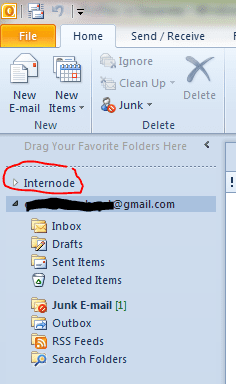
Nope, I can't think of any other cons to this structure. What you can also do to avoid being distracted by the various email accounts down the side bar, is simply to minimise it by clicking the little black triangle - as shown below. It keeps it nice and tidy that way.

Regards,
Golden
 

Attachments

  • Capture.PNG
    Capture.PNG
    12.5 KB · Views: 0

My Computer

Computer type
PC/Desktop
Computer Manufacturer/Model Number
Golden Mk. I.4
OS
Windows 10 Pro x64 ; Xubuntu x64
CPU
Intel i7 860 @ 2.80 GHz O/C'ed to 4.0GHz
Motherboard
Gigabyte P55A-UD3R Rev.1. Award BIOS F13
Memory
16GB Corsair Vengance DDR3 @ 661 MHz Dual Channel (9-9-9-24)
Graphics Card(s)
EVGA NVidia GTX 560 1024MB
Sound Card
Realtek Integrated
Monitor(s) Displays
Dual Samsung SyncMaster 2494HS
Screen Resolution
1920*1080 and 1920*1080
Hard Drives
1*Samsung 840 EVO 120GB SSD;
1*OCZ Vertex 2 60GB SSD;
2*Samsung F3 SpinPoint 1TB in RAID0;
1*Samsung F1 SpinPoint 1TB;
2*Western Digital 1TB External USB 3.0
1*Western Digital 500GB External USB 3.0
1*Seagate 500GB External USB 2.0
PSU
Thermaltake ToughPower QFan 750W
Case
Thermaltake Element S VK60001W2Z
Cooling
Corsair H60 Water Cooling, 2*230mm and 2*80mm case fans
Keyboard
Logitech G110
Mouse
Logitech MX518
Back
Top