command line to delete folder contents

Sebastian42

New member
Member
Local time
7:55 AM
Messages
60
What line in a batch file would delete the contents of
C:\Users\MyName\AppData\Local\Microsoft\Windows\Temporary Internet Files\ ?
del /F /S /Q /A "C:\Users\MyName\AppData\Local\Microsoft\Windows\Temporary Internet Files\*.*" fails, so does
del "C:\Users\MyName\AppData\Local\Microsoft\Windows\Temporary Internet Files\*.*" /q
 

My Computer

OS
Win7 Ultimate x32
CPU
AMD Athlon(tm) II X2 260 Processor
Motherboard
ASRock N68-VS3 UCC
Memory
4Gb of which 3.75Gb usable
Graphics Card(s)
NVIDIA GeForce GT 520
Sound Card
(1) NVIDIA High Definition Audio (2) High Definition Audio
Monitor(s) Displays
ViewSonic VA1938 & LG 566LM, both Generic PnP Monitors
Screen Resolution
1366x768 ; 1024x768
Hard Drives
SAMSUNG HD080HJ SCSI Disk Device
Hello,

Try:

Code:
DEL "C:\Users\MyName\AppData\Local\Microsoft\Windows\Temporary Internet Files\"

Haven't coded BATCH in awhile, so not totally sure.

-Justin
 

My Computer

Computer type
PC/Desktop
Computer Manufacturer/Model Number
Custom
OS
Windows 8.1 Pro x64
CPU
Intel Core i5-4570 CPU @ 3.20GHz
Motherboard
Gigabyte Z87-D3HP-CF
Memory
8GB DDR3-1596 - Dual Channel
Graphics Card(s)
NVIDIA GeForce GTX 750 Ti SC
Sound Card
Onboard
Monitor(s) Displays
Samsung
Screen Resolution
1920x1080
Hard Drives
SSD - 120GB
Second - 1TB
Antivirus
MSE
Browser
Chrome
Thanks Justin - NO improvement
 

My Computer

OS
Win7 Ultimate x32
CPU
AMD Athlon(tm) II X2 260 Processor
Motherboard
ASRock N68-VS3 UCC
Memory
4Gb of which 3.75Gb usable
Graphics Card(s)
NVIDIA GeForce GT 520
Sound Card
(1) NVIDIA High Definition Audio (2) High Definition Audio
Monitor(s) Displays
ViewSonic VA1938 & LG 566LM, both Generic PnP Monitors
Screen Resolution
1366x768 ; 1024x768
Hard Drives
SAMSUNG HD080HJ SCSI Disk Device
Okay i looked it up this time:

Code:
del "C:\Users\MyName\AppData\Local\Microsoft\Windows\Temporary Internet Files\*.*"

You had a /q in there, and there is no need for it. So give that a shot, if not, then let me know.

-Justin
 

My Computer

Computer type
PC/Desktop
Computer Manufacturer/Model Number
Custom
OS
Windows 8.1 Pro x64
CPU
Intel Core i5-4570 CPU @ 3.20GHz
Motherboard
Gigabyte Z87-D3HP-CF
Memory
8GB DDR3-1596 - Dual Channel
Graphics Card(s)
NVIDIA GeForce GTX 750 Ti SC
Sound Card
Onboard
Monitor(s) Displays
Samsung
Screen Resolution
1920x1080
Hard Drives
SSD - 120GB
Second - 1TB
Antivirus
MSE
Browser
Chrome
Still no better - could it be that \Temporary Internet Files\ is more stubborn than other folders ?
 

My Computer

OS
Win7 Ultimate x32
CPU
AMD Athlon(tm) II X2 260 Processor
Motherboard
ASRock N68-VS3 UCC
Memory
4Gb of which 3.75Gb usable
Graphics Card(s)
NVIDIA GeForce GT 520
Sound Card
(1) NVIDIA High Definition Audio (2) High Definition Audio
Monitor(s) Displays
ViewSonic VA1938 & LG 566LM, both Generic PnP Monitors
Screen Resolution
1366x768 ; 1024x768
Hard Drives
SAMSUNG HD080HJ SCSI Disk Device
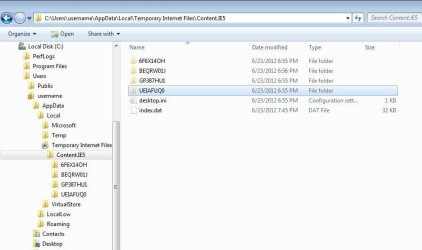
If you open an admin cmd prompt window and type in your command - you will be told that index.dat is in use. You will even see that there are folders that will show in the cmd prompt but do not usually show in windows file explorer.
 

My Computer

Computer type
Laptop
Computer Manufacturer/Model Number
Employer provided Dell Latitude
OS
W7 Pro SP1 64bit
CPU
i7
Memory
8GB
Graphics Card(s)
Intel HD Graphics
Hard Drives
crappy SSD
Antivirus
Employer mandated Symantec Endpoint Protection
Browser
Pale Moon 64bit, IE11 64bit & Chrome 64bit
I am not clear what the implication is from your information. Index.dat does not show as a content item in MY TIF folder.
It may be relevant to point out that there is NO difficulty opening that folder, selecting all the contents and deleting them. The problem arises when I try to use code to do it.
 
Last edited:

My Computer

OS
Win7 Ultimate x32
CPU
AMD Athlon(tm) II X2 260 Processor
Motherboard
ASRock N68-VS3 UCC
Memory
4Gb of which 3.75Gb usable
Graphics Card(s)
NVIDIA GeForce GT 520
Sound Card
(1) NVIDIA High Definition Audio (2) High Definition Audio
Monitor(s) Displays
ViewSonic VA1938 & LG 566LM, both Generic PnP Monitors
Screen Resolution
1366x768 ; 1024x768
Hard Drives
SAMSUNG HD080HJ SCSI Disk Device
The path that you are using is not a real path. It is one of the many places where Microsoft shows you info that is not really located in that folder structure. Also, there are real folders and files under the "TIF" folder that you do not normally see via the Windows file explorer. My suggestion is to not mess with them:

TIF.JPG
 

My Computer

Computer type
Laptop
Computer Manufacturer/Model Number
Employer provided Dell Latitude
OS
W7 Pro SP1 64bit
CPU
i7
Memory
8GB
Graphics Card(s)
Intel HD Graphics
Hard Drives
crappy SSD
Antivirus
Employer mandated Symantec Endpoint Protection
Browser
Pale Moon 64bit, IE11 64bit & Chrome 64bit
Thanks for that advice. My only interest in deleting the files in TIF arises from the advice I was given to do that in order to solve a problem in Windows Live Mail.
 

My Computer

OS
Win7 Ultimate x32
CPU
AMD Athlon(tm) II X2 260 Processor
Motherboard
ASRock N68-VS3 UCC
Memory
4Gb of which 3.75Gb usable
Graphics Card(s)
NVIDIA GeForce GT 520
Sound Card
(1) NVIDIA High Definition Audio (2) High Definition Audio
Monitor(s) Displays
ViewSonic VA1938 & LG 566LM, both Generic PnP Monitors
Screen Resolution
1366x768 ; 1024x768
Hard Drives
SAMSUNG HD080HJ SCSI Disk Device
you can try:

rd "C:\Users\username\AppData\Local\Microsoft\Windows\Temporary Internet Files\Content.IE5\" /q/s

It will still fail because index.dat is in use - but the folders and and temp files should be gone.
 

My Computer

Computer type
Laptop
Computer Manufacturer/Model Number
Employer provided Dell Latitude
OS
W7 Pro SP1 64bit
CPU
i7
Memory
8GB
Graphics Card(s)
Intel HD Graphics
Hard Drives
crappy SSD
Antivirus
Employer mandated Symantec Endpoint Protection
Browser
Pale Moon 64bit, IE11 64bit & Chrome 64bit
Still no obvious deletion of ANY files. I repeat that 'manually' I CAN clear the folder, but not by code (in a batch file).
 

My Computer

OS
Win7 Ultimate x32
CPU
AMD Athlon(tm) II X2 260 Processor
Motherboard
ASRock N68-VS3 UCC
Memory
4Gb of which 3.75Gb usable
Graphics Card(s)
NVIDIA GeForce GT 520
Sound Card
(1) NVIDIA High Definition Audio (2) High Definition Audio
Monitor(s) Displays
ViewSonic VA1938 & LG 566LM, both Generic PnP Monitors
Screen Resolution
1366x768 ; 1024x768
Hard Drives
SAMSUNG HD080HJ SCSI Disk Device
The only way that I know how to do it via a batch file involves messing with folder permissions... maybe someone else knows of a safer way.
 

My Computer

Computer type
Laptop
Computer Manufacturer/Model Number
Employer provided Dell Latitude
OS
W7 Pro SP1 64bit
CPU
i7
Memory
8GB
Graphics Card(s)
Intel HD Graphics
Hard Drives
crappy SSD
Antivirus
Employer mandated Symantec Endpoint Protection
Browser
Pale Moon 64bit, IE11 64bit & Chrome 64bit
I repeat that 'manually' I CAN clear the folder, but not by code (in a batch file).

Pretty sure UsernameIssues is correct on this. If you are using Explorer to manually clean that folder I think all that's really happening is that you are cleaning files from 4 different folders that actually reside one level deeper.

If you look at that folder's contents offline (without Windows running) you'll see it only contains one file (that index.dat file) and a bunch of randomly named folders. I think 4 of those folders contain the temporary files you're deleting. The rest of those folders seem to be "decommissioned" folders containing even older temporary files.
 

My Computer

OS
Windows 7 Ultimate x64
Sebastian42, I don't use a computer with W7. I have a couple of W7 virtual machines that I can play with and learn from and a few W7 computers that I support. I've used a script to clear IE's data for many years, but I don't know enough about W7 to know what needs to be changed in my script tn order to accomplish what you need.

The script calls a line like this: RunDll32.exe InetCpl.cpl,ClearMyTracksByProcess 4351
and then the script handles things that the "ClearMyTracksByProcess" call does not clear.

If you want to run that line inside a batch file, you may see a window popup showing you the progress of the cleanup - it depends on how many files there are to be cleaned and the speed of your computer - you might not see that window.

There are lots of web pages detailing the flags that can be used with this command.
The flag would be the 4351 part of:
RunDll32.exe InetCpl.cpl,ClearMyTracksByProcess 4351

If you do not want to see the progress window, try:
RunDll32.exe InetCpl.cpl,ClearMyTracksByProcess 23035

None of this clears all of the info inside DOMStore and I don't know if that DOM info is what might be causing you problems inside WLM or not. Clearing the IE data via the regular user interface can clear the DOM info. My attempts to ferret out more knowledge about the flags used with ClearMyTracksByProcess via Process Monitor has not yielded the magic flag for clearing that DOM data yet.
 

My Computer

Computer type
Laptop
Computer Manufacturer/Model Number
Employer provided Dell Latitude
OS
W7 Pro SP1 64bit
CPU
i7
Memory
8GB
Graphics Card(s)
Intel HD Graphics
Hard Drives
crappy SSD
Antivirus
Employer mandated Symantec Endpoint Protection
Browser
Pale Moon 64bit, IE11 64bit & Chrome 64bit

My Computer

Computer type
PC/Desktop
Computer Manufacturer/Model Number
Home made Desktop
OS
Windows 10 Pro. 64/ version 1709 Windows 7 Pro/64
CPU
Intel i7-6800K @ 4.3
Motherboard
ASUS X-99 Deluxe II
Memory
Corsair Platinum 16 gig @2400
Graphics Card(s)
EVGA GTX 1070 OC
Monitor(s) Displays
Asus 27" LED LCD/VE278Q
Screen Resolution
1920-1080 or 1280-720 HDMI
Hard Drives
INTEL SSD 730-240 Gb Sata 3.0/
PSU
EVGA Platium 1200W
Case
Phanteks Luxe Tempered Glass 8 fans/ one radiator
Cooling
XSPC/ Water Cooled CPU
Keyboard
Das 4 Professional
Mouse
Logitech M705/MX Anywhere 2-S
Internet Speed
100 mbits
Antivirus
Microsoft Security Essentials/ Malwarebytes Premium 3.0/ SAS
Browser
I.E. 11 default/Firefox/ ISP Time Warner Cable/Spectrum
Other Info
LG BluRay Burner/
Sound system-KLipsch-THX/
Icy Dock ssd Hot Swap bays.
....I repeat that 'manually' I CAN clear the folder, but not by code (in a batch file).
Could you please post a screenshot of the files that you see before you do this manual cleanup.
 

My Computer

Computer type
Laptop
Computer Manufacturer/Model Number
Employer provided Dell Latitude
OS
W7 Pro SP1 64bit
CPU
i7
Memory
8GB
Graphics Card(s)
Intel HD Graphics
Hard Drives
crappy SSD
Antivirus
Employer mandated Symantec Endpoint Protection
Browser
Pale Moon 64bit, IE11 64bit & Chrome 64bit
Back
Top