Command Prompt at Startup

How to Open a Command Prompt at Boot in Windows 7

   Information
This will show you how to open a command prompt at boot from the System Recovery Options or Advanced Boot Options screen in Windows 7.
   Note
Command Prompt is a feature of Windows 7 that provides an entry point for typing MS‑DOS (Microsoft Disk Operating System) commands and other computer commands. The most important thing to know is that by typing commands, you can perform tasks on your computer without using the Windows 7 graphical interface (GUI). Command Prompt is typically only used by advanced users.


OPTION ONE

To Open a Command Prompt at Boot
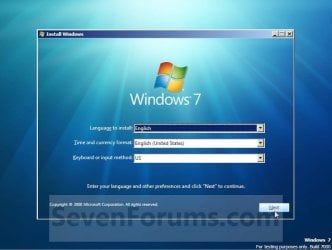
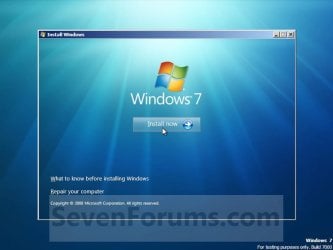
1. Boot from either your Windows 7 installation disc or Windows 7 System Repair Disc, and press Shift + F10 when at either screen below. Step3.jpg

Step4.jpg

A) Go to step 3.
OR

2. Boot to the System Recovery Options screen, and select the Command Prompt option. (see screenshot below) Command.jpg
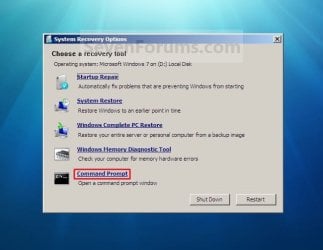
A) Continue on to step 3.
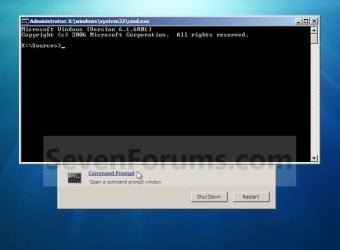
3. A command prompt window will now open. (see screenshot below)
NOTE: To exit and restart to the Windows 7 logon screen, close the command prompt window and click on the Restart button on the screenshot below step 2. Command_Prompt-1.jpg


OPTION TWO

To Boot to "Safe Mode with Command Prompt"


   Note
This starts Windows 7 in safe mode with a command prompt window instead of the usual Windows interface.
1. Boot to the Advanced Boot Options screen.

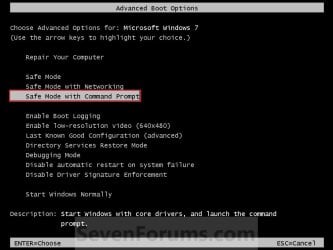
2. Select Safe Mode with Command Prompt and press Enter. (See screenshot below) Command-2.jpg
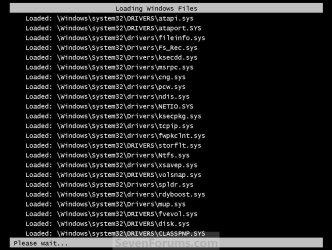
3. Windows 7 will now start loading Safe Mode with Command Prompt. (See screenshot below) Command-3.jpg
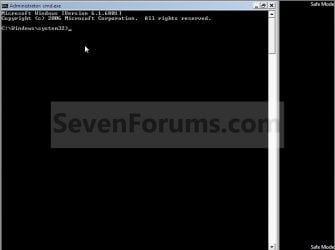
4. When finished, you are now in Safe Mode with Command Prompt. (See screenshot below)
NOTE: To exit from here, press Ctrl+Alt+Delete or type Exit and press Enter to restart the computer. Safe-Mode_Command-4.jpg
That's it,
Shawn


Last edited:
You can always open a command prompt during install by pressing Shift+F10
 

My Computer

OS
Microsoft Windows 6.1 (Build 6801)
Great tutorial.
Thanks a lot!.

Brink & MegaFixer, The "SHIFT+F10" is a great tip.
 
Last edited:

My Computer

OS
Windows 7 Ultimate 32bit
CPU
AMD Phenom II x4 965 3.4GHz
Motherboard
Gigabyte GA-890FXA-UD5 rev2.0
Memory
G.SKILL F3-16000CL8D-4GBPIS (2GBx2)
Graphics Card(s)
Inno3d GTX480 1.5GB GDDR5
Monitor(s) Displays
LG FLATRON W2486L
Screen Resolution
1920x1080@60Hz
Hard Drives
Western Digital Caviar Black WD1002FAEX 1TB 64MB 7200RPM Sata III x3
PSU
Enermax MODU82+ 625W
Case
Thermaltake Element G Middle Tower
You can always open a command prompt during install by pressing Shift+F10
I tried this the other day, trying to set up a VHD that I can boot from, and when I'm at the start of the windows 7 installation screen I press shift+f10 and nothing happens.

:(
 

My Computer

OS
Windows 7 Ultimate x64
Motherboard
Asus P5ne-sli
Memory
8 gig Crusial ballistix
Sound Card
M-audio 24-96 + onboard
Monitor(s) Displays
dual 19"
Hello Zeph, and welcome to Seven Forums.

You could also select the Command Prompt option instead in step 3 of Option Two to be able to open a command prompt at boot.

Hope this helps,
Shawn
 

My Computer

Computer type
PC/Desktop
Computer Manufacturer/Model Number
Self built custom
OS
64-bit Windows 11 Pro for Workstations
CPU
Intel i7-8700K OC'd to 5 GHz
Motherboard
ASUS ROG Maximus XI Formula Z390
Memory
64 GB (4x16GB) G.SKILL TridentZ RGB DDR4 3600 MHz
Graphics Card(s)
ASUS ROG-STRIX-GTX1080TI-O11G-GAMING
Sound Card
Integrated
Monitor(s) Displays
2 x Samsung Odyssey G7 27"
Screen Resolution
2560x1440
Hard Drives
1TB Samsung 990 PRO M.2,
4TB Samsung 990 PRO PRO M.2,
TerraMaster F8 SSD Plus NAS
PSU
Seasonic Prime Titanium 850W
Case
Thermaltake Core P3
Cooling
Corsair Hydro H115i
Keyboard
Logitech wireless K800
Mouse
Logitech MX Master 4
Internet Speed
2 Gb/s Download and 100 Mb/s Upload
Antivirus
Malwarebyte Anti-Malware Premium
Browser
Google Chrome
Other Info
Logitech Z625 speaker system,
Logitech BRIO 4K Pro webcam,
HP Color LaserJet Pro MFP M477fdn,
APC SMART-UPS RT 1000 XL - SURT1000XLI,
Galaxy S23 Plus phone
MegaFixer Shift+F10 tip is very important to me, and thank you for that man!:thumbsup:
 

My Computer

OS
Windows 7 Ultimate 32bit
CPU
Intel Core 2 Duo E8400
Motherboard
Asus P5E3 Premium
Memory
OCZ 1333 Mhz
Graphics Card(s)
nVidia GeForce 9600 GT
Sound Card
Asus Xonar DS
Monitor(s) Displays
Belinea
Screen Resolution
1680x1050
Hard Drives
Western Digital 500 GB WD5000AAKS
PSU
Chieftec 550 W
Case
Thermaltake VS Black
Cooling
Cooler Master
i have tried option2 but it is not showing command prompt instead it is showing normal windows login screen.
 

My Computer

OS
windows7
Hello Ankitgoyal, and welcome to Seven Forums.

How does OPTION ONE work for you? It would be a better option. :)
 

My Computer

Computer type
PC/Desktop
Computer Manufacturer/Model Number
Self built custom
OS
64-bit Windows 11 Pro for Workstations
CPU
Intel i7-8700K OC'd to 5 GHz
Motherboard
ASUS ROG Maximus XI Formula Z390
Memory
64 GB (4x16GB) G.SKILL TridentZ RGB DDR4 3600 MHz
Graphics Card(s)
ASUS ROG-STRIX-GTX1080TI-O11G-GAMING
Sound Card
Integrated
Monitor(s) Displays
2 x Samsung Odyssey G7 27"
Screen Resolution
2560x1440
Hard Drives
1TB Samsung 990 PRO M.2,
4TB Samsung 990 PRO PRO M.2,
TerraMaster F8 SSD Plus NAS
PSU
Seasonic Prime Titanium 850W
Case
Thermaltake Core P3
Cooling
Corsair Hydro H115i
Keyboard
Logitech wireless K800
Mouse
Logitech MX Master 4
Internet Speed
2 Gb/s Download and 100 Mb/s Upload
Antivirus
Malwarebyte Anti-Malware Premium
Browser
Google Chrome
Other Info
Logitech Z625 speaker system,
Logitech BRIO 4K Pro webcam,
HP Color LaserJet Pro MFP M477fdn,
APC SMART-UPS RT 1000 XL - SURT1000XLI,
Galaxy S23 Plus phone
Thanks Brink,
Actually I have forgot my account password and I want to enable my built-in admin account so that i can reset my account's password from there. will i be able to do it with option 1?
 

My Computer

OS
windows7

My Computer

Computer type
PC/Desktop
Computer Manufacturer/Model Number
Self built custom
OS
64-bit Windows 11 Pro for Workstations
CPU
Intel i7-8700K OC'd to 5 GHz
Motherboard
ASUS ROG Maximus XI Formula Z390
Memory
64 GB (4x16GB) G.SKILL TridentZ RGB DDR4 3600 MHz
Graphics Card(s)
ASUS ROG-STRIX-GTX1080TI-O11G-GAMING
Sound Card
Integrated
Monitor(s) Displays
2 x Samsung Odyssey G7 27"
Screen Resolution
2560x1440
Hard Drives
1TB Samsung 990 PRO M.2,
4TB Samsung 990 PRO PRO M.2,
TerraMaster F8 SSD Plus NAS
PSU
Seasonic Prime Titanium 850W
Case
Thermaltake Core P3
Cooling
Corsair Hydro H115i
Keyboard
Logitech wireless K800
Mouse
Logitech MX Master 4
Internet Speed
2 Gb/s Download and 100 Mb/s Upload
Antivirus
Malwarebyte Anti-Malware Premium
Browser
Google Chrome
Other Info
Logitech Z625 speaker system,
Logitech BRIO 4K Pro webcam,
HP Color LaserJet Pro MFP M477fdn,
APC SMART-UPS RT 1000 XL - SURT1000XLI,
Galaxy S23 Plus phone
Hi Brink

To begin with: Superb thread as all you make are!

Now the question: I want to defrag my my 2 laptop hdds (c: and d: ). In order to get the best results, which option should i use to get to the CMD at boot?

Thanks in advance.
 

My Computer

Computer Manufacturer/Model Number
Asus
OS
Windows 7 Home Premium 64bit
CPU
Intel Core i7-2630QM @ 2.00/2.90GHz
Motherboard
ASUSTeK G74Sx
Memory
12GB DDR3 @ 1333MHz
Graphics Card(s)
GeForce GTX 560M - 3 GB GDDR5
Sound Card
Steelseries 7.1 Surround (external)
Screen Resolution
1920x1080 @ 60Hz
Hard Drives
500 GB 7200rpm + 500 GB 7200rpm + 1 TB MemUp 5400rpm (external)
Cooling
Asus + Coolermaster Notepal U3
Mouse
ASUS ROG GX800 3200 DPI Laser Gaming Mouse
Internet Speed
54Mbs wifi / 100Mbs cable
Hello Joaodiogo,

For defrag, OPTION ONE would be best to not have to worry about anything being "in use". :)
 

My Computer

Computer type
PC/Desktop
Computer Manufacturer/Model Number
Self built custom
OS
64-bit Windows 11 Pro for Workstations
CPU
Intel i7-8700K OC'd to 5 GHz
Motherboard
ASUS ROG Maximus XI Formula Z390
Memory
64 GB (4x16GB) G.SKILL TridentZ RGB DDR4 3600 MHz
Graphics Card(s)
ASUS ROG-STRIX-GTX1080TI-O11G-GAMING
Sound Card
Integrated
Monitor(s) Displays
2 x Samsung Odyssey G7 27"
Screen Resolution
2560x1440
Hard Drives
1TB Samsung 990 PRO M.2,
4TB Samsung 990 PRO PRO M.2,
TerraMaster F8 SSD Plus NAS
PSU
Seasonic Prime Titanium 850W
Case
Thermaltake Core P3
Cooling
Corsair Hydro H115i
Keyboard
Logitech wireless K800
Mouse
Logitech MX Master 4
Internet Speed
2 Gb/s Download and 100 Mb/s Upload
Antivirus
Malwarebyte Anti-Malware Premium
Browser
Google Chrome
Other Info
Logitech Z625 speaker system,
Logitech BRIO 4K Pro webcam,
HP Color LaserJet Pro MFP M477fdn,
APC SMART-UPS RT 1000 XL - SURT1000XLI,
Galaxy S23 Plus phone
Hello Joaodiogo,

For defrag, OPTION ONE would be best to not have to worry about anything being "in use". :)

well that's what i imagined.
thanks for confirming my suspects!! :D
 

My Computer

Computer Manufacturer/Model Number
Asus
OS
Windows 7 Home Premium 64bit
CPU
Intel Core i7-2630QM @ 2.00/2.90GHz
Motherboard
ASUSTeK G74Sx
Memory
12GB DDR3 @ 1333MHz
Graphics Card(s)
GeForce GTX 560M - 3 GB GDDR5
Sound Card
Steelseries 7.1 Surround (external)
Screen Resolution
1920x1080 @ 60Hz
Hard Drives
500 GB 7200rpm + 500 GB 7200rpm + 1 TB MemUp 5400rpm (external)
Cooling
Asus + Coolermaster Notepal U3
Mouse
ASUS ROG GX800 3200 DPI Laser Gaming Mouse
Internet Speed
54Mbs wifi / 100Mbs cable
You're most welcome. :)
 

My Computer

Computer type
PC/Desktop
Computer Manufacturer/Model Number
Self built custom
OS
64-bit Windows 11 Pro for Workstations
CPU
Intel i7-8700K OC'd to 5 GHz
Motherboard
ASUS ROG Maximus XI Formula Z390
Memory
64 GB (4x16GB) G.SKILL TridentZ RGB DDR4 3600 MHz
Graphics Card(s)
ASUS ROG-STRIX-GTX1080TI-O11G-GAMING
Sound Card
Integrated
Monitor(s) Displays
2 x Samsung Odyssey G7 27"
Screen Resolution
2560x1440
Hard Drives
1TB Samsung 990 PRO M.2,
4TB Samsung 990 PRO PRO M.2,
TerraMaster F8 SSD Plus NAS
PSU
Seasonic Prime Titanium 850W
Case
Thermaltake Core P3
Cooling
Corsair Hydro H115i
Keyboard
Logitech wireless K800
Mouse
Logitech MX Master 4
Internet Speed
2 Gb/s Download and 100 Mb/s Upload
Antivirus
Malwarebyte Anti-Malware Premium
Browser
Google Chrome
Other Info
Logitech Z625 speaker system,
Logitech BRIO 4K Pro webcam,
HP Color LaserJet Pro MFP M477fdn,
APC SMART-UPS RT 1000 XL - SURT1000XLI,
Galaxy S23 Plus phone
Hi again.
I wanted to perform the defrag tonight but im not comfortable with the idea of letting my pc on all night.
Does my pc shuts down or restarts automatically after a complete defrag? do i really need to write "exit" or is there any other way?
 

My Computer

Computer Manufacturer/Model Number
Asus
OS
Windows 7 Home Premium 64bit
CPU
Intel Core i7-2630QM @ 2.00/2.90GHz
Motherboard
ASUSTeK G74Sx
Memory
12GB DDR3 @ 1333MHz
Graphics Card(s)
GeForce GTX 560M - 3 GB GDDR5
Sound Card
Steelseries 7.1 Surround (external)
Screen Resolution
1920x1080 @ 60Hz
Hard Drives
500 GB 7200rpm + 500 GB 7200rpm + 1 TB MemUp 5400rpm (external)
Cooling
Asus + Coolermaster Notepal U3
Mouse
ASUS ROG GX800 3200 DPI Laser Gaming Mouse
Internet Speed
54Mbs wifi / 100Mbs cable
No, it will not shutdown on it's own when defrag at boot has finished, but it's not going to hurt anything to have it running overnight though. You could turn off the monitor(s), and just leave the computer running until it's finished. :)

I would recommend to use the command prompt from OPTION ONE.
 

My Computer

Computer type
PC/Desktop
Computer Manufacturer/Model Number
Self built custom
OS
64-bit Windows 11 Pro for Workstations
CPU
Intel i7-8700K OC'd to 5 GHz
Motherboard
ASUS ROG Maximus XI Formula Z390
Memory
64 GB (4x16GB) G.SKILL TridentZ RGB DDR4 3600 MHz
Graphics Card(s)
ASUS ROG-STRIX-GTX1080TI-O11G-GAMING
Sound Card
Integrated
Monitor(s) Displays
2 x Samsung Odyssey G7 27"
Screen Resolution
2560x1440
Hard Drives
1TB Samsung 990 PRO M.2,
4TB Samsung 990 PRO PRO M.2,
TerraMaster F8 SSD Plus NAS
PSU
Seasonic Prime Titanium 850W
Case
Thermaltake Core P3
Cooling
Corsair Hydro H115i
Keyboard
Logitech wireless K800
Mouse
Logitech MX Master 4
Internet Speed
2 Gb/s Download and 100 Mb/s Upload
Antivirus
Malwarebyte Anti-Malware Premium
Browser
Google Chrome
Other Info
Logitech Z625 speaker system,
Logitech BRIO 4K Pro webcam,
HP Color LaserJet Pro MFP M477fdn,
APC SMART-UPS RT 1000 XL - SURT1000XLI,
Galaxy S23 Plus phone
No, it will not shutdown on it's own when defrag at boot has finished, but it's not going to hurt anything to have it running overnight though. You could turn off the monitor(s), and just leave the computer running until it's finished. :)

I would recommend to use the command prompt from OPTION ONE.

Yeah, you're right. I guess it cant hurt that much! :p

BTW, im using a laptop, so ill just leave it and it'll turn the monitor off automatically after 15 minutes...

Thanks again!
 

My Computer

Computer Manufacturer/Model Number
Asus
OS
Windows 7 Home Premium 64bit
CPU
Intel Core i7-2630QM @ 2.00/2.90GHz
Motherboard
ASUSTeK G74Sx
Memory
12GB DDR3 @ 1333MHz
Graphics Card(s)
GeForce GTX 560M - 3 GB GDDR5
Sound Card
Steelseries 7.1 Surround (external)
Screen Resolution
1920x1080 @ 60Hz
Hard Drives
500 GB 7200rpm + 500 GB 7200rpm + 1 TB MemUp 5400rpm (external)
Cooling
Asus + Coolermaster Notepal U3
Mouse
ASUS ROG GX800 3200 DPI Laser Gaming Mouse
Internet Speed
54Mbs wifi / 100Mbs cable
You're most welcome. You'll most likely need to leave the AC plugged in though.
 

My Computer

Computer type
PC/Desktop
Computer Manufacturer/Model Number
Self built custom
OS
64-bit Windows 11 Pro for Workstations
CPU
Intel i7-8700K OC'd to 5 GHz
Motherboard
ASUS ROG Maximus XI Formula Z390
Memory
64 GB (4x16GB) G.SKILL TridentZ RGB DDR4 3600 MHz
Graphics Card(s)
ASUS ROG-STRIX-GTX1080TI-O11G-GAMING
Sound Card
Integrated
Monitor(s) Displays
2 x Samsung Odyssey G7 27"
Screen Resolution
2560x1440
Hard Drives
1TB Samsung 990 PRO M.2,
4TB Samsung 990 PRO PRO M.2,
TerraMaster F8 SSD Plus NAS
PSU
Seasonic Prime Titanium 850W
Case
Thermaltake Core P3
Cooling
Corsair Hydro H115i
Keyboard
Logitech wireless K800
Mouse
Logitech MX Master 4
Internet Speed
2 Gb/s Download and 100 Mb/s Upload
Antivirus
Malwarebyte Anti-Malware Premium
Browser
Google Chrome
Other Info
Logitech Z625 speaker system,
Logitech BRIO 4K Pro webcam,
HP Color LaserJet Pro MFP M477fdn,
APC SMART-UPS RT 1000 XL - SURT1000XLI,
Galaxy S23 Plus phone
You're most welcome. You'll most likely need to leave the AC plugged in though.

Well... Im with a problem here. i cant get the "defrag" command to work in command prompt from option one no mather what letters i write after it! :cry:

Ive tried "defrag.exe -c" and "defrag -c" and it said: "defrag(.exe) is not recognised as an internal or external command, operable program or batch file."

then i tried "c:\windows\system32\defrag.exe -c" and it said: "the resource loader cache doesnt have loaded MUI entry. <0x80073B01> " three times in a row...

What should i do?! :confused:

it doesnt work with 2 either... i type the stuff in there and it says:

Microsoft windows defragmenter
Copyright 2007 etc

and does nothing....

any ideas?
 
Last edited by a moderator:

My Computer

Computer Manufacturer/Model Number
Asus
OS
Windows 7 Home Premium 64bit
CPU
Intel Core i7-2630QM @ 2.00/2.90GHz
Motherboard
ASUSTeK G74Sx
Memory
12GB DDR3 @ 1333MHz
Graphics Card(s)
GeForce GTX 560M - 3 GB GDDR5
Sound Card
Steelseries 7.1 Surround (external)
Screen Resolution
1920x1080 @ 60Hz
Hard Drives
500 GB 7200rpm + 500 GB 7200rpm + 1 TB MemUp 5400rpm (external)
Cooling
Asus + Coolermaster Notepal U3
Mouse
ASUS ROG GX800 3200 DPI Laser Gaming Mouse
Internet Speed
54Mbs wifi / 100Mbs cable

My Computer

Computer type
PC/Desktop
Computer Manufacturer/Model Number
Self built custom
OS
64-bit Windows 11 Pro for Workstations
CPU
Intel i7-8700K OC'd to 5 GHz
Motherboard
ASUS ROG Maximus XI Formula Z390
Memory
64 GB (4x16GB) G.SKILL TridentZ RGB DDR4 3600 MHz
Graphics Card(s)
ASUS ROG-STRIX-GTX1080TI-O11G-GAMING
Sound Card
Integrated
Monitor(s) Displays
2 x Samsung Odyssey G7 27"
Screen Resolution
2560x1440
Hard Drives
1TB Samsung 990 PRO M.2,
4TB Samsung 990 PRO PRO M.2,
TerraMaster F8 SSD Plus NAS
PSU
Seasonic Prime Titanium 850W
Case
Thermaltake Core P3
Cooling
Corsair Hydro H115i
Keyboard
Logitech wireless K800
Mouse
Logitech MX Master 4
Internet Speed
2 Gb/s Download and 100 Mb/s Upload
Antivirus
Malwarebyte Anti-Malware Premium
Browser
Google Chrome
Other Info
Logitech Z625 speaker system,
Logitech BRIO 4K Pro webcam,
HP Color LaserJet Pro MFP M477fdn,
APC SMART-UPS RT 1000 XL - SURT1000XLI,
Galaxy S23 Plus phone
Back
Top