
MarcChamberlain
New member
- Local time
- 7:26 AM
- Messages
- 5
Hi All
I was hoping someone could help me and see if it could be possible for the below, I have setup a script/batch file to remote shutdown several PCs which all work fine without any issues as long all the machines are turned on then it will go through the list one by one and push down the command to each machine, what I'm having issues with is for example
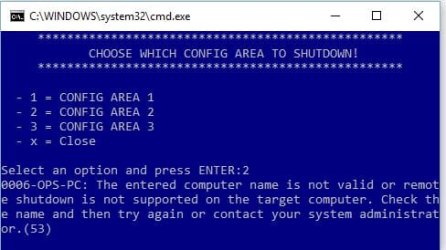
If I have 5 machines 1,2,4,5 are turned on and PC3 was currently off. the batch file would run through and send each command down turning off PCS 1,2 then it would sit there trying to send the command to PC3 (now this machine is turned off) - I would then get an error message as shown below - it would then move onto PC4,5 - this is all well and good but if I have 100 machines and only 30 are turned on I need to wait a long time for all to be turned off with these error message.
Error:
The entered computer name is not valid or remote shutdown is not supported on the target computer. Check the name and then try again or contact your system administrator. (53)
All I want to do is push down the command with waiting for a response whether the PC is up or not, this would bypass checked for a ping response (if it did this)
Can this be possible, i have looked online and can't see anything to use
I was hoping someone could help me and see if it could be possible for the below, I have setup a script/batch file to remote shutdown several PCs which all work fine without any issues as long all the machines are turned on then it will go through the list one by one and push down the command to each machine, what I'm having issues with is for example
If I have 5 machines 1,2,4,5 are turned on and PC3 was currently off. the batch file would run through and send each command down turning off PCS 1,2 then it would sit there trying to send the command to PC3 (now this machine is turned off) - I would then get an error message as shown below - it would then move onto PC4,5 - this is all well and good but if I have 100 machines and only 30 are turned on I need to wait a long time for all to be turned off with these error message.
Error:
The entered computer name is not valid or remote shutdown is not supported on the target computer. Check the name and then try again or contact your system administrator. (53)
All I want to do is push down the command with waiting for a response whether the PC is up or not, this would bypass checked for a ping response (if it did this)
Can this be possible, i have looked online and can't see anything to use
Attachments
My Computer
At a glance
Windows 7 Professional x64
- Computer type
- PC/Desktop
- OS
- Windows 7 Professional x64


