Common File Dialog Box - Customize Places Bar

How to Customize Common Open File Dialog Box Places Bar in Windows


   Information
When you save or open a file in an application that uses Windows common dialog box, the Places bar on the left side of the dialog box can help you navigate quicker to a location.

This will show you how to customize the list of items displayed in the Places Bar in the Windows XP style common open file dialog box (ex: Save As, Open) for all users in Vista, Windows 7, and Windows 8.

You can specify from 1 to 5 items to be displayed in the Places Bar.
   Note
The valid items you may display in the Places Bar are:

1) Shortcuts (full path) to a local folder -- (ex. C:\Windows)
NOTE: Do not include full path in quotes.

2) Shortcuts (full path) to remote folders -- (\\server\share)

3) FTP folders

4) web folders

5) Shell Commands in Windows 7 or Windows 8 for locations

6) Common Shell folders -- (examples)
  • MyComputerFolder
  • MyDocuments
  • MyFavorites
  • MyMusic
  • MyPictures
  • MyNetworkPlaces
  • MyFavorites
  • CommonDocuments
  • CommonMusic
  • CommonPictures
  • Desktop
  • Printers
  • ProgramFiles
  • Recent
  • shell:desktop
  • shell:documentsLibrary
  • shell:Libraries
  • shell:MusicLibrary
  • shell:PicturesLibrary
  • shell:VideosLibrary
  • shell:MyComputerFolder
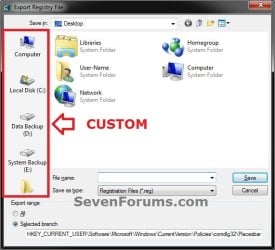
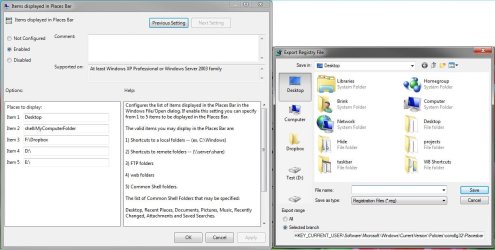
EXAMPLE: Default and Custom Places Bar Items in Common Open File Dialog Box
NOTE: These will be the smaller Windows XP (ex: Browse type) common dialog box style windows that have shortcut icons (places) instead of the normal Navigation Pane that has a folder tree.
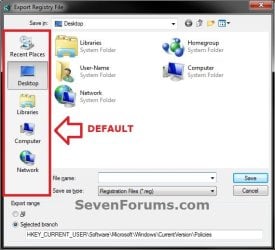
Default.jpg

Custom.jpg


OPTION ONE

Customize Places Bar using the Local Group Policy Editor


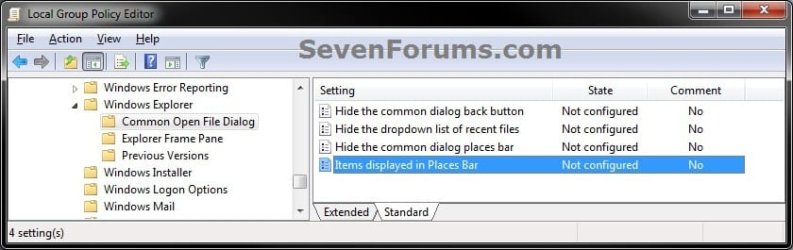
1. Open the all users, specific users or groups, or all users except administrators Local Group Policy Editor for how you want this policy applied.
2. In the left pane, click/tap on to expand User Configuration, Administrative Templates, Windows Components, Windows Explorer (Vista and Windows 7) or File Explorer (Windows 8), and Common Open File Dialog. (see screenshot below)
GPEDIT-1.jpg
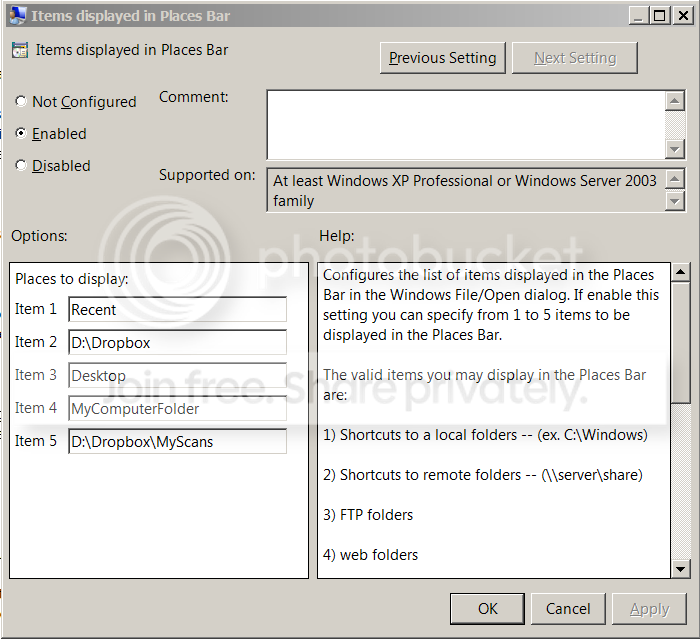
3. In the right pane of Common Open File Dialog, double click/tap on Items displayed in Places Bar to edit it. (see screenshot above)

4. To Restore Default Items Displayed in the Places Bar
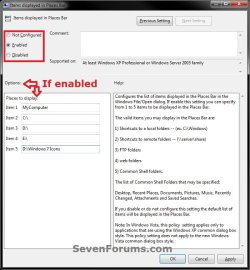
A) Select (dot) either Not Configured or Disabled. (see screenshot below step 6)
B) Go to step 6.
5. To Customize Items to be Displayed in the Places Bar
A) Select (dot) Enabled. (see screenshot below step 6)

B) Under Options, you can type in up to 5 separate items (locations) for Places to display. (see screenshot below step 6)
NOTE: See the NOTE box at the top of the tutorial for more on valid items you may display in the Places Bar.
6. Click/tap on OK. (see screenshot below)
GPEDIT-2.jpg
7. Close the Local Group Policy Editor window.


OPTION TWO

To Customize Places Bar Manually in Registry Editor


1. Press the Windows + R keys to open the Run dialog, type regedit, and press enter.

2. If prompted by UAC, click/tap on Yes (Windows 7/8) or Continue (Vista).

3. In regedit, navigate to the location below. (see screenshot below)
HKEY_CURRENT_USER\Software\Microsoft\Windows\CurrentVersion\Policies
Reg1.jpg
4. To Customize Items to be Displayed in the Places Bar
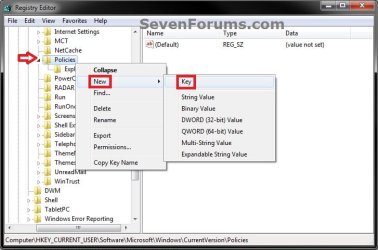
A) In the left pane, right click on Policies, and click/tap on New and Key. (see screenshot below)
Reg2.jpg
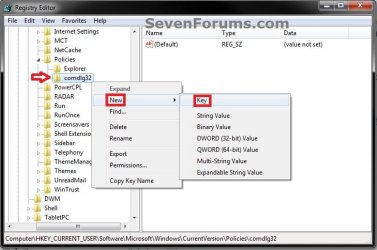
B) Type comdlg32, and press enter. Right click on comdlg32, and click/tap on New and Key. (see screenshot below)
NOTE: If you already have the comdlg32 key, then you can skip on to step 4C below.
Reg3.jpg
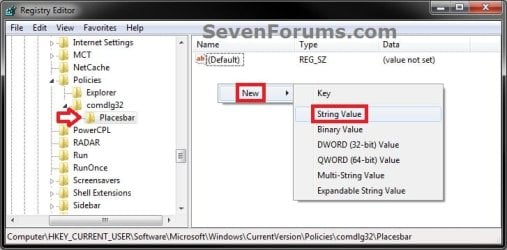
C) Type Placesbar, and press enter. (see screenshot below step 4D)

D) In the right pane of Placesbar, right click or press and hold on an empty space, and click/tap on New and String Value. (see screenshot below)
Reg4.jpg
E) You can specify up to 5 places, so type Place0, Place1, Place2, Place3, or Place4 for each one you would like to customize, and press Enter. (see screenshot below)
Reg5.jpg
F) Repeat steps 4D and 4E to add each Place# string value for how many custom places you wanted to be displayed as items in the Places Bar.

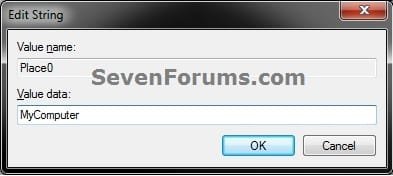
G) In the right pane, double click/tap on the Place# to modify it. Type in the item location that you want to have displayed in the Places Bar, and click/tap on OK. Repeat for each Place# that you have added in step 4E above. (see screenshot below)
NOTE: See the NOTE box at the top of the tutorial for more on valid items you may display in the Places Bar.
Modify.jpg
H) Go to step 6.
5. To Restore Default Items Displayed in the Places Bar
A) In the left pane, right click on Placesbar, and click/tap on Delete. (see screenshot below)
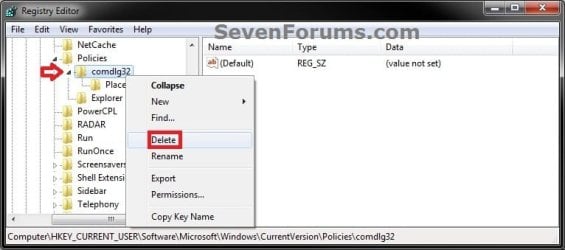
Delete-1.jpg
B) Click/tap on Yes to approve deletion. (see screenshot below)
Delete-2.jpg
6. Close regedit.
That's it,
Shawn


Last edited:
Just adding what I learned.

Even though it says:

The list of Common Shell Folders that may be specified:

Desktop, Recent Places, Documents, Pictures, Music, Recently Changed, Attachments and Saved Searches.
This is not actually true....

Many of these words will get you nothing, while others will get you something different than what you typed. Very strange. So use the following:

1. For Desktop:

c:\Users\<user>\Links\Desktop.lnk
(do not try to use %userprofile%, it will not work)

Note: if you just use "c:\users\<user>\Desktop" it will use a different icon (regular folder icon) and link directly to your desktop. The desktop view will not have shortcuts to "Libraries" and "My computer" (which normally appear under "Desktop" even though they are not on your actual desktop).

2. For Libraries:

c:\Users\<user>\AppData\Roaming\Microsoft\Windows\Libraries\Documents.library-ms

Note: if you just use "c:\users\<user>\Documents" it will show a different icon (regular folder icon) and call it "My Documents". Go figure...

Also see in this same folder:

Music.library-ms
Pictures.library-ms
Videos.library-ms

------------------------------

Hope this helps everyone.

------------------------------

Edit: I should have read the article. It lists several useful things that differ fro what windows says, such as using


  • MyComputerFolder
  • MyDocuments
  • MyFavorites
  • MyMusic
  • MyPictures
  • MyNetworkPlaces
  • MyFavorites
  • CommonDocuments
  • CommonMusic
  • CommonPictures
  • Desktop
These work, whereas the ones in the policy editor do not.


Hello Adipose, and welcome to Seven Forums.

Thank you for sharing. Even easier though, you can use the shell commands for them instead. :)
  • shell:desktop
  • shell:documentsLibrary
  • shell:MusicLibrary
  • shell:PicturesLibrary
  • shell:VideosLibrary
 
Last edited:

My Computer My Computer

At a glance

64-bit Windows 11 Pro for WorkstationsIntel i7-8700K OC'd to 5 GHz64 GB (4x16GB) G.SKILL TridentZ RGB DDR4 3600...ASUS ROG-STRIX-GTX1080TI-O11G-GAMING
Computer type
PC/Desktop
Computer Manufacturer/Model Number
Self built custom
OS
64-bit Windows 11 Pro for Workstations
CPU
Intel i7-8700K OC'd to 5 GHz
Motherboard
ASUS ROG Maximus XI Formula Z390
Memory
64 GB (4x16GB) G.SKILL TridentZ RGB DDR4 3600 MHz
Graphics Card(s)
ASUS ROG-STRIX-GTX1080TI-O11G-GAMING
Sound Card
Integrated
Monitor(s) Displays
2 x Samsung Odyssey G7 27"
Screen Resolution
2560x1440
Hard Drives
1TB Samsung 990 PRO M.2,
4TB Samsung 990 PRO PRO M.2,
TerraMaster F8 SSD Plus NAS
PSU
Seasonic Prime Titanium 850W
Case
Thermaltake Core P3
Cooling
Corsair Hydro H115i
Keyboard
Logitech wireless K800
Mouse
Logitech MX Master 4
Internet Speed
2 Gb/s Download and 100 Mb/s Upload
Antivirus
Malwarebyte Anti-Malware Premium
Browser
Google Chrome
Other Info
Logitech Z625 speaker system,
Logitech BRIO 4K Pro webcam,
HP Color LaserJet Pro MFP M477fdn,
APC SMART-UPS RT 1000 XL - SURT1000XLI,
Galaxy S23 Plus phone
Thanks, Brink. I stupidly did not read your article to the end, and missed the "MyDocuments" keyword.

The shell: suggestions are helpful as well.

Props for a good article.
 

My Computer My Computer

At a glance

Windows 7 64 bit
OS
Windows 7 64 bit
No problem Adipose. Thank you for reminding me about those. :)
 

My Computer My Computer

At a glance

64-bit Windows 11 Pro for WorkstationsIntel i7-8700K OC'd to 5 GHz64 GB (4x16GB) G.SKILL TridentZ RGB DDR4 3600...ASUS ROG-STRIX-GTX1080TI-O11G-GAMING
Computer type
PC/Desktop
Computer Manufacturer/Model Number
Self built custom
OS
64-bit Windows 11 Pro for Workstations
CPU
Intel i7-8700K OC'd to 5 GHz
Motherboard
ASUS ROG Maximus XI Formula Z390
Memory
64 GB (4x16GB) G.SKILL TridentZ RGB DDR4 3600 MHz
Graphics Card(s)
ASUS ROG-STRIX-GTX1080TI-O11G-GAMING
Sound Card
Integrated
Monitor(s) Displays
2 x Samsung Odyssey G7 27"
Screen Resolution
2560x1440
Hard Drives
1TB Samsung 990 PRO M.2,
4TB Samsung 990 PRO PRO M.2,
TerraMaster F8 SSD Plus NAS
PSU
Seasonic Prime Titanium 850W
Case
Thermaltake Core P3
Cooling
Corsair Hydro H115i
Keyboard
Logitech wireless K800
Mouse
Logitech MX Master 4
Internet Speed
2 Gb/s Download and 100 Mb/s Upload
Antivirus
Malwarebyte Anti-Malware Premium
Browser
Google Chrome
Other Info
Logitech Z625 speaker system,
Logitech BRIO 4K Pro webcam,
HP Color LaserJet Pro MFP M477fdn,
APC SMART-UPS RT 1000 XL - SURT1000XLI,
Galaxy S23 Plus phone
Thank you SO MUCH for this!!!
Microsoft should have an easy 2 click customization way for things like this!

now i only need to find a way to open a folder when mouse over with a dragndrop item (like osx)
 

My Computer My Computer

At a glance

windows7
OS
windows7
You're most welcome Stampler. :)

I'd probably end up opening up everything by mistake with a hover and open feature. :o
 

My Computer My Computer

At a glance

64-bit Windows 11 Pro for WorkstationsIntel i7-8700K OC'd to 5 GHz64 GB (4x16GB) G.SKILL TridentZ RGB DDR4 3600...ASUS ROG-STRIX-GTX1080TI-O11G-GAMING
Computer type
PC/Desktop
Computer Manufacturer/Model Number
Self built custom
OS
64-bit Windows 11 Pro for Workstations
CPU
Intel i7-8700K OC'd to 5 GHz
Motherboard
ASUS ROG Maximus XI Formula Z390
Memory
64 GB (4x16GB) G.SKILL TridentZ RGB DDR4 3600 MHz
Graphics Card(s)
ASUS ROG-STRIX-GTX1080TI-O11G-GAMING
Sound Card
Integrated
Monitor(s) Displays
2 x Samsung Odyssey G7 27"
Screen Resolution
2560x1440
Hard Drives
1TB Samsung 990 PRO M.2,
4TB Samsung 990 PRO PRO M.2,
TerraMaster F8 SSD Plus NAS
PSU
Seasonic Prime Titanium 850W
Case
Thermaltake Core P3
Cooling
Corsair Hydro H115i
Keyboard
Logitech wireless K800
Mouse
Logitech MX Master 4
Internet Speed
2 Gb/s Download and 100 Mb/s Upload
Antivirus
Malwarebyte Anti-Malware Premium
Browser
Google Chrome
Other Info
Logitech Z625 speaker system,
Logitech BRIO 4K Pro webcam,
HP Color LaserJet Pro MFP M477fdn,
APC SMART-UPS RT 1000 XL - SURT1000XLI,
Galaxy S23 Plus phone
Hi Brink!!!
Sorry, i didnt mean it that way!! my English are not so good but ill try to explain!!

Lets say we have a folder "A"
Inside "A" a subfolder "B"
Inside "B" a subsubfolder "C"
etc etc

I select some files in folder "A" and drag them in "B" without releasing the mouse button ... this will open the folder "B" and now i can see folder "C".... drag them and hold (hover) on folder "C" and "C" will open...

That way i can go deep inside subfolders by holding the files and i can release the mouse click where i what the files to be.

This is very very useful if i dont know exactly the place where i need to move the files!!

Now i drag the files from "A" to "B" and then opening "B"
if i finally want them in "C" i drag them again to "C" and opening "C" to continue working...
(the same if using explorer's Tree)

I mean to drag some files and be able to view the contents of any folder i mouse over so i can decide if this is the right place to drop them.

(all these in a single window)
 

My Computer My Computer

At a glance

windows7
OS
windows7

My Computer My Computer

At a glance

64-bit Windows 11 Pro for WorkstationsIntel i7-8700K OC'd to 5 GHz64 GB (4x16GB) G.SKILL TridentZ RGB DDR4 3600...ASUS ROG-STRIX-GTX1080TI-O11G-GAMING
Computer type
PC/Desktop
Computer Manufacturer/Model Number
Self built custom
OS
64-bit Windows 11 Pro for Workstations
CPU
Intel i7-8700K OC'd to 5 GHz
Motherboard
ASUS ROG Maximus XI Formula Z390
Memory
64 GB (4x16GB) G.SKILL TridentZ RGB DDR4 3600 MHz
Graphics Card(s)
ASUS ROG-STRIX-GTX1080TI-O11G-GAMING
Sound Card
Integrated
Monitor(s) Displays
2 x Samsung Odyssey G7 27"
Screen Resolution
2560x1440
Hard Drives
1TB Samsung 990 PRO M.2,
4TB Samsung 990 PRO PRO M.2,
TerraMaster F8 SSD Plus NAS
PSU
Seasonic Prime Titanium 850W
Case
Thermaltake Core P3
Cooling
Corsair Hydro H115i
Keyboard
Logitech wireless K800
Mouse
Logitech MX Master 4
Internet Speed
2 Gb/s Download and 100 Mb/s Upload
Antivirus
Malwarebyte Anti-Malware Premium
Browser
Google Chrome
Other Info
Logitech Z625 speaker system,
Logitech BRIO 4K Pro webcam,
HP Color LaserJet Pro MFP M477fdn,
APC SMART-UPS RT 1000 XL - SURT1000XLI,
Galaxy S23 Plus phone
Thanks so much for this, Shawn. Worked great!

I'm wondering if there is a way to give custom name to the item in the dialogue box. I connect to several remote servers that have long names containing many numbers and letters, and it'd be great to just have it say Office3 or whatever, instead of HKDF554FDG87345GJGG.

Thanks!
 

My Computer My Computer

At a glance

Windows 7 Professional 64 bit
Computer Manufacturer/Model Number
Dell
OS
Windows 7 Professional 64 bit
Hello DD, and welcome to Seven Forums.

I suppose that you could create a shortcut of the long named remote server folders, rename the shortcut to what you like, and add the shortcut in group policy instead.

Hope this helps,
Shawn
 

My Computer My Computer

At a glance

64-bit Windows 11 Pro for WorkstationsIntel i7-8700K OC'd to 5 GHz64 GB (4x16GB) G.SKILL TridentZ RGB DDR4 3600...ASUS ROG-STRIX-GTX1080TI-O11G-GAMING
Computer type
PC/Desktop
Computer Manufacturer/Model Number
Self built custom
OS
64-bit Windows 11 Pro for Workstations
CPU
Intel i7-8700K OC'd to 5 GHz
Motherboard
ASUS ROG Maximus XI Formula Z390
Memory
64 GB (4x16GB) G.SKILL TridentZ RGB DDR4 3600 MHz
Graphics Card(s)
ASUS ROG-STRIX-GTX1080TI-O11G-GAMING
Sound Card
Integrated
Monitor(s) Displays
2 x Samsung Odyssey G7 27"
Screen Resolution
2560x1440
Hard Drives
1TB Samsung 990 PRO M.2,
4TB Samsung 990 PRO PRO M.2,
TerraMaster F8 SSD Plus NAS
PSU
Seasonic Prime Titanium 850W
Case
Thermaltake Core P3
Cooling
Corsair Hydro H115i
Keyboard
Logitech wireless K800
Mouse
Logitech MX Master 4
Internet Speed
2 Gb/s Download and 100 Mb/s Upload
Antivirus
Malwarebyte Anti-Malware Premium
Browser
Google Chrome
Other Info
Logitech Z625 speaker system,
Logitech BRIO 4K Pro webcam,
HP Color LaserJet Pro MFP M477fdn,
APC SMART-UPS RT 1000 XL - SURT1000XLI,
Galaxy S23 Plus phone
Can't get MyComputer to appear

This worked. Thank you Brink!

Only I can't get MyComputer to appear in the save dialog, even after copy/pasting your exact text. I'm running Windows 7 x64 (US English)

Capture.png


Capture2.png
 

My Computer My Computer

At a glance

Windows 7 Professional 64bit
OS
Windows 7 Professional 64bit
Hello rotorb,

You ran into an odd little issue here. Normally, you would be able to use just MyComputerFolder. For some reason when you had the D: folder paths, MyComputerFolder stops working. However, if you use Shell:MyComputerFolder instead, it works. Odd, but it works this way when you wouldn't normally need to. :confused:
 

My Computer My Computer

At a glance

64-bit Windows 11 Pro for WorkstationsIntel i7-8700K OC'd to 5 GHz64 GB (4x16GB) G.SKILL TridentZ RGB DDR4 3600...ASUS ROG-STRIX-GTX1080TI-O11G-GAMING
Computer type
PC/Desktop
Computer Manufacturer/Model Number
Self built custom
OS
64-bit Windows 11 Pro for Workstations
CPU
Intel i7-8700K OC'd to 5 GHz
Motherboard
ASUS ROG Maximus XI Formula Z390
Memory
64 GB (4x16GB) G.SKILL TridentZ RGB DDR4 3600 MHz
Graphics Card(s)
ASUS ROG-STRIX-GTX1080TI-O11G-GAMING
Sound Card
Integrated
Monitor(s) Displays
2 x Samsung Odyssey G7 27"
Screen Resolution
2560x1440
Hard Drives
1TB Samsung 990 PRO M.2,
4TB Samsung 990 PRO PRO M.2,
TerraMaster F8 SSD Plus NAS
PSU
Seasonic Prime Titanium 850W
Case
Thermaltake Core P3
Cooling
Corsair Hydro H115i
Keyboard
Logitech wireless K800
Mouse
Logitech MX Master 4
Internet Speed
2 Gb/s Download and 100 Mb/s Upload
Antivirus
Malwarebyte Anti-Malware Premium
Browser
Google Chrome
Other Info
Logitech Z625 speaker system,
Logitech BRIO 4K Pro webcam,
HP Color LaserJet Pro MFP M477fdn,
APC SMART-UPS RT 1000 XL - SURT1000XLI,
Galaxy S23 Plus phone
Many thanks, Shawn.

Crisp, clear, works!

Keep up the good work.

JS
 

My Computer My Computer

At a glance

windows 7 home premium 64bit
OS
windows 7 home premium 64bit
You're most welcome James, and welcome to Seven Forums. :)
 

My Computer My Computer

At a glance

64-bit Windows 11 Pro for WorkstationsIntel i7-8700K OC'd to 5 GHz64 GB (4x16GB) G.SKILL TridentZ RGB DDR4 3600...ASUS ROG-STRIX-GTX1080TI-O11G-GAMING
Computer type
PC/Desktop
Computer Manufacturer/Model Number
Self built custom
OS
64-bit Windows 11 Pro for Workstations
CPU
Intel i7-8700K OC'd to 5 GHz
Motherboard
ASUS ROG Maximus XI Formula Z390
Memory
64 GB (4x16GB) G.SKILL TridentZ RGB DDR4 3600 MHz
Graphics Card(s)
ASUS ROG-STRIX-GTX1080TI-O11G-GAMING
Sound Card
Integrated
Monitor(s) Displays
2 x Samsung Odyssey G7 27"
Screen Resolution
2560x1440
Hard Drives
1TB Samsung 990 PRO M.2,
4TB Samsung 990 PRO PRO M.2,
TerraMaster F8 SSD Plus NAS
PSU
Seasonic Prime Titanium 850W
Case
Thermaltake Core P3
Cooling
Corsair Hydro H115i
Keyboard
Logitech wireless K800
Mouse
Logitech MX Master 4
Internet Speed
2 Gb/s Download and 100 Mb/s Upload
Antivirus
Malwarebyte Anti-Malware Premium
Browser
Google Chrome
Other Info
Logitech Z625 speaker system,
Logitech BRIO 4K Pro webcam,
HP Color LaserJet Pro MFP M477fdn,
APC SMART-UPS RT 1000 XL - SURT1000XLI,
Galaxy S23 Plus phone
I tried using MyComputerFolder and shell:MyComputerFolder and none of them works unfortunately.
Desktop and shell:Desktop do not work either.
 

My Computer My Computer

At a glance

Windows 7 Professional x64Core 2 Duo
Computer Manufacturer/Model Number
HP Compaq 8510w
OS
Windows 7 Professional x64
CPU
Core 2 Duo
Hello 5moufl, and welcome to Seven Forums.

They seem to be working fine for me. Could you post screenshots showing the same below to see if it may reveal what the issue may be? :)


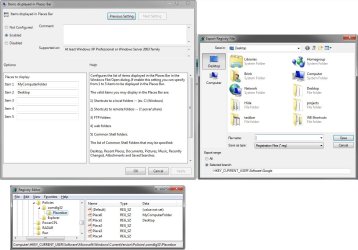
places-1.jpg
 

My Computer My Computer

At a glance

64-bit Windows 11 Pro for WorkstationsIntel i7-8700K OC'd to 5 GHz64 GB (4x16GB) G.SKILL TridentZ RGB DDR4 3600...ASUS ROG-STRIX-GTX1080TI-O11G-GAMING
Computer type
PC/Desktop
Computer Manufacturer/Model Number
Self built custom
OS
64-bit Windows 11 Pro for Workstations
CPU
Intel i7-8700K OC'd to 5 GHz
Motherboard
ASUS ROG Maximus XI Formula Z390
Memory
64 GB (4x16GB) G.SKILL TridentZ RGB DDR4 3600 MHz
Graphics Card(s)
ASUS ROG-STRIX-GTX1080TI-O11G-GAMING
Sound Card
Integrated
Monitor(s) Displays
2 x Samsung Odyssey G7 27"
Screen Resolution
2560x1440
Hard Drives
1TB Samsung 990 PRO M.2,
4TB Samsung 990 PRO PRO M.2,
TerraMaster F8 SSD Plus NAS
PSU
Seasonic Prime Titanium 850W
Case
Thermaltake Core P3
Cooling
Corsair Hydro H115i
Keyboard
Logitech wireless K800
Mouse
Logitech MX Master 4
Internet Speed
2 Gb/s Download and 100 Mb/s Upload
Antivirus
Malwarebyte Anti-Malware Premium
Browser
Google Chrome
Other Info
Logitech Z625 speaker system,
Logitech BRIO 4K Pro webcam,
HP Color LaserJet Pro MFP M477fdn,
APC SMART-UPS RT 1000 XL - SURT1000XLI,
Galaxy S23 Plus phone
DRdAD.png
 

My Computer My Computer

At a glance

Windows 7 Professional x64Core 2 Duo
Computer Manufacturer/Model Number
HP Compaq 8510w
OS
Windows 7 Professional x64
CPU
Core 2 Duo
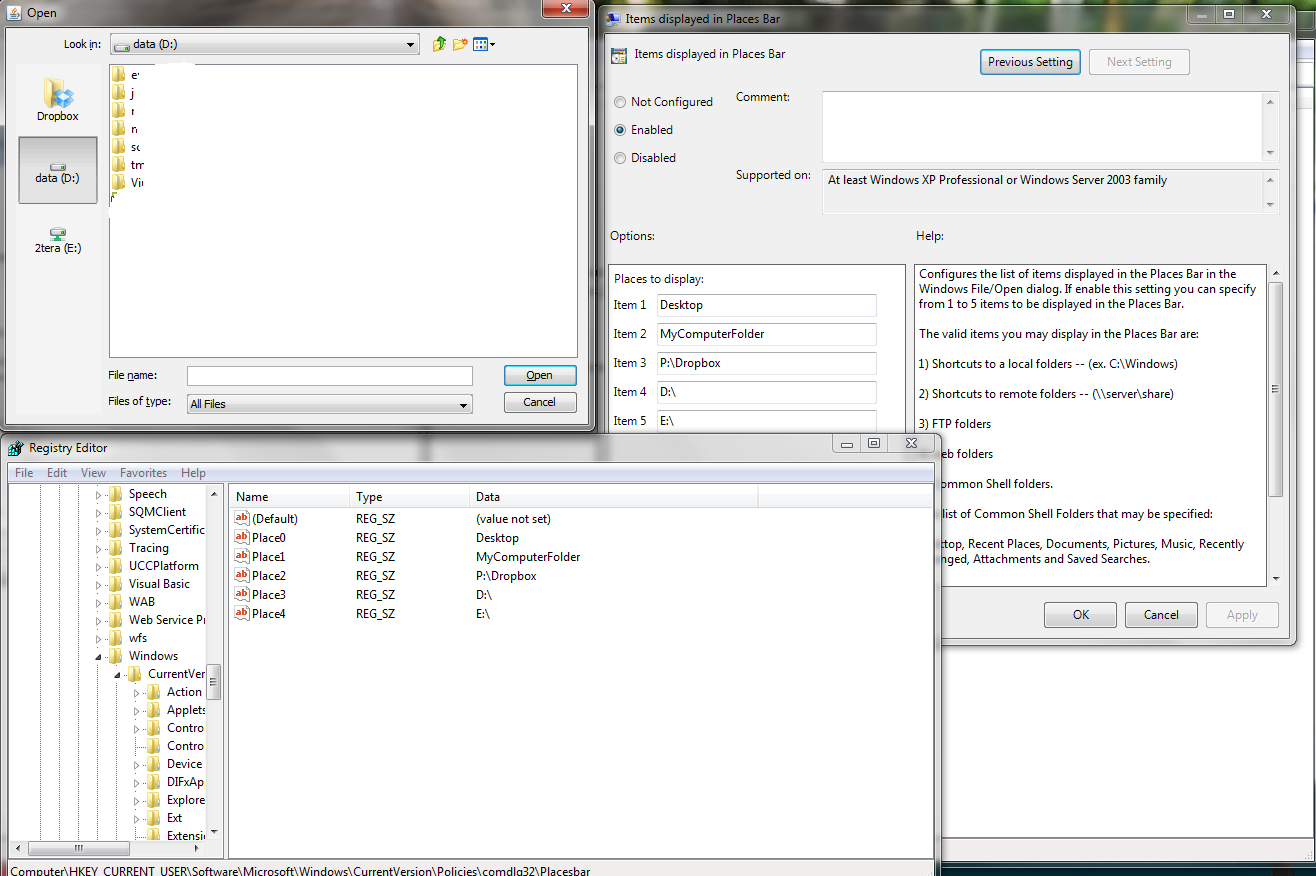
This below worked for me. You might see how it does for you. Is P, D, and E all local internal drives?

Test-2.jpg
 

My Computer My Computer

At a glance

64-bit Windows 11 Pro for WorkstationsIntel i7-8700K OC'd to 5 GHz64 GB (4x16GB) G.SKILL TridentZ RGB DDR4 3600...ASUS ROG-STRIX-GTX1080TI-O11G-GAMING
Computer type
PC/Desktop
Computer Manufacturer/Model Number
Self built custom
OS
64-bit Windows 11 Pro for Workstations
CPU
Intel i7-8700K OC'd to 5 GHz
Motherboard
ASUS ROG Maximus XI Formula Z390
Memory
64 GB (4x16GB) G.SKILL TridentZ RGB DDR4 3600 MHz
Graphics Card(s)
ASUS ROG-STRIX-GTX1080TI-O11G-GAMING
Sound Card
Integrated
Monitor(s) Displays
2 x Samsung Odyssey G7 27"
Screen Resolution
2560x1440
Hard Drives
1TB Samsung 990 PRO M.2,
4TB Samsung 990 PRO PRO M.2,
TerraMaster F8 SSD Plus NAS
PSU
Seasonic Prime Titanium 850W
Case
Thermaltake Core P3
Cooling
Corsair Hydro H115i
Keyboard
Logitech wireless K800
Mouse
Logitech MX Master 4
Internet Speed
2 Gb/s Download and 100 Mb/s Upload
Antivirus
Malwarebyte Anti-Malware Premium
Browser
Google Chrome
Other Info
Logitech Z625 speaker system,
Logitech BRIO 4K Pro webcam,
HP Color LaserJet Pro MFP M477fdn,
APC SMART-UPS RT 1000 XL - SURT1000XLI,
Galaxy S23 Plus phone
They all are local drives except for E:
In fact I just noticed that I get the correct dialog box in some situations and the one I showed you in some others. But it was the same type of dialog window, wasn't it? (after all I get those custom links for Dropbox, D and E)
 

My Computer My Computer

At a glance

Windows 7 Professional x64Core 2 Duo
Computer Manufacturer/Model Number
HP Compaq 8510w
OS
Windows 7 Professional x64
CPU
Core 2 Duo
May be something with the program. What are you using "Open" in for the ones that don't show all of them? I'll do some more experimenting with the same ones to see if I may be able to find a way for it to show with them as well.
 
Last edited:

My Computer My Computer

At a glance

64-bit Windows 11 Pro for WorkstationsIntel i7-8700K OC'd to 5 GHz64 GB (4x16GB) G.SKILL TridentZ RGB DDR4 3600...ASUS ROG-STRIX-GTX1080TI-O11G-GAMING
Computer type
PC/Desktop
Computer Manufacturer/Model Number
Self built custom
OS
64-bit Windows 11 Pro for Workstations
CPU
Intel i7-8700K OC'd to 5 GHz
Motherboard
ASUS ROG Maximus XI Formula Z390
Memory
64 GB (4x16GB) G.SKILL TridentZ RGB DDR4 3600 MHz
Graphics Card(s)
ASUS ROG-STRIX-GTX1080TI-O11G-GAMING
Sound Card
Integrated
Monitor(s) Displays
2 x Samsung Odyssey G7 27"
Screen Resolution
2560x1440
Hard Drives
1TB Samsung 990 PRO M.2,
4TB Samsung 990 PRO PRO M.2,
TerraMaster F8 SSD Plus NAS
PSU
Seasonic Prime Titanium 850W
Case
Thermaltake Core P3
Cooling
Corsair Hydro H115i
Keyboard
Logitech wireless K800
Mouse
Logitech MX Master 4
Internet Speed
2 Gb/s Download and 100 Mb/s Upload
Antivirus
Malwarebyte Anti-Malware Premium
Browser
Google Chrome
Other Info
Logitech Z625 speaker system,
Logitech BRIO 4K Pro webcam,
HP Color LaserJet Pro MFP M477fdn,
APC SMART-UPS RT 1000 XL - SURT1000XLI,
Galaxy S23 Plus phone
May be something with the program. What are using "Open" in for the ones that don't show all of them? I'll do some more experimenting with the same ones to see if I may be able to find a way for it to show with them as well.
I didn't understand that last message but the program where the dialog kinda works (without desktop or mycomputerfolder) is Album Art Optimizer - iAudiophile.net Forums this.
 

My Computer My Computer

At a glance

Windows 7 Professional x64Core 2 Duo
Computer Manufacturer/Model Number
HP Compaq 8510w
OS
Windows 7 Professional x64
CPU
Core 2 Duo
Back
Top