
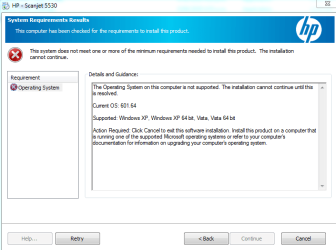
Problem: had previously installed HP's full version software for a Scanjet 5530 photosmart scanner and used it for several years. Recently for no obvious reason it suddenly stopped working - not associated with any 3rd party installation or update. Attempted re-installation using the same HP software package (setup_full_5530.exe) now fails with an "OS not supported' message - see attached screen grab.
This is on a standalone desktop PC running Win7 SP1 (6.1) Home Premium 64-bit, administrator status and following the HP instructions for installation via compatibility assistant and Vista as the recommended choice. Scanner connection is direct via USB cable.
Over the course of multiple attempts to install I have (very carefully, C drive image backup) used regedit to search and remove as many references to '5530' as I could find with attempted re-installation continuing to fail. As this has run for an extended time previously with no problems I am at a loss. It would seem to me that there must be a left-over registry entry that is somehow blocking the re-install. It is a perfectly good scanner and seems criminal to 'junk it' for want of getting software to work that demonstrably can work. I accept that it is an old (but good!) unit but would be very grateful for thoughts, suggestions and methods that might assist in clarifying this hassle and getting it up and running.
Many thanks, Phillip Hughes
[Email removed for user safety]
This is on a standalone desktop PC running Win7 SP1 (6.1) Home Premium 64-bit, administrator status and following the HP instructions for installation via compatibility assistant and Vista as the recommended choice. Scanner connection is direct via USB cable.
Over the course of multiple attempts to install I have (very carefully, C drive image backup) used regedit to search and remove as many references to '5530' as I could find with attempted re-installation continuing to fail. As this has run for an extended time previously with no problems I am at a loss. It would seem to me that there must be a left-over registry entry that is somehow blocking the re-install. It is a perfectly good scanner and seems criminal to 'junk it' for want of getting software to work that demonstrably can work. I accept that it is an old (but good!) unit but would be very grateful for thoughts, suggestions and methods that might assist in clarifying this hassle and getting it up and running.
Many thanks, Phillip Hughes
[Email removed for user safety]
Attachments
Last edited by a moderator:
My Computer
- OS
- Windows Home Premium 64 bit

