Compatibility Mode

How to Run a Program in Compatibility Mode in Windows 7


   Information
Compatibility mode allows a older program written for an earlier versions of Windows to possibly run in Windows 7. You can also use Compatibility mode to always have a program to Run as an administrator.

   Note
32 bit Windows has emulation for 16 bit programs built in. 64-bit Windows only has emulation for 32 bit programs. If the program ran on 32-bit Windows 7 and not 64 bit, then chances are it's a 16 bit program and you may have to use something like DosBox or XP Mode to be able to run it in 64-bit Windows.

   Tip
If changing the Compatibility settings does not fix the problem, go to the program manufacturer's website to see if there is an update for the program.

To see if your software is compatible with Windows 7, check it here: Windows 7 Compatibility Center home

   Warning
Do not use Compatibility mode on antivirus programs, firewall programs, disk utilities, or other system programs because it could cause data loss or create a security risk.

You only want to use these type of programs for the Windows listed in their system requirements.


OPTION ONE

To Set Compatibility Mode of Application in Properties Page

1. Right click on the program's shortcut (LNK file), .EXE file, BAT file, CMD file, or MSI file.

2. Click on Properties.

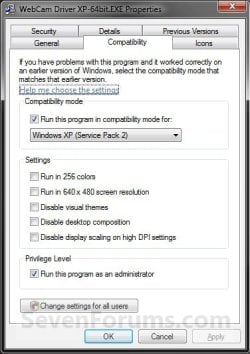
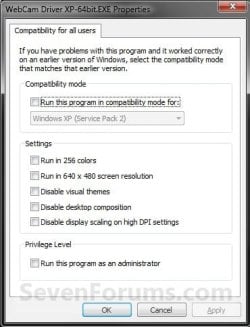
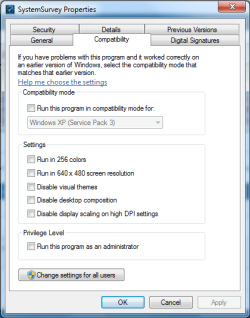
3. Click on the Compatibility tab. (see screenshot below)
NOTE: If the Compatiblity options are grayed out, then it is a 64 bit program and cannot be changed.Compatibility-1.jpg

4. To Run a Program in Compatibility Mode in Only your User Account
NOTE: Runs the program using settings from a previous version of Windows. Try this setting if you know the program is designed for (or worked in) a specific previous version of Windows.A) Check the Run this program in compatibility mode for box. (see screenshot below)

B) Click on the drop down menu arrow and select which version of Windows the program was made for. (see screenshot below)
NOTE: Always pick the latest Windows version the program was written for to have a better chance of it running properly in Windows 7.

   Warning
MSI files (right screenshot below) will only have the Previous version of Windows option available for it. This option will allow Windows 7 to automatically use the previous version compatibility mode it thinks is best for the MSI file to run properly as. You will not be able to do steps 5 and 6 below.
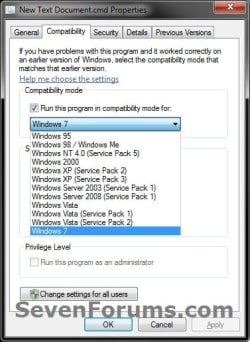
compatibility.jpgMSI_Properties.jpg


5. To Change the Settings for a Program in Only your User Account
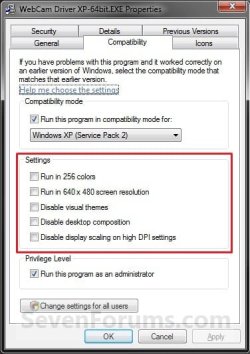
NOTE: These settings will be grayed out and not available for 64-bit programs.A) Check or uncheck the settings you want for the program. (see screenshot below)
NOTE: See the table below the screenshot for a description of each setting.Settings.jpg

SettingDescription
Run in 256 colorsUses a limited set of colors in the program. Some older programs are designed to use fewer colors.
Run in 640 × 480 screen resolutionRuns the program in a smaller-sized window. Try this setting if the graphical user interface appears jagged or is rendered improperly.
Disable visual themesDisables themes on the program. Try this setting if you notice problems with the menus or buttons on the title bar of the program.
Disable desktop compositionTurns off transparency and other advanced display features. Choose this setting if window movement appears erratic or you notice other display problems.
Disable display scaling on high DPI settingsTurns off automatic resizing of programs if large-scale font size (DPI) is in use. Try this setting if large-scale fonts are interfering with the appearance of the program.


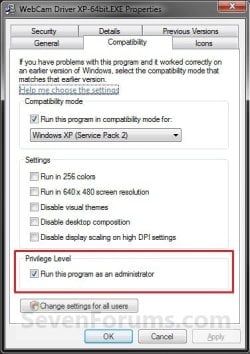
6. To Change the Privilege Level of a Program in Only your User Account
NOTE: Runs the program as an administrator. Some programs require administrator privileges to run properly. If you are not currently logged on as an administrator, this option is not available.A) Check or uncheck the Run this program as an administrator box to enable or disable this option. (see screenshot below)Privilege Level.jpg


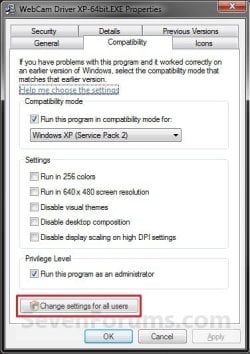
7. To Change These Settings for All Users
NOTE: You must be logged in as an administrator to be able to do this step. A) Click on the Change settings for all users button. (See screenshot below)All_Users.jpg

B) Repeat steps 4, 5, and 6 in this new window to apply them to all users on the computer, and click on OK. (see screenshot below)
NOTE: Changes made here will override and gray out the same setting in the window used in step 4, 5, or 6 above.Compatibility_All_Users.jpg


8. Click on OK to apply the changes. (see screenshot below step 3)


OPTION TWO

Set Compatibility Mode of Application using "Troubleshoot compatibility"


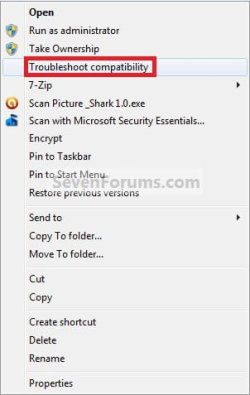
NOTE: This option opens the Program Compatibility Assistant wizard to let Windows 7 help decide what is best to try and make the program compatible.1. Right click on the program's shortcut (LNK file), .EXE file, BAT file, CMD file, or MSI file, and click on Troubleshoot compatibility. (see screenshot below)
NOTE: You will not have the Troubleshoot compatibility option available for pinned items in the Start Menu or on the taskbar. You will only have the Troubleshoot compatibility option available for 3rd party programs in the Start Menu - All Programs area instead.Context_menu.jpg

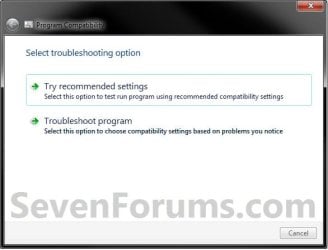
2. You will see this for a moment while Windows 7 is detecting what the issues may be with the program. (see screenshot below)StepA.jpg

3. The wizard will now give you a list of choices to choose from. Select the option you would like to try, then follow the rest of the onscreen instructions until you are through troubleshooting the compatibility issue with the program. (see screenshot below)StepB.jpg


OPTION THREE

To Set Compatibility Mode of Application in Registry Editor

1. Open the Start Menu, then type regedit in the search box and press Enter.

2. If prompted by UAC, then click on Yes.

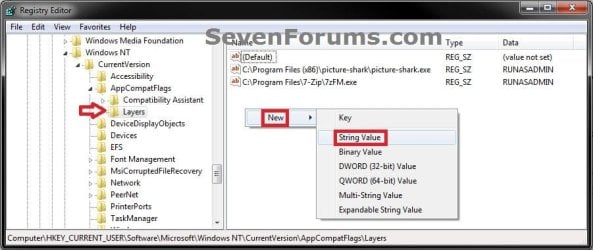
3. In regedit, navigate to each location below one at a time and do the steps below for each location. (see screenshot below)

Code:
HKEY_CURRENT_USER\Software\Microsoft\Windows NT\CurrentVersion\AppCompatFlags\Layers
Code:
HKEY_LOCAL_MACHINE\SOFTWARE\Microsoft\Windows NT\CurrentVersion\AppCompatFlags\Layers
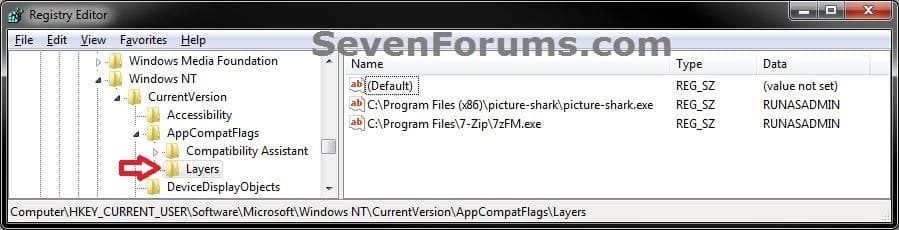
Reg1.jpg

4. To Run a Program in Compatibility ModeA) In the right pane of Layers, right click on a empty area and click on New, then on String Value. (see screenshot below)Reg2.jpg

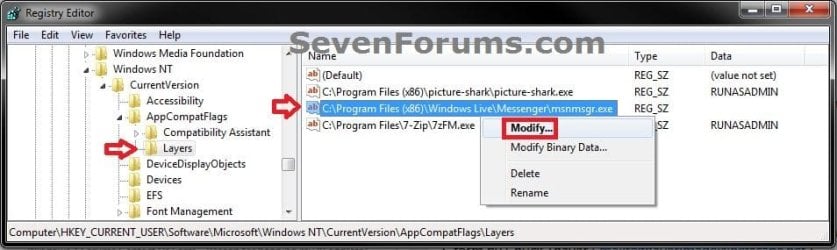
B) Type in the full path of the program's exe file and press Enter, then right click on the full path and click on Modify. (see screenshot below)Reg3.jpg

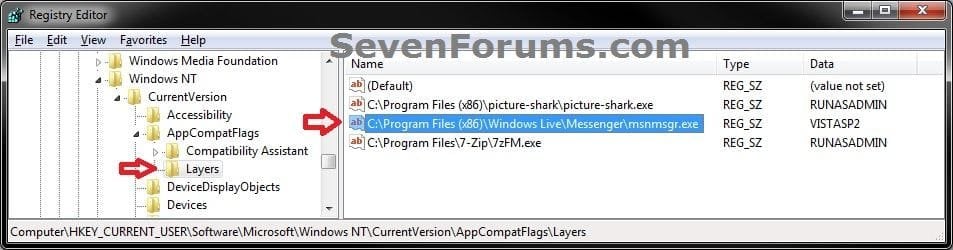
C) Type in a single or combination of Data values (see tables below) for how you want to run the program as, and click on OK. (see screenshot below)
NOTE: If you use more than one Settings, then you must add them in the order they are in the table below.

[Compatibility Mode (only one)] + space + [Settings (one or more with a space inbetween)] + space + [Privilege Level]Reg4.jpg

   Tip

EXAMPLE ONE:
To run a program as if it was in Windows Vista SP2 (Compatibility Mode), and Run in 256 colors (Settings), and to run as administrator you would type:

VISTASP2 256Color RUNASADMIN

EXAMPLE TWO:
Say you also wanted to Run in 640 x 480 screen resolution (2nd Settings) with the above example, you would type:

VISTASP2 256Color 640x480 RUNASADMIN


Compatibility ModeData Value
Windows 95WIN95
Windows 98 / Windows MeWIN98
Windows NT 4.0 (Service Pack 5)NT4SP5
Windows 2000WIN2000
Windows XP (Service Pack 2)WINXPSP2
Windows XP (Service Pack 3)WINXPSP3
Windows Server 2003 (Service Pack 1)WINSRV03SP1
Windows Server 2008 (Service Pack 1)WINSRV08SP1
Windows VistaVISTARTM
Windows Vista (Service Pack 1)VISTASP1
Windows Vista (Service Pack 2)VISTASP2
Windows 7WIN7RTM

SettingsData Value
Run in 256 colors256Color
Run in 640 x 480 screen resolution640x480
Disable visual themesDISABLETHEMES
Disable desktop compositionDISABLEDWM
Disable display scaling on high DPI settingsHIGHDPIAWARE

Privilege LevelData Value
Run this program as an AdministratorRUNASADMIN

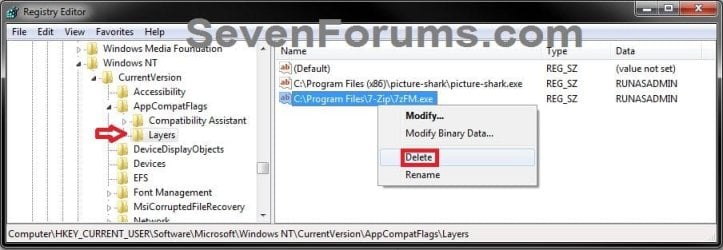
5. To Stop a Program from Running in Compatibility ModeA) In the right pane of Layers, right click on the full path Name and click on Delete. (see screenshot below)Delete1.jpg

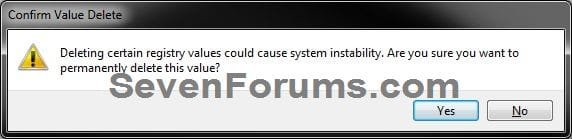
B) Click on Yes to confirm deletion. (see screenshot below)Delete2.jpg


6. Close regedit when done.
NOTE: Some programs may require you to restart the computer for this to be applied.


That's it,
Shawn Brink


Attachments

  • Reg5.jpg
    Reg5.jpg
    59 KB · Views: 51
Last edited:
Hello Brittan, and welcome to Seven Forums. :)

Is the Run this program in compatibility mode for box checked?

Could you also post back with a screenshot showing this?
 

My Computer

Computer type
PC/Desktop
Computer Manufacturer/Model Number
Self built custom
OS
64-bit Windows 11 Pro for Workstations
CPU
Intel i7-8700K OC'd to 5 GHz
Motherboard
ASUS ROG Maximus XI Formula Z390
Memory
64 GB (4x16GB) G.SKILL TridentZ RGB DDR4 3600 MHz
Graphics Card(s)
ASUS ROG-STRIX-GTX1080TI-O11G-GAMING
Sound Card
Integrated
Monitor(s) Displays
2 x Samsung Odyssey G7 27"
Screen Resolution
2560x1440
Hard Drives
1TB Samsung 990 PRO M.2,
4TB Samsung 990 PRO PRO M.2,
TerraMaster F8 SSD Plus NAS
PSU
Seasonic Prime Titanium 850W
Case
Thermaltake Core P3
Cooling
Corsair Hydro H115i
Keyboard
Logitech wireless K800
Mouse
Logitech MX Master 4
Internet Speed
2 Gb/s Download and 100 Mb/s Upload
Antivirus
Malwarebyte Anti-Malware Premium
Browser
Google Chrome
Other Info
Logitech Z625 speaker system,
Logitech BRIO 4K Pro webcam,
HP Color LaserJet Pro MFP M477fdn,
APC SMART-UPS RT 1000 XL - SURT1000XLI,
Galaxy S23 Plus phone
Just registered to say thanks to you all, if I do have any questions,It'll probably be in two weeks when I complete the upgrades to the workstation or I'll be mostly lurking because book I bought I found to be rather thin info wise.
 

My Computer

Computer type
PC/Desktop
Computer Manufacturer/Model Number
All builds,AMD..ASRock,Asus.
OS
2000Pro,XP SP3 x86..W7 on next build
Hello Lone Browncoat, and welcome to Seven Forums.

Please feel free to ask any questions you may have. :)
 

My Computer

Computer type
PC/Desktop
Computer Manufacturer/Model Number
Self built custom
OS
64-bit Windows 11 Pro for Workstations
CPU
Intel i7-8700K OC'd to 5 GHz
Motherboard
ASUS ROG Maximus XI Formula Z390
Memory
64 GB (4x16GB) G.SKILL TridentZ RGB DDR4 3600 MHz
Graphics Card(s)
ASUS ROG-STRIX-GTX1080TI-O11G-GAMING
Sound Card
Integrated
Monitor(s) Displays
2 x Samsung Odyssey G7 27"
Screen Resolution
2560x1440
Hard Drives
1TB Samsung 990 PRO M.2,
4TB Samsung 990 PRO PRO M.2,
TerraMaster F8 SSD Plus NAS
PSU
Seasonic Prime Titanium 850W
Case
Thermaltake Core P3
Cooling
Corsair Hydro H115i
Keyboard
Logitech wireless K800
Mouse
Logitech MX Master 4
Internet Speed
2 Gb/s Download and 100 Mb/s Upload
Antivirus
Malwarebyte Anti-Malware Premium
Browser
Google Chrome
Other Info
Logitech Z625 speaker system,
Logitech BRIO 4K Pro webcam,
HP Color LaserJet Pro MFP M477fdn,
APC SMART-UPS RT 1000 XL - SURT1000XLI,
Galaxy S23 Plus phone
Hello Mojonba,

The program may be overriding it. I don't know of any way to force it if that's the case. :(

Brink,

I am trying to disable Desktop Window Composition for AutoCad Lt 2013 on w7 x64. I have done it via the compatibility tab as well as the registry option with no avail. I am doing it right as it works with other executables. It just doesnot work with AutoCad LT 2013. Any ideas on how to force this?

Thanks,

Brink,

I found out that disabling windows composition does not work in any x64 app. It does work with all x86 apps. Any idea why?

Thanks
 

My Computer

OS
W7 x64
Hello Mojonba,

64-bit apps do not use the options under "Settings" in the Compatibility tab since those are only for 16-bit and 32-bit programs instead. :(
 

My Computer

Computer type
PC/Desktop
Computer Manufacturer/Model Number
Self built custom
OS
64-bit Windows 11 Pro for Workstations
CPU
Intel i7-8700K OC'd to 5 GHz
Motherboard
ASUS ROG Maximus XI Formula Z390
Memory
64 GB (4x16GB) G.SKILL TridentZ RGB DDR4 3600 MHz
Graphics Card(s)
ASUS ROG-STRIX-GTX1080TI-O11G-GAMING
Sound Card
Integrated
Monitor(s) Displays
2 x Samsung Odyssey G7 27"
Screen Resolution
2560x1440
Hard Drives
1TB Samsung 990 PRO M.2,
4TB Samsung 990 PRO PRO M.2,
TerraMaster F8 SSD Plus NAS
PSU
Seasonic Prime Titanium 850W
Case
Thermaltake Core P3
Cooling
Corsair Hydro H115i
Keyboard
Logitech wireless K800
Mouse
Logitech MX Master 4
Internet Speed
2 Gb/s Download and 100 Mb/s Upload
Antivirus
Malwarebyte Anti-Malware Premium
Browser
Google Chrome
Other Info
Logitech Z625 speaker system,
Logitech BRIO 4K Pro webcam,
HP Color LaserJet Pro MFP M477fdn,
APC SMART-UPS RT 1000 XL - SURT1000XLI,
Galaxy S23 Plus phone
Hello. I'm not entirely sure this is the correct topic for posting this kind of problem (please let me know if it isn't), but I have been experiencing a great number of compatibility-related issues with certain Windows (optional) updates. Previously, I have been installing regular recommended updates as normal. I began experiencing difficulties with a USB microphone. I checked the optional updates (they also included a graphics card update, and a realtek update) and installed them. Upon my computer starting up and me logging in, zero .exe files are able to be launched. After a bit of fiddling around and research, it appears all (.exe files at least) files have been set to run compatibility mode for Windows XP. I found that setting specific applications to compatability mode for Win7 let them run, but the problem remains for the hundreds of other programs switched to Windows XP Service pack 3. I have no idea why this happened, but the problem occurred after I installed a couple updates from 2011-2013. These affected the system files, and based on what I have read and see, I am not able to dig through update history and revert them or even see them.
I tried the troubleshooting program, and when it produced its recommended settings, they were for Windows XP Service Pack 3 - so I am lead to believe that after the updates installed, they somehow decided it was a good idea that all my applications be switched to run compatibility mode for WinXPSP3.

NOTE: Upon checking the file properties for .exe files, the "Run in compatability mode for:" box is NOT checked. In the dropdown menu right below (which is greyed out because the box is not checked), it says Windows XP Service Pack 3. Screenshot attached for above description. When this program and all programs I have not manually changed the compatibility settings for, it instantly crashes. I am willing to go into more detail with requested information, but I'm not very tech savvy, so in English please! :)

I looked around a bit on these forums and it does not appear (at least at second glance) that anyone else had this problem occur to them. Any help or insight would be greatly appreciated.
 

Attachments

  • sduvciybrg.png
    sduvciybrg.png
    43.8 KB · Views: 1,032

My Computer

Computer type
PC/Desktop
Computer Manufacturer/Model Number
HP
OS
Windows 7 Home Premium 64bit
Browser
Firefox
Hello Cats, and welcome to Seven Forums.

I must admit that I've not seen this before either. How long ago did this start?

I would recommend to check the two Layers keys locations in OPTION THREE of the tutorial to make sure that both do not have any XP entries in their right pane. If they do, then delete them. This is where the compatibility mode settings are stored at, and would be easier to undo them here than one by one for each .exe file.

If nothing is in the Layers keys, then you could do a system restore using a restore point dated before this happened to hopefully undo and fix this.

Hope this helps, :)
Shawn
 

My Computer

Computer type
PC/Desktop
Computer Manufacturer/Model Number
Self built custom
OS
64-bit Windows 11 Pro for Workstations
CPU
Intel i7-8700K OC'd to 5 GHz
Motherboard
ASUS ROG Maximus XI Formula Z390
Memory
64 GB (4x16GB) G.SKILL TridentZ RGB DDR4 3600 MHz
Graphics Card(s)
ASUS ROG-STRIX-GTX1080TI-O11G-GAMING
Sound Card
Integrated
Monitor(s) Displays
2 x Samsung Odyssey G7 27"
Screen Resolution
2560x1440
Hard Drives
1TB Samsung 990 PRO M.2,
4TB Samsung 990 PRO PRO M.2,
TerraMaster F8 SSD Plus NAS
PSU
Seasonic Prime Titanium 850W
Case
Thermaltake Core P3
Cooling
Corsair Hydro H115i
Keyboard
Logitech wireless K800
Mouse
Logitech MX Master 4
Internet Speed
2 Gb/s Download and 100 Mb/s Upload
Antivirus
Malwarebyte Anti-Malware Premium
Browser
Google Chrome
Other Info
Logitech Z625 speaker system,
Logitech BRIO 4K Pro webcam,
HP Color LaserJet Pro MFP M477fdn,
APC SMART-UPS RT 1000 XL - SURT1000XLI,
Galaxy S23 Plus phone
Thanks for the quick response!

The problems started as soon as my computer turned back on after those updates were installed - so it's about 3 days old.
The screenshots are below - the first one is from the HKEY_CURRENT_USER path, and the second is from HKEY_LOCAL_MACHINE path. Only the 2nd had anything related to WinXP, and it was two programs with the comp. set to XP Service pack 2. I promptly banished them from this plane, and yet nothing has changed. Now that I think about it I ought to have waited to delete those two things. :confused: The two programs you see are the ones in which I went into the .exe properties and manually changed the compatibility to Win7. Though, I do find it a bit odd nothing else was in there, seeing as the other programs are still set to WinXP SP3. Perhaps it was what I thought originally and my computer decided that was to be the recommended compatibility for all files? I've got nothing, and I'm completely open to a system restore, I just want to know what else there is I can do.
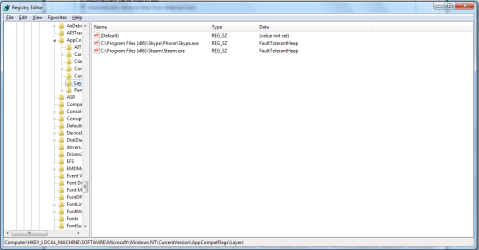
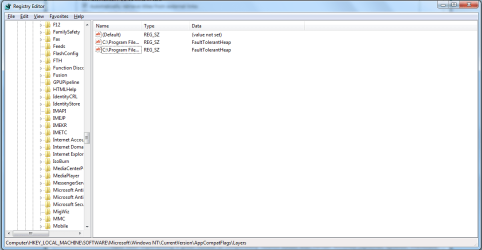
Thanks a bunch for helping me! It's greatly appreciated.
 

Attachments

  • asinbef.png
    asinbef.png
    86.3 KB · Views: 501
  • asinbef2.png
    asinbef2.png
    87 KB · Views: 516
Last edited:

My Computer

Computer type
PC/Desktop
Computer Manufacturer/Model Number
HP
OS
Windows 7 Home Premium 64bit
Browser
Firefox
The .exe files are not actually set to use compatibility mode unless the Run this program in compatibility mode for box is checked, so it doesn't matter what is selected for compatibility mode until checked.

I would recommend to do a system restore using a restore point dated before this started.
 

My Computer

Computer type
PC/Desktop
Computer Manufacturer/Model Number
Self built custom
OS
64-bit Windows 11 Pro for Workstations
CPU
Intel i7-8700K OC'd to 5 GHz
Motherboard
ASUS ROG Maximus XI Formula Z390
Memory
64 GB (4x16GB) G.SKILL TridentZ RGB DDR4 3600 MHz
Graphics Card(s)
ASUS ROG-STRIX-GTX1080TI-O11G-GAMING
Sound Card
Integrated
Monitor(s) Displays
2 x Samsung Odyssey G7 27"
Screen Resolution
2560x1440
Hard Drives
1TB Samsung 990 PRO M.2,
4TB Samsung 990 PRO PRO M.2,
TerraMaster F8 SSD Plus NAS
PSU
Seasonic Prime Titanium 850W
Case
Thermaltake Core P3
Cooling
Corsair Hydro H115i
Keyboard
Logitech wireless K800
Mouse
Logitech MX Master 4
Internet Speed
2 Gb/s Download and 100 Mb/s Upload
Antivirus
Malwarebyte Anti-Malware Premium
Browser
Google Chrome
Other Info
Logitech Z625 speaker system,
Logitech BRIO 4K Pro webcam,
HP Color LaserJet Pro MFP M477fdn,
APC SMART-UPS RT 1000 XL - SURT1000XLI,
Galaxy S23 Plus phone
Hi guys,

How can i set compatibility mode for a program using cmd? Is this possible ?
 

My Computer

Computer type
PC/Desktop
OS
Windows 7 Ultimate X64
Hello R3nam3, and welcome to Seven Forums. :)

You could use a .bat file to run the commands below to make the registry changes like in OPTION THREE instead.

For example:

Code:
REG ADD "HKCU\Software\Microsoft\Windows NT\CurrentVersion\AppCompatFlags\Layers" /V [B][COLOR=#ff0000]Full-path-to-.exe-file[/COLOR][/B] /T REG_SZ /D [B][COLOR=#ff0000]CompatibilityMode[/COLOR][/B] /F
 
REG ADD "HKLM\SOFTWARE\Microsoft\Windows NT\CurrentVersion\AppCompatFlags\Layers" /V [B][COLOR=red]Full-path-to-.exe-file[/COLOR][/B] /T REG_SZ /D [COLOR=red][B]CompatibilityMode[/B][/COLOR] /F

Substitute Full-path-to-.exe-file in the commands above with the actual full path to the .exe file of the program.

Substitute CompatibilityMode in the commands above with what compatibility mode data value you want to use on the program.
 

My Computer

Computer type
PC/Desktop
Computer Manufacturer/Model Number
Self built custom
OS
64-bit Windows 11 Pro for Workstations
CPU
Intel i7-8700K OC'd to 5 GHz
Motherboard
ASUS ROG Maximus XI Formula Z390
Memory
64 GB (4x16GB) G.SKILL TridentZ RGB DDR4 3600 MHz
Graphics Card(s)
ASUS ROG-STRIX-GTX1080TI-O11G-GAMING
Sound Card
Integrated
Monitor(s) Displays
2 x Samsung Odyssey G7 27"
Screen Resolution
2560x1440
Hard Drives
1TB Samsung 990 PRO M.2,
4TB Samsung 990 PRO PRO M.2,
TerraMaster F8 SSD Plus NAS
PSU
Seasonic Prime Titanium 850W
Case
Thermaltake Core P3
Cooling
Corsair Hydro H115i
Keyboard
Logitech wireless K800
Mouse
Logitech MX Master 4
Internet Speed
2 Gb/s Download and 100 Mb/s Upload
Antivirus
Malwarebyte Anti-Malware Premium
Browser
Google Chrome
Other Info
Logitech Z625 speaker system,
Logitech BRIO 4K Pro webcam,
HP Color LaserJet Pro MFP M477fdn,
APC SMART-UPS RT 1000 XL - SURT1000XLI,
Galaxy S23 Plus phone
Thank you !

I also find this...

"However the application compatibily flags are stored in the registry (user or system part):

HKEY_CURRENT_USER\Software\Microsoft\Windows NT\CurrentVersion\AppCompatFlags\Layers
HKEY_LOCAL_MACHINE\Software\Microsoft\Windows NT\CurrentVersion\AppCompatFlags\Layers

Therefore you can use the standard command line registry editor for creating the required entry:

reg.exe Add "HKLM\Software\Microsoft\Windows NT\CurrentVersion\AppCompatFlags\Layers" /v "C:\Program Files\MyApp\Test.exe" /d "WINXPSP3"

I will try bouth and i will replay...

UPDATE

I used just this and its worked perfectly.

reg.exe Add "HKLM\Software\Microsoft\Windows NT\CurrentVersion\AppCompatFlags\Layers" /v "C:\Program Files\MyApp\Test.exe" /d "WINXPSP3"
 
Last edited:

My Computer

Computer type
PC/Desktop
OS
Windows 7 Ultimate X64
Hi,

I'm having trouble completing the HKEY_LOCAL_MACHINE part of Option 3. I navigated to that part in regedit, but I cannot find that exact directory (my AppCompatFlags doesnt have a Layers subfolder) Should I just create one? Leave it alone?
 

My Computer

Computer type
PC/Desktop
OS
Win7 Pro 64-bit
Hello Mike, and welcome to Seven Forums. :)

That's correct, you would just need to create the keys if you do not already have them.
 

My Computer

Computer type
PC/Desktop
Computer Manufacturer/Model Number
Self built custom
OS
64-bit Windows 11 Pro for Workstations
CPU
Intel i7-8700K OC'd to 5 GHz
Motherboard
ASUS ROG Maximus XI Formula Z390
Memory
64 GB (4x16GB) G.SKILL TridentZ RGB DDR4 3600 MHz
Graphics Card(s)
ASUS ROG-STRIX-GTX1080TI-O11G-GAMING
Sound Card
Integrated
Monitor(s) Displays
2 x Samsung Odyssey G7 27"
Screen Resolution
2560x1440
Hard Drives
1TB Samsung 990 PRO M.2,
4TB Samsung 990 PRO PRO M.2,
TerraMaster F8 SSD Plus NAS
PSU
Seasonic Prime Titanium 850W
Case
Thermaltake Core P3
Cooling
Corsair Hydro H115i
Keyboard
Logitech wireless K800
Mouse
Logitech MX Master 4
Internet Speed
2 Gb/s Download and 100 Mb/s Upload
Antivirus
Malwarebyte Anti-Malware Premium
Browser
Google Chrome
Other Info
Logitech Z625 speaker system,
Logitech BRIO 4K Pro webcam,
HP Color LaserJet Pro MFP M477fdn,
APC SMART-UPS RT 1000 XL - SURT1000XLI,
Galaxy S23 Plus phone
I was wondering if anyone knew of a way to get a list of the programs that have been set to compatibility mode. I am working on a client computer that has had several programs set to compatible mode and so far none of them load until I switch them back to normal.

Any help would be appreciated.

Shaun
 

My Computer

Computer type
PC/Desktop
Computer Manufacturer/Model Number
Custom
OS
Windows 8.1 Pro
CPU
i5-4670k
Motherboard
MSI Z87-G45 Gaming
Memory
16GB DDR3 1600
Graphics Card(s)
GTX 670
Monitor(s) Displays
Acer 22" and Acer 18.5"
Screen Resolution
1680x1050
Hard Drives
120 GB SSD
1TB 7200RPM WD Blue
2TB 7200RPM Seagate
PSU
900w Sparkle Power
Cooling
Corsair H80i
Keyboard
Logitech G510
Mouse
Logitech G500
Internet Speed
100Mbit
Antivirus
Windows Defender
Browser
Firefox
Hello Shaun, and welcome to Seven Forums. :)

They should all be listed at the two registry locations in OPTION THREE.
 

My Computer

Computer type
PC/Desktop
Computer Manufacturer/Model Number
Self built custom
OS
64-bit Windows 11 Pro for Workstations
CPU
Intel i7-8700K OC'd to 5 GHz
Motherboard
ASUS ROG Maximus XI Formula Z390
Memory
64 GB (4x16GB) G.SKILL TridentZ RGB DDR4 3600 MHz
Graphics Card(s)
ASUS ROG-STRIX-GTX1080TI-O11G-GAMING
Sound Card
Integrated
Monitor(s) Displays
2 x Samsung Odyssey G7 27"
Screen Resolution
2560x1440
Hard Drives
1TB Samsung 990 PRO M.2,
4TB Samsung 990 PRO PRO M.2,
TerraMaster F8 SSD Plus NAS
PSU
Seasonic Prime Titanium 850W
Case
Thermaltake Core P3
Cooling
Corsair Hydro H115i
Keyboard
Logitech wireless K800
Mouse
Logitech MX Master 4
Internet Speed
2 Gb/s Download and 100 Mb/s Upload
Antivirus
Malwarebyte Anti-Malware Premium
Browser
Google Chrome
Other Info
Logitech Z625 speaker system,
Logitech BRIO 4K Pro webcam,
HP Color LaserJet Pro MFP M477fdn,
APC SMART-UPS RT 1000 XL - SURT1000XLI,
Galaxy S23 Plus phone
Thank you for the quick reply, and sorry I should have read a little closer.
 

My Computer

Computer type
PC/Desktop
Computer Manufacturer/Model Number
Custom
OS
Windows 8.1 Pro
CPU
i5-4670k
Motherboard
MSI Z87-G45 Gaming
Memory
16GB DDR3 1600
Graphics Card(s)
GTX 670
Monitor(s) Displays
Acer 22" and Acer 18.5"
Screen Resolution
1680x1050
Hard Drives
120 GB SSD
1TB 7200RPM WD Blue
2TB 7200RPM Seagate
PSU
900w Sparkle Power
Cooling
Corsair H80i
Keyboard
Logitech G510
Mouse
Logitech G500
Internet Speed
100Mbit
Antivirus
Windows Defender
Browser
Firefox
You're most welcome. :)
 

My Computer

Computer type
PC/Desktop
Computer Manufacturer/Model Number
Self built custom
OS
64-bit Windows 11 Pro for Workstations
CPU
Intel i7-8700K OC'd to 5 GHz
Motherboard
ASUS ROG Maximus XI Formula Z390
Memory
64 GB (4x16GB) G.SKILL TridentZ RGB DDR4 3600 MHz
Graphics Card(s)
ASUS ROG-STRIX-GTX1080TI-O11G-GAMING
Sound Card
Integrated
Monitor(s) Displays
2 x Samsung Odyssey G7 27"
Screen Resolution
2560x1440
Hard Drives
1TB Samsung 990 PRO M.2,
4TB Samsung 990 PRO PRO M.2,
TerraMaster F8 SSD Plus NAS
PSU
Seasonic Prime Titanium 850W
Case
Thermaltake Core P3
Cooling
Corsair Hydro H115i
Keyboard
Logitech wireless K800
Mouse
Logitech MX Master 4
Internet Speed
2 Gb/s Download and 100 Mb/s Upload
Antivirus
Malwarebyte Anti-Malware Premium
Browser
Google Chrome
Other Info
Logitech Z625 speaker system,
Logitech BRIO 4K Pro webcam,
HP Color LaserJet Pro MFP M477fdn,
APC SMART-UPS RT 1000 XL - SURT1000XLI,
Galaxy S23 Plus phone
hi, Brink
Please tell me the reason for some of the programs , which does not show any alert during installation, found in the HKCU.......Layers. I have not changed the compatibility tab to any version.Is it windows itself adding the app comp flag to the said folder. I did not find the same in the HKLM... layers.
Your explantion would educate me .
I have just deleted the key to remove it from hkcu... But why , the program shows in HKCU in compatibility mode?
Some programs , would have been edited by me to run in comp mode, but i did not touch the Malware bytes program, which showed that in the HKCU....layer folder.
 

My Computer

Computer type
PC/Desktop
Computer Manufacturer/Model Number
custom build
OS
Microsoft Windows 7 Ultimate 64-bit 7601 Multiprocessor Free Service Pack 1
CPU
Intel(R) Core(TM)2 Duo CPU E7200 @ 2.53GHz
Motherboard
To be filled by O.E.M. To be filled by O.E.M.
Memory
4.00 GB
Graphics Card(s)
NVIDIA GeForce 210
Sound Card
(1) NVIDIA High Definition Audio (2) Realtek High Definiti
Screen Resolution
1920 x 1080 x 32 bits (4294967296 colors) @ 60 Hz
Hard Drives
ST3500312CS ATA Device
Hello jraju, :)

I'm not sure why either unless the program itself placed it there when installing it.
 

My Computer

Computer type
PC/Desktop
Computer Manufacturer/Model Number
Self built custom
OS
64-bit Windows 11 Pro for Workstations
CPU
Intel i7-8700K OC'd to 5 GHz
Motherboard
ASUS ROG Maximus XI Formula Z390
Memory
64 GB (4x16GB) G.SKILL TridentZ RGB DDR4 3600 MHz
Graphics Card(s)
ASUS ROG-STRIX-GTX1080TI-O11G-GAMING
Sound Card
Integrated
Monitor(s) Displays
2 x Samsung Odyssey G7 27"
Screen Resolution
2560x1440
Hard Drives
1TB Samsung 990 PRO M.2,
4TB Samsung 990 PRO PRO M.2,
TerraMaster F8 SSD Plus NAS
PSU
Seasonic Prime Titanium 850W
Case
Thermaltake Core P3
Cooling
Corsair Hydro H115i
Keyboard
Logitech wireless K800
Mouse
Logitech MX Master 4
Internet Speed
2 Gb/s Download and 100 Mb/s Upload
Antivirus
Malwarebyte Anti-Malware Premium
Browser
Google Chrome
Other Info
Logitech Z625 speaker system,
Logitech BRIO 4K Pro webcam,
HP Color LaserJet Pro MFP M477fdn,
APC SMART-UPS RT 1000 XL - SURT1000XLI,
Galaxy S23 Plus phone
Back
Top