Solved Complete loss of sound on my Dell XPS 8300?

Sceptre

New member
Local time
8:09 AM
Messages
8
I have had my computer for about 4-5 months now, it has always worked perfectly.

But 2 days ago, I turned it on and there was absolutely no sound. My speakers have a USB cable and a smaller cable like you have on headphones that goes in jacks.

I am really, really bad with computers and I don't know what the speakers are called or anything.

I have tried everything I could think of in the control panel and it definitely isn't the speakers (They work fine on my Mum's laptop). I tried some headphones in the computer in every plug but still no joy.

I would really appreciate it if you guys could help me out here.

P.S. If you need some extra information about my computer, I will try to find some. I have posted all I can get for now in my system specs but I don't know what some of it means.


EDIT: I recently ran a troubleshooting program and it says that my speakers are not plugged in but they plainly are. Does this mean anything?
 
Last edited:

My Computer My Computer

At a glance

64 bit Windows 7Intel Core i7-2600 CPU @ 3.40GHzRAM: 8.00 GB
Computer Manufacturer/Model Number
Dell XPS 8300
OS
64 bit Windows 7
CPU
Intel Core i7-2600 CPU @ 3.40GHz
Memory
RAM: 8.00 GB
Sound Card
Creative SB X-Fi
Screen Resolution
1920 x 1080
Hard Drives
1.8 TB Hard Drive
Check the Sound in the Device Manager. Make sure it shows the sound device as the RealTek HD Audio (assuming you have the standard integrated - on the motherboard audio)l If it shows something else such as the generic "HD Audioi Codec" that Windows installs that is most likely the problem. I do a lot of support on the Dell users forum and we have found that non-Dell sound drivers either do not work or do not work correctly.

To access the Device Manager, hold the Windows Key down and press the Pause/Break Key. The Device Manager can be accessed from the panel that comes up.

If it shows the RealTek with an error code, report back with the code. If it shows as working properly, RIGHT click on the RealTek entry and then LEFT click "Uninstall". DO NOT check the box to uninstall the drivers. Restart the PC and when Windows starts it will detect and reinstall the sound. If there was a Windows status corruption, this will fix it.
 

My Computer My Computer

At a glance

Windows 10 64 bitIntel i7 6700K16GB Corsair DominatorIntel CPU Graphics
Computer type
PC/Desktop
Computer Manufacturer/Model Number
My Own Build
OS
Windows 10 64 bit
CPU
Intel i7 6700K
Motherboard
ASUS ROG Maximus VIII Hero
Memory
16GB Corsair Dominator
Graphics Card(s)
Intel CPU Graphics
Sound Card
RealTek
Monitor(s) Displays
27" Dell S2719dgf
Screen Resolution
2560X1440
Hard Drives
1 TB Samsung 850 EVO SSD for Win 10 Pro
500GB Samsung 850 EVO SSD for Win 10 Insider
2 TB drive for backup
PSU
EVGA Supernova 750G2
Case
BeQuiet Silent Base 600
Cooling
Deepcool Captain 120EX
Keyboard
Microsoft Wireless 2000
Mouse
Microsoft wireless
Internet Speed
100 MB/sec (Cable)
Antivirus
Microsoft Defender and Malwarebytes
Browser
Edge/Firefox
Other Info
Cakewalk (Sonar) by BandLab and Studio One 4.1 Pro recording studio software. MOTU 896Mk3 Hybrid recording interface, Frontier Tranzport wireless control unit, Behringer X-Touch Control Surface.
Five USB connected optical drives for CD Audio production using Nero BurningROM
Thank you firebird for your quick reply!

I pulled up the device manager and under "Sound, Video and Game Controllers" it has only 2 options:

-Creative SB X-Fi
-High definition audio device

It doesn't say RealTek anywhere that I looked in the device manager and not even in the start menu search.

What is RealTek and do the 2 bullet points above mean anything to you?

Once again thank you for the help and quick reply!
 

My Computer My Computer

At a glance

64 bit Windows 7Intel Core i7-2600 CPU @ 3.40GHzRAM: 8.00 GB
Computer Manufacturer/Model Number
Dell XPS 8300
OS
64 bit Windows 7
CPU
Intel Core i7-2600 CPU @ 3.40GHz
Memory
RAM: 8.00 GB
Sound Card
Creative SB X-Fi
Screen Resolution
1920 x 1080
Hard Drives
1.8 TB Hard Drive
Check that both the USB cable and the 3.5mm phono lead is pushed home fully and that you're using the correct socket for the speaker cable - it should be the green socket on the sound card.

Realtek is the on board sound system.

If it's not showing up in device manager you need to download and install a driver for it.

You can get your sound drivers from Dell Support.

http://support.dell.com/support/index.aspx?c=us&cs=19&l=en&s=dhs&~ck=mn

If you're using Creative's sound, there could be a problem with the sound card itself.
 

My Computer My Computer

At a glance

Windows 7 Ultimate SP1 64-BitIntel Core i7 870 @ 2.93GHz8Gb Dual-Channel DDR3 @ 664MHznVidia GeForce GTX 460 1024MB dedicated RAM
Computer Manufacturer/Model Number
HP Pavilion Elite 495UK
OS
Windows 7 Ultimate SP1 64-Bit
CPU
Intel Core i7 870 @ 2.93GHz
Motherboard
MSI 2A9C (CPU1)
Memory
8Gb Dual-Channel DDR3 @ 664MHz
Graphics Card(s)
nVidia GeForce GTX 460 1024MB dedicated RAM
Sound Card
Realtek HD Audio
Monitor(s) Displays
HP2310i
Screen Resolution
1920 x 1080
Hard Drives
1x1954GB Hitachi HDS22020ALA 330 (RAID), 1x1954GB Hitachi External for backup and storage
PSU
460W
Case
HP Elite
Cooling
Air cooled
Keyboard
Logitech K750 solar-powered keyboard
Mouse
Logitech Wireless M180 mouse
Internet Speed
2Mb
Other Info
Pure Avanti Flow Internet Radio with iPod Dock, 64Gb iPod, HP USB Speakers, Sony MDR-V500 Headphones, Sony Vaio F-Series Laptop
Maybe I will have to get a new sound card/call Dell support.

I will report back soon if I can.

Thanks for the help!
 

My Computer My Computer

At a glance

64 bit Windows 7Intel Core i7-2600 CPU @ 3.40GHzRAM: 8.00 GB
Computer Manufacturer/Model Number
Dell XPS 8300
OS
64 bit Windows 7
CPU
Intel Core i7-2600 CPU @ 3.40GHz
Memory
RAM: 8.00 GB
Sound Card
Creative SB X-Fi
Screen Resolution
1920 x 1080
Hard Drives
1.8 TB Hard Drive
I know it sounds simple, (and you've probably already checked it) but make sure your volume isn't on mute or anything :) I've had my fair share of duh moments like that before, and it's always best to start with the simplest possible explanation.

RealTek is just the built-in audio hardware for your computer (and I suspect that your second bullet point "High definition audio device" is referring to that.) Creative SB X-Fi is going to be the good sound card you have installed and are likely using.

Based on Dell's description of your computer, you should have audio jacks in two different groupings in the back of your computer. If you have for sure tried using working headphones in each of these ports without any results, we can be pretty sure that the problem lies with your operating system somewhere, which is good because that means it's probably not faulty hardware. And if the speakers work on another computer then you can be pretty sure there's nothing wrong with them.

If you have a system restore point from before your sound stopped working, and nothing else helps you out, I'd recommend trying to revert to that and see what happens. But save that for later.

Did you install anything noteworthy or make any significant changes to your system or even notice anything unusual within a few days before you starting having this issue?
 

My Computer My Computer

At a glance

MS Windows 7 Ultimate 64-bit SP1Intel Mobile Core 2 Duo T6400 @ 2.00GHz, Penr...4.00 GB Dual-Channel DDR2 @ 399MHz (6-6-6-18)Mobile Intel(R) 4 Series Express Chipset Fami...
Computer Manufacturer/Model Number
Dell Inspiron 1545
OS
MS Windows 7 Ultimate 64-bit SP1
CPU
Intel Mobile Core 2 Duo T6400 @ 2.00GHz, Penryn 45nm
Motherboard
Dell Inc. 0G848F (Microprocessor)
Memory
4.00 GB Dual-Channel DDR2 @ 399MHz (6-6-6-18)
Graphics Card(s)
Mobile Intel(R) 4 Series Express Chipset Family (Integrated)
Sound Card
IDT High Definition Audio CODEC
Monitor(s) Displays
Generic PnP Monitor (DPMS) (1366x768@60Hz)
Screen Resolution
1366x768 (16:9)
Hard Drives
2TB External, with ~1TB partition booting OS
PSU
Laptop
Case
Laptop
Cooling
Laptop vent
Keyboard
Laptop
Mouse
Touchpad, and Logitech wireless USB mouse.
Internet Speed
~150 kb/s
Other Info
I'm running Windows COMPLETELY off a 2TB portable hard drive (since my 300GB internal drive just isn't big enough). It works exactly the same as it would normally, only it has to be constantly connected to my USB port. Obviously. I'll show you how to do it, if you ask! It's pretty cool.

Specs via Speccy
I occasionally download mods for my games like ArmA 2 but only from trustworthy sites. I haven't done anything major and I haven't noticed any unusual activity on the computer.

I love the quick replies on this forum!

P.S Yes I've checked for a duhhh moment but unfortunately nothing:p
 

My Computer My Computer

At a glance

64 bit Windows 7Intel Core i7-2600 CPU @ 3.40GHzRAM: 8.00 GB
Computer Manufacturer/Model Number
Dell XPS 8300
OS
64 bit Windows 7
CPU
Intel Core i7-2600 CPU @ 3.40GHz
Memory
RAM: 8.00 GB
Sound Card
Creative SB X-Fi
Screen Resolution
1920 x 1080
Hard Drives
1.8 TB Hard Drive
Make sure your speakers are connected the way you had them before the problem started, then right click on the speaker icon in the task bar and select "playback devices". What is listed?
 

My Computer My Computer

At a glance

Windows 7 Ultimate x64 SP1Core i7-2670QM8GB DDR3 PC3-10600Intel HD Graphics 3000 + GeForce GT 540M
Computer Manufacturer/Model Number
Dell XPS 15 L502x
OS
Windows 7 Ultimate x64 SP1
CPU
Core i7-2670QM
Memory
8GB DDR3 PC3-10600
Graphics Card(s)
Intel HD Graphics 3000 + GeForce GT 540M
Screen Resolution
1920x1080
Hard Drives
1TB 5400RPM Seagate
kegobeer,

It says:

-SPIDF Out
Creative SB X-Fi
Ready

-Digital Audio (HDMI)
Creative SB X-Fi
Default Device

-Digital audio (HDMI)
High Definition Audio Device
Not plugged in

I hope this helps you to help me!


P.S. Could anyone recommend to me some good malware removal programs.... just in case....
 
Last edited:

My Computer My Computer

At a glance

64 bit Windows 7Intel Core i7-2600 CPU @ 3.40GHzRAM: 8.00 GB
Computer Manufacturer/Model Number
Dell XPS 8300
OS
64 bit Windows 7
CPU
Intel Core i7-2600 CPU @ 3.40GHz
Memory
RAM: 8.00 GB
Sound Card
Creative SB X-Fi
Screen Resolution
1920 x 1080
Hard Drives
1.8 TB Hard Drive
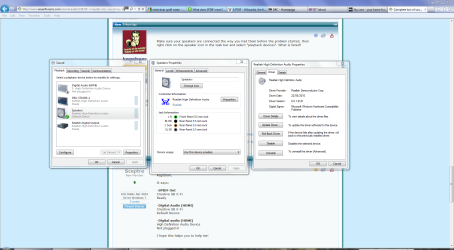
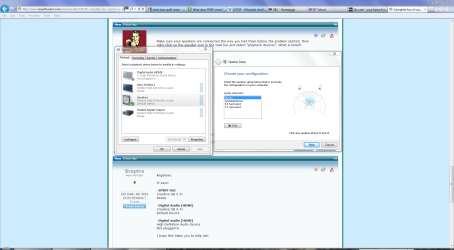
Check your sound properties and speaker setup in Control Panel's Hardware & Sound category.

Sound.PNG

Speaker.PNG

Malwabytes is recommended for malware removal.

http://www.malwarebytes.org/products/malwarebytes_free

However, if you can't get any sound when you test your speakers, you may well have a defective sound card.
 

My Computer My Computer

At a glance

Windows 7 Ultimate SP1 64-BitIntel Core i7 870 @ 2.93GHz8Gb Dual-Channel DDR3 @ 664MHznVidia GeForce GTX 460 1024MB dedicated RAM
Computer Manufacturer/Model Number
HP Pavilion Elite 495UK
OS
Windows 7 Ultimate SP1 64-Bit
CPU
Intel Core i7 870 @ 2.93GHz
Motherboard
MSI 2A9C (CPU1)
Memory
8Gb Dual-Channel DDR3 @ 664MHz
Graphics Card(s)
nVidia GeForce GTX 460 1024MB dedicated RAM
Sound Card
Realtek HD Audio
Monitor(s) Displays
HP2310i
Screen Resolution
1920 x 1080
Hard Drives
1x1954GB Hitachi HDS22020ALA 330 (RAID), 1x1954GB Hitachi External for backup and storage
PSU
460W
Case
HP Elite
Cooling
Air cooled
Keyboard
Logitech K750 solar-powered keyboard
Mouse
Logitech Wireless M180 mouse
Internet Speed
2Mb
Other Info
Pure Avanti Flow Internet Radio with iPod Dock, 64Gb iPod, HP USB Speakers, Sony MDR-V500 Headphones, Sony Vaio F-Series Laptop
Unfortunately I think you are right seavixen32, I must have a defective sound card.

Oh well I will look at the bright side! My sound card has a 3 year warranty on it and it has only been 4-5 months so I should get a free new one!

Thanks again for helping me guys:D

All the best,
Sceptre
 

My Computer My Computer

At a glance

64 bit Windows 7Intel Core i7-2600 CPU @ 3.40GHzRAM: 8.00 GB
Computer Manufacturer/Model Number
Dell XPS 8300
OS
64 bit Windows 7
CPU
Intel Core i7-2600 CPU @ 3.40GHz
Memory
RAM: 8.00 GB
Sound Card
Creative SB X-Fi
Screen Resolution
1920 x 1080
Hard Drives
1.8 TB Hard Drive
You're very welcome.

Please do post back and let us know if the new sound card resolves your problem as any solution can help others with a similar problem.
 

My Computer My Computer

At a glance

Windows 7 Ultimate SP1 64-BitIntel Core i7 870 @ 2.93GHz8Gb Dual-Channel DDR3 @ 664MHznVidia GeForce GTX 460 1024MB dedicated RAM
Computer Manufacturer/Model Number
HP Pavilion Elite 495UK
OS
Windows 7 Ultimate SP1 64-Bit
CPU
Intel Core i7 870 @ 2.93GHz
Motherboard
MSI 2A9C (CPU1)
Memory
8Gb Dual-Channel DDR3 @ 664MHz
Graphics Card(s)
nVidia GeForce GTX 460 1024MB dedicated RAM
Sound Card
Realtek HD Audio
Monitor(s) Displays
HP2310i
Screen Resolution
1920 x 1080
Hard Drives
1x1954GB Hitachi HDS22020ALA 330 (RAID), 1x1954GB Hitachi External for backup and storage
PSU
460W
Case
HP Elite
Cooling
Air cooled
Keyboard
Logitech K750 solar-powered keyboard
Mouse
Logitech Wireless M180 mouse
Internet Speed
2Mb
Other Info
Pure Avanti Flow Internet Radio with iPod Dock, 64Gb iPod, HP USB Speakers, Sony MDR-V500 Headphones, Sony Vaio F-Series Laptop
Before you try to get a new one from Dell (and they will want you to run some tests), try reseating the SoundBlaster sound card. With the PC powered off, open the case and remove the SoundBlaster, then reinstall making sure it's fully and correctly seated. Power on and after Windows loads see if that fixes it. If not, contact Dell support.
 

My Computer My Computer

At a glance

Windows 10 64 bitIntel i7 6700K16GB Corsair DominatorIntel CPU Graphics
Computer type
PC/Desktop
Computer Manufacturer/Model Number
My Own Build
OS
Windows 10 64 bit
CPU
Intel i7 6700K
Motherboard
ASUS ROG Maximus VIII Hero
Memory
16GB Corsair Dominator
Graphics Card(s)
Intel CPU Graphics
Sound Card
RealTek
Monitor(s) Displays
27" Dell S2719dgf
Screen Resolution
2560X1440
Hard Drives
1 TB Samsung 850 EVO SSD for Win 10 Pro
500GB Samsung 850 EVO SSD for Win 10 Insider
2 TB drive for backup
PSU
EVGA Supernova 750G2
Case
BeQuiet Silent Base 600
Cooling
Deepcool Captain 120EX
Keyboard
Microsoft Wireless 2000
Mouse
Microsoft wireless
Internet Speed
100 MB/sec (Cable)
Antivirus
Microsoft Defender and Malwarebytes
Browser
Edge/Firefox
Other Info
Cakewalk (Sonar) by BandLab and Studio One 4.1 Pro recording studio software. MOTU 896Mk3 Hybrid recording interface, Frontier Tranzport wireless control unit, Behringer X-Touch Control Surface.
Five USB connected optical drives for CD Audio production using Nero BurningROM
Thanks firebird, I tried that, but still nothing:(

I shall now proceed to contact Dell support:D
 

My Computer My Computer

At a glance

64 bit Windows 7Intel Core i7-2600 CPU @ 3.40GHzRAM: 8.00 GB
Computer Manufacturer/Model Number
Dell XPS 8300
OS
64 bit Windows 7
CPU
Intel Core i7-2600 CPU @ 3.40GHz
Memory
RAM: 8.00 GB
Sound Card
Creative SB X-Fi
Screen Resolution
1920 x 1080
Hard Drives
1.8 TB Hard Drive
Okay guys, a Dell agent came to my house, opened the casing on my computer, whipped the sound card out, and stuck a new one in! Works like a dream! Of course this was free.

Thanks guys, without your help I would not have known what is wrong and how to fix the problem.

I hope this thread helps other people with the same problem!
 

My Computer My Computer

At a glance

64 bit Windows 7Intel Core i7-2600 CPU @ 3.40GHzRAM: 8.00 GB
Computer Manufacturer/Model Number
Dell XPS 8300
OS
64 bit Windows 7
CPU
Intel Core i7-2600 CPU @ 3.40GHz
Memory
RAM: 8.00 GB
Sound Card
Creative SB X-Fi
Screen Resolution
1920 x 1080
Hard Drives
1.8 TB Hard Drive
You're very welcome.

It's good to know that Dell did the right thing so thanks for the upfate.
 

My Computer My Computer

At a glance

Windows 7 Ultimate SP1 64-BitIntel Core i7 870 @ 2.93GHz8Gb Dual-Channel DDR3 @ 664MHznVidia GeForce GTX 460 1024MB dedicated RAM
Computer Manufacturer/Model Number
HP Pavilion Elite 495UK
OS
Windows 7 Ultimate SP1 64-Bit
CPU
Intel Core i7 870 @ 2.93GHz
Motherboard
MSI 2A9C (CPU1)
Memory
8Gb Dual-Channel DDR3 @ 664MHz
Graphics Card(s)
nVidia GeForce GTX 460 1024MB dedicated RAM
Sound Card
Realtek HD Audio
Monitor(s) Displays
HP2310i
Screen Resolution
1920 x 1080
Hard Drives
1x1954GB Hitachi HDS22020ALA 330 (RAID), 1x1954GB Hitachi External for backup and storage
PSU
460W
Case
HP Elite
Cooling
Air cooled
Keyboard
Logitech K750 solar-powered keyboard
Mouse
Logitech Wireless M180 mouse
Internet Speed
2Mb
Other Info
Pure Avanti Flow Internet Radio with iPod Dock, 64Gb iPod, HP USB Speakers, Sony MDR-V500 Headphones, Sony Vaio F-Series Laptop
Back
Top