
Hello, I registered to these forums as I need help with the problem I encountered with my PC.
Some time after startup ( Not right away ) my CPU usage goes to 100%. I open task manager and kill the process which takes most of the CPU and then another process gets the high usage and so on untill some system process which I am afraid to kill or some app that I need gets it.
Problem started happening a while ago, I thought it's just a problem with my OS which collected garbage over the time as I didn't really keep it clean. Few days ago I reinstalled my OS and this thing is still happening and I really have no clue on what it is or how to fix it.
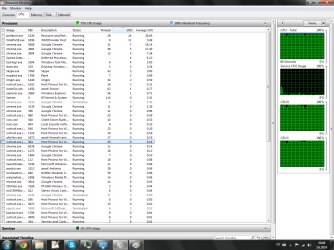
I provided a screenshot of resource monitor below, it shows that resmon itself uses 24% of the CPU which I find quite weird.
Note: System is updated with the latest updates from windows update. I also have AVAST Premier and I run a boot scan 2 days ago and it didn't detect any virus.
Some time after startup ( Not right away ) my CPU usage goes to 100%. I open task manager and kill the process which takes most of the CPU and then another process gets the high usage and so on untill some system process which I am afraid to kill or some app that I need gets it.
Problem started happening a while ago, I thought it's just a problem with my OS which collected garbage over the time as I didn't really keep it clean. Few days ago I reinstalled my OS and this thing is still happening and I really have no clue on what it is or how to fix it.
I provided a screenshot of resource monitor below, it shows that resmon itself uses 24% of the CPU which I find quite weird.
Note: System is updated with the latest updates from windows update. I also have AVAST Premier and I run a boot scan 2 days ago and it didn't detect any virus.
Attachments
My Computer
- Computer type
- PC/Desktop
- OS
- Windows 7 Professional x64
- CPU
- Intel Pentium D 2.8Ghz
- Motherboard
- Gigabyte EP31-DS3L
- Memory
- 4GB DDR2
- Graphics Card(s)
- NVIDIA GeForce n210
- Antivirus
- AVAST
- Browser
- Google Chrome


