Solved Complicated problem with hdmi cable

dufresneandy

New member
Local time
10:08 PM
Messages
9
Okay so few months ago i watched movies normally via hdmi cable,everything was good until i sent my pc for fix(cant remember what was the problem) anyway after it came back it just didnt work.I tried every possible solution i could find on forums but none worked.

I really think it's something about my GRAPHICS CARD which is why this is on this topic.Let me explain a few things which im not sure if they are important but probably are.Before my pc was getting fixed one period i couldnt watch with hdmi until i do this: go to device manager and there i had 2 things on display adapters:nvidia card and some intel thing.

Now im not sure exactly which and what but i think i had to enable intel one in order to make it work(hdmi).Aand after my pc came back from repair it didnt have the intel,only nvidia option to select so i couldnt enable it in order to work.Also other thing i noticed is,I have 2 hdmi inputs on my pc(one is at the top and one is pretty much at the bottom).

One hdmi cable which is connected with my monitor is on the bottom hdmi input(I'm not sure if this is the right word xd) and im putting my hdmi cable to connect to tv on the top hdmi input and it doesnt work,also when i try to move the monitor hdmi cable and put it on the top one it doesnt work,and when i put hdmi cable for tv on the bottom one it shows me part of my desktop which says windows 7 bla bla in bottom right corner but i cant see the icons,start button etc. I know its kinda complicated and that i made it even more xd,but i hope someone knows how to fix this.Thx
 

My Computer My Computer

At a glance

Windows 7 Ultimate 64-bit SP1Intel Core i5 3330 @ 3.00GHz 30 °C Ivy Bridge...8,00GB Dual-Channel DDR3 @ 933MHz239CQH (1920x1080@60Hz) 2047MB NVIDIA GeForce...
Computer type
PC/Desktop
Computer Manufacturer/Model Number
Custom build
OS
Windows 7 Ultimate 64-bit SP1
CPU
Intel Core i5 3330 @ 3.00GHz 30 °C Ivy Bridge 22nm Technolog
Motherboard
ASRock Z77 Pro3 (CPUSocket)
Memory
8,00GB Dual-Channel DDR3 @ 933MHz
Graphics Card(s)
239CQH (1920x1080@60Hz) 2047MB NVIDIA GeForce GTX 660 (Gigab
Sound Card
Realtek High Definition Audio
Screen Resolution
1920x1080
I would take it back to whoever "fixed" it and let them sort out the problem since it was working before they got ahold of it.
 

My Computer My Computer

At a glance

Win 7 Ultimate 64 bitIntel i7-3930KKingston HyperX Genesis 32GB Kit (8x4GB Modul...MSI R7850 Twin Frozr 2GD5/OC Radeon HD 7850 2...
Computer type
PC/Desktop
Computer Manufacturer/Model Number
Custom Build
OS
Win 7 Ultimate 64 bit
CPU
Intel i7-3930K
Motherboard
ASUS P9X79 WS
Memory
Kingston HyperX Genesis 32GB Kit (8x4GB Modules) 1600MHz DDR
Graphics Card(s)
MSI R7850 Twin Frozr 2GD5/OC Radeon HD 7850 2GB 256-bit GDDR
Sound Card
Asus Xonar Essence STX
Monitor(s) Displays
3x Asus VG248QE 24", Vizio 32" TV
Screen Resolution
1920 x 1080, ?
Hard Drives
Samsung 128GB 840 Pro SSD (1),
Samsung 4TB 850 EVO SSDs (4)
Samsung 4TB 850 EVO SSDs (16) external backup drives used in 2.5" hot swap bays in the computer.
PSU
Corsair HX750w
Case
Antec Two Hundred v2 (modified)
Cooling
Cooler Master GeminII S524 120mm (fan replaced with a 140mm)
Keyboard
Logitech G510s
Mouse
Logitech M525 (two in use)
Internet Speed
=< 32Mbps down, 8Mbps up
Antivirus
AVAST!, MBAM, SAS, Spybot S&D (all but MBAM free) Glary Util
Browser
IE11
Other Info
LSI 9211-8i HBA card (8 SATA III ports), 2.5" & 3.5" Hot Swap Bays, HooToo HT-CR001 PCI-E to USB 3.0 Internal Hub + 6 Slot Card Reader, and LG Model CH12LS28 BD-ROM Optical Drive. Also, ScanSnap S1500 ADF duplexing scanner, Canon 9000F flat bed scanner, Corsair SP2500 2.1 speakers, Samsung CLP 415nw laser color printer, Cyberpower PP2200SW UPS
I would take it back to whoever "fixed" it and let them sort out the problem since it was working before they got ahold of it.

I'm taking that as my last option since it's ''only'' hdmi and the company that fixed it is 200 miles from me and it would take like 2 weeks until i get my pc back :/
 

My Computer My Computer

At a glance

Windows 7 Ultimate 64-bit SP1Intel Core i5 3330 @ 3.00GHz 30 °C Ivy Bridge...8,00GB Dual-Channel DDR3 @ 933MHz239CQH (1920x1080@60Hz) 2047MB NVIDIA GeForce...
Computer type
PC/Desktop
Computer Manufacturer/Model Number
Custom build
OS
Windows 7 Ultimate 64-bit SP1
CPU
Intel Core i5 3330 @ 3.00GHz 30 °C Ivy Bridge 22nm Technolog
Motherboard
ASRock Z77 Pro3 (CPUSocket)
Memory
8,00GB Dual-Channel DDR3 @ 933MHz
Graphics Card(s)
239CQH (1920x1080@60Hz) 2047MB NVIDIA GeForce GTX 660 (Gigab
Sound Card
Realtek High Definition Audio
Screen Resolution
1920x1080
First thing to do is to contact whoever performed the repair and get them to repair the fault that was not there before they had the PC.

It looks as if either drivers are missing or some physical damage has been done to the graphics system

Two HDMI Ports could be due to having an output on the Motherboard and a discrete Graphics card, If this is the case then it would be normal for only the port on the Graphics card to operate to prevent accidental use (I usually fit a cap over the port when fitting a discrete card). The other way to have two ports would be a twin port card which in your situation would suggest an issue with the card as mentioned above
 

My Computers My Computers

  • At a glance

    Windows 11 Pro x64 [Latest Release and Releas...Ryzen 9 5950X, 3.8 - 5.2 MHz64GB [2 x 32GB] DDR4 3200MHz4GB NVIDIA GEFORCE GTX 1650 Ti
    Computer type
    PC/Desktop
    Computer Manufacturer/Model Number
    ChillBlast - Custom to my design
    OS
    Windows 11 Pro x64 [Latest Release and Release Preview]
    CPU
    Ryzen 9 5950X, 3.8 - 5.2 MHz
    Motherboard
    Asus Prime X570-Pro
    Memory
    64GB [2 x 32GB] DDR4 3200MHz
    Graphics Card(s)
    4GB NVIDIA GEFORCE GTX 1650 Ti
    Sound Card
    On-board SPDIF to 5.1 System + HDMI [5.1 system]
    Monitor(s) Displays
    32" UHD 32 Bit HDR Monitor + 43" UHD 4K 32Bit HDR TV
    Screen Resolution
    2 x 3840 x 2160 @60Hz
    Hard Drives
    1TB M2 SSD OS, 500GB Fast Access SSD, 2 x 8TB Data + Various Externals from 1TB to 4TB, 10TB NAS
    PSU
    NZXT C750 80 PLUS Gold 750W Modular PSU
    Case
    Workstation Case [Matt Black]
    Cooling
    NZXT Kraken X63 280mm CPU Cooler +2x Quiet Case fans
    Keyboard
    Logitech Wireless MX Keys & K400 + others
    Mouse
    Logitech Wireless MX Master 3S
    Internet Speed
    920 MB Down 50 MB Up
    Antivirus
    BitDefender Total Security Pro
    Browser
    Chrome (always run latest Non-Beta)
    Other Info
    Also run ...
    Laptop - Quad 8GB - Windows 10 Pro x64
    Nexus 7 Android tablet x2
    Samsung 10.2" tablet
    Blackview TAB 8 4G Android Tablet c/w Keyboard
    Wacom Intuos Pro Medium Pen Pad
    Wacom Intuos Pro Small Pen Pad
    Wacom Expresskeys Remote
    Loopdeck+ Graphics Controller
    Shuttle Pro v2 Control
  • At a glance

    Windows 11 Pro x64 Latest RPIntel I7 10750H 5.0GHz32GB [2x16GB] DDR4 2933 MHznVidia GTX1650Ti 4 GB GDDR6
    Computer type
    Laptop
    System Manufacturer/Model Number
    Dell XPS 17 10750H
    OS
    Windows 11 Pro x64 Latest RP
    CPU
    Intel I7 10750H 5.0GHz
    Motherboard
    Dell XPS
    Memory
    32GB [2x16GB] DDR4 2933 MHz
    Graphics Card(s)
    nVidia GTX1650Ti 4 GB GDDR6
    Sound Card
    Stock [Realtek] 4 Speaker
    Monitor(s) Displays
    17" IPS UHD+ Infinity Edge Touchscreen
    Screen Resolution
    3840 x 2400
    Hard Drives
    2TB M2 NVMe, 4TB External + various 500GB & 1TB External NVMe (also have access to spinner HDD from
    PSU
    Stock
    Case
    Stock XPS Aluminium & Carbon Fibre
    Cooling
    Stock - Active Fan Control
    Keyboard
    Backlit + Various Logitech
    Mouse
    Stock Track Pad + Logitech MX Trackball
    Internet Speed
    72 MB Down 18MB Up
    Browser
    Chrome
    Other Info
    Also run ...
    Laptop - Quad 8GB - Windows 10 Pro x64
    Nexus 7 Android tablet x2
    10.2" tablet
    Sony Z3 Android Smartphone
    Wacom Intuos Pro Medium Pen Pad
    Wacom Intuos Pro Small Pen Pad
    Wacom Expresskeys Remote
    Loopdeck+ Graphics Controller
    Shuttle Pro v2 Control Pad
    10TB NAS
Thanks for your help,but do you think there may be some other way to try to make it work without having to contact them? any advice is helpful,i tried to update graphic driver also now but it didnt help
 

My Computer My Computer

At a glance

Windows 7 Ultimate 64-bit SP1Intel Core i5 3330 @ 3.00GHz 30 °C Ivy Bridge...8,00GB Dual-Channel DDR3 @ 933MHz239CQH (1920x1080@60Hz) 2047MB NVIDIA GeForce...
Computer type
PC/Desktop
Computer Manufacturer/Model Number
Custom build
OS
Windows 7 Ultimate 64-bit SP1
CPU
Intel Core i5 3330 @ 3.00GHz 30 °C Ivy Bridge 22nm Technolog
Motherboard
ASRock Z77 Pro3 (CPUSocket)
Memory
8,00GB Dual-Channel DDR3 @ 933MHz
Graphics Card(s)
239CQH (1920x1080@60Hz) 2047MB NVIDIA GeForce GTX 660 (Gigab
Sound Card
Realtek High Definition Audio
Screen Resolution
1920x1080
In order for anyone to help you you will need to fill in your system specs so helpers can know what they are dealing with - Click on My System Specs bottom Left of any post and select Update your System Spec - complete as much as you can

https://www.piriform.com/speccy/builds the standard Speccy program will help find the details
 

My Computers My Computers

  • At a glance

    Windows 11 Pro x64 [Latest Release and Releas...Ryzen 9 5950X, 3.8 - 5.2 MHz64GB [2 x 32GB] DDR4 3200MHz4GB NVIDIA GEFORCE GTX 1650 Ti
    Computer type
    PC/Desktop
    Computer Manufacturer/Model Number
    ChillBlast - Custom to my design
    OS
    Windows 11 Pro x64 [Latest Release and Release Preview]
    CPU
    Ryzen 9 5950X, 3.8 - 5.2 MHz
    Motherboard
    Asus Prime X570-Pro
    Memory
    64GB [2 x 32GB] DDR4 3200MHz
    Graphics Card(s)
    4GB NVIDIA GEFORCE GTX 1650 Ti
    Sound Card
    On-board SPDIF to 5.1 System + HDMI [5.1 system]
    Monitor(s) Displays
    32" UHD 32 Bit HDR Monitor + 43" UHD 4K 32Bit HDR TV
    Screen Resolution
    2 x 3840 x 2160 @60Hz
    Hard Drives
    1TB M2 SSD OS, 500GB Fast Access SSD, 2 x 8TB Data + Various Externals from 1TB to 4TB, 10TB NAS
    PSU
    NZXT C750 80 PLUS Gold 750W Modular PSU
    Case
    Workstation Case [Matt Black]
    Cooling
    NZXT Kraken X63 280mm CPU Cooler +2x Quiet Case fans
    Keyboard
    Logitech Wireless MX Keys & K400 + others
    Mouse
    Logitech Wireless MX Master 3S
    Internet Speed
    920 MB Down 50 MB Up
    Antivirus
    BitDefender Total Security Pro
    Browser
    Chrome (always run latest Non-Beta)
    Other Info
    Also run ...
    Laptop - Quad 8GB - Windows 10 Pro x64
    Nexus 7 Android tablet x2
    Samsung 10.2" tablet
    Blackview TAB 8 4G Android Tablet c/w Keyboard
    Wacom Intuos Pro Medium Pen Pad
    Wacom Intuos Pro Small Pen Pad
    Wacom Expresskeys Remote
    Loopdeck+ Graphics Controller
    Shuttle Pro v2 Control
  • At a glance

    Windows 11 Pro x64 Latest RPIntel I7 10750H 5.0GHz32GB [2x16GB] DDR4 2933 MHznVidia GTX1650Ti 4 GB GDDR6
    Computer type
    Laptop
    System Manufacturer/Model Number
    Dell XPS 17 10750H
    OS
    Windows 11 Pro x64 Latest RP
    CPU
    Intel I7 10750H 5.0GHz
    Motherboard
    Dell XPS
    Memory
    32GB [2x16GB] DDR4 2933 MHz
    Graphics Card(s)
    nVidia GTX1650Ti 4 GB GDDR6
    Sound Card
    Stock [Realtek] 4 Speaker
    Monitor(s) Displays
    17" IPS UHD+ Infinity Edge Touchscreen
    Screen Resolution
    3840 x 2400
    Hard Drives
    2TB M2 NVMe, 4TB External + various 500GB & 1TB External NVMe (also have access to spinner HDD from
    PSU
    Stock
    Case
    Stock XPS Aluminium & Carbon Fibre
    Cooling
    Stock - Active Fan Control
    Keyboard
    Backlit + Various Logitech
    Mouse
    Stock Track Pad + Logitech MX Trackball
    Internet Speed
    72 MB Down 18MB Up
    Browser
    Chrome
    Other Info
    Also run ...
    Laptop - Quad 8GB - Windows 10 Pro x64
    Nexus 7 Android tablet x2
    10.2" tablet
    Sony Z3 Android Smartphone
    Wacom Intuos Pro Medium Pen Pad
    Wacom Intuos Pro Small Pen Pad
    Wacom Expresskeys Remote
    Loopdeck+ Graphics Controller
    Shuttle Pro v2 Control Pad
    10TB NAS
While we're on that subject,i can't seem to run any downloads i try lately : View image: fc
 

My Computer My Computer

At a glance

Windows 7 Ultimate 64-bit SP1Intel Core i5 3330 @ 3.00GHz 30 °C Ivy Bridge...8,00GB Dual-Channel DDR3 @ 933MHz239CQH (1920x1080@60Hz) 2047MB NVIDIA GeForce...
Computer type
PC/Desktop
Computer Manufacturer/Model Number
Custom build
OS
Windows 7 Ultimate 64-bit SP1
CPU
Intel Core i5 3330 @ 3.00GHz 30 °C Ivy Bridge 22nm Technolog
Motherboard
ASRock Z77 Pro3 (CPUSocket)
Memory
8,00GB Dual-Channel DDR3 @ 933MHz
Graphics Card(s)
239CQH (1920x1080@60Hz) 2047MB NVIDIA GeForce GTX 660 (Gigab
Sound Card
Realtek High Definition Audio
Screen Resolution
1920x1080
First thing to do is to contact whoever performed the repair and get them to repair the fault that was not there before they had the PC.

It looks as if either drivers are missing or some physical damage has been done to the graphics system

Two HDMI Ports could be due to having an output on the Motherboard and a discrete Graphics card, If this is the case then it would be normal for only the port on the Graphics card to operate to prevent accidental use (I usually fit a cap over the port when fitting a discrete card). The other way to have two ports would be a twin port card which in your situation would suggest an issue with the card as mentioned above

@ Nigel. Actually, there a handful of newer (in the last five years) MOBOs that allow both onboard graphics and a GPU card to work simultaneously. The OP did state that that both of his HDMI ports did work together (granted, they both could be in the card).

@ dufresneandy. One thing that might help make it easier for someone to help you here would be for you to fill in all your system specs. You can use the free program Speccy to get the data you need to fill in your specs.
 

My Computer My Computer

At a glance

Win 7 Ultimate 64 bitIntel i7-3930KKingston HyperX Genesis 32GB Kit (8x4GB Modul...MSI R7850 Twin Frozr 2GD5/OC Radeon HD 7850 2...
Computer type
PC/Desktop
Computer Manufacturer/Model Number
Custom Build
OS
Win 7 Ultimate 64 bit
CPU
Intel i7-3930K
Motherboard
ASUS P9X79 WS
Memory
Kingston HyperX Genesis 32GB Kit (8x4GB Modules) 1600MHz DDR
Graphics Card(s)
MSI R7850 Twin Frozr 2GD5/OC Radeon HD 7850 2GB 256-bit GDDR
Sound Card
Asus Xonar Essence STX
Monitor(s) Displays
3x Asus VG248QE 24", Vizio 32" TV
Screen Resolution
1920 x 1080, ?
Hard Drives
Samsung 128GB 840 Pro SSD (1),
Samsung 4TB 850 EVO SSDs (4)
Samsung 4TB 850 EVO SSDs (16) external backup drives used in 2.5" hot swap bays in the computer.
PSU
Corsair HX750w
Case
Antec Two Hundred v2 (modified)
Cooling
Cooler Master GeminII S524 120mm (fan replaced with a 140mm)
Keyboard
Logitech G510s
Mouse
Logitech M525 (two in use)
Internet Speed
=< 32Mbps down, 8Mbps up
Antivirus
AVAST!, MBAM, SAS, Spybot S&D (all but MBAM free) Glary Util
Browser
IE11
Other Info
LSI 9211-8i HBA card (8 SATA III ports), 2.5" & 3.5" Hot Swap Bays, HooToo HT-CR001 PCI-E to USB 3.0 Internal Hub + 6 Slot Card Reader, and LG Model CH12LS28 BD-ROM Optical Drive. Also, ScanSnap S1500 ADF duplexing scanner, Canon 9000F flat bed scanner, Corsair SP2500 2.1 speakers, Samsung CLP 415nw laser color printer, Cyberpower PP2200SW UPS
I really think it's something about my GRAPHICS CARD which is why this is on this topic.Let me explain a few things which im not sure if they are important but probably are.Before my pc was getting fixed one period i couldnt watch with hdmi until i do this: go to device manager and there i had 2 things on display adapters:nvidia card and some intel thing.
It would be helpful if you would provide your system specs in detail. Brand and model of your PC or laptop. A screenshot from Device Manager with the "Display Adapter" item expanded would be particularly useful.

But just from your comments above it suggests you have a "discrete nVidia graphics card/chip" in your machine, along with the built-in Intel HD Graphics that normally is available with modern i3/i5/i7 Intel CPUs.

The Intel HD Graphics (from built-in CPU) corresponds to the motherboard built-in video connectors, which are up toward the top (when you look at the back of the computer standing vertically). There might also be other video connectors, like VGA and/or DisplayPort and/or HDMI. But all of these would be associated with the onboard Intel HD graphics. All of these video connectors are managed by the Intel HD Graphics Family driver.

In contrast, down low (again as you're looking at the rear of the computer standing vertically) you would see the nVidia graphics card connectors, down in one of the perhaps 4-7 expansion slots available. Typically the top PCIe-x16 slot is where the graphics card would be inserted, so it's probably at the top of the 4-7 expansion slots (that go all the way down to the bottom of the case, when viewing the rear of the PC).

The discrete nVidia graphics card would also have its own video connectors. Depending on the model of card it, too, could have VGA, and/or DisplayPort, and/or HDMI, possibly multiple of these. But this card and all of its connectors are managed by the nVidia Graphics Driver... which is completely independent of the Intel Graphics driver which controls the motherboard's video connectors.

You've sort of described how you're trying to cable things, but you need to be precise and accurate. Are you trying to connect the PC to both a monitor via one HDMI cable, and a TV via a second HDMI cable? As I described, the "top HDMI connector" is from the motherboard, and is controlled by the Intel HD graphics. The "bottom HDMI connector" is on the nVidia Graphics card, and is controlled by the nVidia graphics card.

Ordinarily, both of these graphics capabilities are NOT ACTIVE SIMULTANEOUSLY, if the BIOS is not configured to support both. By default, the BIOS graphics configuration would normally use the built-in Intel graphics unless there is a discrete graphics card discovered to be present in which case the INtel graphics is disabled and the discrete graphics card is enabled. If this is how the BIOS is currently set then this is why you're seeing the "lower HDMI connector" (on the nVidia graphics card) operational, and the "upper HDMI connector" (on the motherboard) disabled.

If this worked for you previously, before you brought your PC in for repair, my guess is that the machine came back to you with the BIOS reset to its default graphics configuration... which has "AUTO" set, meaning that if a discrete graphics card is detected then it is activated with the Intel built-in graphics disabled. I would speculate that there must be another setting, which supports BOTH Intel graphics as well as nVidia graphics, which is the only way it can be possible for both your motherboard HDMI connector as well as the nVidia HDMI connector to ever have both worked.


Ok... that's my speculation.

You need to provide details of your hardware, in order for that speculation to be justified and/or corrected or clarified.
 

My Computer My Computer

At a glance

Windows 7 Pro x64 (1), Win7 Pro X64 (2)i5-3350p 3.1Ghz/6MB-cache (1); E8400 3.0Ghz/6...8GB PC3-12800 DDR3 (1); 4GB PC3-10600 DDR3 (2)ATI HD7750 (1), (see TV cards); ATI R7 250 (2)
Computer type
PC/Desktop
Computer Manufacturer/Model Number
Home-built, two systems (1) and (2)
OS
Windows 7 Pro x64 (1), Win7 Pro X64 (2)
CPU
i5-3350p 3.1Ghz/6MB-cache (1); E8400 3.0Ghz/6MB-cache (2)
Motherboard
ASUS P8Z77-V Pro (1); ASUS P5Q3 (2)
Memory
8GB PC3-12800 DDR3 (1); 4GB PC3-10600 DDR3 (2)
Graphics Card(s)
ATI HD7750 (1), (see TV cards); ATI R7 250 (2)
Sound Card
Realtek ALC892 HD Audio (1); Realtek ALC1200 HD Audio (2)
Monitor(s) Displays
Eizo HD2441W LCD, Eizo S2433W (1); Eizo 24" S2433W (2)
Screen Resolution
1920x1200, 1920x1200 (1); 1920x1200 (2)
Hard Drives
(1) 1TB SATA-II (7200RPM), 2x2TB SATA-III (7200RPM), 250GB SATA-III (10000RPM) for OS; 2x2TB external USB 3.0

(2) 320GB SATA-II (7200RPM), 750GB SATA-II (7200RPM), 150GB SATA-II (10000RPM) for OS; 2TB external USB 3.0
PSU
Nesteq ECS-6001 600W (1); Nesteq ECS-5001 500W (2)
Case
Acousti-Case 360 (1) and (2)
Cooling
Noctua NH-U12P SE2 for CPU, 2x120mm case fans (1) and (2)
Keyboard
IBM PS/2 (1) and (2)
Mouse
Logitech MX Revolution wireless (1); Microsoft wired (2)
Internet Speed
100mbps down / 10mbps up
Antivirus
Microsoft Security Essentials; Malwarebyte Anti-Malware Pro
Browser
Firefox
Other Info
Ceton InfiniTV 4-tuner cablecard-enabled TV card as well as Hauppauge HVR-2250 OTA/ATSC 2-tuner TV card in (1), running under Win7 WMC
Wow thanks for this,really got me thinking,im not that much of an expert when it comes to pc but i'm not completely ignorant,i uploaded my specs,i hope that's enough for you to see and this is a photo of device manager : View image: 1 , and this a photo of back of my pc : View image: 2 my fingers are pointing at the bottom hdmi cable which im using at the moment for my monitor hdmi cable)

And yes there is a hdmi cable which is one side plugged in my monitor and the other side on the hdmi bottom port,i bought a new hdmi cable which im using for watching movies from my pc to tv.I hope this is helpful enough for you.
 

My Computer My Computer

At a glance

Windows 7 Ultimate 64-bit SP1Intel Core i5 3330 @ 3.00GHz 30 °C Ivy Bridge...8,00GB Dual-Channel DDR3 @ 933MHz239CQH (1920x1080@60Hz) 2047MB NVIDIA GeForce...
Computer type
PC/Desktop
Computer Manufacturer/Model Number
Custom build
OS
Windows 7 Ultimate 64-bit SP1
CPU
Intel Core i5 3330 @ 3.00GHz 30 °C Ivy Bridge 22nm Technolog
Motherboard
ASRock Z77 Pro3 (CPUSocket)
Memory
8,00GB Dual-Channel DDR3 @ 933MHz
Graphics Card(s)
239CQH (1920x1080@60Hz) 2047MB NVIDIA GeForce GTX 660 (Gigab
Sound Card
Realtek High Definition Audio
Screen Resolution
1920x1080
Should i just disconnect hdmi from monitor and put it to tv in order to work?
 

My Computer My Computer

At a glance

Windows 7 Ultimate 64-bit SP1Intel Core i5 3330 @ 3.00GHz 30 °C Ivy Bridge...8,00GB Dual-Channel DDR3 @ 933MHz239CQH (1920x1080@60Hz) 2047MB NVIDIA GeForce...
Computer type
PC/Desktop
Computer Manufacturer/Model Number
Custom build
OS
Windows 7 Ultimate 64-bit SP1
CPU
Intel Core i5 3330 @ 3.00GHz 30 °C Ivy Bridge 22nm Technolog
Motherboard
ASRock Z77 Pro3 (CPUSocket)
Memory
8,00GB Dual-Channel DDR3 @ 933MHz
Graphics Card(s)
239CQH (1920x1080@60Hz) 2047MB NVIDIA GeForce GTX 660 (Gigab
Sound Card
Realtek High Definition Audio
Screen Resolution
1920x1080
Why did you bring your PC in for repair? Or was it for an upgrade? Exactly what was done? This is very significant information.

First, assuming you had the same ASRock Z77 motherboard before you got your PC repaired, the User Manual is here. On page 53 in describing the UEFI Setup Utility (i.e. the BIOS and how you talk to it and configure your machine's hardware), it describes the primary graphics adapter. It's either (a) onboard, i.e. Intel HD graphics which controls the upper video connectors from the motherboard, or (b) PCI, which is a type of expansion slot down at the very bottom of which your board has two, but which you are NOT using for a PCI video card, or (c) PCI Express (which is the default) and which IS the situation you have, with the nVidia GTX 660 installed in the topmost PCIe slot of which your board has three.

So, there is NO WAY you could ever have been using BOTH HDMI CONNECTORS SIMULTANEOUSLY... one of which went to your monitor and the other of which went to your TV. Impossible.

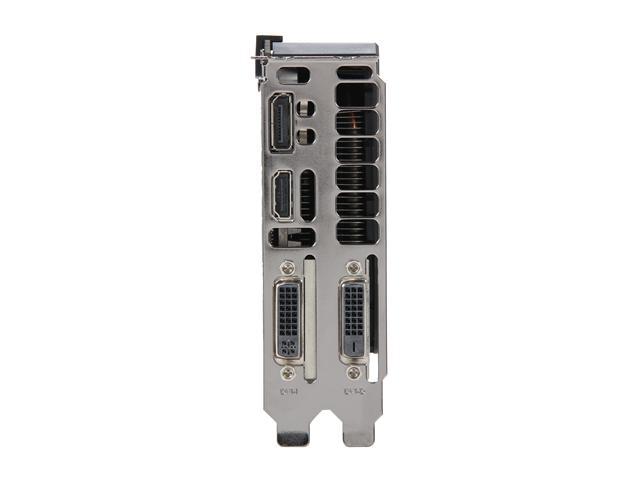
And your Device Manager screenshot shows exactly that, i.e. only nVidia GTX 660 graphics, and NO INTEL GRAPHICS. So the only video connectors possible are from the GTX 660 card. If you have the card I think you have, it is "double wide" meaning it takes up two expansion slots and looks like the following:

VhNMd6.jpg


Is that correct? If so then this is a very powerful card and can actually support output to both your monitor and your TV... from this card's connectors. You don't need to be attempting to use that second upper HDMI connector from the Intel graphics and motherboard... which won't work anyway.

You simply need to buy a different cable. The GTX 660 card has one HDMI connector, along with a DisplayPort connector. Either of these can be used to feed audio+video to your monitor and also to your TV. But since your TV most likely has only an HDMI connector it must be connected to using an HDMI cable at that end. Your monitor probably has multiple optional digital connectors: HDMI, DisplayPort, or DVI. I don't know if you're using your monitor for sound, feeding the speakers in the monitor via the HDMI cable you're currently using, or if you have regular external speakers that you're using for sound so that you're actually only using the monitor's video capability through that HDMI cable.

Anyway, you simply need a new cable: DisplayPort -> to -> HDMI, with the DisplayPort end of the cable plugged into the DisplayPort connector on your GTX 660 graphics card at that end, and the other HDMi end of the cable plugged into your TV. Bingo, presto. You now have TWO DISPLAY DEVICES SUPPORTED FROM YOUR GTX 660. Windows and the nVidia drivers will support these two devices, as Monitor#1 and Monitor#2 in "extended desktop" mode. You will be able to use either display for anything you want to send to each, dragging windows across the two of them back and forth as you desire.

So let's summarize:

(1) remove that top HDMI cable going to your TV. It is worthless, and that top HDMI connector from the motherboard is disabled and inoperative, and cannot be used period.

(2) Depending on the digital connector options on your monitor, and where your speakers are, you just need to get the proper cable to support your monitor. If you want both audio and video from that monitor then you'll need to feed it through either an HDMI or DisplayPort connection, both of which support both audio and video. And the other end of the cable can either be HDMI or DisplayPort at the GTX 660 end, because again both HDMI and DisplayPort connectors provide both audio and video.

On the other hand, if you only need to provide video to the monitor because you have external speakers connected to the Realtek HD Audio connectors on the motherboard (probably the lime green connector, for L/R stereo, or perhaps multiple connectors if you have a multi-channel audio speaker setup) then you only need to get video from GTX 660 to the monitor. So now you can use HDMI or DisplayPort or DVI connectors on the monitor, and a proper cable so that at the other end it connects to either HDMI or DisplayPort or DVI on the GTX 660.

(3) Depending on which GTX 660 connector you used for getting video (and possibly audio as well) to your monitor, you now simply use either the remaining available HDMI or DisplayPort connector on the GTX 660 to feed your TV. Both of these can provide both audio and video, if you're going to use your TV's speakers.

Am I clear?

One final caveat... the DisplayPort connector on the GTX 660 can feed either DisplayPort connector on your monitor, or the HDMI connector on your monitor. Similarly, the DisplayPort connector on the GTX 660 can feed the HDMI connector on your TV, if that's the way you want to connect it. You just need the proper 2-ended cable, with the correct connector type at each end. These are inexpensive to buy, but you need to get one with the proper connector at each end for your need.

However the HDMI connector on the GTX 660 can only feed an HDMI connector on the monitor or TV. You cannot feed a DisplayPort connector on your monitor from an HDMI connector on the GTX 660.

So just think about how you want to set things up, and where the speakers are going to be for sound from either monitor or TV depending on what you're playing, and that's the cabling you'll need. Both HDMI and DisplayPort cables can provide audio and video.

Using the DVI connector on the monitor (if you want to use it) does NOT provide audio, it only provides video. And it must go to one of the two DVI connectors on the GTX 660.

You have a powerful video card, and you will likely need to use nVidia Control Panel along with Windows Desktop Properties to configure the two connected display devices the way you want. You need to specify which is the primary Windows monitor #1 or #2, etc. But you will be able to do everything you want.
 
Last edited:

My Computer My Computer

At a glance

Windows 7 Pro x64 (1), Win7 Pro X64 (2)i5-3350p 3.1Ghz/6MB-cache (1); E8400 3.0Ghz/6...8GB PC3-12800 DDR3 (1); 4GB PC3-10600 DDR3 (2)ATI HD7750 (1), (see TV cards); ATI R7 250 (2)
Computer type
PC/Desktop
Computer Manufacturer/Model Number
Home-built, two systems (1) and (2)
OS
Windows 7 Pro x64 (1), Win7 Pro X64 (2)
CPU
i5-3350p 3.1Ghz/6MB-cache (1); E8400 3.0Ghz/6MB-cache (2)
Motherboard
ASUS P8Z77-V Pro (1); ASUS P5Q3 (2)
Memory
8GB PC3-12800 DDR3 (1); 4GB PC3-10600 DDR3 (2)
Graphics Card(s)
ATI HD7750 (1), (see TV cards); ATI R7 250 (2)
Sound Card
Realtek ALC892 HD Audio (1); Realtek ALC1200 HD Audio (2)
Monitor(s) Displays
Eizo HD2441W LCD, Eizo S2433W (1); Eizo 24" S2433W (2)
Screen Resolution
1920x1200, 1920x1200 (1); 1920x1200 (2)
Hard Drives
(1) 1TB SATA-II (7200RPM), 2x2TB SATA-III (7200RPM), 250GB SATA-III (10000RPM) for OS; 2x2TB external USB 3.0

(2) 320GB SATA-II (7200RPM), 750GB SATA-II (7200RPM), 150GB SATA-II (10000RPM) for OS; 2TB external USB 3.0
PSU
Nesteq ECS-6001 600W (1); Nesteq ECS-5001 500W (2)
Case
Acousti-Case 360 (1) and (2)
Cooling
Noctua NH-U12P SE2 for CPU, 2x120mm case fans (1) and (2)
Keyboard
IBM PS/2 (1) and (2)
Mouse
Logitech MX Revolution wireless (1); Microsoft wired (2)
Internet Speed
100mbps down / 10mbps up
Antivirus
Microsoft Security Essentials; Malwarebyte Anti-Malware Pro
Browser
Firefox
Other Info
Ceton InfiniTV 4-tuner cablecard-enabled TV card as well as Hauppauge HVR-2250 OTA/ATSC 2-tuner TV card in (1), running under Win7 WMC
deleted - misread OP's pic
 
Last edited:

My Computer My Computer

At a glance

W10 Pro x64, W7 Pro x64 in VMwarei7 2600K @ 4.4GHz8GB Mushkin @ 1600MHzNvidia GTX 750 Ti
Computer type
PC/Desktop
Computer Manufacturer/Model Number
self build
OS
W10 Pro x64, W7 Pro x64 in VMware
CPU
i7 2600K @ 4.4GHz
Motherboard
MSI Z68A-GD80
Memory
8GB Mushkin @ 1600MHz
Graphics Card(s)
Nvidia GTX 750 Ti
Monitor(s) Displays
27" Benq + 27" LG
Screen Resolution
1080p
Hard Drives
500GB 850 Evo SSD + 3 * 2TB Seagate
PSU
EVGA 650 GS modular
Case
Antec 300
Cooling
Seidon 120V v2
Internet Speed
62/18 Mbps
Antivirus
Defender (W10) + MSE (W7)
Browser
Firefox
If i remember correctly i brought it because I couldn't start pc properly,just wouldn't load and they brought it back to me and said the problem was in dust that covered it. And about 2 hdmi connections u are stating is impossible,you're probably right,i dont remember exactly but i think my monitor had a different cable or something like that before they brought it back,im not quite sure,i just remember that i couldnt start watching on my tv until i enable intel on device manager and i disabled it when i wanted to get back to pc. Here is a closer picture of those ports,I guess u re reffering to this : View image: 3 .


And thank u so much for your help,I'll buy that cable in 2 days and hope it's fixed :)
 

My Computer My Computer

At a glance

Windows 7 Ultimate 64-bit SP1Intel Core i5 3330 @ 3.00GHz 30 °C Ivy Bridge...8,00GB Dual-Channel DDR3 @ 933MHz239CQH (1920x1080@60Hz) 2047MB NVIDIA GeForce...
Computer type
PC/Desktop
Computer Manufacturer/Model Number
Custom build
OS
Windows 7 Ultimate 64-bit SP1
CPU
Intel Core i5 3330 @ 3.00GHz 30 °C Ivy Bridge 22nm Technolog
Motherboard
ASRock Z77 Pro3 (CPUSocket)
Memory
8,00GB Dual-Channel DDR3 @ 933MHz
Graphics Card(s)
239CQH (1920x1080@60Hz) 2047MB NVIDIA GeForce GTX 660 (Gigab
Sound Card
Realtek High Definition Audio
Screen Resolution
1920x1080
newer (in the last five years) MOBOs that allow both onboard graphics and a GPU card to work simultaneously.
Onboard graphics (IGP integrated to the motherboard as a part of chipset) is almost history; nowadays (in the last few years) the Integrated graphics is on-Processor Graphics, like AMD APU or Intel HD Graphics.
 

My Computer My Computer

At a glance

Microsoft Windows 10 Pro Insider Preview 64-bitIntel(R) Core(TM) i3-4130 CPU @ 3.40GHzCorsair Vengence 4GB x2 (8.00GB Dual-Channel ...2047MB GeForce GTS 450 (ZOTAC International)
Computer type
PC/Desktop
Computer Manufacturer/Model Number
Self Assembled
OS
Microsoft Windows 10 Pro Insider Preview 64-bit
CPU
Intel(R) Core(TM) i3-4130 CPU @ 3.40GHz
Motherboard
Gigabyte Technology Co., Ltd. B85M-D3H
Memory
Corsair Vengence 4GB x2 (8.00GB Dual-Channel DDR3 @ 798MHz)
Graphics Card(s)
2047MB GeForce GTS 450 (ZOTAC International)
Sound Card
Onboard (Realtek High Definition Audio)
Monitor(s) Displays
LG Flatron E2040T
Screen Resolution
1600x900
Hard Drives
Western Digital 1 TB
Seagate 500 GB
PSU
Corsair VS550
Case
Cooler Master K380
Cooling
Cooler Master Seidon 120V Plus
Keyboard
Logitech MK260r
Mouse
Logitech MK260r
Internet Speed
PMPL Broadband
Antivirus
Windows Defender + MBAM
Browser
Firefox
Other Info
Dell Studio 15" Laptop
And about 2 hdmi connections u are stating is impossible,you're probably right,i dont remember exactly but i think my monitor had a different cable or something like that before they brought it back,im not quite sure,i just remember that i couldnt start watching on my tv until i enable intel on device manager and i disabled it when i wanted to get back to pc.
I confess I still don't see evidence of the Intel on-CPU graphics for you to even possibly be able to enable or disable. Device Manager only shows the nVidia GTX 660 in Display Adapter.

But your description further suggests you never actually watched BOTH TV and used your PC/monitor at the same time, simultaneously. It sounds like you have some method of doing one or the other, and switching back and forth through some enable/disable of Intel Graphics in Device Manager to accomplish that. From your screenshots I just don't see how that's possible, or what you actually used to do.

In any case, if you do actually have the type of GTX 660 that I showed in my picture, then you certainly CAN run BOTH the TV and your PC monitor simultaneously, doing nothing extra or special when you want to do that. Your system will simply support the TWO display devices simultaneously, as part of a "double-wide" Windows desktop. Both of these display devices can therefore be used as output from Windows programs.

However your mysterious description of what you used to do before bringing the computer into the shop for repair still concerns and confuses me, since maybe I don't fully understand what "watch TV" actually means to you.


Here is a closer picture of those ports,I guess u re reffering to this : View image: 3 .
I don't know what that cable on the right could be. It's not part of the graphics card set of connectors, at least not according to my picture. Maybe it's for external power, instead of being fed the additional power it needs internally with a 75W PCIe cable from your power supply. I don't know. You're not showing the entire card and you haven't provided the manufacturer of that graphics card.

If you could take one more picture showing the entire WIDTH of that card, so that all connectors could be seen, that would be most useful. It's entirely possible that the picture I posted is not exactly your GTX 660, but hopefully since this latest picture does show two DVI connectors it does strongly suggest your card is truly double-wide (i.e. takes up two slots) and therefore probably will have all the connectors I've described... HDMI and DisplayPort along with those two DVI connectors shown in your latest picture.


And thank u so much for your help,I'll buy that cable in 2 days and hope it's fixed :)
Just remember, this will allow you to run BOTH the TV and your PC monitor simultaneously, which is what I have assumed you're really wanting to do. There will be no need to enable or disable anything in Device Manager when you want to "watch TV", whatever that means.

But it's possible this new TWO DISPLAY configuration (once you get the proper cable) will give you new flexibility or possibilities, so be prepared for a likely need to conceptually reconfigure your mind to how you do whatever it is you want to accomplish. Again, you'll likely need to use both nVidia Control Panel as well as Windows Desktop -> Properties (from right-click on desktop) to get the TWO DISPLAY configuration set to your liking.
 

My Computer My Computer

At a glance

Windows 7 Pro x64 (1), Win7 Pro X64 (2)i5-3350p 3.1Ghz/6MB-cache (1); E8400 3.0Ghz/6...8GB PC3-12800 DDR3 (1); 4GB PC3-10600 DDR3 (2)ATI HD7750 (1), (see TV cards); ATI R7 250 (2)
Computer type
PC/Desktop
Computer Manufacturer/Model Number
Home-built, two systems (1) and (2)
OS
Windows 7 Pro x64 (1), Win7 Pro X64 (2)
CPU
i5-3350p 3.1Ghz/6MB-cache (1); E8400 3.0Ghz/6MB-cache (2)
Motherboard
ASUS P8Z77-V Pro (1); ASUS P5Q3 (2)
Memory
8GB PC3-12800 DDR3 (1); 4GB PC3-10600 DDR3 (2)
Graphics Card(s)
ATI HD7750 (1), (see TV cards); ATI R7 250 (2)
Sound Card
Realtek ALC892 HD Audio (1); Realtek ALC1200 HD Audio (2)
Monitor(s) Displays
Eizo HD2441W LCD, Eizo S2433W (1); Eizo 24" S2433W (2)
Screen Resolution
1920x1200, 1920x1200 (1); 1920x1200 (2)
Hard Drives
(1) 1TB SATA-II (7200RPM), 2x2TB SATA-III (7200RPM), 250GB SATA-III (10000RPM) for OS; 2x2TB external USB 3.0

(2) 320GB SATA-II (7200RPM), 750GB SATA-II (7200RPM), 150GB SATA-II (10000RPM) for OS; 2TB external USB 3.0
PSU
Nesteq ECS-6001 600W (1); Nesteq ECS-5001 500W (2)
Case
Acousti-Case 360 (1) and (2)
Cooling
Noctua NH-U12P SE2 for CPU, 2x120mm case fans (1) and (2)
Keyboard
IBM PS/2 (1) and (2)
Mouse
Logitech MX Revolution wireless (1); Microsoft wired (2)
Internet Speed
100mbps down / 10mbps up
Antivirus
Microsoft Security Essentials; Malwarebyte Anti-Malware Pro
Browser
Firefox
Other Info
Ceton InfiniTV 4-tuner cablecard-enabled TV card as well as Hauppauge HVR-2250 OTA/ATSC 2-tuner TV card in (1), running under Win7 WMC
Just a couple of things that may help understanding ...

If the On-board graphics (Chip or On-die) are disabled in the BIOS, I believe they would not show at all within the Device manager in windows.

The other thing is that as we are talking about an nVidia discrete Graphics card, it may well be that the DVI ports (or at least the one type that are fitted), will include the sound as well as Video, (as long as they use a suitable DVI-HDMI Cable/Adapter), which could increase options for the TV
 

My Computers My Computers

  • At a glance

    Windows 11 Pro x64 [Latest Release and Releas...Ryzen 9 5950X, 3.8 - 5.2 MHz64GB [2 x 32GB] DDR4 3200MHz4GB NVIDIA GEFORCE GTX 1650 Ti
    Computer type
    PC/Desktop
    Computer Manufacturer/Model Number
    ChillBlast - Custom to my design
    OS
    Windows 11 Pro x64 [Latest Release and Release Preview]
    CPU
    Ryzen 9 5950X, 3.8 - 5.2 MHz
    Motherboard
    Asus Prime X570-Pro
    Memory
    64GB [2 x 32GB] DDR4 3200MHz
    Graphics Card(s)
    4GB NVIDIA GEFORCE GTX 1650 Ti
    Sound Card
    On-board SPDIF to 5.1 System + HDMI [5.1 system]
    Monitor(s) Displays
    32" UHD 32 Bit HDR Monitor + 43" UHD 4K 32Bit HDR TV
    Screen Resolution
    2 x 3840 x 2160 @60Hz
    Hard Drives
    1TB M2 SSD OS, 500GB Fast Access SSD, 2 x 8TB Data + Various Externals from 1TB to 4TB, 10TB NAS
    PSU
    NZXT C750 80 PLUS Gold 750W Modular PSU
    Case
    Workstation Case [Matt Black]
    Cooling
    NZXT Kraken X63 280mm CPU Cooler +2x Quiet Case fans
    Keyboard
    Logitech Wireless MX Keys & K400 + others
    Mouse
    Logitech Wireless MX Master 3S
    Internet Speed
    920 MB Down 50 MB Up
    Antivirus
    BitDefender Total Security Pro
    Browser
    Chrome (always run latest Non-Beta)
    Other Info
    Also run ...
    Laptop - Quad 8GB - Windows 10 Pro x64
    Nexus 7 Android tablet x2
    Samsung 10.2" tablet
    Blackview TAB 8 4G Android Tablet c/w Keyboard
    Wacom Intuos Pro Medium Pen Pad
    Wacom Intuos Pro Small Pen Pad
    Wacom Expresskeys Remote
    Loopdeck+ Graphics Controller
    Shuttle Pro v2 Control
  • At a glance

    Windows 11 Pro x64 Latest RPIntel I7 10750H 5.0GHz32GB [2x16GB] DDR4 2933 MHznVidia GTX1650Ti 4 GB GDDR6
    Computer type
    Laptop
    System Manufacturer/Model Number
    Dell XPS 17 10750H
    OS
    Windows 11 Pro x64 Latest RP
    CPU
    Intel I7 10750H 5.0GHz
    Motherboard
    Dell XPS
    Memory
    32GB [2x16GB] DDR4 2933 MHz
    Graphics Card(s)
    nVidia GTX1650Ti 4 GB GDDR6
    Sound Card
    Stock [Realtek] 4 Speaker
    Monitor(s) Displays
    17" IPS UHD+ Infinity Edge Touchscreen
    Screen Resolution
    3840 x 2400
    Hard Drives
    2TB M2 NVMe, 4TB External + various 500GB & 1TB External NVMe (also have access to spinner HDD from
    PSU
    Stock
    Case
    Stock XPS Aluminium & Carbon Fibre
    Cooling
    Stock - Active Fan Control
    Keyboard
    Backlit + Various Logitech
    Mouse
    Stock Track Pad + Logitech MX Trackball
    Internet Speed
    72 MB Down 18MB Up
    Browser
    Chrome
    Other Info
    Also run ...
    Laptop - Quad 8GB - Windows 10 Pro x64
    Nexus 7 Android tablet x2
    10.2" tablet
    Sony Z3 Android Smartphone
    Wacom Intuos Pro Medium Pen Pad
    Wacom Intuos Pro Small Pen Pad
    Wacom Expresskeys Remote
    Loopdeck+ Graphics Controller
    Shuttle Pro v2 Control Pad
    10TB NAS
If the On-board graphics (Chip or On-die) are disabled in the BIOS, I believe they would not show at all within the Device manager in windows.
As I mentioned earlier after looking in the User Manual for the motherboard, there didn't appear to be any option to enable or disable onboard graphics as there commonly is, for example, in Lenovo Thinkpad laptops.

This is a PC desktop motherboard, and it simply allows specification of which ONE OF THREE possible locations for graphics hardware should be looked at first. And the PCIe-x16 slot is the typical one to be used, as that's where today's graphics cards go. And that's also what this machine has in it... an nVidia GTX 660 from some still unknown manufacturer, but nevertheless a GTX 660 obviously with two DVI connectors and almost certainly also with an HDMI and DisplayPort connector.

I don't know what OP had before, or how "watching TV" was accomplished by "disabling and enabling something in Device Manager" when there obviously is no Intel Graphics shown in Display Adapter right now. So there are still unanswered questions about the before situation.

But right now, that GTX 660 used properly and with TWO CABLES going to the monitor and the TV is the clear solution to the assumed objective of allowing BOTH DISPLAY DEVICES TO BE USED SIMULTANEOUSLY and without any fooling around in Device Manager to do that.

The TV is simply connected with an inexpensive standard cable that has HDMI at the TV end. The other end can either be HDMI or DisplayPort. HDMI-to-HDMI is obviously a universally common cable, and DisplayPort-to-HDMI is an inexpensive optional order (around $8USD). Either cable supports both audio and video, so the TV's speakers could be used if that's what was wanted. Alternatively audio from the PC to external speakers or sound system could also work.

The monitor is simply connected using a variety of optional cables, if only we knew what that monitor was and therefore what its connector options were, and also whether or not the speakers in the monitor are to be used or again whether external speakers are being used. For video-only, either DVI, HDMI or DisplayPort connector at the PC end of the cable would work. For audio+video either HDMi or DisplayPort connector at the PC end should be used (trying to provide sound via DVI is totally unnecessary and expensive, when a simple HDMI or DisplayPort cable is the obvious solution). The monitor end of the cable can also vary, depending on the monitor and depending on whether audio from the monitor's speakers is to be used. But both HDMi and DisplayPort at the monitor end of the cable would provide both audio and video, or just video.

Only caveat is that a DisplayPort connector on the monitor CAN ONLY BE FED FROM DISPLAYPORT CONNECTOR ON THE GTX 660. You can't feed DisplayPort on the display device from HDMI on the graphics card using a standard inexpensive 2-ended "passive cable" (although it is technically possible with an expensive "active adapter").


I think OP has enough info to make progress here. Once the needed second cable is obtained, I'm sure this thread will continue on with some more questions and answers.
 

My Computer My Computer

At a glance

Windows 7 Pro x64 (1), Win7 Pro X64 (2)i5-3350p 3.1Ghz/6MB-cache (1); E8400 3.0Ghz/6...8GB PC3-12800 DDR3 (1); 4GB PC3-10600 DDR3 (2)ATI HD7750 (1), (see TV cards); ATI R7 250 (2)
Computer type
PC/Desktop
Computer Manufacturer/Model Number
Home-built, two systems (1) and (2)
OS
Windows 7 Pro x64 (1), Win7 Pro X64 (2)
CPU
i5-3350p 3.1Ghz/6MB-cache (1); E8400 3.0Ghz/6MB-cache (2)
Motherboard
ASUS P8Z77-V Pro (1); ASUS P5Q3 (2)
Memory
8GB PC3-12800 DDR3 (1); 4GB PC3-10600 DDR3 (2)
Graphics Card(s)
ATI HD7750 (1), (see TV cards); ATI R7 250 (2)
Sound Card
Realtek ALC892 HD Audio (1); Realtek ALC1200 HD Audio (2)
Monitor(s) Displays
Eizo HD2441W LCD, Eizo S2433W (1); Eizo 24" S2433W (2)
Screen Resolution
1920x1200, 1920x1200 (1); 1920x1200 (2)
Hard Drives
(1) 1TB SATA-II (7200RPM), 2x2TB SATA-III (7200RPM), 250GB SATA-III (10000RPM) for OS; 2x2TB external USB 3.0

(2) 320GB SATA-II (7200RPM), 750GB SATA-II (7200RPM), 150GB SATA-II (10000RPM) for OS; 2TB external USB 3.0
PSU
Nesteq ECS-6001 600W (1); Nesteq ECS-5001 500W (2)
Case
Acousti-Case 360 (1) and (2)
Cooling
Noctua NH-U12P SE2 for CPU, 2x120mm case fans (1) and (2)
Keyboard
IBM PS/2 (1) and (2)
Mouse
Logitech MX Revolution wireless (1); Microsoft wired (2)
Internet Speed
100mbps down / 10mbps up
Antivirus
Microsoft Security Essentials; Malwarebyte Anti-Malware Pro
Browser
Firefox
Other Info
Ceton InfiniTV 4-tuner cablecard-enabled TV card as well as Hauppauge HVR-2250 OTA/ATSC 2-tuner TV card in (1), running under Win7 WMC
Im not actually sure what part do u want me to take picture from.And 'watching tv', i only used hdmi earlier to watch movies i downloaded on my pc,therefore i didnt even need both pictures(on tv and on monitor). I dont even need it now coz all i want is to watch movies on tv for better picture.Im positive that i watched it before with hdmi end on both plugs(pc and tv) but im not exactly sure to be honest even what monitor i had,because i have 2 monitors in my house but im pretty sure i used this one as well when i was able to watch it.I dont know what to tell you about intel,thats how it happened,i would just enable intel or disable nvidia and picture would went from my monitor to tv and after that i would just go other way around to switch it.
 

My Computer My Computer

At a glance

Windows 7 Ultimate 64-bit SP1Intel Core i5 3330 @ 3.00GHz 30 °C Ivy Bridge...8,00GB Dual-Channel DDR3 @ 933MHz239CQH (1920x1080@60Hz) 2047MB NVIDIA GeForce...
Computer type
PC/Desktop
Computer Manufacturer/Model Number
Custom build
OS
Windows 7 Ultimate 64-bit SP1
CPU
Intel Core i5 3330 @ 3.00GHz 30 °C Ivy Bridge 22nm Technolog
Motherboard
ASRock Z77 Pro3 (CPUSocket)
Memory
8,00GB Dual-Channel DDR3 @ 933MHz
Graphics Card(s)
239CQH (1920x1080@60Hz) 2047MB NVIDIA GeForce GTX 660 (Gigab
Sound Card
Realtek High Definition Audio
Screen Resolution
1920x1080
Yea so I just took dvi cable from my other monitor from other pc and i disconnected the hdmi cable connecting my monitor and pc and put the dvi( there is dvi and hdmi plug on my monitor) and connected the other end in my pc so i had that hdmi plug on pc available and connected my hdmi there,set up a few settings in display and voila,its working,both simultaneously.Thank you @dsperber for all your help as well as everyone else for helping me with this.I guess tomorrow i can buy a cable with both dvi ends as well as one with dvi and hdmi end,it would make no difference
 

My Computer My Computer

At a glance

Windows 7 Ultimate 64-bit SP1Intel Core i5 3330 @ 3.00GHz 30 °C Ivy Bridge...8,00GB Dual-Channel DDR3 @ 933MHz239CQH (1920x1080@60Hz) 2047MB NVIDIA GeForce...
Computer type
PC/Desktop
Computer Manufacturer/Model Number
Custom build
OS
Windows 7 Ultimate 64-bit SP1
CPU
Intel Core i5 3330 @ 3.00GHz 30 °C Ivy Bridge 22nm Technolog
Motherboard
ASRock Z77 Pro3 (CPUSocket)
Memory
8,00GB Dual-Channel DDR3 @ 933MHz
Graphics Card(s)
239CQH (1920x1080@60Hz) 2047MB NVIDIA GeForce GTX 660 (Gigab
Sound Card
Realtek High Definition Audio
Screen Resolution
1920x1080
Back
Top