Computer auto restart when Windows Logon booting

LWJ

New member
Local time
1:22 AM
Messages
3
My computer auto restart when the Windows Logon booting(after Starting Windows). So I need to press F8 when booting then I choose Disable Automatic Restart When System Failure and it will boot normally but I need to do this many times (sometimes it also auto restart after I choose Disable Automatic Restart When System Failure). I had use cmd -> sfc /scannow and the result is no problem and I also disable Automatically Restart in Advanced System Settings. But the problem didn't solve, I don't it is my hardware(include hard disc,power adapter and others)because after boot success everything become normal.I think the problem is Windows boot file.Please help!! :cry::cry:

OS : Windows 7 Ultimate 32bit
 

My Computer

Computer type
Laptop
Computer Manufacturer/Model Number
Acer
OS
Windows 7 Ultimate 32bit
CPU
Genuine Intel T2300
Memory
2.5 GB
Graphics Card(s)
ATI Radeon X1400

My Computer

Computer type
PC/Desktop
Computer Manufacturer/Model Number
Custom Build
OS
Windows 7 Ultimate x64 SP1
CPU
AMD Phenom 2 1090T
Motherboard
Gigabyte GA-890FXA-UD5
Memory
2x8GB Kingston HyperX Fury Black 1600Mhz Unganged
Graphics Card(s)
MSI GTX 970 Gaming 4G
Sound Card
Realtek On-Board HD 7.1 Audio / Logitech G35
Monitor(s) Displays
3xAcer GD245HQ
Screen Resolution
1920x1080
Hard Drives
Samsung 850 Pro 512GB SSD - OS /
WD Caviar Black SATA 3 - 1 TBx2 - Dynamic RAID 0 /
WD Caviar Green SATA 2 - 640GBx2 - Dynamic RAID 0 /
WD Caviar Green SATA 2 - 640GB - Internal Backup /
Seagate Barracude SATA 3 - 3TB - External Backup/ Sync
PSU
HighPower 1000W
Case
Cooler Master HAF 932
Cooling
Noctua NH-D14
Keyboard
Logitech G19
Mouse
Logitech G500
Internet Speed
100/4 Mbit Cable (100GB quota)
Antivirus
ZoneAlarm Extreme Security / MBAM Pro / MBAE Free / SAS Free
Browser
IE 11 - Firefox - Chrome
Other Info
Logitech F710/ G27/ G940/ Z5500 // TrackIR 5 // Nvidia 3D Surround Vision
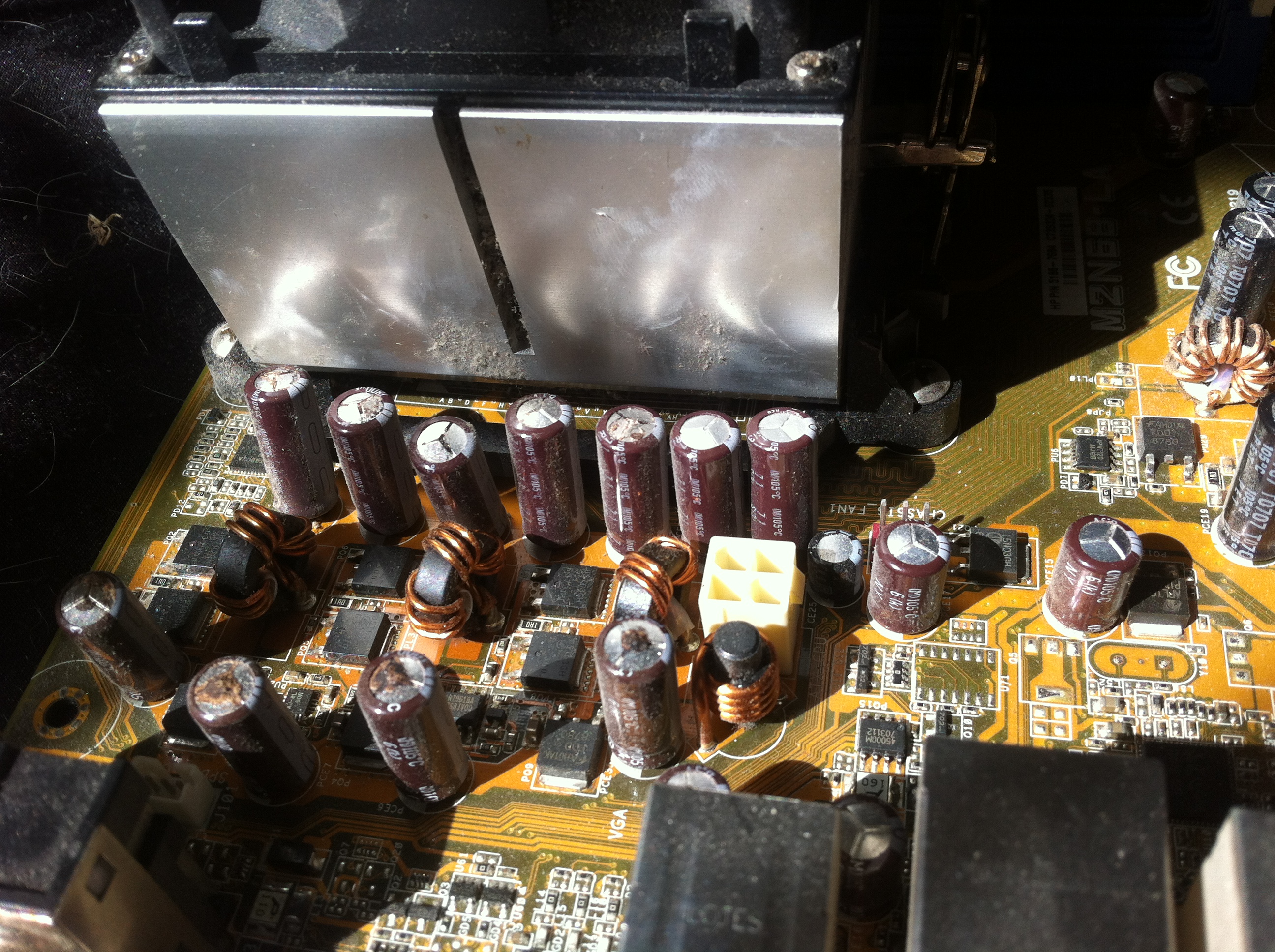
I had [thread="373289"]almost exactly the same problem[/thread]. and it turned out to be a dead motherboard (which could be see by the bulging capacitors with blackened tops).

Image of old motherboard:
 
KuPN8Ro.jpg

SFC scan only shows an error in a couple of .JSON files, and disk surface tests showed no errors. A startup repair said it could not repair anything.

A new motherboard cured my issues
 

My Computer

Computer type
PC/Desktop
Computer Manufacturer/Model Number
Custom Build
OS
Windows 7 Ultimate
CPU
Intel Core2 Duo
Motherboard
Gigabyte GA-P35-DS3L
Memory
8Gb Corsair XMS2 DDR2
Graphics Card(s)
NVidia GeForce GTX280
Sound Card
On-board
Monitor(s) Displays
Goldstar Generic CRT
Screen Resolution
1024x1280
Hard Drives
Disk 0: C: (Windows Drive, Internal SSD): 120Gb
Disk 1: F: (Seagate, External USB): 2Tb
Disk 2: J: (WD Elements, External USB): 1Tb
Disk 3: P: (WD My Book, External USB): 1Tb
PSU
Corsair CX750M (750W)
Case
Hewlett Packard
Mouse
Microsoft Bluetooth
Internet Speed
12Mbps
Antivirus
Kaspersky 15.0.2.361
Browser
Usually Chrome but also have Opera, IE, Tor, Nightly, Safari
Other Info
Originally a HP 'budget' PC, but only case is left - motherboard, PSU and Graphics card have all been updated since, and no original drives are left.


GokAy, thanks for your reply, http://www.sevenforums.com/tutorial...ation-conflicts-performing-clean-startup.html didn't solve the problem.http://www.sevenforums.com/tutorials/681-startup-repair.html restore using Restore Point I had create last time and the problem also didn't solve. I tried the 5th solution http://www.sevenforums.com/tutorials/219533-troubleshooting-windows-7-failure-boot.html it works but I not sure it will boot normally on the next restart and I hope it will. If it still can't boot normally and the 5th solution works, I will use this way to boot my computer. If 5th solution not working I will go to computer shop to fix my laptop.
 

My Computer

Computer type
Laptop
Computer Manufacturer/Model Number
Acer
OS
Windows 7 Ultimate 32bit
CPU
Genuine Intel T2300
Memory
2.5 GB
Graphics Card(s)
ATI Radeon X1400
I had [thread="373289"]almost exactly the same problem[/thread]. and it turned out to be a dead motherboard (which could be see by the bulging capacitors with blackened tops).

Image of old motherboard:
 
KuPN8Ro.jpg

SFC scan only shows an error in a couple of .JSON files, and disk surface tests showed no errors. A startup repair said it could not repair anything.

A new motherboard cured my issues

Jamdog, thanks for you reply. Noted.
 

My Computer

Computer type
Laptop
Computer Manufacturer/Model Number
Acer
OS
Windows 7 Ultimate 32bit
CPU
Genuine Intel T2300
Memory
2.5 GB
Graphics Card(s)
ATI Radeon X1400
Back
Top