Solved Computer Backup

huffman

New member
Pro User
Local time
7:23 PM
Messages
715
I have just installed Windows 7 Ultimate on a new computer.

When I go to try to back up what I have done so far (to an external drive, don't think this matters) I get the message:

"Windows Backup has not been setup. Windows could not find a backup for this computer."

How do I fix this problem?
 

My Computer

OS
Windows 7 Pro
CPU
Intel(R) Pentium(R) Duel CPU E2200 2.20 Ghz
Motherboard
GA-G41M-ES2L
Memory
4 gb 2.96 Usable
Graphics Card(s)
Onboard
Sound Card
Onboard
Hard Drives
2 - 1TB WD Sata Drives
When you click on setup backup do you see a dialog where there is a list of choices such as your optical drive or your seconday hard drive?
I would install paragon backup and recovery free 2013 as an alternative. I have used it many times on various systems and have never run into an issue.
 

My Computer

Computer type
Laptop
OS
Windows 7 Home Premium 64bit
Josea

Thanks for the response. Clicking on Setup Backup gave the options that I wanted.

I will give Paragon backup a try.

Thanks much
 

My Computer

OS
Windows 7 Pro
CPU
Intel(R) Pentium(R) Duel CPU E2200 2.20 Ghz
Motherboard
GA-G41M-ES2L
Memory
4 gb 2.96 Usable
Graphics Card(s)
Onboard
Sound Card
Onboard
Hard Drives
2 - 1TB WD Sata Drives
Another good program is the free version of Macrium Reflect. One of our members, whs, has written an excellent tutorial on how to use it and many of our members, besides whs, are familiar with it and are available to help anyone needing help with it.
 

My Computer

Computer type
PC/Desktop
Computer Manufacturer/Model Number
Custom Build
OS
Win 7 Ultimate 64 bit
CPU
Intel i7-3930K
Motherboard
ASUS P9X79 WS
Memory
Kingston HyperX Genesis 32GB Kit (8x4GB Modules) 1600MHz DDR
Graphics Card(s)
MSI R7850 Twin Frozr 2GD5/OC Radeon HD 7850 2GB 256-bit GDDR
Sound Card
Asus Xonar Essence STX
Monitor(s) Displays
3x Asus VG248QE 24", Vizio 32" TV
Screen Resolution
1920 x 1080, ?
Hard Drives
Samsung 128GB 840 Pro SSD (1),
Samsung 4TB 850 EVO SSDs (4)
Samsung 4TB 850 EVO SSDs (16) external backup drives used in 2.5" hot swap bays in the computer.
PSU
Corsair HX750w
Case
Antec Two Hundred v2 (modified)
Cooling
Cooler Master GeminII S524 120mm (fan replaced with a 140mm)
Keyboard
Logitech G510s
Mouse
Logitech M525 (two in use)
Internet Speed
=< 32Mbps down, 8Mbps up
Antivirus
AVAST!, MBAM, SAS, Spybot S&D (all but MBAM free) Glary Util
Browser
IE11
Other Info
LSI 9211-8i HBA card (8 SATA III ports), 2.5" & 3.5" Hot Swap Bays, HooToo HT-CR001 PCI-E to USB 3.0 Internal Hub + 6 Slot Card Reader, and LG Model CH12LS28 BD-ROM Optical Drive. Also, ScanSnap S1500 ADF duplexing scanner, Canon 9000F flat bed scanner, Corsair SP2500 2.1 speakers, Samsung CLP 415nw laser color printer, Cyberpower PP2200SW UPS
I have a question about Paragon Backup and Recovery.

Is there a bootable version?

I download two of them and neither is bootable.
 

My Computer

OS
Windows 7 Pro
CPU
Intel(R) Pentium(R) Duel CPU E2200 2.20 Ghz
Motherboard
GA-G41M-ES2L
Memory
4 gb 2.96 Usable
Graphics Card(s)
Onboard
Sound Card
Onboard
Hard Drives
2 - 1TB WD Sata Drives
You have to install it in windows - then open tools- recovery media builder - and then you are able to create a bootable USB drive or CD (linux) with a functional recovery/backup program. Good question!
I always do my image backups from the USB drive but have tested running the program from windows and it works fine using the Windows Shadow Copy service (for creating images). There is no real issue with windows backup, but I found it a bit cumbersome to restore individual files. With Paragon the you can easiy restore individual files or folders, and the builtin wizards make the various tasks very easy.
 
Last edited:

My Computer

Computer type
Laptop
OS
Windows 7 Home Premium 64bit
Bear with me this will be a long post.
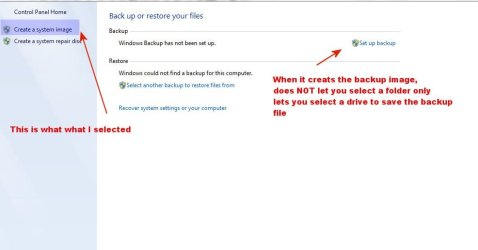
I went to the control panel and selected "Backup and Restore" and this is what I see:

backup2.jpg

There are two ways to create and image that create two completely different looking backups. I am not sure which is the best but I liked the "Create a system image" best.

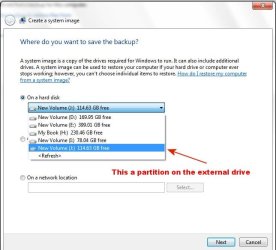
"Create a system image" showes this:

backup3.jpg

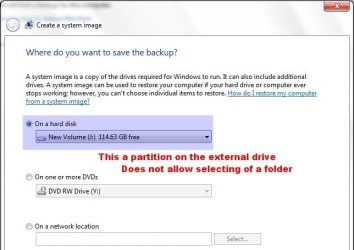
The next set showed this:

backup4.jpg

Note that it only allows the selection of a partition on a hard drive but NOT a folder.

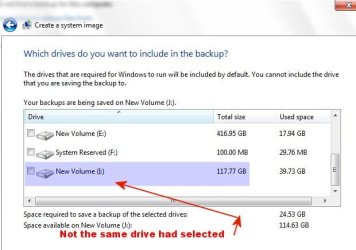
At the next step I got this:

backup5.jpg

Note that this is not the same partition I had selected before.

At the next step I got this:

backup6.jpg

Note that it did want to put the image on the original location I had selected.

It does take some time to create the image, but here are the files and folders created.

backup7.jpg

I assume that with the rescue disk I have crated, I can restore my image if Windows will NOT boot.

The only concern I have is if i made a new backup (same location) it will replace the original image.

Any comments would be appreciated.

BTW I have considered using Acronis True Image. I used this several years ago and it was very reliable.
 

My Computer

OS
Windows 7 Pro
CPU
Intel(R) Pentium(R) Duel CPU E2200 2.20 Ghz
Motherboard
GA-G41M-ES2L
Memory
4 gb 2.96 Usable
Graphics Card(s)
Onboard
Sound Card
Onboard
Hard Drives
2 - 1TB WD Sata Drives
All quite normal. It won't replace the backups in case you make a new backup. It looks like it saves only the newest version..... but you can select older ones as well during recovery! It is the same like "system restore points". Older information is somewhere stored on disk.

You can restore using "win7 system repair disc" or installtion dvd. Some restrictions

  • if you restore to a disk, it should have EXACTLY same partition layout. so don't make new partitions, resize/ move/delete.
If it sees the disk layout is different.... it will make it exactly as it was. Sort of a clean disk prior to restore will take place. As a result you can't restore to smaller disks
 

My Computer

Computer type
Laptop
Computer Manufacturer/Model Number
ACER ASPIRE 5742G
OS
Microsoft Windows 7 Home Premium 64-bits 7601 Multiprocessor Free Service Pack 1
CPU
Intel(R) Core(TM) i3 CPU M 370 @ 2.40GHz
Motherboard
Acer Aspire 5742G
Memory
4,00 GB
Graphics Card(s)
ATI Mobility Radeon HD 5400 Series
Sound Card
(1) AMD High Definition Audio Device (2) Realtek High Defi
Screen Resolution
1366 x 768 x 32 bits (4294967296 colors) @ 60 Hz
Hard Drives
WDC WD5000BEVT-22ZAT0
I created a backup on an external hard drive. I know depending on how I do it, there are two different results. Is one better than the other or will either work to restore?

Maybe I am as sharp as I should be, but if I use the Repair Disc to restore an image from the external hard drive, do I have to select anything from the backup files to get the restore done? All the files are created in one folder.
 

My Computer

OS
Windows 7 Pro
CPU
Intel(R) Pentium(R) Duel CPU E2200 2.20 Ghz
Motherboard
GA-G41M-ES2L
Memory
4 gb 2.96 Usable
Graphics Card(s)
Onboard
Sound Card
Onboard
Hard Drives
2 - 1TB WD Sata Drives
BTW I have used Macrium Reflect before. I don't know if they have fixed the newest version that I have used, but version 5.x never worked for me.

Previous to 5.x, I used v4.x and it worked fine although it was much more limited than the 5.x version.
 

My Computer

OS
Windows 7 Pro
CPU
Intel(R) Pentium(R) Duel CPU E2200 2.20 Ghz
Motherboard
GA-G41M-ES2L
Memory
4 gb 2.96 Usable
Graphics Card(s)
Onboard
Sound Card
Onboard
Hard Drives
2 - 1TB WD Sata Drives
I created a backup on an external hard drive. I know depending on how I do it, there are two different results. Is one better than the other or will either work to restore?

Maybe I am as sharp as I should be, but if I use the Repair Disc to restore an image from the external hard drive, do I have to select anything from the backup files to get the restore done? All the files are created in one folder.
Are you talking about window system image backup? You can only do it the way you shoulde do it. "Is one better than the other or will either work to restore"... there is only one way to do it
 

My Computer

Computer type
Laptop
Computer Manufacturer/Model Number
ACER ASPIRE 5742G
OS
Microsoft Windows 7 Home Premium 64-bits 7601 Multiprocessor Free Service Pack 1
CPU
Intel(R) Core(TM) i3 CPU M 370 @ 2.40GHz
Motherboard
Acer Aspire 5742G
Memory
4,00 GB
Graphics Card(s)
ATI Mobility Radeon HD 5400 Series
Sound Card
(1) AMD High Definition Audio Device (2) Realtek High Defi
Screen Resolution
1366 x 768 x 32 bits (4294967296 colors) @ 60 Hz
Hard Drives
WDC WD5000BEVT-22ZAT0
BTW I have used Macrium Reflect before. I don't know if they have fixed the newest version that I have used, but version 5.x never worked for me.

Previous to 5.x, I used v4.x and it worked fine although it was much more limited than the 5.x version.
What didn't work ... didn't the version in win7 work? Or are you talking about the winpe version?
Any errors... what went wrong?
 

My Computer

Computer type
Laptop
Computer Manufacturer/Model Number
ACER ASPIRE 5742G
OS
Microsoft Windows 7 Home Premium 64-bits 7601 Multiprocessor Free Service Pack 1
CPU
Intel(R) Core(TM) i3 CPU M 370 @ 2.40GHz
Motherboard
Acer Aspire 5742G
Memory
4,00 GB
Graphics Card(s)
ATI Mobility Radeon HD 5400 Series
Sound Card
(1) AMD High Definition Audio Device (2) Realtek High Defi
Screen Resolution
1366 x 768 x 32 bits (4294967296 colors) @ 60 Hz
Hard Drives
WDC WD5000BEVT-22ZAT0
Kaktussoft Macrium v5x would not restore an image created with it. That is what I meant that it did not work.

When you open Backup and restore in the control panel:

(1) On the right side I believe it says "Setup System Imaging" or something like that. That will create a backup image on an external hard drive (not all files in one folder).

(2) On the left side there is an option "Create a System Image". This will also create a backup image on an external hard drive (everything is in one folder).

If you look at both of them they totally different. That is why said I did not know which to use or either of them work if I had to restore my C-drive.

If you know the answer I would appreciate knowing just which works and exactly how to restore the system image.

Hope all that makes sense.
 

My Computer

OS
Windows 7 Pro
CPU
Intel(R) Pentium(R) Duel CPU E2200 2.20 Ghz
Motherboard
GA-G41M-ES2L
Memory
4 gb 2.96 Usable
Graphics Card(s)
Onboard
Sound Card
Onboard
Hard Drives
2 - 1TB WD Sata Drives
Kaktussoft Macrium v5x would not restore an image created with it. That is what I meant that it did not work.

When you open Backup and restore in the control panel:

(1) On the right side I believe it says "Setup System Imaging" or something like that. That will create a backup image on an external hard drive (not all files in one folder).

(2) On the left side there is an option "Create a System Image". This will also create a backup image on an external hard drive (everything is in one folder).

If you look at both of them they totally different. That is why said I did not know which to use or either of them work if I had to restore my C-drive.

If you know the answer I would appreciate knowing just which works and exactly how to restore the system image.

Hope all that makes sense.
http://www.sevenforums.com/tutorials/663-backup-complete-computer-create-image-backup.html
http://www.sevenforums.com/tutorials/675-system-image-recovery.html

Kaktussoft Macrium v5x would not restore an image created with it. That is what I meant that it did not work.
Couldn't boot from DVD, couldn't access the backup image on external disk, or ....? Be more clear about what happened
 

My Computer

Computer type
Laptop
Computer Manufacturer/Model Number
ACER ASPIRE 5742G
OS
Microsoft Windows 7 Home Premium 64-bits 7601 Multiprocessor Free Service Pack 1
CPU
Intel(R) Core(TM) i3 CPU M 370 @ 2.40GHz
Motherboard
Acer Aspire 5742G
Memory
4,00 GB
Graphics Card(s)
ATI Mobility Radeon HD 5400 Series
Sound Card
(1) AMD High Definition Audio Device (2) Realtek High Defi
Screen Resolution
1366 x 768 x 32 bits (4294967296 colors) @ 60 Hz
Hard Drives
WDC WD5000BEVT-22ZAT0
Back
Top