Solved Computer boot up sound.

levelchaser

New member
So I recently installed a new theme and I love it. Other than the fact it threw in some queer sound that plays everytime my computer boots into the login screen. This is NOT the "Windows login sound" or the one that you hear after you login, there is no sound here by default. So how can I remove it, or change it? I'd appreciate any help. Thanks.
 

My Computer

Computer Manufacturer/Model Number
Custom
OS
Windows 7 Ultimate x64
CPU
AMD FX 8150 Zambezi 3.6Ghz
Motherboard
MSI 990XA-GD55 AM3+
Memory
G.SKILL Ares Series 16GB (2 x 8GB) 240-Pin DDR3 1866
Graphics Card(s)
NVIDIA Gigabyte Geforce GTX 560 Fermi
Monitor(s) Displays
Samsung SyncMaster 2494HM
Screen Resolution
1920x1080
Hard Drives
500GB WD don't remember the speed.
PSU
500W Cooler Master
Case
Sentey Extreme Division GS-6510 Burton
Cooling
Stock FX8150 cooler. :( 5+ LED fans on the case.
Keyboard
Wireless Microsoft Keyboard
Mouse
Logitech M510 Wireless Mouse
Post a link to the theme you installed and I will look at it and see if I can help.

Jerry
 

My Computer

Computer type
Laptop
Computer Manufacturer/Model Number
Sager NP9170
OS
Win 7 Pro x64 / Win 10 Pro
CPU
Intel(R) Core(TM) i7-3630QM CPU @ 2.40GHz
Motherboard
CLEVO P170EM
Memory
12 GB
Graphics Card(s)
(1) Intel(R) HD Graphics 4000 (2) NVIDIA GeForce GTX 675M
Sound Card
(1) Realtek High Definition Audio (2) Intel(R) Display Aud
Monitor(s) Displays
17.3
Screen Resolution
1920x1080
Hard Drives
(1) Samsung 860 EVO 500GB(OS) (1) Samsung 860 EVO 500GB(Data)
Keyboard
Backlite
Antivirus
MSE, Malwarebytes Pro
Browser
Firefox
Other Info
DESKTOP: Custom-built.
OS: Win 10 Pro x64.
CASE: Rosewill R5.
CPU: Intel I5 4670K CPU @ 3.40GHz.
CPU COOLER: Cool Master Hyper 212 EVO.
MOTHERBOARD: Asus Z87-A.
MEMORY: Kingston HyperX 2x4 GB.
GPU: Nvidia Geforce 650 TI.
PSU: Corsair TX750.
DRIVES: (1) Samsung 840 120 GB SSD (2) Western Digital blue 500 GB 7200 RPM.
Here is a link to it: Dark Soft - big updates by ~RajTheeban95 on deviantART

it's nearly perfect the only two things I don't like are the sound that's played at the beginning, and also how incredibly crazy hard to read some text is. For example:
39319995.png


I'm guessing the only way to change that font would involve editing the explorer?
 

My Computer

Computer Manufacturer/Model Number
Custom
OS
Windows 7 Ultimate x64
CPU
AMD FX 8150 Zambezi 3.6Ghz
Motherboard
MSI 990XA-GD55 AM3+
Memory
G.SKILL Ares Series 16GB (2 x 8GB) 240-Pin DDR3 1866
Graphics Card(s)
NVIDIA Gigabyte Geforce GTX 560 Fermi
Monitor(s) Displays
Samsung SyncMaster 2494HM
Screen Resolution
1920x1080
Hard Drives
500GB WD don't remember the speed.
PSU
500W Cooler Master
Case
Sentey Extreme Division GS-6510 Burton
Cooling
Stock FX8150 cooler. :( 5+ LED fans on the case.
Keyboard
Wireless Microsoft Keyboard
Mouse
Logitech M510 Wireless Mouse
I will download and test this and it will probably be tomorrow morning before I get back to you.

That hard to read black text in your screenshot cannot be changed, no one has found it.

Jerry
 

My Computer

Computer type
Laptop
Computer Manufacturer/Model Number
Sager NP9170
OS
Win 7 Pro x64 / Win 10 Pro
CPU
Intel(R) Core(TM) i7-3630QM CPU @ 2.40GHz
Motherboard
CLEVO P170EM
Memory
12 GB
Graphics Card(s)
(1) Intel(R) HD Graphics 4000 (2) NVIDIA GeForce GTX 675M
Sound Card
(1) Realtek High Definition Audio (2) Intel(R) Display Aud
Monitor(s) Displays
17.3
Screen Resolution
1920x1080
Hard Drives
(1) Samsung 860 EVO 500GB(OS) (1) Samsung 860 EVO 500GB(Data)
Keyboard
Backlite
Antivirus
MSE, Malwarebytes Pro
Browser
Firefox
Other Info
DESKTOP: Custom-built.
OS: Win 10 Pro x64.
CASE: Rosewill R5.
CPU: Intel I5 4670K CPU @ 3.40GHz.
CPU COOLER: Cool Master Hyper 212 EVO.
MOTHERBOARD: Asus Z87-A.
MEMORY: Kingston HyperX 2x4 GB.
GPU: Nvidia Geforce 650 TI.
PSU: Corsair TX750.
DRIVES: (1) Samsung 840 120 GB SSD (2) Western Digital blue 500 GB 7200 RPM.
I will download and test this and it will probably be tomorrow morning before I get back to you.

That hard to read black text in your screenshot cannot be changed, no one has found it.

Jerry

Ah okay, so i guess my only option would be to lighten up the window. What would be the easiest way to go about doing that? Also thanks for all of your help (:
 

My Computer

Computer Manufacturer/Model Number
Custom
OS
Windows 7 Ultimate x64
CPU
AMD FX 8150 Zambezi 3.6Ghz
Motherboard
MSI 990XA-GD55 AM3+
Memory
G.SKILL Ares Series 16GB (2 x 8GB) 240-Pin DDR3 1866
Graphics Card(s)
NVIDIA Gigabyte Geforce GTX 560 Fermi
Monitor(s) Displays
Samsung SyncMaster 2494HM
Screen Resolution
1920x1080
Hard Drives
500GB WD don't remember the speed.
PSU
500W Cooler Master
Case
Sentey Extreme Division GS-6510 Burton
Cooling
Stock FX8150 cooler. :( 5+ LED fans on the case.
Keyboard
Wireless Microsoft Keyboard
Mouse
Logitech M510 Wireless Mouse
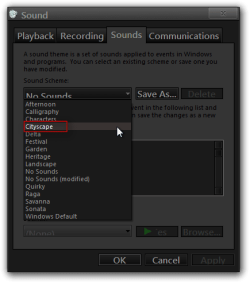
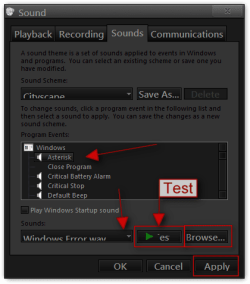
The theme maker used Cityscape sound effects you will need to scroll through the different sounds and use the test button to figure out which sounded is you do not like and change it. This tutorial should help you out http://www.sevenforums.com/tutorials/285-sounds-change.html Here are a few screenshots to.
Sound.pngSound2.png


For the background look at Post #6 of this thread http://www.sevenforums.com/themes-s...ties-window-background-color.html#post2096369 I just showed someone else how to change that background.
Basically follow what I have their accept your image number will be #902 and is 50px x 50px image.
You will find .msstyles here
C:\Windows\Resources\Themes\Dark Soft\Dark Soft.msstyles

The Dark Soft Folder and .msstyles will be which ever one you used (big icons, little icons, squared big, squared little)

If you need more help let me know
Jerry
 

My Computer

Computer type
Laptop
Computer Manufacturer/Model Number
Sager NP9170
OS
Win 7 Pro x64 / Win 10 Pro
CPU
Intel(R) Core(TM) i7-3630QM CPU @ 2.40GHz
Motherboard
CLEVO P170EM
Memory
12 GB
Graphics Card(s)
(1) Intel(R) HD Graphics 4000 (2) NVIDIA GeForce GTX 675M
Sound Card
(1) Realtek High Definition Audio (2) Intel(R) Display Aud
Monitor(s) Displays
17.3
Screen Resolution
1920x1080
Hard Drives
(1) Samsung 860 EVO 500GB(OS) (1) Samsung 860 EVO 500GB(Data)
Keyboard
Backlite
Antivirus
MSE, Malwarebytes Pro
Browser
Firefox
Other Info
DESKTOP: Custom-built.
OS: Win 10 Pro x64.
CASE: Rosewill R5.
CPU: Intel I5 4670K CPU @ 3.40GHz.
CPU COOLER: Cool Master Hyper 212 EVO.
MOTHERBOARD: Asus Z87-A.
MEMORY: Kingston HyperX 2x4 GB.
GPU: Nvidia Geforce 650 TI.
PSU: Corsair TX750.
DRIVES: (1) Samsung 840 120 GB SSD (2) Western Digital blue 500 GB 7200 RPM.
The theme maker used Cityscape sound effects you will need to scroll through the different sounds and use the test button to figure out which sounded is you do not like and change it. This tutorial should help you out http://www.sevenforums.com/tutorials/285-sounds-change.html Here are a few screenshots to.
View attachment 234035View attachment 234036


For the background look at Post #6 of this thread http://www.sevenforums.com/themes-s...ties-window-background-color.html#post2096369 I just showed someone else how to change that background.
Basically follow what I have their accept your image number will be #902 and is 50px x 50px image.
You will find .msstyles here
C:\Windows\Resources\Themes\Dark Soft\Dark Soft.msstyles

The Dark Soft Folder and .msstyles will be which ever one you used (big icons, little icons, squared big, squared little)

If you need more help let me know
Jerry

uhhh.. maybe it was something else i installed then. Because when I boot up my system a beat plays and a like..panther roars or something.
 

My Computer

Computer Manufacturer/Model Number
Custom
OS
Windows 7 Ultimate x64
CPU
AMD FX 8150 Zambezi 3.6Ghz
Motherboard
MSI 990XA-GD55 AM3+
Memory
G.SKILL Ares Series 16GB (2 x 8GB) 240-Pin DDR3 1866
Graphics Card(s)
NVIDIA Gigabyte Geforce GTX 560 Fermi
Monitor(s) Displays
Samsung SyncMaster 2494HM
Screen Resolution
1920x1080
Hard Drives
500GB WD don't remember the speed.
PSU
500W Cooler Master
Case
Sentey Extreme Division GS-6510 Burton
Cooling
Stock FX8150 cooler. :( 5+ LED fans on the case.
Keyboard
Wireless Microsoft Keyboard
Mouse
Logitech M510 Wireless Mouse
Type in msconfig in the start menu search box and click on msconfig.exe go to startup tab and see what is starting at startup.

Jerry
 

My Computer

Computer type
Laptop
Computer Manufacturer/Model Number
Sager NP9170
OS
Win 7 Pro x64 / Win 10 Pro
CPU
Intel(R) Core(TM) i7-3630QM CPU @ 2.40GHz
Motherboard
CLEVO P170EM
Memory
12 GB
Graphics Card(s)
(1) Intel(R) HD Graphics 4000 (2) NVIDIA GeForce GTX 675M
Sound Card
(1) Realtek High Definition Audio (2) Intel(R) Display Aud
Monitor(s) Displays
17.3
Screen Resolution
1920x1080
Hard Drives
(1) Samsung 860 EVO 500GB(OS) (1) Samsung 860 EVO 500GB(Data)
Keyboard
Backlite
Antivirus
MSE, Malwarebytes Pro
Browser
Firefox
Other Info
DESKTOP: Custom-built.
OS: Win 10 Pro x64.
CASE: Rosewill R5.
CPU: Intel I5 4670K CPU @ 3.40GHz.
CPU COOLER: Cool Master Hyper 212 EVO.
MOTHERBOARD: Asus Z87-A.
MEMORY: Kingston HyperX 2x4 GB.
GPU: Nvidia Geforce 650 TI.
PSU: Corsair TX750.
DRIVES: (1) Samsung 840 120 GB SSD (2) Western Digital blue 500 GB 7200 RPM.
Type in msconfig in the start menu search box and click on msconfig.exe go to startup tab and see what is starting at startup.

Jerry

i said earlier that it's not during startup. I don't even login to the machine, it's when the computer has finished booting. The only other thing I installed was a folder pack called "Flurry AQD IconPack 7600x64."
 

My Computer

Computer Manufacturer/Model Number
Custom
OS
Windows 7 Ultimate x64
CPU
AMD FX 8150 Zambezi 3.6Ghz
Motherboard
MSI 990XA-GD55 AM3+
Memory
G.SKILL Ares Series 16GB (2 x 8GB) 240-Pin DDR3 1866
Graphics Card(s)
NVIDIA Gigabyte Geforce GTX 560 Fermi
Monitor(s) Displays
Samsung SyncMaster 2494HM
Screen Resolution
1920x1080
Hard Drives
500GB WD don't remember the speed.
PSU
500W Cooler Master
Case
Sentey Extreme Division GS-6510 Burton
Cooling
Stock FX8150 cooler. :( 5+ LED fans on the case.
Keyboard
Wireless Microsoft Keyboard
Mouse
Logitech M510 Wireless Mouse
Back
Top