Win 7: Black screen on boot up, before login screen?

Thanks again. It is more surprising now. I did not add any partition, since I purchased the laptop.

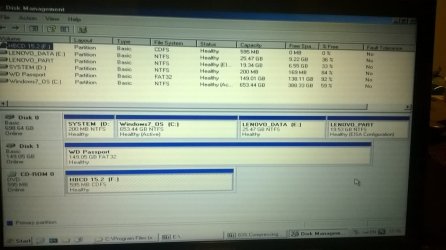
I did post the diskpart earlier. Here you go again.

Code:
DISKPART> list volume
 
 
  Volume ###  Ltr  Label        Fs   Type        Size    Status     Info
  ----------  ---  -----------  -----  ----------  -------  ---------  --------
  Volume 0     F DVD-ROM     B  No Media 
  Volume 1     C      NTFS      Partition    200 MB  Healthy
  Volume 2     D   Windows7_OS  NTFS   Partition    653 GB  Healthy
  Volume 3     E   LENOVO       NTFS   Partition       25 GB  Healthy
   Volume 4     G    FAT    Removable    979 MB  Healthy
  [B]Volume  5         LENOVO_PART NTFS   Partition     19 GB Healthy    Hidden[/B]
 
 
DISKPART> exit

Awaiting for your insight? :geek:

Update:

I am finding some threads talked about OEM partitions in Lenovo Z580 (subject laptop). Is it the one shows as 5th partition in Partition Wizard?
 
Last edited:

My Computer My Computer

At a glance

Win 7 64 bit, 6.1.7601 Service Pack 1 Build 76011 Processor(s) Installed. [01]: Intel64 Famil...8,056 MBIntel HD 4000
Computer type
Laptop
Computer Manufacturer/Model Number
Lenovo IdeaPad Z580, x64-based PC
OS
Win 7 64 bit, 6.1.7601 Service Pack 1 Build 7601
CPU
1 Processor(s) Installed. [01]: Intel64 Family 6 Model 58 St
Memory
8,056 MB
Graphics Card(s)
Intel HD 4000
Antivirus
Windows Security Essential
Browser
FireFox, Chrome
I have nothing more to say than that is contained in post #78
 

My Computer My Computer

At a glance

Microsoft Windows 10 Pro Insider Preview 64-bitIntel(R) Core(TM) i3-4130 CPU @ 3.40GHzCorsair Vengence 4GB x2 (8.00GB Dual-Channel ...2047MB GeForce GTS 450 (ZOTAC International)
Computer type
PC/Desktop
Computer Manufacturer/Model Number
Self Assembled
OS
Microsoft Windows 10 Pro Insider Preview 64-bit
CPU
Intel(R) Core(TM) i3-4130 CPU @ 3.40GHz
Motherboard
Gigabyte Technology Co., Ltd. B85M-D3H
Memory
Corsair Vengence 4GB x2 (8.00GB Dual-Channel DDR3 @ 798MHz)
Graphics Card(s)
2047MB GeForce GTS 450 (ZOTAC International)
Sound Card
Onboard (Realtek High Definition Audio)
Monitor(s) Displays
LG Flatron E2040T
Screen Resolution
1600x900
Hard Drives
Western Digital 1 TB
Seagate 500 GB
PSU
Corsair VS550
Case
Cooler Master K380
Cooling
Cooler Master Seidon 120V Plus
Keyboard
Logitech MK260r
Mouse
Logitech MK260r
Internet Speed
PMPL Broadband
Antivirus
Windows Defender + MBAM
Browser
Firefox
Other Info
Dell Studio 15" Laptop
All the four Lenovo partitions including LENOVO_PART 19GB are shown in the Partition Wizard. What is suspicious is the 201.87 MB Unallocated logical partition shown in Partition Wizard. I would think that some "unauthorised" program - it could as well be a game that was tried on the machine - tried to create its own partition, failed and left the debries. Naturally it should have tried to grab some space from the other legit partitions. Once the original partition structure changed your system became unbootable. Lenovo's Partition Structure with "One Key Recovery/Restore " is very sensitive and I am sure you have seen many users trying to resize the original partitions getting into problems in Lenovo forums.

I am afraid whatever changes have taken place, cannot be undone except by a complete reinstall- Factory Restore. If your "One Touch Restore" ( which is initiated by pressing the button next to the Power Button on your machine, in the powered off condition - please read your manual page 32/33/34 ? ) works it is Ok. Or else you have get the Recovery Disks from Lenovo for your system and version of the system - G580 has many variants - if you haven't made such Recovery Disks.

Before you attempt any such "Factory Restore" which will wipe all your data :

1. Try to set your UEFI to Legacy mode and check whether your system boots. ( most unlikely but nothing wrong in trying :))

2. Try to recover all data from your disk with a Live Linux CD/pendrive.( You may have to disable secure boot and change to legacy mode to boot from these.)

Data Recovery with Lucid Puppy pendrive:

Prepare a Live Linux pen drive. I would recommend Lucid Puppy ( because that is the one I had used and you have some guide on using it here in SevenForums :))

Download lupu-528.005.iso (132.6 MB) from http://puppylinux.org/main/Long-Term-Supported%20Puppy.htm#lucidpuppy

Create your bootable Lucid Puppy pendrive with this ISO using Rufus 2.2 (808KB) https://rufus.akeo.ie/ (All data on the pendrive will be lost when rufus formats the pendrive before writing the ISO and so backup any data on the pendrive elsewhere before running Rufus)

Boot your PC with this pendrive using the onetime boot menu Check whether that faulty drive is shown and you can access it and see your data. If seen copy all data to the empty drive.( You must have plugged in the empty drive before booting into Lucid Puppy and see it along with other drives/partitions)

Guide on how to use Lucid Puppy :Go to the topic Recovering files from the non-bootable Internal Drive: in my thread
http://www.sevenforums.com/software/198909-lucid-puppy-way-recover-files-non-bootable-computer.html
 

My Computer My Computer

At a glance

Windows 7 Home Premium 32 bit
OS
Windows 7 Home Premium 32 bit
Welcome to this thread. :party:Thanks for looking into my issue. I appreciate your assessment. :)

I did see UEFI Boot Legacy mode was [Enabled] in BIOS by Local default setup. I changed to [Disabled] & tried to boot ===> Same outcome (Black screen with cursor in the middle). :rolleyes:

I reviwed your link (Lucid Puppy way to recover files from a non-bootable computer) , where you mentioned

if after trying out the various Windows Repair Options, Windows refuses to budge and only a reinstall is the option,
Did we try all the options before leading to reinstall? Here are the things we covered so far. Please correct me, if I miss something :geek:

Code:
Virus/Malware ==> Ran WDO nothing showed up (Post #18), Farbar Recovery Scan Tool x64  post # 24-29
Registry disruption ===> ???
Memory Health ===> Post # 61 Passed
HDD Health ===> Partition Wizzard/Sea tools post #77 , #78, #83
HDD Health/Drive health ===> Sea tools post # 55, # 61
HDD Health ===> Chkdsk, Diskpart post #20, # 57
Drivers Health ===> SFC ===> CBS.log post # 51
BIOS Health =====> ????
Graphic Card Health ===> ????
Windows 7 (OS) Health ====> ????
Config Health ====> Lazesoft Recovery Suite Home Edition Free post # 
31-32 ==> Unable to get into msconfig same black screen
BIOS Default settings ==> same black screen post # 41


Do we need to address the items with ???? before going to reinstall?
:geek:

What is suspicious is the 201.87 MB Unallocated logical partition shown in Partition Wizard. I would think that some "unauthorised" program - it could as well be a game that was tried on the machine - tried to create its own partition, failed and left the debries. Naturally it should have tried to grab some space from the other legit partitions. Once the original partition structure changed your system became unbootable.
I have three(3) user logins in this laptop such as Admin, Local user1, Local user 2. The regular use of this computer was with Local User 1 primarily, that does not have admin rights to install/configure disk partition etc .

How does a "unauthorised" program/games alter the disk structure without Admin rights? :geek:

Lenovo's Partition Structure with "One Key Recovery/Restore " is very sensitive and I am sure you have seen many users trying to resize the original partitions getting into problems in Lenovo forums.
How do we protect the partition (OEM hidden) required for "One Key Recovery/Restore " operation during our clean install? :geek:

Do we able to backup this partition (OEM hidden) using Lucid Puppy?

As I mentioned earlier, I have three(3) user logins in this laptop such as Admin, Local user1, Local user 2.

What are the additional steps required to preserve the data within these logins?:geek:

I have installed various tools/software in this laptop.

Will I able to restore (bring back) all installed items (Software/tools/Registry entries etc) during this process?

My HDD capacity is 750 GB. What kind of media to use for backing up my data using Lucid Puppy?

Will Read/write CD work?

How do I restore back after setting to factory default?

How do I bring back all the windows 7 updates todate?


Thanks for helping.
 
Last edited:

My Computer My Computer

At a glance

Win 7 64 bit, 6.1.7601 Service Pack 1 Build 76011 Processor(s) Installed. [01]: Intel64 Famil...8,056 MBIntel HD 4000
Computer type
Laptop
Computer Manufacturer/Model Number
Lenovo IdeaPad Z580, x64-based PC
OS
Win 7 64 bit, 6.1.7601 Service Pack 1 Build 7601
CPU
1 Processor(s) Installed. [01]: Intel64 Family 6 Model 58 St
Memory
8,056 MB
Graphics Card(s)
Intel HD 4000
Antivirus
Windows Security Essential
Browser
FireFox, Chrome
What do you guys think of:
- deleting that 201MB unused partition (the logical one) and re-running the startup repairs? It doesn't even show in diskpart
 

My Computer My Computer

At a glance

Windows 7 Ultimate x64 SP1AMD Phenom 2 1090T2x8GB Kingston HyperX Fury Black 1600Mhz Unga...MSI GTX 970 Gaming 4G
Computer type
PC/Desktop
Computer Manufacturer/Model Number
Custom Build
OS
Windows 7 Ultimate x64 SP1
CPU
AMD Phenom 2 1090T
Motherboard
Gigabyte GA-890FXA-UD5
Memory
2x8GB Kingston HyperX Fury Black 1600Mhz Unganged
Graphics Card(s)
MSI GTX 970 Gaming 4G
Sound Card
Realtek On-Board HD 7.1 Audio / Logitech G35
Monitor(s) Displays
3xAcer GD245HQ
Screen Resolution
1920x1080
Hard Drives
Samsung 850 Pro 512GB SSD - OS /
WD Caviar Black SATA 3 - 1 TBx2 - Dynamic RAID 0 /
WD Caviar Green SATA 2 - 640GBx2 - Dynamic RAID 0 /
WD Caviar Green SATA 2 - 640GB - Internal Backup /
Seagate Barracude SATA 3 - 3TB - External Backup/ Sync
PSU
HighPower 1000W
Case
Cooler Master HAF 932
Cooling
Noctua NH-D14
Keyboard
Logitech G19
Mouse
Logitech G500
Internet Speed
100/4 Mbit Cable (100GB quota)
Antivirus
ZoneAlarm Extreme Security / MBAM Pro / MBAE Free / SAS Free
Browser
IE 11 - Firefox - Chrome
Other Info
Logitech F710/ G27/ G940/ Z5500 // TrackIR 5 // Nvidia 3D Surround Vision
After reviewing GokAy's suggestion,

What do you guys think of:
- Merging that 201MB unused partition (the logical one) with existing NTFS partition ? :geek:

Is it a option to consider?

What do you guys think of:

I was told about another option of EXTEND. Please review

How does suspicious Unallocated logical partition shows up suddenly?


Thanks for sharing .
 
Last edited:

My Computer My Computer

At a glance

Win 7 64 bit, 6.1.7601 Service Pack 1 Build 76011 Processor(s) Installed. [01]: Intel64 Famil...8,056 MBIntel HD 4000
Computer type
Laptop
Computer Manufacturer/Model Number
Lenovo IdeaPad Z580, x64-based PC
OS
Win 7 64 bit, 6.1.7601 Service Pack 1 Build 7601
CPU
1 Processor(s) Installed. [01]: Intel64 Family 6 Model 58 St
Memory
8,056 MB
Graphics Card(s)
Intel HD 4000
Antivirus
Windows Security Essential
Browser
FireFox, Chrome
Deleting and/or extending the added extra partition will work, if and only if the disc is converted back to a basic disc again after that deletion/extension; otherwise not.

So the story of conversion comes back, and you have no other place to go without doing it.

And, when the story of conversion comes, then those two terms comes back, destructive conversion and non-destructive conversion.

For a destructive conversion, follow post #83 by jumanji.

For a non-destructive conversion, the only way I can say that is to use the Partition Wizard bootable CD version 4.2.2; which offered this conversion as a free feature. But I dont know how you can get it; that is stopped years ago. Here is the method: If you buy partitin wizard, then you will get access to this option.

Finally, doing this and that, making multiple threads, avoiding good suggestions and paying attention to easy to look but baseless to work suggestions will not solve this issue. Either you pay heed to what is already stated by jumanji and me, or get the PC to a repair shop. Remember that there is no fix button there, at least for this issue.
 

My Computer My Computer

At a glance

Microsoft Windows 10 Pro Insider Preview 64-bitIntel(R) Core(TM) i3-4130 CPU @ 3.40GHzCorsair Vengence 4GB x2 (8.00GB Dual-Channel ...2047MB GeForce GTS 450 (ZOTAC International)
Computer type
PC/Desktop
Computer Manufacturer/Model Number
Self Assembled
OS
Microsoft Windows 10 Pro Insider Preview 64-bit
CPU
Intel(R) Core(TM) i3-4130 CPU @ 3.40GHz
Motherboard
Gigabyte Technology Co., Ltd. B85M-D3H
Memory
Corsair Vengence 4GB x2 (8.00GB Dual-Channel DDR3 @ 798MHz)
Graphics Card(s)
2047MB GeForce GTS 450 (ZOTAC International)
Sound Card
Onboard (Realtek High Definition Audio)
Monitor(s) Displays
LG Flatron E2040T
Screen Resolution
1600x900
Hard Drives
Western Digital 1 TB
Seagate 500 GB
PSU
Corsair VS550
Case
Cooler Master K380
Cooling
Cooler Master Seidon 120V Plus
Keyboard
Logitech MK260r
Mouse
Logitech MK260r
Internet Speed
PMPL Broadband
Antivirus
Windows Defender + MBAM
Browser
Firefox
Other Info
Dell Studio 15" Laptop

My Computer My Computer

At a glance

Windows 7 Ultimate x64 SP1AMD Phenom 2 1090T2x8GB Kingston HyperX Fury Black 1600Mhz Unga...MSI GTX 970 Gaming 4G
Computer type
PC/Desktop
Computer Manufacturer/Model Number
Custom Build
OS
Windows 7 Ultimate x64 SP1
CPU
AMD Phenom 2 1090T
Motherboard
Gigabyte GA-890FXA-UD5
Memory
2x8GB Kingston HyperX Fury Black 1600Mhz Unganged
Graphics Card(s)
MSI GTX 970 Gaming 4G
Sound Card
Realtek On-Board HD 7.1 Audio / Logitech G35
Monitor(s) Displays
3xAcer GD245HQ
Screen Resolution
1920x1080
Hard Drives
Samsung 850 Pro 512GB SSD - OS /
WD Caviar Black SATA 3 - 1 TBx2 - Dynamic RAID 0 /
WD Caviar Green SATA 2 - 640GBx2 - Dynamic RAID 0 /
WD Caviar Green SATA 2 - 640GB - Internal Backup /
Seagate Barracude SATA 3 - 3TB - External Backup/ Sync
PSU
HighPower 1000W
Case
Cooler Master HAF 932
Cooling
Noctua NH-D14
Keyboard
Logitech G19
Mouse
Logitech G500
Internet Speed
100/4 Mbit Cable (100GB quota)
Antivirus
ZoneAlarm Extreme Security / MBAM Pro / MBAE Free / SAS Free
Browser
IE 11 - Firefox - Chrome
Other Info
Logitech F710/ G27/ G940/ Z5500 // TrackIR 5 // Nvidia 3D Surround Vision
Thanks for help and guidance. I did not avoid guidance & suggestion of thread. It is my mistake to keep only windows restore points help in recovery. I did not think about image backup, because I am familiar about this. I did not anticipate this situation.

I learned from this thread that I am able to copy personal files using Repair Disk. I do have lot of installed software/tools for which I do not have KEYS to reinstall. I did review threads about backup in this forum, but I am not able to find a way to do that. I did open multiple threads to learn about potential root cause of this issues.

Here are some questions, I have about backing up strategy. I need your guidance/pointer.

How do I able to backup OEM Hidden partition (recovery partition created by Lenovo factory install)? :geek:

I have three(3) user logins in this laptop such as Admin, Local user1, Local user 2.

Are there any backup/restore software to pull/push user by user?

What are the additional steps required to preserve the data within these logins/users?


Will I able to restore (bring back) all installed items (Software/tools/Registry entries etc) during this process?

My HDD capacity is 750 GB. What kind of media to use for backing up my data?

Will Read/write CD work?

How do I restore back after setting to factory default?

How do I bring back all the windows 7 updates todate?


Thanks for helping.
 

My Computer My Computer

At a glance

Win 7 64 bit, 6.1.7601 Service Pack 1 Build 76011 Processor(s) Installed. [01]: Intel64 Famil...8,056 MBIntel HD 4000
Computer type
Laptop
Computer Manufacturer/Model Number
Lenovo IdeaPad Z580, x64-based PC
OS
Win 7 64 bit, 6.1.7601 Service Pack 1 Build 7601
CPU
1 Processor(s) Installed. [01]: Intel64 Family 6 Model 58 St
Memory
8,056 MB
Graphics Card(s)
Intel HD 4000
Antivirus
Windows Security Essential
Browser
FireFox, Chrome
"Unallocated" is not a partition. It's unallocated space?

Thanks for looking into my issue. I like to share my findings for collective learning of this forum. I am not challenging the folks, who contributed to this thread.


Code:
 @jumanji 
Once the original partition structure changed your system became 
unbootable. Lenovo's Partition Structure with "One Key Recovery/Restore " is 
very sensitive and I am sure you have seen many users trying to resize the 
original partitions getting into problems in Lenovo forums.
Code:
From Lennovo
 
 
If you made any changes in the partition like (D drive, E drive).
 
 
As if there are any other partition made then the one key recovery(OKR) may 
not work.
As I reviewed the disk conversion strategy, it will disrupt built in one key recovery(OKR). It shows as RED light.

Will some one enlighten me on this subject? :geek:


Code:
"Unallocated" is not a partition. It's unallocated space, that would not expect 
it  to show up in Diskpart.
I did research on above quote on this forum that point me to

Tutorials - Partition / Extended : Logical Drives

The post # Post 43 thru 47 resemble my Z580 condition, where 4 partitions & 1 unallocated space is showing up in MBR kind. It booted successfully and showing Disk Management in the post.

It looks like normal to have unallocated space with 4 partitions in Win 7 and some factory install keep it that way.

I'm wondering, why this condition leads to non bootable situation on my Z580? :geek:

Thanks for helping

Update 8/20/2015

I did the following DISKMAP using HIRENS_CD. It is not showing 5th partition/unallocated space. It looks like health map.

What do you guys think about it?

Thanks for your insight.
 

Attachments

  • LENOVO_DISKMAP.jpg
    LENOVO_DISKMAP.jpg
    161.7 KB · Views: 0
Last edited:

My Computer My Computer

At a glance

Win 7 64 bit, 6.1.7601 Service Pack 1 Build 76011 Processor(s) Installed. [01]: Intel64 Famil...8,056 MBIntel HD 4000
Computer type
Laptop
Computer Manufacturer/Model Number
Lenovo IdeaPad Z580, x64-based PC
OS
Win 7 64 bit, 6.1.7601 Service Pack 1 Build 7601
CPU
1 Processor(s) Installed. [01]: Intel64 Family 6 Model 58 St
Memory
8,056 MB
Graphics Card(s)
Intel HD 4000
Antivirus
Windows Security Essential
Browser
FireFox, Chrome
Clean Install - Lenovo OneKey recovery

Thanks for helping so far,

As you guys suggested, I am able to copy the files into USB storage. I tried Lenovo OneKey recovery. Even though I have the OEM DISKMAP as shown above, it did not work. That too went to black screen with cursor in the middle.

Is there a way to make Lenovo OneKey recovery work? :geek:

Is it possible to use the Lenovo recovery partition in above DISKMAP to reinstall Windows 7, instead OEM ISO download?

I did search in this forum for Clean Install & found

Clean Reinstall - Factory OEM Windows 7

USB Windows 7 Installation Key Drive - Create

I used links provided in 1st page of above. I am getting

1) Option 1

The product key you entered appears to be for software pre-installed by the device manufacturer. Please contact the device manufacturer for software recovery options.
2) Option 2

goes to -- HeiDoc.net - The Technology Treasure Chest. It says

Windows 7 used to be available for public download on servers owned by Digital River, Microsoft's service provider for e-commerce. As of February 2015, these downloads have been pulled. "Free" access to the OS disk images is somewhat limited now, but a few options remain.
What is the revised source this community use to download win 7 ISO?

What is the size of USB storage required to work with this download?:geek:

If you update these links in 1st page, it will help others.

Thanks for your guidance.

Do you want me to continue in this thread for this install or open a new thread?:geek:

What do you guys think?
 

My Computer My Computer

At a glance

Win 7 64 bit, 6.1.7601 Service Pack 1 Build 76011 Processor(s) Installed. [01]: Intel64 Famil...8,056 MBIntel HD 4000
Computer type
Laptop
Computer Manufacturer/Model Number
Lenovo IdeaPad Z580, x64-based PC
OS
Win 7 64 bit, 6.1.7601 Service Pack 1 Build 7601
CPU
1 Processor(s) Installed. [01]: Intel64 Family 6 Model 58 St
Memory
8,056 MB
Graphics Card(s)
Intel HD 4000
Antivirus
Windows Security Essential
Browser
FireFox, Chrome
From your post #89

I do have lot of installed software/tools for which I do not have KEYS to reinstall.
I have asked this question of you before and never got a answer.
So I will ask again.

How and why do you have software and tools that you don't have key for.

http://www.sevenforums.com/tutorials/287439-emergency-kit-save-your-files-dead-os-2.html#post3132520

Because this thread has so many post and suggestions and no resolution has been found let start with a basic.
It might reveal something to help.

Complete this tutorial by Brink and post the log here.

http://www.sevenforums.com/windows-...ne-activation-issue-posting-instructions.html
 

My Computer My Computer

At a glance

Windows 10 Pro. 64/ version 1709 Windows 7 Pr...Intel i7-6800K @ 4.3Corsair Platinum 16 gig @2400EVGA GTX 1070 OC
Computer type
PC/Desktop
Computer Manufacturer/Model Number
Home made Desktop
OS
Windows 10 Pro. 64/ version 1709 Windows 7 Pro/64
CPU
Intel i7-6800K @ 4.3
Motherboard
ASUS X-99 Deluxe II
Memory
Corsair Platinum 16 gig @2400
Graphics Card(s)
EVGA GTX 1070 OC
Monitor(s) Displays
Asus 27" LED LCD/VE278Q
Screen Resolution
1920-1080 or 1280-720 HDMI
Hard Drives
INTEL SSD 730-240 Gb Sata 3.0/
PSU
EVGA Platium 1200W
Case
Phanteks Luxe Tempered Glass 8 fans/ one radiator
Cooling
XSPC/ Water Cooled CPU
Keyboard
Das 4 Professional
Mouse
Logitech M705/MX Anywhere 2-S
Internet Speed
100 mbits
Antivirus
Microsoft Security Essentials/ Malwarebytes Premium 3.0/ SAS
Browser
I.E. 11 default/Firefox/ ISP Time Warner Cable/Spectrum
Other Info
LG BluRay Burner/
Sound system-KLipsch-THX/
Icy Dock ssd Hot Swap bays.
Welcome to my thread. Thanks for sharing your ideas.:D

@baarod
I am not aware about recreating the OneKey partitions options. I did comb through Lenovo forum, I did not hit this piece. I appreciate to bring this to forum. Thanks for having you in this forum. :D

It is a good idea. As I posted in #91, I have some hurdles to cross to get Windows 7 64 bit ISO.

When I ponder on this situation, I found your thread "Install Windows 7 FAST without a DVD or USB device". You address some interesting stuff of building windows image from existing windows.

My Z580 is not boot-able. I am able to access my computer only via recovery console command line. I am not sure, whether I could recover my installed windows 7 image in your way. I want to give a try, before heading for win 7 clean install using ISO. What do you think? :geek:

@Layback Bear

I am sorry. I was asked not to post multiple threads in this forum. That was the reason; I did not answer your questions. :confused:

I installed some software awhile ago (MS Office suite – download). I got the KEY via email. I am not able to find that email now. I have couple of software like visio, MS project, Greenplum community edition. I am realizing about my disorganization now.

My Z580 is not boot-able.

Am I able to run Windows Genuine and Activation in command line of recovery console? :geek:

Thanks for sharing.
 

My Computer My Computer

At a glance

Win 7 64 bit, 6.1.7601 Service Pack 1 Build 76011 Processor(s) Installed. [01]: Intel64 Famil...8,056 MBIntel HD 4000
Computer type
Laptop
Computer Manufacturer/Model Number
Lenovo IdeaPad Z580, x64-based PC
OS
Win 7 64 bit, 6.1.7601 Service Pack 1 Build 7601
CPU
1 Processor(s) Installed. [01]: Intel64 Family 6 Model 58 St
Memory
8,056 MB
Graphics Card(s)
Intel HD 4000
Antivirus
Windows Security Essential
Browser
FireFox, Chrome
Recovery console does not provide a runtime environment supporting the diskpart, imagex or bcdboot utilities required to prepare and apply a WIM image volume. You will need some kind of bootable media providing at least a Windows PE (pre-installation environment). What steps have you tried in the recovery environment? What error are you getting when you try to boot normally? Have you tried safe mode?

To extract keys from an existing installation of Windows I use Nirsoft's utility ProduKey - Recover lost product key (CD-Key) of Windows/MS-Office/SQL Server
 

My Computer My Computer

At a glance

El Capitan / Windows 10i7-4980HQ16GBIris 5200
Computer type
Laptop
Computer Manufacturer/Model Number
Apple
OS
El Capitan / Windows 10
CPU
i7-4980HQ
Memory
16GB
Graphics Card(s)
Iris 5200
MDRI, I have read the thread now. Don't bother answering my questions above. Here's what I know from the thread. BIOS can boot MBR and boot sect code gets you far enough for recovery console. The mouse pointer showing up means that Windows has started and it has nothing to do with partitions etc. SFC isn't finding much and your disk looks OK. What's left is your user profile. A corrupt user profile can hang the system at the point you described. Do you have autologin enabled? Did it hang before or after entering password? Offline Windows Password & Registry Editor This utility can boot the machine, enable the hidden built-in administrator account and erase it's password. By using this account you can create a new profile. Are you following me?
 

My Computer My Computer

At a glance

El Capitan / Windows 10i7-4980HQ16GBIris 5200
Computer type
Laptop
Computer Manufacturer/Model Number
Apple
OS
El Capitan / Windows 10
CPU
i7-4980HQ
Memory
16GB
Graphics Card(s)
Iris 5200
Thanks for your reviewing thread. I appreciate your questions.

I described the out come of all options in Post #20.

When I pick SAFE Mode. It loaded couple of drivers and paused at CLASSPNP.SYS load. It went to Black screen with cursor at center.

I am not sure, whether Autologin enabled.

As I boot the computer, I am getting LENOVO banner & Starting widows+LOGO. After a while it goes to Black screen with cursor in the middle. Cursor is respoding to mouse keys.

Normally I will get login music after Starting widows+LOGO. I am not getting it now.

F8 ===> Repair Computer===> Command Prompt ===> Works OK


It goes to System Recovery option ==> Select a keyboard input Method (Drop Down)

Then it goes to System Recovery option log on drop down (shows Admin, defined local users)

It validate the all login credentials. If I pick Admin, I can get into elevated command prompt.


If I enter Runs as Admin command ==> it asks PW. It recognize the admin PW here.

I am not able to run GUI based command. I am getting
"The subsystem needed to support the image type is not present." :o

I am able to run DISKPART.

I used the HIREN's Bootable CD to poke around. I am able to see all folders/contents, except hidden recovery partition. There is no drive assigned to it. I backed up the folders using HIREN's Bootable CD tools.

I am following you. How do you want me to use Offline Windows Password & Registry Editor?:geek:

@Layback Bear


I tried MGADiag Tool. I am getting. "The subsystem needed to support the image type is not present." :o

Are there any services to be started in command prompt to make this work? :geek:

Awaiting for next steps .

Thanks for helping.
 
Last edited:

My Computer My Computer

At a glance

Win 7 64 bit, 6.1.7601 Service Pack 1 Build 76011 Processor(s) Installed. [01]: Intel64 Famil...8,056 MBIntel HD 4000
Computer type
Laptop
Computer Manufacturer/Model Number
Lenovo IdeaPad Z580, x64-based PC
OS
Win 7 64 bit, 6.1.7601 Service Pack 1 Build 7601
CPU
1 Processor(s) Installed. [01]: Intel64 Family 6 Model 58 St
Memory
8,056 MB
Graphics Card(s)
Intel HD 4000
Antivirus
Windows Security Essential
Browser
FireFox, Chrome
Do you manually log on? I mean, does Windows prompt you for a password or do you choose a user account to log in?
 

My Computer My Computer

At a glance

El Capitan / Windows 10i7-4980HQ16GBIris 5200
Computer type
Laptop
Computer Manufacturer/Model Number
Apple
OS
El Capitan / Windows 10
CPU
i7-4980HQ
Memory
16GB
Graphics Card(s)
Iris 5200
Thanks again. I picked a user account from Drop down & manually enter PW in PW prompt.

Is there anything , I can do in command window & report to you for your diagnosis?
 

My Computer My Computer

At a glance

Win 7 64 bit, 6.1.7601 Service Pack 1 Build 76011 Processor(s) Installed. [01]: Intel64 Famil...8,056 MBIntel HD 4000
Computer type
Laptop
Computer Manufacturer/Model Number
Lenovo IdeaPad Z580, x64-based PC
OS
Win 7 64 bit, 6.1.7601 Service Pack 1 Build 7601
CPU
1 Processor(s) Installed. [01]: Intel64 Family 6 Model 58 St
Memory
8,056 MB
Graphics Card(s)
Intel HD 4000
Antivirus
Windows Security Essential
Browser
FireFox, Chrome
Do you have any other accounts in that drop down that you can try to login with? If not you can use the Offline Password Reset to enable the built-in Windows default administrator account (normally hidden) and reset it's password so you can use it to login and create a new user profile for yourself. My educated guess from everything you've said is that your existing profile in the registry is damaged and will not allow successful login. By creating a new one by way of the built-in administrator account you will again be able to login and then all that's left is to move all the files from your old c:\users\<profile> tree into the new one. Use these instructions Offline NT pw & reg-editor, walkthrough
 

My Computer My Computer

At a glance

El Capitan / Windows 10i7-4980HQ16GBIris 5200
Computer type
Laptop
Computer Manufacturer/Model Number
Apple
OS
El Capitan / Windows 10
CPU
i7-4980HQ
Memory
16GB
Graphics Card(s)
Iris 5200
Back
Top