
Computer cannot connect to wifi6 router

ColourOz

New member
Power User
Local time
9:39 AM
Messages
75
Some time ago I purchased an Ultrabook with Windows 10 pre-installed. With the help of this forum, I was able to install Windows 7 and got over some hiccups. All has been going well except that I have purchased a wifi6 router and cannot get the router/OS to connect to the wifi. The wifi adapter is an "Atheros QCA61X4A". The laptop picks up the LAN without hesitating. The Linux Mint OS has no trouble connecting to the router using the wifi (same laptop).

I was hoping to find an updated driver, but can only find an Intel driver which I have not attempted to install despite the wifi6's being an Intel invention. My next option is to open the laptop and replace the card. Being such a slim laptop with plastic clips, I am apprehensive to open it incase I snap a plastic clip. Also, I am not sure whether the card is replaceable. Cannot find a diagram.

Does anyone have any ideas? Would be most appreciated.
 

My Computer

Computer type
PC/Desktop
Computer Manufacturer/Model Number
Custom built
OS
Windows 7 Ultimate x64 SP1
CPU
Intel i7 6700
Motherboard
Asus H170-Pro
Memory
Crucial 16 GB (x1)
Graphics Card(s)
Nvidia GeForce GTX1050Ti
Sound Card
(incorporated with Nvidia Graphics Card)
Monitor(s) Displays
LG HDR WFHD 29" Model 705948
Screen Resolution
3840 x 2160
Hard Drives
1 x M.2 2TB, 1 x WD black 1TB
PSU
650 W
Case
traditional design
Cooling
2 fans
Keyboard
Wireless
Mouse
Wireless
Internet Speed
NBN fixed wireless
Antivirus
Microsoft Security Essentials
Browser
Mozilla
Other Info
*Acer Ultrabook, 500GB M.2, 8GB RAM - partitioned Win7 & Linux Mint
*Gigabyte Mini-PC (x64) 1TB HDD, 8GB RAM Windows7

*Windows7 setup identical to Main computer*

My Computers

System One System Two

  • Computer type
    PC/Desktop
    OS
    7 X64
    CPU
    i5 8400
    Motherboard
    gigabyte b365m ds3h
    Memory
    2x8gb 3200mhz
    Hard Drives
    various
    PSU
    pure power 11 400w cm
    Case
    Coolermaster
    Cooling
    cryorig m9i
  • Computer type
    PC/Desktop
    OS
    7x64
    CPU
    g5400
    Motherboard
    ga b365m ds3h
    Memory
    8gb ddr4 2400
    PSU
    xfx pro 450w
Thank you for your reply. Will the Lenova driver suit wifi 6?
 

My Computer

Computer type
PC/Desktop
Computer Manufacturer/Model Number
Custom built
OS
Windows 7 Ultimate x64 SP1
CPU
Intel i7 6700
Motherboard
Asus H170-Pro
Memory
Crucial 16 GB (x1)
Graphics Card(s)
Nvidia GeForce GTX1050Ti
Sound Card
(incorporated with Nvidia Graphics Card)
Monitor(s) Displays
LG HDR WFHD 29" Model 705948
Screen Resolution
3840 x 2160
Hard Drives
1 x M.2 2TB, 1 x WD black 1TB
PSU
650 W
Case
traditional design
Cooling
2 fans
Keyboard
Wireless
Mouse
Wireless
Internet Speed
NBN fixed wireless
Antivirus
Microsoft Security Essentials
Browser
Mozilla
Other Info
*Acer Ultrabook, 500GB M.2, 8GB RAM - partitioned Win7 & Linux Mint
*Gigabyte Mini-PC (x64) 1TB HDD, 8GB RAM Windows7

*Windows7 setup identical to Main computer*
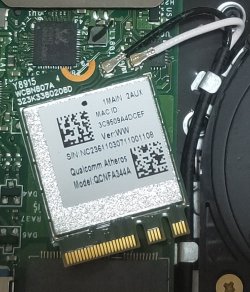
Just noticed is the model x4A.

DEll have driver for win7 Qualcomm QCA61x4A QCA9377 WiFi and Bluetooth Driver.

another one slightly more recent
PCI\VEN_168C&DEV_003E&SUBSYS_87521043&REV_32
device drivers for Windows 7 x64
QualComm-FORCED-7x64-QCA6320_11.0.0.791-drp.zip
 
Last edited:

My Computers

System One System Two

  • Computer type
    PC/Desktop
    OS
    7 X64
    CPU
    i5 8400
    Motherboard
    gigabyte b365m ds3h
    Memory
    2x8gb 3200mhz
    Hard Drives
    various
    PSU
    pure power 11 400w cm
    Case
    Coolermaster
    Cooling
    cryorig m9i
  • Computer type
    PC/Desktop
    OS
    7x64
    CPU
    g5400
    Motherboard
    ga b365m ds3h
    Memory
    8gb ddr4 2400
    PSU
    xfx pro 450w
Many thanks! In the meantime I have removed the ultrabook cover to have a better look at the wifi card as I was unable to find any information/images of the inside of the laptop.
I have been searching for a Wifi 6 card that will replace the current card and it appears that the wifi 6 card is for Windows 10, and the 6E for Windows 11. No mention of Windows 7 other than unappreciative comments. This is sad so will have to rethink the wifi 6 card as I will also need a driver. ...mmm......

wifi-card.jpg
 

My Computer

Computer type
PC/Desktop
Computer Manufacturer/Model Number
Custom built
OS
Windows 7 Ultimate x64 SP1
CPU
Intel i7 6700
Motherboard
Asus H170-Pro
Memory
Crucial 16 GB (x1)
Graphics Card(s)
Nvidia GeForce GTX1050Ti
Sound Card
(incorporated with Nvidia Graphics Card)
Monitor(s) Displays
LG HDR WFHD 29" Model 705948
Screen Resolution
3840 x 2160
Hard Drives
1 x M.2 2TB, 1 x WD black 1TB
PSU
650 W
Case
traditional design
Cooling
2 fans
Keyboard
Wireless
Mouse
Wireless
Internet Speed
NBN fixed wireless
Antivirus
Microsoft Security Essentials
Browser
Mozilla
Other Info
*Acer Ultrabook, 500GB M.2, 8GB RAM - partitioned Win7 & Linux Mint
*Gigabyte Mini-PC (x64) 1TB HDD, 8GB RAM Windows7

*Windows7 setup identical to Main computer*
Is there an id in win7 msinfo32>components>problem devices

something like this:
PCI\VEN_168C&DEV_003E&SUBSYS_87521043&REV_32
 

My Computers

System One System Two

  • Computer type
    PC/Desktop
    OS
    7 X64
    CPU
    i5 8400
    Motherboard
    gigabyte b365m ds3h
    Memory
    2x8gb 3200mhz
    Hard Drives
    various
    PSU
    pure power 11 400w cm
    Case
    Coolermaster
    Cooling
    cryorig m9i
  • Computer type
    PC/Desktop
    OS
    7x64
    CPU
    g5400
    Motherboard
    ga b365m ds3h
    Memory
    8gb ddr4 2400
    PSU
    xfx pro 450w
OPen a cmd prompt type

ipconfig /all

make sure DHCP is on
post results
 

My Computer

Computer type
PC/Desktop
OS
win 8 32 bit
Thank you so much. In the meantime as nothing has worked, I have wiped the hard drive and will start again. I appreciate the help very much.
 

My Computer

Computer type
PC/Desktop
Computer Manufacturer/Model Number
Custom built
OS
Windows 7 Ultimate x64 SP1
CPU
Intel i7 6700
Motherboard
Asus H170-Pro
Memory
Crucial 16 GB (x1)
Graphics Card(s)
Nvidia GeForce GTX1050Ti
Sound Card
(incorporated with Nvidia Graphics Card)
Monitor(s) Displays
LG HDR WFHD 29" Model 705948
Screen Resolution
3840 x 2160
Hard Drives
1 x M.2 2TB, 1 x WD black 1TB
PSU
650 W
Case
traditional design
Cooling
2 fans
Keyboard
Wireless
Mouse
Wireless
Internet Speed
NBN fixed wireless
Antivirus
Microsoft Security Essentials
Browser
Mozilla
Other Info
*Acer Ultrabook, 500GB M.2, 8GB RAM - partitioned Win7 & Linux Mint
*Gigabyte Mini-PC (x64) 1TB HDD, 8GB RAM Windows7

*Windows7 setup identical to Main computer*
I have not attempted to install despite the wifi6's being an Intel invention.

Actually, it's an "invention" of the Wi-Fi Alliance. Wi-Fi 6 or 802.11ax.

Unless ALL your devices in your area support 802.11ax, I wouldn't use it. Never the less, your laptop should perform with the router and your router should use 802.11ac and 802.11n and 802.11g all at the same time providing you create each SSID (Service Set Identifier)/network name for those channels.

The Atheros QCA61X4A is not 802.11ax compatible. Qualcomm Atheros QCA61x4A Wireless Network Adapter - Qualcomm Wi-Fi Specifications and Certification

Neither is the QCNFA344A shown in the picture.

- - - Updated - - -

You'll need an external adapter.


https://www.amazon.com.au/ALFA-AWUS036AXML-802-11axe-Adapter-AXE3000/dp/B0BY8GMW32

https://www.amazon.com.au/ALFA-AWUS036AX-802-11ax-Adapter-Antennas/dp/B0C3GY285L

https://www.amazon.com.au/ALFA-AWUS036AXER-802-11ax-WiFi-Adapter/dp/B0C8CPVFQF

Not sure if those come with Windows 7 drivers though.

- - - Updated - - -

Keep in mind that Wi-Fi 6e is (6 GHz) or Wi-Fi 6 is (2.4 GHz & 6 GHz). If you do use 6 GHz your range is going to be very low. You'd need to deploy a mesh system in your house. An apartment should perform well. 5 GHz was already bad enough with range.

Also, if you have IoT stuff like a smart speaker or wireless camera, those may only be 802.11g capable. So create a SSID for those channels accordingly.

For 802.11g you only wanna use channels 1, 6 or 11 (if provided in Oz). Those are non overlapping channels.

For 802.11ac you want to use channels 36 through 48. The others will auto negotiate with Doppler radar an whatnot and can have an effect on your Wi-Fi signal. You also probably want to limit to 80 MHz of bandwidth if the router allows you to select it. I think most smartphones, tablets and whatnot may not even support 160 MHz bandwidth anyway. So channel 42 in this case.


Edit-

And now I just figured out that the use of the term "Wi-Fi 6" was inconsequential. Should have just stated that the router was unable to communicate with the wireless LAN card in the laptop.... The use of term Wi-Fi 6 in this case has no bearing to the question...
 

My Computer

Computer type
PC/Desktop
OS
Windows 7 Ultimate x64
Thank you for your advice. The router is a new router which has many connection and security options. Despite the Ultrabook, I would have assumed that the laptop would connect to the router (and visa-versa) as it did with the previous router. I have been looking at replacing the wi-fi card and have now decided to let it go as the ultrabook can be used successfully with Linux. Linux does not seem to have the same hiccups as Windows. I do not want to upgrade Windows 7 to a later OS as I have a great setup as things are. However, I am hoping to find a Win7 driver for the TP-Link AX3000. Companies seem to think that Windows 7 never happened.
 

My Computer

Computer type
PC/Desktop
Computer Manufacturer/Model Number
Custom built
OS
Windows 7 Ultimate x64 SP1
CPU
Intel i7 6700
Motherboard
Asus H170-Pro
Memory
Crucial 16 GB (x1)
Graphics Card(s)
Nvidia GeForce GTX1050Ti
Sound Card
(incorporated with Nvidia Graphics Card)
Monitor(s) Displays
LG HDR WFHD 29" Model 705948
Screen Resolution
3840 x 2160
Hard Drives
1 x M.2 2TB, 1 x WD black 1TB
PSU
650 W
Case
traditional design
Cooling
2 fans
Keyboard
Wireless
Mouse
Wireless
Internet Speed
NBN fixed wireless
Antivirus
Microsoft Security Essentials
Browser
Mozilla
Other Info
*Acer Ultrabook, 500GB M.2, 8GB RAM - partitioned Win7 & Linux Mint
*Gigabyte Mini-PC (x64) 1TB HDD, 8GB RAM Windows7

*Windows7 setup identical to Main computer*
Your laptop should have been able to connect to the router if everything is configured correctly. You might have to compare the WiFi specs of the router and laptops to see what modes are compatible.

I have a WiFi 6E router. I can connect to it with all my wireless devices including my 13 year old Dell laptop and my 17 year old Toshiba laptop. Note I had to make a change in the router settings for these older laptops to connect.

Comcast XB-8 Gateway (modem/router)
2.4GHz: Mode: 802.11 g/n/ax | Security Mode: WPA3-Personal Transition
5.0GHz: Mode: 802.11 a/n/ac/ax | Security Mode: WPA3-Personal Transition
6.0GHz: Mode: 802.11 ax | Security Mode: WPA3-Personal Only

I had to make the following change in the router setup so that the Toshiba laptop would connect:
2.4GHz: Mode: 802.11 g/n/ax | Security Mode: WPA2-PSK (AES)

Dell Latitude E-6410 laptop (802.11 b/g/n) purchased in 2010
Protocol: Wi-Fi 4 (802.11n)
Security type: WPA2-Personal
Network band: 2.4 GHz

Toshiba Tecra M7-S7331 laptop (802.11a/b/g) purchased in 2006
Protocol: 802.11g
Security type: WPA2-Personal
Network band: 2.4 GHz
 

My Computers

System One System Two

  • Computer type
    PC/Desktop
    Computer Manufacturer/Model Number
    Custom build
    OS
    Windows 7 Home Premium 64-bits
    CPU
    AMD FX-8350
    Motherboard
    Gigabyte GA-990FXA-UD3 (AM3+)
    Memory
    GSKILL Ripjaw-X PC3 12800 8GB (2x4GB)
    Graphics Card(s)
    ASUS ROG STRIX GTX 1060 6GB
    Sound Card
    Integrated
    Monitor(s) Displays
    Asus VE228H (21.5-in)
    Screen Resolution
    1920x1080 60Hz
    Hard Drives
    SAMSUNG 870 EVO 2.5 Inch SATA SSD (1TB)
    SAMSUNG 870 EVO 2.5 Inch SATA SSD (1TB)
    SAMSUNG 870 EVO 2.5 Inch SATA SSD (1TB)
    PSU
    Corsair RM750x (750 watts)
    Case
    Corsair Carbide Series 200R
    Cooling
    Corsair Hydro Series H60 (CWCH60)
    Keyboard
    Logitech Elite
    Mouse
    Logitech M510 Wireless Mouse
    Internet Speed
    Comcast Gigabit Extra (1200Mbps down / 35Mbps up)
    Antivirus
    Malwarebytes
    Browser
    Firefox, Edge, Chrome
    Other Info
    ASUS DRW-24B1ST DVD-RW (24X) optical drive
    Seagate Expansion Desk (5TB) external SATA/USB HDD
    Comcast XB8 Internet Gateway
  • Computer type
    PC/Desktop
    System Manufacturer/Model Number
    Custom
    OS
    Windows 7 Pro (64-bit)
    CPU
    AMD Phenom II 960T X4
    Motherboard
    ASUS M4N82 Deluxe
    Memory
    Corsair XMS2 DDR2-800 8GB (4x2GB)
    Graphics Card(s)
    ASUS ENGTX560 DCII OC/2DI/1GD5 1GB
    Monitor(s) Displays
    Samsung 930B 19-inch LCD
    Screen Resolution
    1280x1024
    Hard Drives
    Samsung SSD 870 EVO 1000 GB (Windows 10)
    Seagate ST1000DM003 1000 GB (Windows 7)
    PSU
    Antec TruePower (new) TP-650
    Case
    Antec Three Hundred
    Cooling
    AMD stock cooler from FX8350
    Mouse
    Logitech M100
    Internet Speed
    Xfinity Gigabit Extra 1200/35 Mbps
Back
Top