computer complete restore help !!!!!!!!

barmirohan

New member
Local time
8:43 PM
Messages
2
so i restored my laptop to factory setting and when it was "preparing computer for first use." I accidently turned it off and now it is saying that i have to reinstall windows but a disk never came with is because it is a refubished laptop from currys so i googled a bit abd found this : http://www.sevenforums.com/installation-setup/151566-reinstalling-windows-7-a.html#post1300819

but you need a product key and miine is worn out and i cant see the numbers what do i do ????
 

My Computer

Computer type
Laptop
Computer Manufacturer/Model Number
acer
OS
Windows 7 Home Premium x64

My Computer

Computer type
PC/Desktop
Computer Manufacturer/Model Number
Custom Build
OS
Windows 7 Ultimate 64-bit
CPU
Intel G3420 3.2GHZ Dual Core
Motherboard
Gigabyte H87-HD3
Memory
Kingson 8GB 1600mhz
Graphics Card(s)
MSI R7970 TF 3GD5/OC BE
Monitor(s) Displays
21" LG & "19 Vertical Samsung
Hard Drives
120GB SSD - Boot
1TB WD
350GB External
2TB External (Wireless)
PSU
Corsair CX 500 modular
Case
Zalman Z11 Plus (modified)
Cooling
Corsair H55, 2x 120mm SP Corsair, 1x 140 Coolermaster
Keyboard
Corsair K50
Mouse
CSL Gaming
Internet Speed
164Mbps
Antivirus
Avast, Malwarebytes
Browser
Google Chrome, IE, Firefox
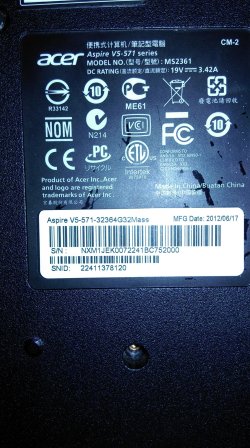
What is the make and full model number of the computer. You should be able to run the recovery again by pressing a Fn key during boot. Which one varies with each manufacturer. The Users Guide/Service Guide at the Manufacturers web site should tell you how.
 

My Computer

Computer type
PC/Desktop
Computer Manufacturer/Model Number
Lenovo IdeaCenter 450
OS
Windows 10 Pro X64
CPU
Intel Quad Core i7-4770 @ 3.4Ghz
Memory
16.0GB PC3-12800 DDR3 SDRAM 1600 MHz
Graphics Card(s)
Intel Integrated HD Graphics
Sound Card
Realtek HD Audio
Monitor(s) Displays
HP 22" LCD
Screen Resolution
1680 x 1050
Hard Drives
250GB Samsung EVO SATA-3 SSD
2TB Seagate ST2000DM001 SATA-2
1.5TB Seagate ST3150041AS SATA
Keyboard
Dell USB
Mouse
Lenovo USB
Internet Speed
Cable via Road Runner 3MB Upload, 30MB Download
Antivirus
Windows Defender, MBAM Pro, MBAE
Browser
Seamonkey
Other Info
UEFI/GPT
PLDS DVD-RW DH16AERSH

My Computer

Computer type
PC/Desktop
Computer Manufacturer/Model Number
Lenovo IdeaCenter 450
OS
Windows 10 Pro X64
CPU
Intel Quad Core i7-4770 @ 3.4Ghz
Memory
16.0GB PC3-12800 DDR3 SDRAM 1600 MHz
Graphics Card(s)
Intel Integrated HD Graphics
Sound Card
Realtek HD Audio
Monitor(s) Displays
HP 22" LCD
Screen Resolution
1680 x 1050
Hard Drives
250GB Samsung EVO SATA-3 SSD
2TB Seagate ST2000DM001 SATA-2
1.5TB Seagate ST3150041AS SATA
Keyboard
Dell USB
Mouse
Lenovo USB
Internet Speed
Cable via Road Runner 3MB Upload, 30MB Download
Antivirus
Windows Defender, MBAM Pro, MBAE
Browser
Seamonkey
Other Info
UEFI/GPT
PLDS DVD-RW DH16AERSH
This should be everything
 

Attachments

  • IMAG0019.jpg
    IMAG0019.jpg
    905.9 KB · Views: 4

My Computer

Computer type
Laptop
Computer Manufacturer/Model Number
acer
OS
Windows 7 Home Premium x64
I don't see anywhere in the Users manual it shows how to do this. It does talk about recovering from a backup on a USB drive.

Did you create the backup USB flash drive?

Recovery options are discussed starting on Page 14 of the manual which you can get here:

http://global-download.acer.com/GDF...p3=ASPIRE V5-571&OS=ALL&LC=en&BC=ACER&SC=PA_6

Web page is here: Acer | Download

Use Or select my product from a list

and choose Ultra-thin, Aspire, Aspire V5-571.

An alternative is to download a legal copy of Windows 7 that matches what you have and do a Clean Install. http://www.sevenforums.com/tutorials/1649-clean-install-windows-7-a.html

See this note:
Win7DDLink.jpg
 

My Computer

Computer type
PC/Desktop
Computer Manufacturer/Model Number
Lenovo IdeaCenter 450
OS
Windows 10 Pro X64
CPU
Intel Quad Core i7-4770 @ 3.4Ghz
Memory
16.0GB PC3-12800 DDR3 SDRAM 1600 MHz
Graphics Card(s)
Intel Integrated HD Graphics
Sound Card
Realtek HD Audio
Monitor(s) Displays
HP 22" LCD
Screen Resolution
1680 x 1050
Hard Drives
250GB Samsung EVO SATA-3 SSD
2TB Seagate ST2000DM001 SATA-2
1.5TB Seagate ST3150041AS SATA
Keyboard
Dell USB
Mouse
Lenovo USB
Internet Speed
Cable via Road Runner 3MB Upload, 30MB Download
Antivirus
Windows Defender, MBAM Pro, MBAE
Browser
Seamonkey
Other Info
UEFI/GPT
PLDS DVD-RW DH16AERSH
This should be everything

No, the CD key is not on that sticker. It's a 25 digit number (in groups of 5) on a separate "Microsoft" sticker, which should be on the base of the laptop.
 

My Computer

Computer type
PC/Desktop
Computer Manufacturer/Model Number
Toshiba L300 pro laptop and self built desktop
OS
dual boot XPx86, W7x86 laptop and XPx86, W7x64 dual boot desktop
Antivirus
Avast, malwarebytes pro, winpatrol pro
Browser
sea monkey and palemoon
try phoning acer and give them the serial number of your laptop and they should give you all the information
 

My Computer

Computer type
Laptop
Computer Manufacturer/Model Number
HP Elitebook 8740w
OS
Windows 7 Ultimate x64
CPU
Intel Core i7 M 620 @2.66GHz
Motherboard
HP 1520
Memory
8GB DDR3
Graphics Card(s)
Nividia Quadro FX 2800M
Hard Drives
HGST 1TB
Antivirus
AVG Free
Browser
Internet Explorer 11
You cannot use the Product Key from the factory install to Clean Reinstall - Factory OEM Windows 7
as it is a batch key used at factory and not the same key on the COA sticker.

Your options are limited now to trying as suggested to use Acer eRecovery Management - Restore Using ALT - F10 - YouTube, or order Acer Recovery disks. Acer Support: Frequently Asked Questions list for Recovery media and Restoring a system to factory load

If these don't work out you can go ahead and do the vastly superior Clean Reinstall - Factory OEM Windows 7 then try using a magnifying glass to piece together the Product Key via trial and error. If it fails use MS Phone Activation and explain the problem and they might activate it with a new key based on information you give them. Activate Windows 7 by Phone - Windows 7 Help Forums .

You can also try contacting Acer Support via chat or phone to ask them what they can do, but don't expect much.
 
Back
Top