Win7 does not detect hard drive on install

DPeterson

New member
Local time
8:36 AM
Messages
9
I have tried MANY things and now I am resorting to this forum to help find a solution to my problem.
I am trying to load win7 onto a hard drive - why is that so difficult?

The computer is an older Server which runs 2003 server OS. It has a SCSI card and 3 SCSI hard drives attached:
1 the boot drive
2 slave drive 130 GB
3 slave drive 130 GB with data like backed up digital photos and videos

That brands are Seagate Cheetah but I don't think that matters. I could be wrong.

The boot drive is only a 10GB partition where win 2003 server is installed. It is overfilled and old and my plan was to clear off and format one of the 130GB drives and load win7 on it.

I inserted my win7 dvd and chose to boot from dvd drive and after following install instructions, I get stopped every time at the screen to choose which drive to load the operating system on. Nothing is listed and it offers a message to load drivers for the drive so that windows can recognize it.

After several attempts to fix, I decided to put my WinVista dvd in and try to load Vista on the drive. That worked without a problem - went right past the screen I have been hung up on, it had my 130GB drive listed, I selected it and loaded Vista on the drive from start to finish. (That's why I said above that I don't think it matters what hdd I am using) However, my problem remains - I want to install Win7 on this drive and it is not being detected at initial install. Hardware requirements meet or exceed the recommendations for Win7 32-bit.

Here are the things I have tried (over and over and over. . .)

  • Booted up 2003server drive, went to Disk Management and checked the health of the 130GB drive. All looks fine. I was able to format, change drive letter, rename, make active partition, etc. It always shows up in Disk Management - No luck when installing win7
  • Downloaded a disk formatting/partitioning utility program GParted Live. Booted computer using this utility and I was able to clear partitions, format and basically get drive ready for use - No luck when installing win7
  • Attempted to download the drivers for this SCSI controller:Compaq 64-Bit/66-MHz Wide Ultra3 SCSI No luck being able to find it online because the company no longer supports this board - But hey, this isn't a driver issue because of several things - the drivers ARE detected when installing VISTA, and also when the 2003 server runs. I do not think the drivers are the issue here - I could be wrong - but why would Vista have no problem and Win7 not be able to locate?
  • Attempted to run the Win7 dvd while the Vista OS was running to see if I could use the UPGRADE choice rather than CUSTOOM INSTALL. At first it said I needed to have Vista SP1 installed in order to upgrade. After hours upon hours of ridiculous Vista Upgrades, I finally got SP1 loaded - tried the UPGRADE to win7 and it hits me with a message saying unable to load operating system on drive. I also tried doing this from booting the win7 dvd and it did not recognize the drive again!
  • I booted up the 2003 server OS again and connected a wireless adapter so that I could access the internet. Then tried to load win7 and have it search online for the most updated drivers for my hardware. As always, this didn't work. It just asked me to inset the disk that came with my hardware, blah blah blah - and didn't find the drivers. No luck - still unable to detect the hard drive.

Ok Win7, what gives??? Why can I load WinVista to this hard drive and not Win7? I am becoming bald from pulling my hair out of my head and my kids are learning all kinds of new curse words and colorful metaphors.

Please help.

The only thing I haven't explored yet is the system BIOS. However, I would assume that if the Vista dvd has no problem installing, then why would there be a BIOS problem concerning this drive.
 

My Computer My Computer

OS
Win 7
It's possible the SCSI drivers are in Vista installer but too old to be included in Win7 installer.

Have you tried an in-place Upgrade of Vista? If it's new without accumulated corruption it could be nearly perfect install and supply the drivers needed.

If not, make sure you have the latest BIOS update. If so, reset the CMOS: Clear CMOS - 3 Ways to Clear the CMOS - Reset BIOS

Then wipe the target HD with zeroes, partition as given in Step 2.2 here to mark the partiiton Active to give the HD every advantage to be discovered.

Google the exact SCSI model to try to find Vista or Win7 driver to unzip to stick or CD, browse from Load Drivers link until it picks it up.
 
The company might have made Vista drivers that aren't compatible with Windows 7 so they aren't included on the disk. Check the manufacturers website for Windows 7 drivers and manually load them during the install and see if this fixes the problem.

I'd look for controller card drivers and hard drive drivers.
 

My Computer My Computer

Computer Manufacturer/Model Number
Custom
OS
Windows 7 Build 7600 (Final)
CPU
AMD Athlon 64 4200+ x2 @ 2.5GHz
Motherboard
MSI K9A Platnium
Memory
2x1GB OCZ Platnium + 2x2GB OCZ SLi Edition
Graphics Card(s)
ATI Raedon x1650Pro Crossfire (Onr HIS and one Sapphire)
Sound Card
Integrated
Monitor(s) Displays
HP w2207 (Glossy 22")
Hard Drives
WD 320GB SATA
Samsung 1TB SATA
PSU
Roswill 500watt
Case
Thermaltake Tsunami (Siler/Platnium)
Cooling
Air
Well, whenever I go online to search for these drivers, numerous sites direct me to the adaptec website and directly to an error page. Then searching the adaptec site I have no success finding the correct download.

Anyway - I really don't think it's a driver issue. Just my gut feeling because it's not a problem with the Vista install and the 2003 install. I know win7 is new but the other two are not that out dated.

I'm looking for the driver for:
Compaq 64-Bit/66-MHz Wide Ultra3 SCSI

just to rule out the driver issue.

YES - another reason I don't think it's the driver is that I DID try to load an in-place UPGRADE from Vista after loading SP1 (for hours) and when I got to the area to select the drive it did not allow me to select it. It only said something like Unable to install operating system to this drive.
 

My Computer My Computer

OS
Win 7
You weren't doing an In=place Upgrade of Win7 if it brought you to a screen where drives are selected.,

Try again choosing Upgrade instead of Custom, allow to remain connected to internet during isntall (to get latest drivers and updates), resolve any issues which will be issued specifically.

Vista drivers should be suitable so you can also look at the SCSI controller properties in Device Manager to locate it's filel location and back up the driver file to Load during clean install. But doing the in-place Upgrade will be easier and likely just as good with no accumulated corruption.
 
This did not work.
I did what you suggested.
I found the driver files for the controller in the win system32 drivers folder, saved them to a cd, tried having the installer load them, unsuccessful.
 

My Computer My Computer

OS
Win 7
What happens when you run an in-place Upgrade from the Vista desktop?
 
It was a monsterous disaster. First of all it took forever. Then, once the sp1 update was installed and I thought what could possible go wrong next, it brought me to the screen where you need to select the drive to install to and FINALLY it had my drive listed BUT a little message on the bottom of the screen said that I could not load to this drive. No other options other than to Exit. AHhhhhhhh!
 

My Computer My Computer

OS
Win 7
Just went throught the process of Partition Magic and did another complete format of the drive, etc, etc. Then tried install and no drive was found. I'm out of options after about 30 attempts to fix this.

I just can't accept that Vista can load find this drive on install but win7 can not!!!
 

My Computer My Computer

OS
Win 7
Again: there is no option to choose which drive to in-place Upgrade to. If you were at any point given a screen where you choose where to install, then you must have either booted or run the installer and chose a Custom or clean install.

Start Vista, place the Win7 DVD in the drive, run it, choose to remain connected to the Internet, then the Upgrade install - not Custom.

Partition Magic is not recommended at all for Win7. Use free Partition Wizard or better yet, use the installer itself to wipe your HD with Diskpart Clean all then create the Primary partition and mark it Active as given in Step 2.2 of this tutorial: http://www.sevenforums.com/tutorials/91339-ssd-hdd-optimize-windows-reinstallation.html

I am giving you dual-track advice here as doing a correct in-place Upgrade from Vista is your best first approach, then if it fails and issues cannot be sorted proceed to wiping the HD with zeros, partiitoning NTFS Primary to mark Active so you have the best slate.
 
Last edited:
Hello DPeterson, welcome to Seven Forums!


If you're using the old obsolete with Windows 7 Partition Magic program to do anything, I'm sure this is causing the issues you're having, the only way to correct the mess this program creates is to use Windows diskpart to run a clean all from PC boot using the tutorial Greg listed.


SSD / HDD : Optimize for Windows Reinstallation

DISKPART : At PC Startup
 

My Computer My Computer

Computer Manufacturer/Model Number
* BFK Customs *
OS
W 7 64-bit Ultimate
CPU
Intel Q9550 Yorkfield
Motherboard
ASUS P5Q Pro
Memory
8GB Dominator 8500C5D
Graphics Card(s)
ATI : XFX 5870
Sound Card
Realtek HD Audio 7-1
Monitor(s) Displays
1x 47" LCD HDMI & 3x 26" LCD HDMI
Screen Resolution
1920x1080P & 1920x1200
Hard Drives
1x 80GB Intel X25-M G2 SSD : 1x 500GB & 1x 640GB WD Caviar Black(s)
PSU
Corsair 620HX
Case
Cooler Master RC-690
Cooling
Tuniq Tower 120, 2x 140mm and 3x 120mm case fans
Keyboard
Microsoft 500
Mouse
Razer Diamondback 3G
Internet Speed
14 Mb/s
Other Info
1x Koutech 3Gb/s SATA HDD Hot Swap Rack
Ok - I did run that. I get through all of the instructions fine right up until the 'format' command which doesn't seem to be a valid command for this program. Whenever I type format, it just spits back a long list of valid commads to use and format is not one of them.
 

My Computer My Computer

OS
Win 7
Since I tried to format with the Partition software (Partiton Magic and then GParted) I have since wiped off my install of Vista from this drive so I can not try again to install from the disk while Vista is operating.

I am now trying to load XP pro and do the install from within XP. But first I have to load my Win 98 OS so that my XP pro Upgrade CD will install, then I have to load the drivers for XP that allow for WPA-2 encryption so that I can connect to my wireless network, then I have to load the drivers for my wireless netowrk adapter to be able to connect to the ineternet, then I have to download and install the XP Service Pack 3 so that it is compatible with an upgrade to Win 7. Sounds like a fun Saturday afternoon planned - all to probably and ultimately fail when I try to do the upgrade. Just like when I tried doing it while Vista was installed.
By the way - Win98, WinXP, WinVISTA ALL had no problems detecting the presence of my hard drive. WTF Win7??? Why is this happening to me and WHY AM I STILL TRYING TO FIX THIS? It should be obvious to me that this SCSI hard drive configuration is just not meant to have Win7 loaded on it.

Other people who have had this problem have solved it by running diskpart an then formatting the disk but when I run diskpart it doesn't allow me to format and if I run diskpart from a scenario in which I boot directly from the Win7 DVD and go to Repair > then Command Prompt, diskpart does not list my hard drive at all. The only way I can run diskpart is by reconnecting my win2003 hard drive, boot to that, go to a command prompt - then diskpart finds the drives (but the format command is not working for me)
 

My Computer My Computer

OS
Win 7
SCSI= System Can't See It
just a guess, but possibly windows 7 just doesn't recognize some SCSI drives without loading a driver for it before the install.
 

My Computer My Computer

Computer Manufacturer/Model Number
HP z800
OS
Windows 7 Professional 64 bit
CPU
xeon x5680 x2
Motherboard
hp
Memory
96 GB
Graphics Card(s)
nVidia quadro FX 5800 x2
Monitor(s) Displays
HP zr30w x4
Hard Drives
4 HP SAS 600GB HDDs RAID 0
PSU
1100w
Case
ATX
Cooling
factory installed liquid cooling
Well - that didn't work. I was unable to get a working copy of XP's SP1,2,3. I downloadedthem to a different computer and after copying them to CD, the files were corrupt. And right from the Microsoft website no less.
So I decied to reinstall VISTA Ultimate with SP2. Took a while but it's up and running now.

Then I tried to run the Win7 install DVD from within the VISTA environment and when I got to the screen asking to UPGRADE or CUSTOM, I chose upgrade. It went to a screen to check for compatibility and was working for a while until finally it came up with this error:

The following issues are preventing Windows from upgrading. Cancel the upgrade, complete each task and then restart the upgrade.
Install upgraded drivers for the following devices: Open COntrol Panel and search for 'update device drivers'
-Storage Controller: Compaq 64-bit/66MHz Wide Ultra3 SCSI Adapter

CLOSE

I went to control panel and had windows do the online seach and it returns the message:
The Best Driver for your device is already installed
Windows has determined the driver software for your device is up to date
Compaq 64-bit/66MHz Wide Ultra3 SCSI Adapter


That's where the story ends. I've been here before and doing the "driver update" as suggested does not fix the problem. Any sugestions?
 
Last edited:

My Computer My Computer

OS
Win 7
This confirms that the Storage driver is not in the Win7 DVD, which apparently cannot use the Vista driver.

A quick Google search turns up no drivers newer than for XP.

Have you tried 32 bit boot clean install? Drivers are a little easier to come by.
 
that's what I have been doing - 32-bit.

Do you think that I need to be running the 64-bit since this controller says 64bit in the description?

I assumed that this older 2003 Server was 32 bit and that the 64 bit Win7 would not be compatible becasue the machine doesn't meet the minumum RAM requirements of 2GB (it only has 1 GB). That's why I have been trying to install the 32 bit Win7 this whole time.
 

My Computer My Computer

OS
Win 7
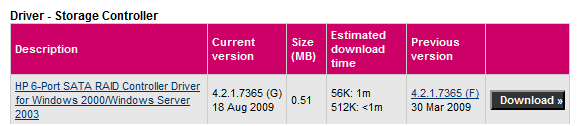
Is this the drivers you are using?

HP sata.PNG
 

My Computer My Computer

OS
ME/XP/Vista/Win7
Windows 7 has dropped a lot of older drivers because Microsoft does not support the older hardware or the hardware vendor no longer supports the hardware. This is why Vista or XP or other older OS’s work.

Here is what you can do to completely figure out these issues.

Load Windows Server 2008 R2 on this machine if it works then you will know for sure that it is a driver issue and nothing else. Windows Server 2008 R2 and Windows 7 are the same in almost every way. The major difference is the driver set. Servers typically have many different controller cards so server supports many different cards, the workstation versions don’t have to support many controllers so Microsoft doesn’t include the drivers. If Windows Server 2008 R2 works then all we need to do is find out which driver Server is using and then copy it to a USB drive or such and then add it to your Windows 7 install. Problem solved. -WS
 

My Computer My Computer

Computer type
PC/Desktop
Computer Manufacturer/Model Number
Dell OP7010
OS
Windows 7 Enterprise (x64); Windows Server 2008 R2 (x64)
Memory
16GB
Monitor(s) Displays
4 Dell 24" LCD
Screen Resolution
1280x1024
Keyboard
Dell
Mouse
Dell Optical
Internet Speed
40meg
Back
Top