
Computer freezes randomly for a few seconds

Crazy6a3er

New member
Local time
4:25 PM
Messages
9
Hi all, SevenForum members! I desperately need some help over here. I had a serious BSOD and freeze problems until I was convinced to clean install my PC and reinstall the OS. Well, this method has fixed my BSOD problem but not the freeze problem. The freeze problem is somehow occurred randomly for a few seconds and RARELY it can freeze up my whole PC that I need to hard reset my PC. This problem has been irritating me now:(

Any reply is appreciated. Thanks in advance.
 

My Computer

Computer type
PC/Desktop
OS
Windows 7 Home Premium 64bit
CPU
i5-2500K
Motherboard
MSI H61M-P31 (G3) (MS-7788)
Memory
8GB
Graphics Card(s)
GTX 560 1GB
Sound Card
(1) NVIDIA High Definition Audio (2) NVIDIA High Definitio
Hi Crazy6a3er, Welcome to Seven Forums.

As mentioned by you that you did a clean install of OS. BSOD is gone, but the freeze is still present. When you installed OS on your hard drive (HDD), did you take the backup and format the complete HDD? Because, the freezing issue can happen by virus or malware. What normally is done that we install a new OS and the virus still remains in the parts of the HDD. Reinstalling the OS can stop the BSOD but it will start affecting the system again causing freezes, crashes and ultimately BSODs.

I will suggest you to run anti virus program, Malwarebytes : Free anti-malware download and check for any potential dangers. Once the scan is complete, check again.

If the problem still persists, you can take the backup of your HDD and format it completely and do a "clean" install of OS.
 

My Computer

Computer type
PC/Desktop
Computer Manufacturer/Model Number
Custom Bulid/Self made
OS
Windows 11 x64
CPU
i5 2500K @ 3.3 GHz
Motherboard
ASUS P8 Z77 V pro
Memory
16 GB DDR 3 @ 1600Mhz
Graphics Card(s)
MSI 1050TI 4GB OC version
Sound Card
On Board (Realtek HD audio)
Monitor(s) Displays
Samsung 22" LCD
Screen Resolution
1920*1080
Hard Drives
Seagate 1 TB, WD 1TB, Seagate 2 TB ( I use a lot of space)
PSU
coolermaster 750 W
Case
Coolermaster HAF912
Cooling
Coolermaster hyper 212 EVO
Keyboard
Samsung
Mouse
Dell Wireless
Internet Speed
Wireless 50 Mbps
Antivirus
AVG 2016 Internet Security
Browser
Google Chrome
I've 4 HDD and I only did a clean install on C:drive where the OS was installed. I had ran Avira anti virus to full scan my PC and no virus was detected. Never use Malwarebytes, might give it a try. Thanks for your suggestion btw.
 

My Computer

Computer type
PC/Desktop
OS
Windows 7 Home Premium 64bit
CPU
i5-2500K
Motherboard
MSI H61M-P31 (G3) (MS-7788)
Memory
8GB
Graphics Card(s)
GTX 560 1GB
Sound Card
(1) NVIDIA High Definition Audio (2) NVIDIA High Definitio
Hello Crazy6a3er and welcome to the SevenForums,

Although freezes and BSOD's aren't my specialty and I will most likely be unable to help you here, it would be useful for us if you could upload the .zip file created by the SF diagnostic tool by following this tutorial.


Good luck and keep us posted,
Nommy
 

My Computer

Computer type
Laptop
Computer Manufacturer/Model Number
Dell Inspiron 5547
OS
Microsoft Windows 8.1 64-bit Professional
CPU
Intel(R) Core(TM) i7-4510U CPU @ 2.00GHz
Motherboard
Dell Inc. 08KNCD
Memory
8.00 GB (2 x 4.00 GB)
Graphics Card(s)
AMD Radeon R7 M265
Screen Resolution
1366 x 768 x 4294967296 colors
Hard Drives
(1) 1TB ST1000LM024 HN-M101MBB (2) 2TB Western Digital external hard drive (3) 500GB Packard Bell external hard drive
Mouse
Corsair Vengeance M60
Antivirus
Windows Defender & Malwarebytes
Browser
Firefox, Chromium
Other Info
+ Acer TravelMate 7730G with 32bit Ubuntu 14.04 LTS Trusty Tahr.
Hardware?

Have you checked the HDD for errors using "Check Disc" and the manufacturer's HDD tools?

Also, check that your cables are securely seated in the HDD and motherboard sockets.

One of my SATA cables worked itself loose (somehow) recently.
I couldn't boot, or use my DVD drives, thus no repair tools.
It caused me some moments of panic. :D
 

My Computer

Computer type
PC/Desktop
Computer Manufacturer/Model Number
n/a
OS
W7 Ultimate SP1, LM19.2 MATE, W10 Home 1703, W10 Pro 1703 VM, #All 64 bit
CPU
AMD Phenom II x6 1100T, 3.3 GHz
Motherboard
ASUS M4A88T-M/USB3 (AM3)
Memory
12GB DDR3 1333 G-Skill (4GB x 2), G-Skill (2GB x 2)
Graphics Card(s)
NVIDIA GeForce GTX 660
Sound Card
Realtek?
Monitor(s) Displays
Samsung S23B350
Screen Resolution
1920x1080
Hard Drives
WD Green 2TB (SATA), WD Green 3TB (SATA), WD Blue 4TB (SATA), WD Blue 6TB (SATA)
PSU
Cooler Master
Case
Antec GX300 Tower
Cooling
3x Antec TRICOOL 120mm Fans
Mouse
Wired Optical
Internet Speed
DSL
Antivirus
Avast
Browser
Pale Moon (64 bit)
Other Info
2018-12-27 Upgraded HDDs
2015-12-10 Upgraded case, graphics card, storage
2015-08-15 Upgraded motherboard & RAM
2015-07-15 Upgraded LM17.1 to LM17.2
Hello Crazy6a3er and welcome to the SevenForums,

Although freezes and BSOD's aren't my specialty and I will most likely be unable to help you here, it would be useful for us if you could upload the .zip file created by the SF diagnostic tool by following this tutorial.


Good luck and keep us posted,
Nommy

I scanned the PC with anti-virus and Malwarebytes and it detected some malware threats so I deleted them but the problem still persists.

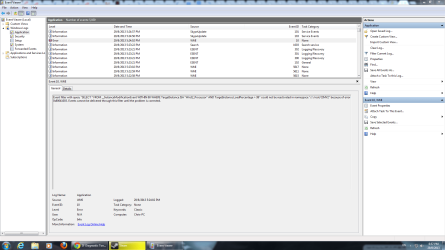
BTW, I have uploaded a Event Viewer's screenshot and I assume that error is causing me the PC freeze.
 

Attachments

Last edited:

My Computer

Computer type
PC/Desktop
OS
Windows 7 Home Premium 64bit
CPU
i5-2500K
Motherboard
MSI H61M-P31 (G3) (MS-7788)
Memory
8GB
Graphics Card(s)
GTX 560 1GB
Sound Card
(1) NVIDIA High Definition Audio (2) NVIDIA High Definitio
Your systeminfo.txt file is empty - run the tool again carefully and re-upload the information

Capture.PNG
 

My Computer

Computer type
PC/Desktop
Computer Manufacturer/Model Number
Golden Mk. I.4
OS
Windows 10 Pro x64 ; Xubuntu x64
CPU
Intel i7 860 @ 2.80 GHz O/C'ed to 4.0GHz
Motherboard
Gigabyte P55A-UD3R Rev.1. Award BIOS F13
Memory
16GB Corsair Vengance DDR3 @ 661 MHz Dual Channel (9-9-9-24)
Graphics Card(s)
EVGA NVidia GTX 560 1024MB
Sound Card
Realtek Integrated
Monitor(s) Displays
Dual Samsung SyncMaster 2494HS
Screen Resolution
1920*1080 and 1920*1080
Hard Drives
1*Samsung 840 EVO 120GB SSD;
1*OCZ Vertex 2 60GB SSD;
2*Samsung F3 SpinPoint 1TB in RAID0;
1*Samsung F1 SpinPoint 1TB;
2*Western Digital 1TB External USB 3.0
1*Western Digital 500GB External USB 3.0
1*Seagate 500GB External USB 2.0
PSU
Thermaltake ToughPower QFan 750W
Case
Thermaltake Element S VK60001W2Z
Cooling
Corsair H60 Water Cooling, 2*230mm and 2*80mm case fans
Keyboard
Logitech G110
Mouse
Logitech MX518

My Computer

Computer type
PC/Desktop
OS
Windows 7 Home Premium 64bit
CPU
i5-2500K
Motherboard
MSI H61M-P31 (G3) (MS-7788)
Memory
8GB
Graphics Card(s)
GTX 560 1GB
Sound Card
(1) NVIDIA High Definition Audio (2) NVIDIA High Definitio
Your MSINFO32 file is corrupt, upload a new version.
:orb:Start> RUN> MSINFO32 and hit [Enter].
In MSINFO32 go to, File> Save> name it your user-name zip and upload.


These entries are found in the SysEvent text file:
Code:
Event[26514]:
  Log Name: System
  Source: Disk
  Date: 2013-08-29T18:24:48.077
  Event ID: 7
  Task: N/A
  Level: Error
  Opcode: N/A
  Keyword: Classic
  User: N/A
  User Name: N/A
  Computer: Chris-PC
  Description: 
The device, \Device\[COLOR=Blue][U][B]Harddisk1[/B][/U][/COLOR]\[COLOR=Blue][U][B]DR1[/B][/U][/COLOR], [COLOR=Red][U][B]has a bad block[/B][/U][/COLOR].

Code:
Event[26057]:
  Log Name: System
  Source: Disk
  Date: 2013-08-28T14:15:20.012
  Event ID: 7
  Task: N/A
  Level: Error
  Opcode: N/A
  Keyword: Classic
  User: N/A
  User Name: N/A
  Computer: Chris-PC
  Description: 
The device, \Device\[COLOR=Blue][U][B]Harddisk2[/B][/U][/COLOR]\[COLOR=Blue][U][B]DR2[/B][/U][/COLOR], [COLOR=Red][U][B]has a bad block[/B][/U][/COLOR].


Start backing up your data now as your HDDs might be failing.
 

My Computer

Computer type
PC/Desktop
OS
Windows 10
CPU
Intel Core i5 3570K
Motherboard
Asus P8Z77V-PRO
Memory
16GB 1600Mhz G.Skill
Graphics Card(s)
Gigabyte GTX 970 G1-Gaming
PSU
Seasonic 1000W Platinum
Case
Fractal Design Define R4
Cooling
Noctua NH-D14
There don't appear to be any .dmp files, so lets assume its not BSOD'ing for now. Try this:

1. Click Start
orb.png

2. In the search box, type cmd
3. In the list that appears, right-click on cmd.exe and choose Run as administrator
4. In the command window that opens, type sfc /scannow and hit enter.

Report the output from the command window once it finishes.

More detail: http://www.sevenforums.com/tutorials/1538-sfc-scannow-command-system-file-checker.html
 

My Computer

Computer type
PC/Desktop
Computer Manufacturer/Model Number
Golden Mk. I.4
OS
Windows 10 Pro x64 ; Xubuntu x64
CPU
Intel i7 860 @ 2.80 GHz O/C'ed to 4.0GHz
Motherboard
Gigabyte P55A-UD3R Rev.1. Award BIOS F13
Memory
16GB Corsair Vengance DDR3 @ 661 MHz Dual Channel (9-9-9-24)
Graphics Card(s)
EVGA NVidia GTX 560 1024MB
Sound Card
Realtek Integrated
Monitor(s) Displays
Dual Samsung SyncMaster 2494HS
Screen Resolution
1920*1080 and 1920*1080
Hard Drives
1*Samsung 840 EVO 120GB SSD;
1*OCZ Vertex 2 60GB SSD;
2*Samsung F3 SpinPoint 1TB in RAID0;
1*Samsung F1 SpinPoint 1TB;
2*Western Digital 1TB External USB 3.0
1*Western Digital 500GB External USB 3.0
1*Seagate 500GB External USB 2.0
PSU
Thermaltake ToughPower QFan 750W
Case
Thermaltake Element S VK60001W2Z
Cooling
Corsair H60 Water Cooling, 2*230mm and 2*80mm case fans
Keyboard
Logitech G110
Mouse
Logitech MX518

My Computer

Computer type
PC/Desktop
OS
Windows 10
CPU
Intel Core i5 3570K
Motherboard
Asus P8Z77V-PRO
Memory
16GB 1600Mhz G.Skill
Graphics Card(s)
Gigabyte GTX 970 G1-Gaming
PSU
Seasonic 1000W Platinum
Case
Fractal Design Define R4
Cooling
Noctua NH-D14
Strange, even I recreate the MSINFO32 file it is still corrupt or incompatible with this version of System Information.
 

My Computer

Computer type
PC/Desktop
OS
Windows 7 Home Premium 64bit
CPU
i5-2500K
Motherboard
MSI H61M-P31 (G3) (MS-7788)
Memory
8GB
Graphics Card(s)
GTX 560 1GB
Sound Card
(1) NVIDIA High Definition Audio (2) NVIDIA High Definitio
There don't appear to be any .dmp files, so lets assume its not BSOD'ing for now. Try this:

1. Click Start
orb.png

2. In the search box, type cmd
3. In the list that appears, right-click on cmd.exe and choose Run as administrator
4. In the command window that opens, type sfc /scannow and hit enter.

Report the output from the command window once it finishes.

More detail: http://www.sevenforums.com/tutorials/1538-sfc-scannow-command-system-file-checker.html

"Windows Resource Protection did not find any integrity violations."
Is it fine?
 

My Computer

Computer type
PC/Desktop
OS
Windows 7 Home Premium 64bit
CPU
i5-2500K
Motherboard
MSI H61M-P31 (G3) (MS-7788)
Memory
8GB
Graphics Card(s)
GTX 560 1GB
Sound Card
(1) NVIDIA High Definition Audio (2) NVIDIA High Definitio
Yep, thats OK. Now do this:

1. Click Start
orb.png

2. In the search box, type cmd
3. In the list that appears, right-click on cmd.exe and choose Run as administrator
4. In the command window that opens, type chkdsk /R and hit enter.

You will be prompted whether you wish to schedule a chkdsk scan at next startup, type 'Y' and hit enter. Now restart your computer and chkdsk will automatically run.

More detail: http://www.sevenforums.com/tutorials/433-disk-check.html
 

My Computer

Computer type
PC/Desktop
Computer Manufacturer/Model Number
Golden Mk. I.4
OS
Windows 10 Pro x64 ; Xubuntu x64
CPU
Intel i7 860 @ 2.80 GHz O/C'ed to 4.0GHz
Motherboard
Gigabyte P55A-UD3R Rev.1. Award BIOS F13
Memory
16GB Corsair Vengance DDR3 @ 661 MHz Dual Channel (9-9-9-24)
Graphics Card(s)
EVGA NVidia GTX 560 1024MB
Sound Card
Realtek Integrated
Monitor(s) Displays
Dual Samsung SyncMaster 2494HS
Screen Resolution
1920*1080 and 1920*1080
Hard Drives
1*Samsung 840 EVO 120GB SSD;
1*OCZ Vertex 2 60GB SSD;
2*Samsung F3 SpinPoint 1TB in RAID0;
1*Samsung F1 SpinPoint 1TB;
2*Western Digital 1TB External USB 3.0
1*Western Digital 500GB External USB 3.0
1*Seagate 500GB External USB 2.0
PSU
Thermaltake ToughPower QFan 750W
Case
Thermaltake Element S VK60001W2Z
Cooling
Corsair H60 Water Cooling, 2*230mm and 2*80mm case fans
Keyboard
Logitech G110
Mouse
Logitech MX518
My PC got freeze again just now but it was able to respond after waiting a few seconds. It seems like the problem hasn't been resolved :(
 

My Computer

Computer type
PC/Desktop
OS
Windows 7 Home Premium 64bit
CPU
i5-2500K
Motherboard
MSI H61M-P31 (G3) (MS-7788)
Memory
8GB
Graphics Card(s)
GTX 560 1GB
Sound Card
(1) NVIDIA High Definition Audio (2) NVIDIA High Definitio

I'm suspicious of your hard drive. If I understand matters you've been using the same hard drive for the duration of this problem. If this is so, you might try a clean install using a different hard drive. If this doesn't solve your freeze problem you can always go back to your present hard drive and continue the debug. Hard drives can be responsible for problems like this and sometimes they even test out OK. In your case as yoyo155 has pointed out, your drive shows a bad block which is further reason to suspect it as the root cause of your freeze problem.
 

My Computer

Computer type
PC/Desktop
Computer Manufacturer/Model Number
Custom Build
OS
Windows 7 professional 64 bit
CPU
i7-870
Motherboard
Gigabyte GA-P55-USB3 (rev 2)
Memory
G.Skill F3-10666CL9D-8GBRL; (8GB)
Graphics Card(s)
Radeon HD4670
Sound Card
on board
Monitor(s) Displays
Dell U2311H plus ASUS PB238
Screen Resolution
1080P (dual monitors)
Hard Drives
VelociRaptor WD1500HLHX 150GB (system)
2TB Samsung spinpoint (data)
596GB WD caviar blue (data)
PSU
FSP AS400 400W ATX2.31/EPS2.92
Case
Antec Sonata III 500
Cooling
CPU cooled by Rosewill HSF RCX-Z90-CP
Keyboard
Microsoft ergonomic PS-2
Mouse
Logitech M510
Internet Speed
very fast via cable
Antivirus
Microsoft Security Essentials
Browser
Chrome and IE10
Other Info
Also have hauppauge TV Card HVR-1600
CPU, case and GPU Fans are controlled by SpeedFan.

My Computer

Computer type
PC/Desktop
Computer Manufacturer/Model Number
Custom Built
OS
Windows 10 Pro
CPU
AMD Ryzen 5 2400G Processor with Radeon RX Vega 11 Graphics
Motherboard
ASRock X470 Master SLI/AC AM4 AMD Promontory X470 SATA 6Gb/s
Memory
G.SKILL Ripjaws V Series 16GB (2 x 8GB) 288-Pin DDR4 SDRAM D
Graphics Card(s)
2047MB NVIDIA GeForce GTX 1060 6GB (EVGA)
Sound Card
Motherboard Built in
Monitor(s) Displays
Acer R240HY bidx 23.8-Inch IPS HDMI DVI VGA (1920 x 1080) Wi
Screen Resolution
1920 x 1080
Hard Drives
1TB Sandisk SSD PLUS (Main drive)
500 GB Seagate 7200 RPM (Games)
500 GB Western Digital 7200 RPM (Virtual Machines)
PSU
CORSAIR TX Series TX650M 650W 80+ Gold Modular Power Supply
Case
CORSAIR CARBIDE SPEC-02 Mid-Tower Gaming Case, Red LED Fan
Cooling
220mm, two 120mm, and four 60mm fans
Keyboard
Wired Dell keyboard
Mouse
Wireless Logitech mouse
Internet Speed
250mb down, 30mb up
Antivirus
Panda Cloud Antivirus
Browser
Chrome-ish x64
Other Info
Your awesome for reading this.
Sorry for asking an idiotic question but how do you exactly replace the cable and what cable did you mention? Hard disk cable?
 

My Computer

Computer type
PC/Desktop
OS
Windows 7 Home Premium 64bit
CPU
i5-2500K
Motherboard
MSI H61M-P31 (G3) (MS-7788)
Memory
8GB
Graphics Card(s)
GTX 560 1GB
Sound Card
(1) NVIDIA High Definition Audio (2) NVIDIA High Definitio
What does event viewer say? Did you look at the guide I gave a link to? Did you find any disk related events?
If this shows disk related faults in there, then I suggest the following below:


In the computer, there is what is called a sata cable. (You can do a google image search to see what they look like.)
I suggest that you buy a new sata cable and replace the one currently going from the motherboard to the hard disk.

Again, if you are not comfortable doing this you might want to take it somewhere. But I believe anyone can do it. It's easy to do.

See this video here:

How to install a SATA hard drive - HD video - YouTube

You can ignore the part about putting in the hard drive and installing it etc. Just pay attention to the parts of putting in the cable etc.
 

My Computer

Computer type
PC/Desktop
Computer Manufacturer/Model Number
Custom Built
OS
Windows 10 Pro
CPU
AMD Ryzen 5 2400G Processor with Radeon RX Vega 11 Graphics
Motherboard
ASRock X470 Master SLI/AC AM4 AMD Promontory X470 SATA 6Gb/s
Memory
G.SKILL Ripjaws V Series 16GB (2 x 8GB) 288-Pin DDR4 SDRAM D
Graphics Card(s)
2047MB NVIDIA GeForce GTX 1060 6GB (EVGA)
Sound Card
Motherboard Built in
Monitor(s) Displays
Acer R240HY bidx 23.8-Inch IPS HDMI DVI VGA (1920 x 1080) Wi
Screen Resolution
1920 x 1080
Hard Drives
1TB Sandisk SSD PLUS (Main drive)
500 GB Seagate 7200 RPM (Games)
500 GB Western Digital 7200 RPM (Virtual Machines)
PSU
CORSAIR TX Series TX650M 650W 80+ Gold Modular Power Supply
Case
CORSAIR CARBIDE SPEC-02 Mid-Tower Gaming Case, Red LED Fan
Cooling
220mm, two 120mm, and four 60mm fans
Keyboard
Wired Dell keyboard
Mouse
Wireless Logitech mouse
Internet Speed
250mb down, 30mb up
Antivirus
Panda Cloud Antivirus
Browser
Chrome-ish x64
Other Info
Your awesome for reading this.
Sorry for the late reply. Let's see, I have replaced all 3 SATA cables but the freeze has not yet fixed. Now I'm really suspicious of my 3 hard disk. If the culprit is my hard disk, any chance to fix or repair it instead of replacing a new one?

BTW, whenever my whole PC freezes up and needs to be hard reset, I go check the event viewer and the error(picture provided) is always seen. Can anyone comprehend the context of the problem?
 

Attachments

  • Capture 3.PNG
    Capture 3.PNG
    56.9 KB · Views: 13

My Computer

Computer type
PC/Desktop
OS
Windows 7 Home Premium 64bit
CPU
i5-2500K
Motherboard
MSI H61M-P31 (G3) (MS-7788)
Memory
8GB
Graphics Card(s)
GTX 560 1GB
Sound Card
(1) NVIDIA High Definition Audio (2) NVIDIA High Definitio
Back
Top