Solved Computer freezes randomly

GabrielK

New member
Local time
1:10 PM
Messages
37
Hello, i originally created a thread like this is BSOD section but thought it would be better suited here.

I've had this issue for a couple of months now, but in the latest 1-2 weeks it has gotten pretty severe. I have no idea how to bugtest this, so any pointers would be really appreciated.

When the computer freezes, it can happen in two different ways, either the monitor goes pitch black and the computer restarts itself, or the screen just freezes (any music freezes and makes a static sound) and you need to hard reboot it. These crashes can happen any time.

Something i've noticed is when i power on the computer for the first time in the day, i usually start the game DOTA2 and just let it idle for a bit. The computer will usually freeze withing 5-10 minutes, and i will do a hard reboot. The next time i open DOTA2 after the hard reboot, the game can run for a couple of hours without crashing or freezing. Although this is usually a hit and miss, sometimes when a crash has happened and i reboot, several more crashes can keep happening in a row and ill have to keep doing hard reboots.

Today it happened again, and this time when i rebooted, the computer actually completely froze on the startup screen that lets you go to BIOS.

Looking at the eventlogger, the Critical one is the regular ID 41 "computer didnt shut of correctly". There are then a total of 9 errors (3 errors from 3 different ones) that are logged about 30-60 seconds after the Critical one, and they have the following ID:

ID 102 PNRPSvc
ID 7001 Service Control Manager
ID 7023 Service Control Manager

As far as im concerned, the temps all seem to be below 40C, and during load it doesnt go above 55-60C
48c37b0b49.png


I've cleaned most of the case with compressed air i believe, but not each piece individually. I've also run a chkdsk but couldn't figure out where to look for wrong info.

My GPU is a Geforce GTX 750 SC(super clocked from factory) if that makes any difference.

The only thing that i can think of doing right now is run a memtest, which i was gonna do today and let it run overnight. I'm wondering however if i should be using memtest86 or memtest86+.

Any help is appreciated, Thank you!
Gabriel
 

My Computer

Computer type
PC/Desktop
Computer Manufacturer/Model Number
Custom build
OS
Windows 7 Professional N 64bit
CPU
AMD Phenom(tm) II X4 965 Processor 3.42GHz
Motherboard
Gigabyte GA-890GPA-UD3H
Memory
4GB RAM
Graphics Card(s)
Nvidia GTX 750
Hard Drives
SSD samsung EVO BASIC
Antivirus
NOD32
Browser
Google Chrome
You need to look at the errors before "the computer did not shut down properly". That message is there becasue you forced a shutdown so the freezing happened before that.
 

My Computer

Computer type
PC/Desktop
OS
windows 7 ultimate x64
Hey cyanna,

There are no errors before the critical one, atleast not within the latest hour in the event logger. The only time errors show up in the event logger is when the PC has a force shutdown, and it's always the same 3(total 9) errors.
 

My Computer

Computer type
PC/Desktop
Computer Manufacturer/Model Number
Custom build
OS
Windows 7 Professional N 64bit
CPU
AMD Phenom(tm) II X4 965 Processor 3.42GHz
Motherboard
Gigabyte GA-890GPA-UD3H
Memory
4GB RAM
Graphics Card(s)
Nvidia GTX 750
Hard Drives
SSD samsung EVO BASIC
Antivirus
NOD32
Browser
Google Chrome
Hi Gabriel,
The minimum RAM for that game is 4GB, so i would suggest you get more.
Dont forget when you start W7 theres a lot of process's vying for resources.

Roy
 

My Computer

Computer type
PC/Desktop
Computer Manufacturer/Model Number
medionl/Aspire 6930G/acer x55a
OS
W7 home premium 32bit/W7HP 64bit/w10 tp insider ring
CPU
E5300 dual core
Motherboard
medion MS7366
Memory
3gb
Graphics Card(s)
Nvidia Geforce 7100 Nforce 630i
Monitor(s) Displays
avixc
Internet Speed
n (isp resticted to 72)
Antivirus
mse/pands
Browser
palemoon
Other Info
Belkin Fd7050 n USB using Railink RT2870 drivers, more upto date
Hey torchwood,

I understand the minimum RAM for the game is 4GB, but i've been playing the game since 2011 with this computer, only to replace the GPU once. I've not had this kind of problem before untill a couple of months ago when it actually started. Back then i didnt mind it too much cause it happened maybe once a month, but this past week it has been happening everyday, sometimes 3-5 times a day.

There are days when i don't start DOTA2 at all, but the PC will still freeze randomly.
 

My Computer

Computer type
PC/Desktop
Computer Manufacturer/Model Number
Custom build
OS
Windows 7 Professional N 64bit
CPU
AMD Phenom(tm) II X4 965 Processor 3.42GHz
Motherboard
Gigabyte GA-890GPA-UD3H
Memory
4GB RAM
Graphics Card(s)
Nvidia GTX 750
Hard Drives
SSD samsung EVO BASIC
Antivirus
NOD32
Browser
Google Chrome

My Computers

System One System Two

  • Computer type
    PC/Desktop
    Computer Manufacturer/Model Number
    custom build
    OS
    Windows 7 HP 64
    CPU
    i5 6600K - 800MHz to 4200MHz
    Motherboard
    GA-Z170-HD3P
    Memory
    4+4G GSkill DDR4 3000
    Graphics Card(s)
    IG - Intel 530
    Monitor(s) Displays
    Samsung 226BW
    Screen Resolution
    1680x1050
    Hard Drives
    (1) -1 SM951 – 128GB M.2 AHCI PCIe SSD drive for Windows 7 and Lubuntu
    (2) -1 WD SATA 3 - 1T for Data
    (3) -1 WD SATA 3 - 1T for backup
    PSU
    Thermaltake 450W TR2 gold
    Keyboard
    Old and good Chicony mechanical keyboard
    Mouse
    Logitech mX performance - 9 buttons (had to disable some)
    Internet Speed
    500Mb/s
    Browser
    Firefox 64
    Other Info
    TinyWall firewall
  • Computer type
    Laptop
    System Manufacturer/Model Number
    Asus Q550LF
    OS
    Windows 7 Pro
    CPU
    i7-4500U 800MHz to 3.0GHz
    Motherboard
    Asus Q550LF
    Memory
    (4+4)G DDR3 1600
    Graphics Card(s)
    IG intel 4400 + NVIDIA GeForce GT 745M
    Sound Card
    Realtek
    Monitor(s) Displays
    LG Display LP156WF4-SPH1
    Screen Resolution
    1920 x 1080
    Hard Drives
    BX500 120G SSD for Windows and programs +
    1T HDD for data
    Internet Speed
    500 Mb/s
    Browser
    Firefox
    Other Info
    TinyWall firewall
Something I noticed from the picture in Post #1

Your ram is running in single channel.
Your motherboard in dual channel capable.

GIGABYTE - Motherboard - Socket AM3 - GA-890GPA-UD3H (rev. 2.1)


  1. 4 x 1.5V DDR3 DIMM sockets supporting up to 16 GB of system memory (Note 1)
  2. Dual channel memory architecture
  3. Support for DDR3 2000(OC)/1333/1066 MHz memory modules

This may or may not cause a problem.

Exactly what ram do you have and what slots are they installed in?
 

My Computer

Computer type
PC/Desktop
Computer Manufacturer/Model Number
Home made Desktop
OS
Windows 10 Pro. 64/ version 1709 Windows 7 Pro/64
CPU
Intel i7-6800K @ 4.3
Motherboard
ASUS X-99 Deluxe II
Memory
Corsair Platinum 16 gig @2400
Graphics Card(s)
EVGA GTX 1070 OC
Monitor(s) Displays
Asus 27" LED LCD/VE278Q
Screen Resolution
1920-1080 or 1280-720 HDMI
Hard Drives
INTEL SSD 730-240 Gb Sata 3.0/
PSU
EVGA Platium 1200W
Case
Phanteks Luxe Tempered Glass 8 fans/ one radiator
Cooling
XSPC/ Water Cooled CPU
Keyboard
Das 4 Professional
Mouse
Logitech M705/MX Anywhere 2-S
Internet Speed
100 mbits
Antivirus
Microsoft Security Essentials/ Malwarebytes Premium 3.0/ SAS
Browser
I.E. 11 default/Firefox/ ISP Time Warner Cable/Spectrum
Other Info
LG BluRay Burner/
Sound system-KLipsch-THX/
Icy Dock ssd Hot Swap bays.

Thanks, the info is in swedish so im not sure if linking anything here is useful, however im guessing the small bit that's important is "0 kB in damaged/bad sector".

i will run a scannow now.

EDIT: Nothing found

Something I noticed from the picture in Post #1

Your ram is running in single channel.
Your motherboard in dual channel capable.

GIGABYTE - Motherboard - Socket AM3 - GA-890GPA-UD3H (rev. 2.1)


  1. 4 x 1.5V DDR3 DIMM sockets supporting up to 16 GB of system memory (Note 1)
  2. Dual channel memory architecture
  3. Support for DDR3 2000(OC)/1333/1066 MHz memory modules

This may or may not cause a problem.

Exactly what ram do you have and what slots are they installed in?

This actually came as a shock to me aswell when i looked at the picture.

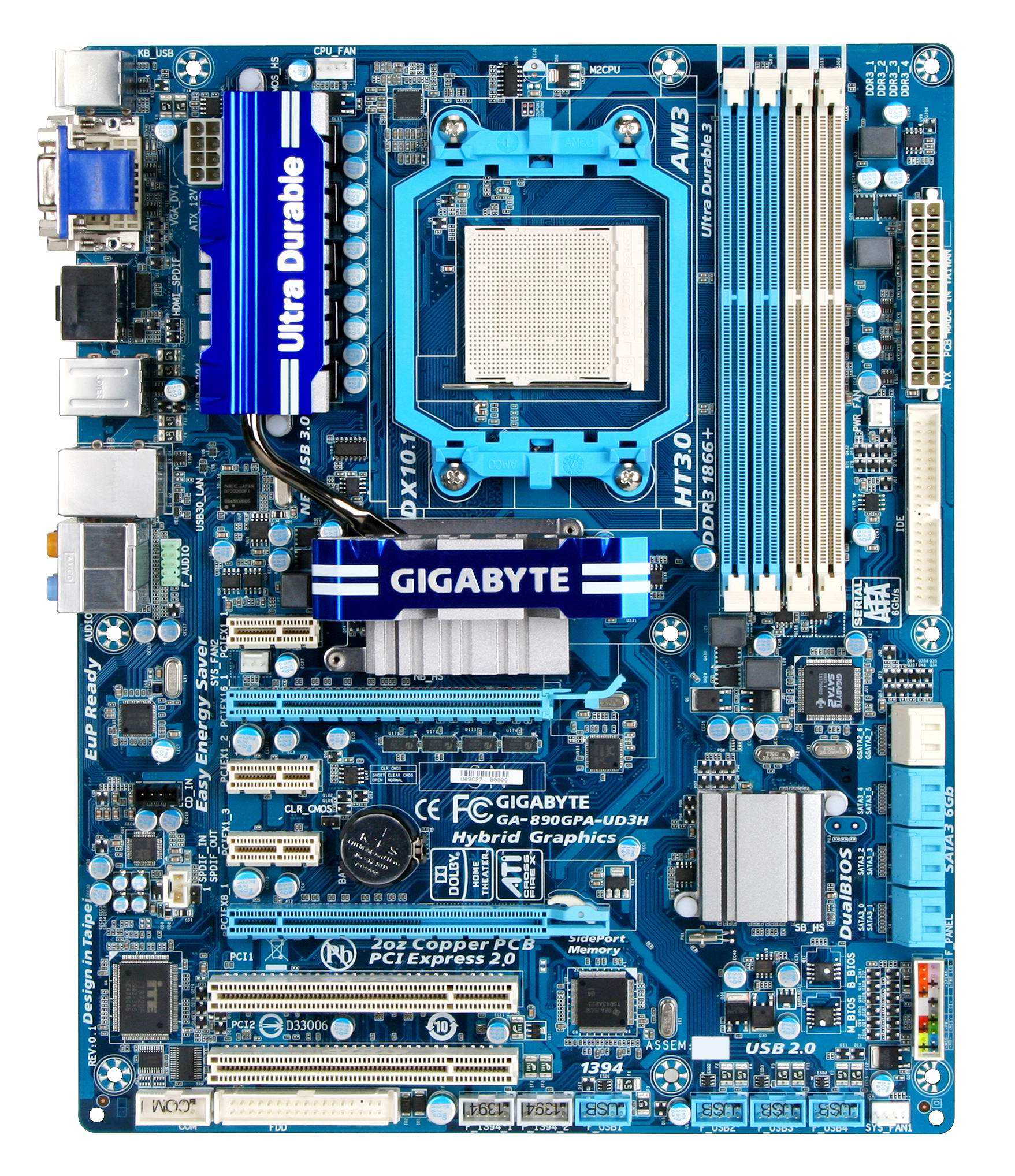
the RAM im using is "Corsair 4GB (2x2048MB) 1600MHz XMS3" and the motherboard looks like this
890GPA-UD3H.jpg

Theres 1 stick in the first blue and 1 stick in the first white. I must be crazy because i could of sworn it used to be blue white blue white, and not blue blue white white, have i mixed up how to do dual channel?
 

My Computer

Computer type
PC/Desktop
Computer Manufacturer/Model Number
Custom build
OS
Windows 7 Professional N 64bit
CPU
AMD Phenom(tm) II X4 965 Processor 3.42GHz
Motherboard
Gigabyte GA-890GPA-UD3H
Memory
4GB RAM
Graphics Card(s)
Nvidia GTX 750
Hard Drives
SSD samsung EVO BASIC
Antivirus
NOD32
Browser
Google Chrome
Break out your motherboard manual and verify the proper slots for your ram.

It appears that Speccy is seeing all your ram but they are in the wrong slots.
This may or may not be your total problem. Many times their is more than one problem.
 

My Computer

Computer type
PC/Desktop
Computer Manufacturer/Model Number
Home made Desktop
OS
Windows 10 Pro. 64/ version 1709 Windows 7 Pro/64
CPU
Intel i7-6800K @ 4.3
Motherboard
ASUS X-99 Deluxe II
Memory
Corsair Platinum 16 gig @2400
Graphics Card(s)
EVGA GTX 1070 OC
Monitor(s) Displays
Asus 27" LED LCD/VE278Q
Screen Resolution
1920-1080 or 1280-720 HDMI
Hard Drives
INTEL SSD 730-240 Gb Sata 3.0/
PSU
EVGA Platium 1200W
Case
Phanteks Luxe Tempered Glass 8 fans/ one radiator
Cooling
XSPC/ Water Cooled CPU
Keyboard
Das 4 Professional
Mouse
Logitech M705/MX Anywhere 2-S
Internet Speed
100 mbits
Antivirus
Microsoft Security Essentials/ Malwarebytes Premium 3.0/ SAS
Browser
I.E. 11 default/Firefox/ ISP Time Warner Cable/Spectrum
Other Info
LG BluRay Burner/
Sound system-KLipsch-THX/
Icy Dock ssd Hot Swap bays.
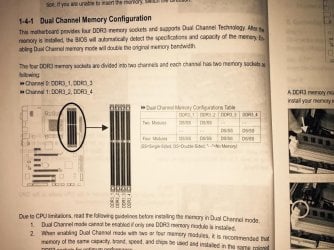
So if i understand this correctly, the RAM should be next to each other in the blue slots? i got a bit confused by the channels being even and odd numbers
 

Attachments

  • ram.jpg
    ram.jpg
    203.5 KB · Views: 0

My Computer

Computer type
PC/Desktop
Computer Manufacturer/Model Number
Custom build
OS
Windows 7 Professional N 64bit
CPU
AMD Phenom(tm) II X4 965 Processor 3.42GHz
Motherboard
Gigabyte GA-890GPA-UD3H
Memory
4GB RAM
Graphics Card(s)
Nvidia GTX 750
Hard Drives
SSD samsung EVO BASIC
Antivirus
NOD32
Browser
Google Chrome
According to you book. Use either slots 1 and 2. Or slots 3 and 4.
I would try 1 and 2 first and then check if you are dual channel.
You can use CPU-Z to check your ram or Speccy.
 

My Computer

Computer type
PC/Desktop
Computer Manufacturer/Model Number
Home made Desktop
OS
Windows 10 Pro. 64/ version 1709 Windows 7 Pro/64
CPU
Intel i7-6800K @ 4.3
Motherboard
ASUS X-99 Deluxe II
Memory
Corsair Platinum 16 gig @2400
Graphics Card(s)
EVGA GTX 1070 OC
Monitor(s) Displays
Asus 27" LED LCD/VE278Q
Screen Resolution
1920-1080 or 1280-720 HDMI
Hard Drives
INTEL SSD 730-240 Gb Sata 3.0/
PSU
EVGA Platium 1200W
Case
Phanteks Luxe Tempered Glass 8 fans/ one radiator
Cooling
XSPC/ Water Cooled CPU
Keyboard
Das 4 Professional
Mouse
Logitech M705/MX Anywhere 2-S
Internet Speed
100 mbits
Antivirus
Microsoft Security Essentials/ Malwarebytes Premium 3.0/ SAS
Browser
I.E. 11 default/Firefox/ ISP Time Warner Cable/Spectrum
Other Info
LG BluRay Burner/
Sound system-KLipsch-THX/
Icy Dock ssd Hot Swap bays.
I have to go to sleep now as it's getting pretty late, i will fix the sticks tomorrow when i come back from work and stresstest the computer.

Thank you so far for your support, i will report back tomorrow!

Regards
Gabi~

EDIT: After almost crushing my motherboard trying to put in the ram, it seems that i've finally managed to get the dual channel setting up.

0a6e29b433.png


Computer hasn't crashed once today, but i also haven't really been able to test it properly. So far so good, i will report back in a few days, or the next time the computer crashes, hopefully it will be good now though.

Thanks for the help so far!
 
Last edited:

My Computer

Computer type
PC/Desktop
Computer Manufacturer/Model Number
Custom build
OS
Windows 7 Professional N 64bit
CPU
AMD Phenom(tm) II X4 965 Processor 3.42GHz
Motherboard
Gigabyte GA-890GPA-UD3H
Memory
4GB RAM
Graphics Card(s)
Nvidia GTX 750
Hard Drives
SSD samsung EVO BASIC
Antivirus
NOD32
Browser
Google Chrome
It's been 3 days so i thought i'd give an update. After air blasting my case and switching RAM to dual channel, the PC has not had any sort of freeze or crash. I still feel a bit skeptical as to whether the the problem is fixed or not, but i am going to mark this as solved. If any freezes occur in the future i will make a new thread again.

Thanks for all the help!
Gabi~
 

My Computer

Computer type
PC/Desktop
Computer Manufacturer/Model Number
Custom build
OS
Windows 7 Professional N 64bit
CPU
AMD Phenom(tm) II X4 965 Processor 3.42GHz
Motherboard
Gigabyte GA-890GPA-UD3H
Memory
4GB RAM
Graphics Card(s)
Nvidia GTX 750
Hard Drives
SSD samsung EVO BASIC
Antivirus
NOD32
Browser
Google Chrome
Glad to see things are going in the right direction.
Time will tell if more needs to be done or if new problems arise.
Happy computhing

Jack
 

My Computer

Computer type
PC/Desktop
Computer Manufacturer/Model Number
Home made Desktop
OS
Windows 10 Pro. 64/ version 1709 Windows 7 Pro/64
CPU
Intel i7-6800K @ 4.3
Motherboard
ASUS X-99 Deluxe II
Memory
Corsair Platinum 16 gig @2400
Graphics Card(s)
EVGA GTX 1070 OC
Monitor(s) Displays
Asus 27" LED LCD/VE278Q
Screen Resolution
1920-1080 or 1280-720 HDMI
Hard Drives
INTEL SSD 730-240 Gb Sata 3.0/
PSU
EVGA Platium 1200W
Case
Phanteks Luxe Tempered Glass 8 fans/ one radiator
Cooling
XSPC/ Water Cooled CPU
Keyboard
Das 4 Professional
Mouse
Logitech M705/MX Anywhere 2-S
Internet Speed
100 mbits
Antivirus
Microsoft Security Essentials/ Malwarebytes Premium 3.0/ SAS
Browser
I.E. 11 default/Firefox/ ISP Time Warner Cable/Spectrum
Other Info
LG BluRay Burner/
Sound system-KLipsch-THX/
Icy Dock ssd Hot Swap bays.
Back
Top