Computer Freezes When External Hard Drive is Accessed

bengiley

New member
Local time
8:39 PM
Messages
5
I bought an HP v165w 32 GB USB 2.0 flash drive off of Amazon and when I plugged it into my USB port and tried to transfer files to it, my computer froze and I had to hold the power button to shut it down.

This happens every time I try to access the flash drive.

Additionally I have 2 other external hard drives that has always worked for me for years and now those too are freezing my computer when I try to access them. It seems like the HP flash drive affected my computer in such a way that it is preventing other devices from working properly.

I have gone into Device Manager and uninstalled the USB Host drivers and restarted my computer. That did not solve the problem.

I have tried using different USB ports on my computer and that has not made a difference.

I have tried uninstalling the drivers for the individual external hard drives and then have them be reinstalled the next time I plug them in. That has not worked.

For some reason though, when I connect my old external hard drives through a powered USB hub I do not experience the freezing. What sucks is that I think my USB Hub is USB 1.0 so it takes forever for anything to transfer.

Every time I plug in the HP flash drive into the USB Hub I get a message saying the driver could not be properly loaded, or that I don't have access to the drive, et cetera.

I am pretty sure the HP flash drive is no good and needs to be returned but does anyone know what I can do to prevent my old external hard drives from freezing my computer without the use of a USB hub?
 
Last edited:

My Computer My Computer

Computer type
Laptop
Computer Manufacturer/Model Number
IBM Thinkpad
OS
Windows 7 Professional 32-Bit Service Pack 1
CPU
Genuine Intel(R) CPU T2300 @ 1.66GHz 1.67 GHz
Memory
2.5 GB
Hard Drives
292 GB
Antivirus
Microsoft Security Essentials
Browser
Google-Chrome
Hello and welcome Ben mate a little more specs would help mate because to see what speed USB the machine supports we need at least the model and more inportnatly the motherboard.
Use this to find those details out.
Using HW Info
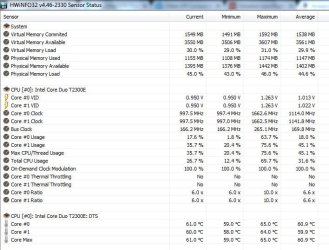
You can test the volts on the PSU with HW Info HWiNFO, HWiNFO32/64 - Download < download the right bit version and close the right hand window select Sensors and scroll down to the power section where you will see what the volts are doing see my pic.
The original right hand window shows the machine running and is handy for that but for looking at the components in some detail close it and use the main left hand side panel
FOR OTHER COMPONENTS
Open each + down into the component itself and then click on it - in the right hand side will appear all sorts of details including brands speeds and other essential info that device. See pic for example.
Use the lower part and find the model of the motherboard please.
 

My Computer My Computer

Computer type
PC/Desktop
Computer Manufacturer/Model Number
Own build (new) Desk1 / Asus ROG Win 7 / Desk2 1st build
OS
Desk1 7 Home Prem / Desk2 10 Pro / Main lap Asus ROG 10 Pro 2 laptop Toshiba 7 Pro Asus P2520 7 & 10
CPU
Desk1 i5 3750K / Laptop i7 GTX 860M / Desk2 i5 2500
Motherboard
Desk1 Asus P877-V / Desk2 Gigabyte H67 UD3H / Laptop ?
Memory
Desk1 8GB (1866) / Desk2 16GB (1333) / Laptop 8Gb DDR3
Graphics Card(s)
Desk 1& 2NVidia GTX 650 & Laptops on board Intel
Sound Card
Desk 1 & 2 -XONAR DG Realtek High Def audio Laptop
Monitor(s) Displays
Desk 1 Benq HD 2450 / Desk2 Philips 24" / Laptop 17.5"
Screen Resolution
1920x1080 D1 & D2 & Laptop 1
Hard Drives
Desk1 Samsung 120GB 830 SSD
Asus ROG 256GB 850 Pro SSD
Desk2 Samsung 840 256 SSD
Toshiba 120GB EVO
PSU
Desk 1 Corsair HX 1050/ Laptop ? / Desk 2 Corsair HX 650
Case
Desk 1 Cooler HAF XM ? Toshiba laptop / Desk2 Coolermaster
Cooling
Fans on all Desk1 -2 Desk2 - all Coolermasters 5 Laptop ?
Keyboard
Desk 1 MS Sidewinder X6 Desk 2 MS Sidewinder X 4
Mouse
Desk 1&2 - Gigabyte MS 900 gamer - laptop - Logitec wireless
Internet Speed
ADSL2+
Other Info
One other Desktop (tester) and spare Toshba laptop both with SSD's
Running Kaspersky 2016 ISS on all machines config'd identically
Logitec audio stereo systems on each machine (x3)
Canon MG5250MFC
Router/modem TP-Link running WPA2SK

Attachments

  • Capture.JPG
    Capture.JPG
    68.9 KB · Views: 0
  • Capture1.JPG
    Capture1.JPG
    59.5 KB · Views: 0
  • Capture2.JPG
    Capture2.JPG
    80 KB · Views: 0

My Computer My Computer

Computer type
Laptop
Computer Manufacturer/Model Number
IBM Thinkpad
OS
Windows 7 Professional 32-Bit Service Pack 1
CPU
Genuine Intel(R) CPU T2300 @ 1.66GHz 1.67 GHz
Memory
2.5 GB
Hard Drives
292 GB
Antivirus
Microsoft Security Essentials
Browser
Google-Chrome

My Computer My Computer

Computer type
PC/Desktop
OS
Windows 7 Ultimate 64 bit
CPU
Intel pentium 3
Motherboard
MSI
Memory
2GB RAM DDR 3
Graphics Card(s)
Intel HD Graphics
Sound Card
Realtek Audio
Monitor(s) Displays
zenware
Screen Resolution
1680x1050
Hard Drives
80 GB
Case
i-Max
Cooling
Cooler Master
Keyboard
A4TECH
Mouse
edvan
Antivirus
Avast Anti virus 2015
Browser
Google chrome
sfc/scannow

I ran sfc/scannow and it reported that "Windows Resource Protection did not find any integrity violations".
 

My Computer My Computer

Computer type
Laptop
Computer Manufacturer/Model Number
IBM Thinkpad
OS
Windows 7 Professional 32-Bit Service Pack 1
CPU
Genuine Intel(R) CPU T2300 @ 1.66GHz 1.67 GHz
Memory
2.5 GB
Hard Drives
292 GB
Antivirus
Microsoft Security Essentials
Browser
Google-Chrome
To make it short, try this,
Go to Device Manager > Disk drives > and right click to "DISABLE" the problem drive. Unplug the power cord attached to the the problem usb drive, wait 30 seconds (just to be safe), then reconnect the the power cord, and wait for a few seconds. Hope this help. Good luck.


I tried this and it just showed the external hard drive as being disabled still.
 

My Computer My Computer

Computer type
Laptop
Computer Manufacturer/Model Number
IBM Thinkpad
OS
Windows 7 Professional 32-Bit Service Pack 1
CPU
Genuine Intel(R) CPU T2300 @ 1.66GHz 1.67 GHz
Memory
2.5 GB
Hard Drives
292 GB
Antivirus
Microsoft Security Essentials
Browser
Google-Chrome
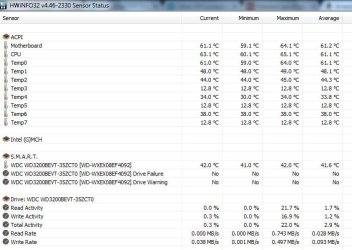
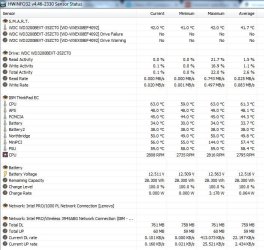
Sorry late reply Ben mate the volts look ok - the temps do a look a little on the high side to me and I would be checking all in vents to the machine and also look into the fan intake see my little ditty for cleaning unopened laptops.

CLEANING A LAPTOP FAN & COOLER RAD
The thing you do is to turn over the laptop and shine a very bright light into the air intake aperture (you will see the fan there) and then while doing that look at the outlet vent on the end of the laptop you should see the light quite clearly shining through the cooling " radiator" if not it is clogged and will need cleaning as will probably the fan opening.
You can do this by blowing it out using a compressed air can in short bursts.
BUT ONE WORD OF WARNING DO NOT blow the air into the fan opening without inserting say a plastic rod or large cable tie to stop the fan from spinning as the air blast will spin the fan at a very high speed that it is not designed to take and may wreck the bearing!!
The "rad" you can clean very gently with one of those pipe cleaners / chenille craft wires. see pic

Plus see my pic for where these are most laptops are reasonably similar:)

If you need a hand with anything inside post back;)

PS Meant to mention in addition to what Jumanji asked you to do try this
http://www.sevenforums.com/tutorials/433-disk-check.html < if necessary include the /f and /r in the command line as per Option2
 

Attachments

  • LAPTOP VENTING.PNG
    LAPTOP VENTING.PNG
    171.1 KB · Views: 1
  • CHINELLE.PNG
    CHINELLE.PNG
    65.6 KB · Views: 14

My Computer My Computer

Computer type
PC/Desktop
Computer Manufacturer/Model Number
Own build (new) Desk1 / Asus ROG Win 7 / Desk2 1st build
OS
Desk1 7 Home Prem / Desk2 10 Pro / Main lap Asus ROG 10 Pro 2 laptop Toshiba 7 Pro Asus P2520 7 & 10
CPU
Desk1 i5 3750K / Laptop i7 GTX 860M / Desk2 i5 2500
Motherboard
Desk1 Asus P877-V / Desk2 Gigabyte H67 UD3H / Laptop ?
Memory
Desk1 8GB (1866) / Desk2 16GB (1333) / Laptop 8Gb DDR3
Graphics Card(s)
Desk 1& 2NVidia GTX 650 & Laptops on board Intel
Sound Card
Desk 1 & 2 -XONAR DG Realtek High Def audio Laptop
Monitor(s) Displays
Desk 1 Benq HD 2450 / Desk2 Philips 24" / Laptop 17.5"
Screen Resolution
1920x1080 D1 & D2 & Laptop 1
Hard Drives
Desk1 Samsung 120GB 830 SSD
Asus ROG 256GB 850 Pro SSD
Desk2 Samsung 840 256 SSD
Toshiba 120GB EVO
PSU
Desk 1 Corsair HX 1050/ Laptop ? / Desk 2 Corsair HX 650
Case
Desk 1 Cooler HAF XM ? Toshiba laptop / Desk2 Coolermaster
Cooling
Fans on all Desk1 -2 Desk2 - all Coolermasters 5 Laptop ?
Keyboard
Desk 1 MS Sidewinder X6 Desk 2 MS Sidewinder X 4
Mouse
Desk 1&2 - Gigabyte MS 900 gamer - laptop - Logitec wireless
Internet Speed
ADSL2+
Other Info
One other Desktop (tester) and spare Toshba laptop both with SSD's
Running Kaspersky 2016 ISS on all machines config'd identically
Logitec audio stereo systems on each machine (x3)
Canon MG5250MFC
Router/modem TP-Link running WPA2SK
I have reinstalled my operating system and I still have the issue.
 

My Computer My Computer

Computer type
Laptop
Computer Manufacturer/Model Number
IBM Thinkpad
OS
Windows 7 Professional 32-Bit Service Pack 1
CPU
Genuine Intel(R) CPU T2300 @ 1.66GHz 1.67 GHz
Memory
2.5 GB
Hard Drives
292 GB
Antivirus
Microsoft Security Essentials
Browser
Google-Chrome
Back
Top