Computer Freezes Without BSOD, Event ID 129

thetravis0916

New member
Local time
2:09 AM
Messages
22
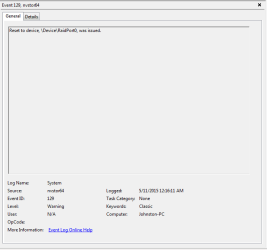
I have a problem with my new install of windows 7 where i guess it thinks that I should have raid. I keep getting this error:Reset to device, \Device\RaidPort0, was issued. It causes my games and computer to freeze. It is completely random and the amount of time it is frozen is random. I have 2 hard drives in my computer. But they are not set up as raid. One is OS and the other is a backup with files. I have checked the bios and flashed it to the latest version. I cant seem to get it to stop any help would be nice.

I have attached the event viewer error i think is causing it. The application and system logs from event viewer.

System Info:
https://onedrive.live.com/redir?resid=55375A86B6A89742!337&authkey=!APO7LTd5MDu2ax8&ithint=file%2ctxt

System Logs:
https://onedrive.live.com/redir?resid=55375A86B6A89742!338&authkey=!ADj4f8o0chgcwfc&ithint=file%2cevtx

Application Logs:
https://onedrive.live.com/redir?resid=55375A86B6A89742!336&authkey=!AOFfbgo8ZeBBjfU&ithint=file%2cevtx

I also attached a report from Speccy while playing the game it usually crashes on.
https://onedrive.live.com/redir?resid=55375A86B6A89742!339&authkey=!AIHJ7Fw_KNvkGiQ&ithint=file%2ctxt
 

Attachments
  • error.png
    error.png
    6.4 KB · Views: 0

My Computer My Computer

OS
Windows 7 Home Premium 64bit
CPU
AMD FX-4100 Zambezi 3.6GHz Socket AM3+ Quad Core
Motherboard
GA-M68MT-S2 (rev. 3.1) rev. 1.3 NVIDIA® GeForce 7025
Memory
G.SKILL Ripjaws Series 8GB (2 x 4GB) 240-Pin DDR3 SDRAM DDR3
Graphics Card(s)
Nvidia GTX 660

My Computer My Computer

Computer type
PC/Desktop
Computer Manufacturer/Model Number
Custom Build
OS
Windows 7 Ultimate x64 SP1
CPU
AMD Phenom 2 1090T
Motherboard
Gigabyte GA-890FXA-UD5
Memory
2x8GB Kingston HyperX Fury Black 1600Mhz Unganged
Graphics Card(s)
MSI GTX 970 Gaming 4G
Sound Card
Realtek On-Board HD 7.1 Audio / Logitech G35
Monitor(s) Displays
3xAcer GD245HQ
Screen Resolution
1920x1080
Hard Drives
Samsung 850 Pro 512GB SSD - OS /
WD Caviar Black SATA 3 - 1 TBx2 - Dynamic RAID 0 /
WD Caviar Green SATA 2 - 640GBx2 - Dynamic RAID 0 /
WD Caviar Green SATA 2 - 640GB - Internal Backup /
Seagate Barracude SATA 3 - 3TB - External Backup/ Sync
PSU
HighPower 1000W
Case
Cooler Master HAF 932
Cooling
Noctua NH-D14
Keyboard
Logitech G19
Mouse
Logitech G500
Internet Speed
100/4 Mbit Cable (100GB quota)
Antivirus
ZoneAlarm Extreme Security / MBAM Pro / MBAE Free / SAS Free
Browser
IE 11 - Firefox - Chrome
Other Info
Logitech F710/ G27/ G940/ Z5500 // TrackIR 5 // Nvidia 3D Surround Vision
Ok i will look into that. I checked bios and it said raid is disabled. And under that ATA/ATPI Devices in device manager its does not show raid drivers
 

My Computer My Computer

OS
Windows 7 Home Premium 64bit
CPU
AMD FX-4100 Zambezi 3.6GHz Socket AM3+ Quad Core
Motherboard
GA-M68MT-S2 (rev. 3.1) rev. 1.3 NVIDIA® GeForce 7025
Memory
G.SKILL Ripjaws Series 8GB (2 x 4GB) 240-Pin DDR3 SDRAM DDR3
Graphics Card(s)
Nvidia GTX 660
Is the System Specs in your profile correct?

Just noticed something, in your screenshot the problem is from nvstor64 - (according to Google :p) which is part of NVIDIA NForce SATA Driver. Your motherboard in specs is AMD southbridge, did you somehow manage to install a wrong driver? Also your speccy info is Gigabyte Technology Co., Ltd. M68MT-S2 (Socket M2) so I guess this is another PC?
Create a system restore point, and make a backup of OS if you have a backup software. You can use free Macrium Reflect (http://www.sevenforums.com/tutorials/73828-imaging-free-macrium.html).

Go through this http://www.sevenforums.com/tutorials/61869-ahci-enable-windows-7-vista.html

After enabling msahci by changing its value to 0
At step 5 - Instead disable nvstor64 by changing its value to 3. It may be listed as nvstor if nvstor64 does not exist in registry.

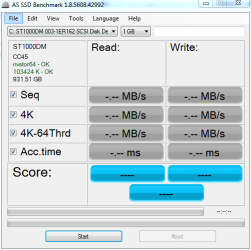
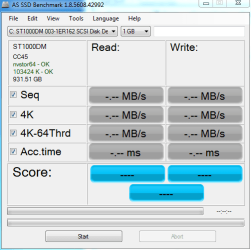
After restart open AS-SSD benchmark (Download AS SSD Benchmark - MajorGeeks) and take a screenshot and post here please, no need to run benchmark.
 

My Computer My Computer

Computer type
PC/Desktop
Computer Manufacturer/Model Number
Custom Build
OS
Windows 7 Ultimate x64 SP1
CPU
AMD Phenom 2 1090T
Motherboard
Gigabyte GA-890FXA-UD5
Memory
2x8GB Kingston HyperX Fury Black 1600Mhz Unganged
Graphics Card(s)
MSI GTX 970 Gaming 4G
Sound Card
Realtek On-Board HD 7.1 Audio / Logitech G35
Monitor(s) Displays
3xAcer GD245HQ
Screen Resolution
1920x1080
Hard Drives
Samsung 850 Pro 512GB SSD - OS /
WD Caviar Black SATA 3 - 1 TBx2 - Dynamic RAID 0 /
WD Caviar Green SATA 2 - 640GBx2 - Dynamic RAID 0 /
WD Caviar Green SATA 2 - 640GB - Internal Backup /
Seagate Barracude SATA 3 - 3TB - External Backup/ Sync
PSU
HighPower 1000W
Case
Cooler Master HAF 932
Cooling
Noctua NH-D14
Keyboard
Logitech G19
Mouse
Logitech G500
Internet Speed
100/4 Mbit Cable (100GB quota)
Antivirus
ZoneAlarm Extreme Security / MBAM Pro / MBAE Free / SAS Free
Browser
IE 11 - Firefox - Chrome
Other Info
Logitech F710/ G27/ G940/ Z5500 // TrackIR 5 // Nvidia 3D Surround Vision
The specs are correct on my profile now.

Also should i disable nvstor and nvstor64?
 

My Computer My Computer

OS
Windows 7 Home Premium 64bit
CPU
AMD FX-4100 Zambezi 3.6GHz Socket AM3+ Quad Core
Motherboard
GA-M68MT-S2 (rev. 3.1) rev. 1.3 NVIDIA® GeForce 7025
Memory
G.SKILL Ripjaws Series 8GB (2 x 4GB) 240-Pin DDR3 SDRAM DDR3
Graphics Card(s)
Nvidia GTX 660
I guess speccy info is wrong then? Never used it before so not sure if it might report a wrong mainboard.

From speccy:
Gigabyte Technology Co., Ltd. M68MT-S2 (Socket M2) -> NVIDIA chipset
the one in your specs: AMD Chipset

Am I missing something?

nvstor64 -> NVidia SATA raid drivers

Also the devices show up as SCSI when RAID is selected in BIOS, at least that is my experience.

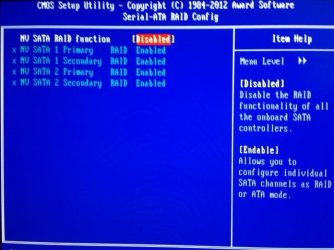
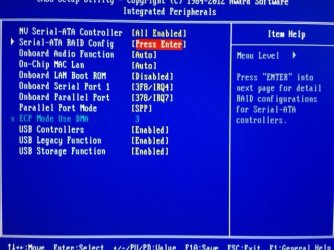
Can you please take a photo of Integrated Peripherals in BIOS and post? Also download AS SSD from my earlier post and put its screenshot as well. (No need to start the benchmark - it will tell in upper left corner which driver is used)
 

My Computer My Computer

Computer type
PC/Desktop
Computer Manufacturer/Model Number
Custom Build
OS
Windows 7 Ultimate x64 SP1
CPU
AMD Phenom 2 1090T
Motherboard
Gigabyte GA-890FXA-UD5
Memory
2x8GB Kingston HyperX Fury Black 1600Mhz Unganged
Graphics Card(s)
MSI GTX 970 Gaming 4G
Sound Card
Realtek On-Board HD 7.1 Audio / Logitech G35
Monitor(s) Displays
3xAcer GD245HQ
Screen Resolution
1920x1080
Hard Drives
Samsung 850 Pro 512GB SSD - OS /
WD Caviar Black SATA 3 - 1 TBx2 - Dynamic RAID 0 /
WD Caviar Green SATA 2 - 640GBx2 - Dynamic RAID 0 /
WD Caviar Green SATA 2 - 640GB - Internal Backup /
Seagate Barracude SATA 3 - 3TB - External Backup/ Sync
PSU
HighPower 1000W
Case
Cooler Master HAF 932
Cooling
Noctua NH-D14
Keyboard
Logitech G19
Mouse
Logitech G500
Internet Speed
100/4 Mbit Cable (100GB quota)
Antivirus
ZoneAlarm Extreme Security / MBAM Pro / MBAE Free / SAS Free
Browser
IE 11 - Firefox - Chrome
Other Info
Logitech F710/ G27/ G940/ Z5500 // TrackIR 5 // Nvidia 3D Surround Vision
speccy is right i had never changed it from before
 

My Computer My Computer

OS
Windows 7 Home Premium 64bit
CPU
AMD FX-4100 Zambezi 3.6GHz Socket AM3+ Quad Core
Motherboard
GA-M68MT-S2 (rev. 3.1) rev. 1.3 NVIDIA® GeForce 7025
Memory
G.SKILL Ripjaws Series 8GB (2 x 4GB) 240-Pin DDR3 SDRAM DDR3
Graphics Card(s)
Nvidia GTX 660
Alright :)

Lets take it one step at a time:

First please go into BIOS and take a photo of Integrated Peripherals
And then download and run AS SSD, take a screenshot of that as well

Post here
 

My Computer My Computer

Computer type
PC/Desktop
Computer Manufacturer/Model Number
Custom Build
OS
Windows 7 Ultimate x64 SP1
CPU
AMD Phenom 2 1090T
Motherboard
Gigabyte GA-890FXA-UD5
Memory
2x8GB Kingston HyperX Fury Black 1600Mhz Unganged
Graphics Card(s)
MSI GTX 970 Gaming 4G
Sound Card
Realtek On-Board HD 7.1 Audio / Logitech G35
Monitor(s) Displays
3xAcer GD245HQ
Screen Resolution
1920x1080
Hard Drives
Samsung 850 Pro 512GB SSD - OS /
WD Caviar Black SATA 3 - 1 TBx2 - Dynamic RAID 0 /
WD Caviar Green SATA 2 - 640GBx2 - Dynamic RAID 0 /
WD Caviar Green SATA 2 - 640GB - Internal Backup /
Seagate Barracude SATA 3 - 3TB - External Backup/ Sync
PSU
HighPower 1000W
Case
Cooler Master HAF 932
Cooling
Noctua NH-D14
Keyboard
Logitech G19
Mouse
Logitech G500
Internet Speed
100/4 Mbit Cable (100GB quota)
Antivirus
ZoneAlarm Extreme Security / MBAM Pro / MBAE Free / SAS Free
Browser
IE 11 - Firefox - Chrome
Other Info
Logitech F710/ G27/ G940/ Z5500 // TrackIR 5 // Nvidia 3D Surround Vision
i disabled ncstor64 like you said and it caused my computer not to boot.
 

My Computer My Computer

OS
Windows 7 Home Premium 64bit
CPU
AMD FX-4100 Zambezi 3.6GHz Socket AM3+ Quad Core
Motherboard
GA-M68MT-S2 (rev. 3.1) rev. 1.3 NVIDIA® GeForce 7025
Memory
G.SKILL Ripjaws Series 8GB (2 x 4GB) 240-Pin DDR3 SDRAM DDR3
Graphics Card(s)
Nvidia GTX 660
I attached them
 

Attachments

  • AS SSD.PNG
    AS SSD.PNG
    13.1 KB · Views: 22
  • IMG_1752.JPG
    IMG_1752.JPG
    62.7 KB · Views: 22
  • IMG_1753.JPG
    IMG_1753.JPG
    53.8 KB · Views: 23

My Computer My Computer

OS
Windows 7 Home Premium 64bit
CPU
AMD FX-4100 Zambezi 3.6GHz Socket AM3+ Quad Core
Motherboard
GA-M68MT-S2 (rev. 3.1) rev. 1.3 NVIDIA® GeForce 7025
Memory
G.SKILL Ripjaws Series 8GB (2 x 4GB) 240-Pin DDR3 SDRAM DDR3
Graphics Card(s)
Nvidia GTX 660
Seems your MB doesn't support AHCI directly. Lets try to revert it back first. Press F8 before windows starts to load (after bios post), and select Last Known Good Configuration.

If it won't work we may have to do a system restore. You did create one before changing registry, right?
 

My Computer My Computer

Computer type
PC/Desktop
Computer Manufacturer/Model Number
Custom Build
OS
Windows 7 Ultimate x64 SP1
CPU
AMD Phenom 2 1090T
Motherboard
Gigabyte GA-890FXA-UD5
Memory
2x8GB Kingston HyperX Fury Black 1600Mhz Unganged
Graphics Card(s)
MSI GTX 970 Gaming 4G
Sound Card
Realtek On-Board HD 7.1 Audio / Logitech G35
Monitor(s) Displays
3xAcer GD245HQ
Screen Resolution
1920x1080
Hard Drives
Samsung 850 Pro 512GB SSD - OS /
WD Caviar Black SATA 3 - 1 TBx2 - Dynamic RAID 0 /
WD Caviar Green SATA 2 - 640GBx2 - Dynamic RAID 0 /
WD Caviar Green SATA 2 - 640GB - Internal Backup /
Seagate Barracude SATA 3 - 3TB - External Backup/ Sync
PSU
HighPower 1000W
Case
Cooler Master HAF 932
Cooling
Noctua NH-D14
Keyboard
Logitech G19
Mouse
Logitech G500
Internet Speed
100/4 Mbit Cable (100GB quota)
Antivirus
ZoneAlarm Extreme Security / MBAM Pro / MBAE Free / SAS Free
Browser
IE 11 - Firefox - Chrome
Other Info
Logitech F710/ G27/ G940/ Z5500 // TrackIR 5 // Nvidia 3D Surround Vision
Yes I have done a system restore.
 

My Computer My Computer

OS
Windows 7 Home Premium 64bit
CPU
AMD FX-4100 Zambezi 3.6GHz Socket AM3+ Quad Core
Motherboard
GA-M68MT-S2 (rev. 3.1) rev. 1.3 NVIDIA® GeForce 7025
Memory
G.SKILL Ripjaws Series 8GB (2 x 4GB) 240-Pin DDR3 SDRAM DDR3
Graphics Card(s)
Nvidia GTX 660
Alright go in to registry once again, but this time only enable pciide and msahci (change value to 0). Don't disable any drivers.

Restart go into BIOS, Integrated Peripherals, Serial ATA RAID Config, NV SATA Raid Function

- Enable NV SATA Raid function
- NV Sata 1 Primary/Secondary/Sata 2 Primary/Secondary: Change those entries to ATA or disabled (whichever is applicable)

If windows wont boot you can come back here and undo changes.

Report back please.
 

My Computer My Computer

Computer type
PC/Desktop
Computer Manufacturer/Model Number
Custom Build
OS
Windows 7 Ultimate x64 SP1
CPU
AMD Phenom 2 1090T
Motherboard
Gigabyte GA-890FXA-UD5
Memory
2x8GB Kingston HyperX Fury Black 1600Mhz Unganged
Graphics Card(s)
MSI GTX 970 Gaming 4G
Sound Card
Realtek On-Board HD 7.1 Audio / Logitech G35
Monitor(s) Displays
3xAcer GD245HQ
Screen Resolution
1920x1080
Hard Drives
Samsung 850 Pro 512GB SSD - OS /
WD Caviar Black SATA 3 - 1 TBx2 - Dynamic RAID 0 /
WD Caviar Green SATA 2 - 640GBx2 - Dynamic RAID 0 /
WD Caviar Green SATA 2 - 640GB - Internal Backup /
Seagate Barracude SATA 3 - 3TB - External Backup/ Sync
PSU
HighPower 1000W
Case
Cooler Master HAF 932
Cooling
Noctua NH-D14
Keyboard
Logitech G19
Mouse
Logitech G500
Internet Speed
100/4 Mbit Cable (100GB quota)
Antivirus
ZoneAlarm Extreme Security / MBAM Pro / MBAE Free / SAS Free
Browser
IE 11 - Firefox - Chrome
Other Info
Logitech F710/ G27/ G940/ Z5500 // TrackIR 5 // Nvidia 3D Surround Vision
I didnt fix it here are the most recent errors.
 

Attachments

My Computer My Computer

OS
Windows 7 Home Premium 64bit
CPU
AMD FX-4100 Zambezi 3.6GHz Socket AM3+ Quad Core
Motherboard
GA-M68MT-S2 (rev. 3.1) rev. 1.3 NVIDIA® GeForce 7025
Memory
G.SKILL Ripjaws Series 8GB (2 x 4GB) 240-Pin DDR3 SDRAM DDR3
Graphics Card(s)
Nvidia GTX 660
You could boot into windows though, right?

run AS SSD please and post screenshot of it.
 

My Computer My Computer

Computer type
PC/Desktop
Computer Manufacturer/Model Number
Custom Build
OS
Windows 7 Ultimate x64 SP1
CPU
AMD Phenom 2 1090T
Motherboard
Gigabyte GA-890FXA-UD5
Memory
2x8GB Kingston HyperX Fury Black 1600Mhz Unganged
Graphics Card(s)
MSI GTX 970 Gaming 4G
Sound Card
Realtek On-Board HD 7.1 Audio / Logitech G35
Monitor(s) Displays
3xAcer GD245HQ
Screen Resolution
1920x1080
Hard Drives
Samsung 850 Pro 512GB SSD - OS /
WD Caviar Black SATA 3 - 1 TBx2 - Dynamic RAID 0 /
WD Caviar Green SATA 2 - 640GBx2 - Dynamic RAID 0 /
WD Caviar Green SATA 2 - 640GB - Internal Backup /
Seagate Barracude SATA 3 - 3TB - External Backup/ Sync
PSU
HighPower 1000W
Case
Cooler Master HAF 932
Cooling
Noctua NH-D14
Keyboard
Logitech G19
Mouse
Logitech G500
Internet Speed
100/4 Mbit Cable (100GB quota)
Antivirus
ZoneAlarm Extreme Security / MBAM Pro / MBAE Free / SAS Free
Browser
IE 11 - Firefox - Chrome
Other Info
Logitech F710/ G27/ G940/ Z5500 // TrackIR 5 // Nvidia 3D Surround Vision
Could i have installed drivers that I didn't need to install?
 

My Computer My Computer

OS
Windows 7 Home Premium 64bit
CPU
AMD FX-4100 Zambezi 3.6GHz Socket AM3+ Quad Core
Motherboard
GA-M68MT-S2 (rev. 3.1) rev. 1.3 NVIDIA® GeForce 7025
Memory
G.SKILL Ripjaws Series 8GB (2 x 4GB) 240-Pin DDR3 SDRAM DDR3
Graphics Card(s)
Nvidia GTX 660
It Booted faster it seemed
 

Attachments

  • new AS SSD.PNG
    new AS SSD.PNG
    13.1 KB · Views: 8

My Computer My Computer

OS
Windows 7 Home Premium 64bit
CPU
AMD FX-4100 Zambezi 3.6GHz Socket AM3+ Quad Core
Motherboard
GA-M68MT-S2 (rev. 3.1) rev. 1.3 NVIDIA® GeForce 7025
Memory
G.SKILL Ripjaws Series 8GB (2 x 4GB) 240-Pin DDR3 SDRAM DDR3
Graphics Card(s)
Nvidia GTX 660
I might just do a clean install how should I go about installing drivers and such? And making sure I don't mess something up because it seemed to happened after I finished installing stuff one day.
 

My Computer My Computer

OS
Windows 7 Home Premium 64bit
CPU
AMD FX-4100 Zambezi 3.6GHz Socket AM3+ Quad Core
Motherboard
GA-M68MT-S2 (rev. 3.1) rev. 1.3 NVIDIA® GeForce 7025
Memory
G.SKILL Ripjaws Series 8GB (2 x 4GB) 240-Pin DDR3 SDRAM DDR3
Graphics Card(s)
Nvidia GTX 660
The problem is it is still loading the SATA Raid drivers.

At the moment:

- pciide - msahci are both set to 0?
- BIOS all 4 SATA controllers set to disabled (or ATA)?

Edit: You can also check Nvstor64 - Event ID 5 - Hard Drives - Storage later to see if any resolve your issues.
 

My Computer My Computer

Computer type
PC/Desktop
Computer Manufacturer/Model Number
Custom Build
OS
Windows 7 Ultimate x64 SP1
CPU
AMD Phenom 2 1090T
Motherboard
Gigabyte GA-890FXA-UD5
Memory
2x8GB Kingston HyperX Fury Black 1600Mhz Unganged
Graphics Card(s)
MSI GTX 970 Gaming 4G
Sound Card
Realtek On-Board HD 7.1 Audio / Logitech G35
Monitor(s) Displays
3xAcer GD245HQ
Screen Resolution
1920x1080
Hard Drives
Samsung 850 Pro 512GB SSD - OS /
WD Caviar Black SATA 3 - 1 TBx2 - Dynamic RAID 0 /
WD Caviar Green SATA 2 - 640GBx2 - Dynamic RAID 0 /
WD Caviar Green SATA 2 - 640GB - Internal Backup /
Seagate Barracude SATA 3 - 3TB - External Backup/ Sync
PSU
HighPower 1000W
Case
Cooler Master HAF 932
Cooling
Noctua NH-D14
Keyboard
Logitech G19
Mouse
Logitech G500
Internet Speed
100/4 Mbit Cable (100GB quota)
Antivirus
ZoneAlarm Extreme Security / MBAM Pro / MBAE Free / SAS Free
Browser
IE 11 - Firefox - Chrome
Other Info
Logitech F710/ G27/ G940/ Z5500 // TrackIR 5 // Nvidia 3D Surround Vision
msachi was set to 3

Edit: This made it boot slower.
 

My Computer My Computer

OS
Windows 7 Home Premium 64bit
CPU
AMD FX-4100 Zambezi 3.6GHz Socket AM3+ Quad Core
Motherboard
GA-M68MT-S2 (rev. 3.1) rev. 1.3 NVIDIA® GeForce 7025
Memory
G.SKILL Ripjaws Series 8GB (2 x 4GB) 240-Pin DDR3 SDRAM DDR3
Graphics Card(s)
Nvidia GTX 660
Back
Top