
About 5 months ago I upgraded my computer with a new power supply and video card. It worked fine for about 3 months and since then it has been freezing. At first it actually froze completely, with a black screen and repeating noise from the speakers. This happened for a couple weeks and occurred randomly while gaming. Sometimes it happened 10 minutes into the game, sometimes 2 hours, etc. I debugged the issue by running a GPU test (furmark or something) and reading the logs but to no avail.
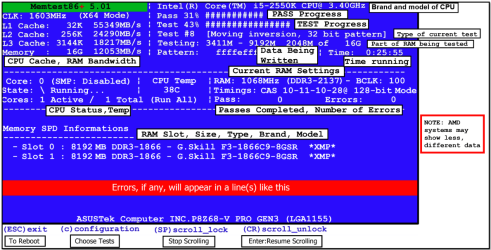
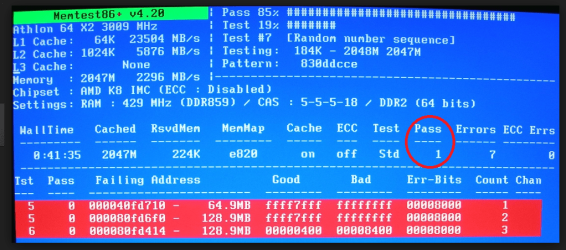
One day I came home to debug the issue, and after turning the PC the GPU fans were being extremely loud and I'm assuming were spinning at 100% speed. Also I wasn't able to get any display on my monitor just a black screen. I decided to to disconnect and reconnect the GPU because I wasn't sure what else to do. After powering back on the fans and display were fine so I decided to game for a while to see if it still froze. After testing for a week or so the result was the computer still froze while gaming but the whole pc didn't crash. Basically, I had to open task manager and click end task and it says this application is not responding. I posted a here a while ago and someone recommended I run memtest 86. It took a while but I finally got around to running memtest86 for about 5 hours straight, and it found nothing.
I finally ended up reformatting my hard drive as a last resort. I had never uninstalled my old gpu drivers before installing my new gpu so I fiigured that could of been the cause. After the reformat I continued to gaming for the past couple weeks with no issues. Granted, I probably only gamed 3 times for a couple hours each time. Then suddenly the computer froze again today. (This was the same as the freezing in the second paragraph. ie: game freezes but computer doesn't crash). I'm hoping someone here might have some insight on what it could be.
Here is the logs from event viewer:
Faulting application name: EoCApp.exe, version: 1.0.177.0, time stamp: 0x541c2bb9
Faulting module name: EoCApp.exe, version: 1.0.177.0, time stamp: 0x541c2bb9
Exception code: 0xc0000005
Fault offset: 0x005a4c4a
Faulting process id: 0x5c8
Faulting application start time: 0x01cfed7ad50470ed
Faulting application path: C:\Program Files (x86)\Steam\steamapps\common\Divinity - Original Sin\Shipping\EoCApp.exe
Faulting module path: C:\Program Files (x86)\Steam\steamapps\common\Divinity - Original Sin\Shipping\EoCApp.exe
Report Id: 40879c10-5976-11e4-85c4-50e549c17dac
Fault bucket 514920811, type 17
Event Name: APPCRASH
Response: Not available
Cab Id: 0
Problem signature:
P1: EoCApp.exe
P2: 1.0.177.0
P3: 541c2bb9
P4: EoCApp.exe
P5: 1.0.177.0
P6: 541c2bb9
P7: c0000005
P8: 005a4c4a
P9:
P10:
Attached files:
C:\Users\Darren\AppData\Local\Temp\WERC4A0.tmp.WERInternalMetadata.xml
These files may be available here:
C:\Users\Darren\AppData\Local\Microsoft\Windows\WER\ReportArchive\AppCrash_EoCApp.exe_fcdcb49f727e6d40c7426969f8be69269ad049_14ea2a83
Analysis symbol:
Rechecking for solution: 0
Report Id: 40879c10-5976-11e4-85c4-50e549c17dac
Report Status: 0
Report.WER
Version=1
EventType=APPCRASH
EventTime=130584061162289671
ReportType=2
Consent=1
UploadTime=130584061163749755
ReportIdentifier=40879c11-5976-11e4-85c4-50e549c17dac
IntegratorReportIdentifier=40879c10-5976-11e4-85c4-50e549c17dac
WOW64=1
Response.BucketId=514920811
Response.BucketTable=17
Response.type=4
Sig[0].Name=Application Name
Sig[0].Value=EoCApp.exe
Sig[1].Name=Application Version
Sig[1].Value=1.0.177.0
Sig[2].Name=Application Timestamp
Sig[2].Value=541c2bb9
Sig[3].Name=Fault Module Name
Sig[3].Value=EoCApp.exe
Sig[4].Name=Fault Module Version
Sig[4].Value=1.0.177.0
Sig[5].Name=Fault Module Timestamp
Sig[5].Value=541c2bb9
Sig[6].Name=Exception Code
Sig[6].Value=c0000005
Sig[7].Name=Exception Offset
Sig[7].Value=005a4c4a
DynamicSig[1].Name=OS Version
DynamicSig[1].Value=6.1.7601.2.1.0.256.48
DynamicSig[2].Name=Locale ID
DynamicSig[2].Value=1033
DynamicSig[22].Name=Additional Information 1
DynamicSig[22].Value=0a9e
DynamicSig[23].Name=Additional Information 2
DynamicSig[23].Value=0a9e372d3b4ad19135b953a78882e789
DynamicSig[24].Name=Additional Information 3
DynamicSig[24].Value=0a9e
DynamicSig[25].Name=Additional Information 4
DynamicSig[25].Value=0a9e372d3b4ad19135b953a78882e789
UI[2]=C:\Program Files (x86)\Steam\steamapps\common\Divinity - Original Sin\Shipping\EoCApp.exe
UI[3]=Divinity Original Sin has stopped working
UI[4]=Windows can check online for a solution to the problem.
UI[5]=Check online for a solution and close the program
UI[6]=Check online for a solution later and close the program
UI[7]=Close the program
LoadedModule[0]=C:\Program Files (x86)\Steam\steamapps\common\Divinity - Original Sin\Shipping\EoCApp.exe
LoadedModule[1]=C:\Windows\SysWOW64\ntdll.dll
LoadedModule[2]=C:\Windows\syswow64\kernel32.dll
LoadedModule[3]=C:\Windows\syswow64\KERNELBASE.dll
LoadedModule[4]=C:\Windows\syswow64\USER32.dll
LoadedModule[5]=C:\Windows\syswow64\GDI32.dll
LoadedModule[6]=C:\Windows\syswow64\LPK.dll
LoadedModule[7]=C:\Windows\syswow64\USP10.dll
LoadedModule[8]=C:\Windows\syswow64\msvcrt.dll
LoadedModule[9]=C:\Windows\syswow64\ADVAPI32.dll
LoadedModule[10]=C:\Windows\SysWOW64\sechost.dll
LoadedModule[11]=C:\Windows\syswow64\RPCRT4.dll
LoadedModule[12]=C:\Windows\syswow64\SspiCli.dll
LoadedModule[13]=C:\Windows\syswow64\CRYPTBASE.dll
LoadedModule[14]=C:\Windows\system32\dbghelp.dll
LoadedModule[15]=C:\Program Files (x86)\Steam\steamapps\common\Divinity - Original Sin\Shipping\QtGui4.dll
LoadedModule[16]=C:\Windows\syswow64\COMDLG32.dll
LoadedModule[17]=C:\Windows\syswow64\SHLWAPI.dll
LoadedModule[18]=C:\Windows\WinSxS\x86_microsoft.windows.common-controls_6595b64144ccf1df_5.82.7601.18201_none_ec80f00e8593ece5\COMCTL32.dll
LoadedModule[19]=C:\Windows\syswow64\SHELL32.dll
LoadedModule[20]=C:\Windows\syswow64\OLEAUT32.dll
LoadedModule[21]=C:\Windows\syswow64\ole32.dll
LoadedModule[22]=C:\Windows\syswow64\IMM32.dll
LoadedModule[23]=C:\Windows\syswow64\MSCTF.dll
LoadedModule[24]=C:\Windows\system32\WINMM.dll
LoadedModule[25]=C:\Windows\system32\WINSPOOL.DRV
LoadedModule[26]=C:\Program Files (x86)\Steam\steamapps\common\Divinity - Original Sin\Shipping\QtCore4.dll
LoadedModule[27]=C:\Windows\syswow64\WS2_32.dll
LoadedModule[28]=C:\Windows\syswow64\NSI.dll
LoadedModule[29]=C:\Windows\WinSxS\x86_microsoft.vc90.crt_1fc8b3b9a1e18e3b_9.0.30729.6161_none_50934f2ebcb7eb57\MSVCP90.dll
LoadedModule[30]=C:\Windows\WinSxS\x86_microsoft.vc90.crt_1fc8b3b9a1e18e3b_9.0.30729.6161_none_50934f2ebcb7eb57\MSVCR90.dll
LoadedModule[31]=C:\Program Files (x86)\Steam\steamapps\common\Divinity - Original Sin\Shipping\binkw32.dll
LoadedModule[32]=C:\Windows\system32\VERSION.dll
LoadedModule[33]=C:\Windows\system32\DINPUT8.dll
LoadedModule[34]=C:\Program Files (x86)\Steam\steamapps\common\Divinity - Original Sin\Shipping\iggy_w32.dll
LoadedModule[35]=C:\Windows\system32\XINPUT1_3.dll
LoadedModule[36]=C:\Windows\syswow64\SETUPAPI.dll
LoadedModule[37]=C:\Windows\syswow64\CFGMGR32.dll
LoadedModule[38]=C:\Windows\syswow64\DEVOBJ.dll
LoadedModule[39]=C:\Program Files (x86)\Steam\steamapps\common\Divinity - Original Sin\Shipping\osiris.dll
LoadedModule[40]=C:\Program Files (x86)\Steam\steamapps\common\Divinity - Original Sin\Shipping\steam_api.dll
LoadedModule[41]=C:\Program Files (x86)\Steam\steamapps\common\Divinity - Original Sin\Shipping\FxStudioRT.dll
LoadedModule[42]=C:\Program Files (x86)\Steam\steamapps\common\Divinity - Original Sin\Shipping\granny2.dll
LoadedModule[43]=C:\Windows\system32\d3d9.dll
LoadedModule[44]=C:\Windows\system32\d3d8thk.dll
LoadedModule[45]=C:\Windows\system32\dwmapi.dll
LoadedModule[46]=C:\Windows\system32\d3dx9_43.dll
LoadedModule[47]=C:\Windows\system32\IPHLPAPI.DLL
LoadedModule[48]=C:\Windows\system32\WINNSI.DLL
LoadedModule[49]=C:\Program Files (x86)\Steam\gameoverlayrenderer.dll
LoadedModule[50]=C:\Windows\syswow64\psapi.dll
LoadedModule[51]=C:\Program Files (x86)\Steam\steamclient.dll
LoadedModule[52]=C:\Windows\syswow64\CRYPT32.dll
LoadedModule[53]=C:\Windows\syswow64\MSASN1.dll
LoadedModule[54]=C:\Windows\syswow64\imagehlp.dll
LoadedModule[55]=C:\Program Files (x86)\Steam\tier0_s.dll
LoadedModule[56]=C:\Program Files (x86)\Steam\vstdlib_s.dll
LoadedModule[57]=C:\Windows\system32\Secur32.dll
LoadedModule[58]=C:\Program Files (x86)\Steam\steam.dll
LoadedModule[59]=C:\Program Files (x86)\Steam\Steam2.dll
LoadedModule[60]=C:\Program Files (x86)\Steam\DbgHelp.dll
LoadedModule[61]=C:\Program Files (x86)\Steam\CSERHelper.dll
LoadedModule[62]=C:\Windows\system32\uxtheme.dll
LoadedModule[63]=C:\Windows\system32\nvd3dum.dll
LoadedModule[64]=C:\Windows\system32\nvspcap.dll
LoadedModule[65]=C:\Windows\system32\d3dcompiler_43.dll
LoadedModule[66]=C:\Windows\system32\powrprof.dll
LoadedModule[67]=C:\Program Files (x86)\NVIDIA Corporation\3D Vision\nvSCPAPI.dll
LoadedModule[68]=C:\Windows\syswow64\WINTRUST.dll
LoadedModule[69]=C:\Windows\system32\HID.DLL
LoadedModule[70]=C:\Windows\system32\mswsock.dll
LoadedModule[71]=C:\Windows\System32\wshtcpip.dll
LoadedModule[72]=C:\Windows\system32\dhcpcsvc6.DLL
LoadedModule[73]=C:\Windows\system32\dhcpcsvc.DLL
LoadedModule[74]=C:\Windows\syswow64\CLBCatQ.DLL
LoadedModule[75]=C:\Windows\SysWow64\XAudio2_7.dll
LoadedModule[76]=C:\Windows\System32\MMDevApi.dll
LoadedModule[77]=C:\Windows\System32\PROPSYS.dll
LoadedModule[78]=C:\Windows\system32\AUDIOSES.DLL
LoadedModule[79]=C:\Windows\system32\avrt.dll
LoadedModule[80]=C:\Windows\system32\NLAapi.dll
LoadedModule[81]=C:\Windows\system32\napinsp.dll
LoadedModule[82]=C:\Windows\system32\pnrpnsp.dll
LoadedModule[83]=C:\Windows\system32\DNSAPI.dll
LoadedModule[84]=C:\Windows\System32\winrnr.dll
LoadedModule[85]=C:\Windows\System32\fwpuclnt.dll
LoadedModule[86]=C:\Windows\system32\rasadhlp.dll
LoadedModule[87]=C:\Windows\system32\nvapi.dll
LoadedModule[88]=C:\Windows\system32\mscms.dll
LoadedModule[89]=C:\Windows\syswow64\USERENV.dll
LoadedModule[90]=C:\Windows\syswow64\profapi.dll
LoadedModule[91]=C:\Windows\system32\icm32.dll
State[0].Key=Transport.DoneStage1
State[0].Value=1
State[1].Key=DataRequest
State[1].Value=Bucket=514920811/nBucketTable=17/nResponse=1/n
FriendlyEventName=Stopped working
ConsentKey=APPCRASH
AppName=Divinity Original Sin
AppPath=C:\Program Files (x86)\Steam\steamapps\common\Divinity - Original Sin\Shipping\EoCApp.exe
Also as you can see these crashes mostly have occurred played the steam game Divinity: Original Sin. It has been the game I've been playing most but it has crashed during Bioshock a couple times as well.
Any help is much appreciated!
Thanks
One day I came home to debug the issue, and after turning the PC the GPU fans were being extremely loud and I'm assuming were spinning at 100% speed. Also I wasn't able to get any display on my monitor just a black screen. I decided to to disconnect and reconnect the GPU because I wasn't sure what else to do. After powering back on the fans and display were fine so I decided to game for a while to see if it still froze. After testing for a week or so the result was the computer still froze while gaming but the whole pc didn't crash. Basically, I had to open task manager and click end task and it says this application is not responding. I posted a here a while ago and someone recommended I run memtest 86. It took a while but I finally got around to running memtest86 for about 5 hours straight, and it found nothing.
I finally ended up reformatting my hard drive as a last resort. I had never uninstalled my old gpu drivers before installing my new gpu so I fiigured that could of been the cause. After the reformat I continued to gaming for the past couple weeks with no issues. Granted, I probably only gamed 3 times for a couple hours each time. Then suddenly the computer froze again today. (This was the same as the freezing in the second paragraph. ie: game freezes but computer doesn't crash). I'm hoping someone here might have some insight on what it could be.
Here is the logs from event viewer:
Faulting application name: EoCApp.exe, version: 1.0.177.0, time stamp: 0x541c2bb9
Faulting module name: EoCApp.exe, version: 1.0.177.0, time stamp: 0x541c2bb9
Exception code: 0xc0000005
Fault offset: 0x005a4c4a
Faulting process id: 0x5c8
Faulting application start time: 0x01cfed7ad50470ed
Faulting application path: C:\Program Files (x86)\Steam\steamapps\common\Divinity - Original Sin\Shipping\EoCApp.exe
Faulting module path: C:\Program Files (x86)\Steam\steamapps\common\Divinity - Original Sin\Shipping\EoCApp.exe
Report Id: 40879c10-5976-11e4-85c4-50e549c17dac
Fault bucket 514920811, type 17
Event Name: APPCRASH
Response: Not available
Cab Id: 0
Problem signature:
P1: EoCApp.exe
P2: 1.0.177.0
P3: 541c2bb9
P4: EoCApp.exe
P5: 1.0.177.0
P6: 541c2bb9
P7: c0000005
P8: 005a4c4a
P9:
P10:
Attached files:
C:\Users\Darren\AppData\Local\Temp\WERC4A0.tmp.WERInternalMetadata.xml
These files may be available here:
C:\Users\Darren\AppData\Local\Microsoft\Windows\WER\ReportArchive\AppCrash_EoCApp.exe_fcdcb49f727e6d40c7426969f8be69269ad049_14ea2a83
Analysis symbol:
Rechecking for solution: 0
Report Id: 40879c10-5976-11e4-85c4-50e549c17dac
Report Status: 0
Report.WER
Version=1
EventType=APPCRASH
EventTime=130584061162289671
ReportType=2
Consent=1
UploadTime=130584061163749755
ReportIdentifier=40879c11-5976-11e4-85c4-50e549c17dac
IntegratorReportIdentifier=40879c10-5976-11e4-85c4-50e549c17dac
WOW64=1
Response.BucketId=514920811
Response.BucketTable=17
Response.type=4
Sig[0].Name=Application Name
Sig[0].Value=EoCApp.exe
Sig[1].Name=Application Version
Sig[1].Value=1.0.177.0
Sig[2].Name=Application Timestamp
Sig[2].Value=541c2bb9
Sig[3].Name=Fault Module Name
Sig[3].Value=EoCApp.exe
Sig[4].Name=Fault Module Version
Sig[4].Value=1.0.177.0
Sig[5].Name=Fault Module Timestamp
Sig[5].Value=541c2bb9
Sig[6].Name=Exception Code
Sig[6].Value=c0000005
Sig[7].Name=Exception Offset
Sig[7].Value=005a4c4a
DynamicSig[1].Name=OS Version
DynamicSig[1].Value=6.1.7601.2.1.0.256.48
DynamicSig[2].Name=Locale ID
DynamicSig[2].Value=1033
DynamicSig[22].Name=Additional Information 1
DynamicSig[22].Value=0a9e
DynamicSig[23].Name=Additional Information 2
DynamicSig[23].Value=0a9e372d3b4ad19135b953a78882e789
DynamicSig[24].Name=Additional Information 3
DynamicSig[24].Value=0a9e
DynamicSig[25].Name=Additional Information 4
DynamicSig[25].Value=0a9e372d3b4ad19135b953a78882e789
UI[2]=C:\Program Files (x86)\Steam\steamapps\common\Divinity - Original Sin\Shipping\EoCApp.exe
UI[3]=Divinity Original Sin has stopped working
UI[4]=Windows can check online for a solution to the problem.
UI[5]=Check online for a solution and close the program
UI[6]=Check online for a solution later and close the program
UI[7]=Close the program
LoadedModule[0]=C:\Program Files (x86)\Steam\steamapps\common\Divinity - Original Sin\Shipping\EoCApp.exe
LoadedModule[1]=C:\Windows\SysWOW64\ntdll.dll
LoadedModule[2]=C:\Windows\syswow64\kernel32.dll
LoadedModule[3]=C:\Windows\syswow64\KERNELBASE.dll
LoadedModule[4]=C:\Windows\syswow64\USER32.dll
LoadedModule[5]=C:\Windows\syswow64\GDI32.dll
LoadedModule[6]=C:\Windows\syswow64\LPK.dll
LoadedModule[7]=C:\Windows\syswow64\USP10.dll
LoadedModule[8]=C:\Windows\syswow64\msvcrt.dll
LoadedModule[9]=C:\Windows\syswow64\ADVAPI32.dll
LoadedModule[10]=C:\Windows\SysWOW64\sechost.dll
LoadedModule[11]=C:\Windows\syswow64\RPCRT4.dll
LoadedModule[12]=C:\Windows\syswow64\SspiCli.dll
LoadedModule[13]=C:\Windows\syswow64\CRYPTBASE.dll
LoadedModule[14]=C:\Windows\system32\dbghelp.dll
LoadedModule[15]=C:\Program Files (x86)\Steam\steamapps\common\Divinity - Original Sin\Shipping\QtGui4.dll
LoadedModule[16]=C:\Windows\syswow64\COMDLG32.dll
LoadedModule[17]=C:\Windows\syswow64\SHLWAPI.dll
LoadedModule[18]=C:\Windows\WinSxS\x86_microsoft.windows.common-controls_6595b64144ccf1df_5.82.7601.18201_none_ec80f00e8593ece5\COMCTL32.dll
LoadedModule[19]=C:\Windows\syswow64\SHELL32.dll
LoadedModule[20]=C:\Windows\syswow64\OLEAUT32.dll
LoadedModule[21]=C:\Windows\syswow64\ole32.dll
LoadedModule[22]=C:\Windows\syswow64\IMM32.dll
LoadedModule[23]=C:\Windows\syswow64\MSCTF.dll
LoadedModule[24]=C:\Windows\system32\WINMM.dll
LoadedModule[25]=C:\Windows\system32\WINSPOOL.DRV
LoadedModule[26]=C:\Program Files (x86)\Steam\steamapps\common\Divinity - Original Sin\Shipping\QtCore4.dll
LoadedModule[27]=C:\Windows\syswow64\WS2_32.dll
LoadedModule[28]=C:\Windows\syswow64\NSI.dll
LoadedModule[29]=C:\Windows\WinSxS\x86_microsoft.vc90.crt_1fc8b3b9a1e18e3b_9.0.30729.6161_none_50934f2ebcb7eb57\MSVCP90.dll
LoadedModule[30]=C:\Windows\WinSxS\x86_microsoft.vc90.crt_1fc8b3b9a1e18e3b_9.0.30729.6161_none_50934f2ebcb7eb57\MSVCR90.dll
LoadedModule[31]=C:\Program Files (x86)\Steam\steamapps\common\Divinity - Original Sin\Shipping\binkw32.dll
LoadedModule[32]=C:\Windows\system32\VERSION.dll
LoadedModule[33]=C:\Windows\system32\DINPUT8.dll
LoadedModule[34]=C:\Program Files (x86)\Steam\steamapps\common\Divinity - Original Sin\Shipping\iggy_w32.dll
LoadedModule[35]=C:\Windows\system32\XINPUT1_3.dll
LoadedModule[36]=C:\Windows\syswow64\SETUPAPI.dll
LoadedModule[37]=C:\Windows\syswow64\CFGMGR32.dll
LoadedModule[38]=C:\Windows\syswow64\DEVOBJ.dll
LoadedModule[39]=C:\Program Files (x86)\Steam\steamapps\common\Divinity - Original Sin\Shipping\osiris.dll
LoadedModule[40]=C:\Program Files (x86)\Steam\steamapps\common\Divinity - Original Sin\Shipping\steam_api.dll
LoadedModule[41]=C:\Program Files (x86)\Steam\steamapps\common\Divinity - Original Sin\Shipping\FxStudioRT.dll
LoadedModule[42]=C:\Program Files (x86)\Steam\steamapps\common\Divinity - Original Sin\Shipping\granny2.dll
LoadedModule[43]=C:\Windows\system32\d3d9.dll
LoadedModule[44]=C:\Windows\system32\d3d8thk.dll
LoadedModule[45]=C:\Windows\system32\dwmapi.dll
LoadedModule[46]=C:\Windows\system32\d3dx9_43.dll
LoadedModule[47]=C:\Windows\system32\IPHLPAPI.DLL
LoadedModule[48]=C:\Windows\system32\WINNSI.DLL
LoadedModule[49]=C:\Program Files (x86)\Steam\gameoverlayrenderer.dll
LoadedModule[50]=C:\Windows\syswow64\psapi.dll
LoadedModule[51]=C:\Program Files (x86)\Steam\steamclient.dll
LoadedModule[52]=C:\Windows\syswow64\CRYPT32.dll
LoadedModule[53]=C:\Windows\syswow64\MSASN1.dll
LoadedModule[54]=C:\Windows\syswow64\imagehlp.dll
LoadedModule[55]=C:\Program Files (x86)\Steam\tier0_s.dll
LoadedModule[56]=C:\Program Files (x86)\Steam\vstdlib_s.dll
LoadedModule[57]=C:\Windows\system32\Secur32.dll
LoadedModule[58]=C:\Program Files (x86)\Steam\steam.dll
LoadedModule[59]=C:\Program Files (x86)\Steam\Steam2.dll
LoadedModule[60]=C:\Program Files (x86)\Steam\DbgHelp.dll
LoadedModule[61]=C:\Program Files (x86)\Steam\CSERHelper.dll
LoadedModule[62]=C:\Windows\system32\uxtheme.dll
LoadedModule[63]=C:\Windows\system32\nvd3dum.dll
LoadedModule[64]=C:\Windows\system32\nvspcap.dll
LoadedModule[65]=C:\Windows\system32\d3dcompiler_43.dll
LoadedModule[66]=C:\Windows\system32\powrprof.dll
LoadedModule[67]=C:\Program Files (x86)\NVIDIA Corporation\3D Vision\nvSCPAPI.dll
LoadedModule[68]=C:\Windows\syswow64\WINTRUST.dll
LoadedModule[69]=C:\Windows\system32\HID.DLL
LoadedModule[70]=C:\Windows\system32\mswsock.dll
LoadedModule[71]=C:\Windows\System32\wshtcpip.dll
LoadedModule[72]=C:\Windows\system32\dhcpcsvc6.DLL
LoadedModule[73]=C:\Windows\system32\dhcpcsvc.DLL
LoadedModule[74]=C:\Windows\syswow64\CLBCatQ.DLL
LoadedModule[75]=C:\Windows\SysWow64\XAudio2_7.dll
LoadedModule[76]=C:\Windows\System32\MMDevApi.dll
LoadedModule[77]=C:\Windows\System32\PROPSYS.dll
LoadedModule[78]=C:\Windows\system32\AUDIOSES.DLL
LoadedModule[79]=C:\Windows\system32\avrt.dll
LoadedModule[80]=C:\Windows\system32\NLAapi.dll
LoadedModule[81]=C:\Windows\system32\napinsp.dll
LoadedModule[82]=C:\Windows\system32\pnrpnsp.dll
LoadedModule[83]=C:\Windows\system32\DNSAPI.dll
LoadedModule[84]=C:\Windows\System32\winrnr.dll
LoadedModule[85]=C:\Windows\System32\fwpuclnt.dll
LoadedModule[86]=C:\Windows\system32\rasadhlp.dll
LoadedModule[87]=C:\Windows\system32\nvapi.dll
LoadedModule[88]=C:\Windows\system32\mscms.dll
LoadedModule[89]=C:\Windows\syswow64\USERENV.dll
LoadedModule[90]=C:\Windows\syswow64\profapi.dll
LoadedModule[91]=C:\Windows\system32\icm32.dll
State[0].Key=Transport.DoneStage1
State[0].Value=1
State[1].Key=DataRequest
State[1].Value=Bucket=514920811/nBucketTable=17/nResponse=1/n
FriendlyEventName=Stopped working
ConsentKey=APPCRASH
AppName=Divinity Original Sin
AppPath=C:\Program Files (x86)\Steam\steamapps\common\Divinity - Original Sin\Shipping\EoCApp.exe
Also as you can see these crashes mostly have occurred played the steam game Divinity: Original Sin. It has been the game I've been playing most but it has crashed during Bioshock a couple times as well.
Any help is much appreciated!
Thanks
Last edited:
My Computer
- Computer type
- PC/Desktop
- Computer Manufacturer/Model Number
- custom build
- OS
- Windows 7 Professional 64 bit
- CPU
- Intel i5-2500k 3.30 GHz (4 CPUs)
- Motherboard
- Gigabyte Z68X-UD3H-B3
- Memory
- 8GB DDR3
- Graphics Card(s)
- Gigabyte GTX 770
- Hard Drives
- Seagate 750GB 5400RPM
- Antivirus
- Avast
- Browser
- Chrome

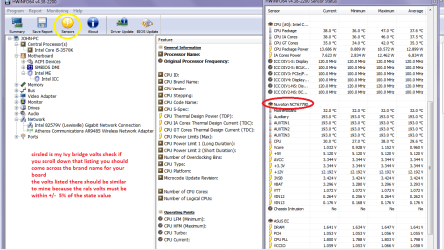
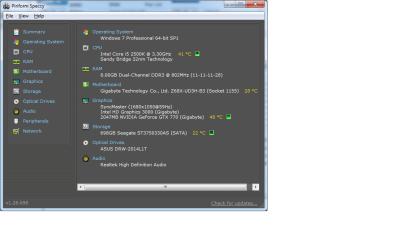
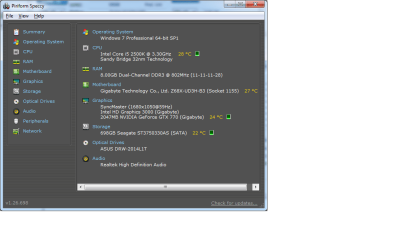
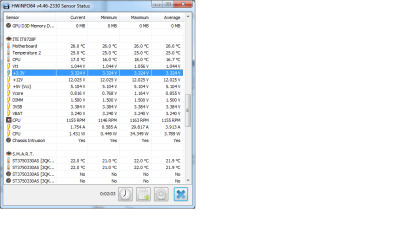



 .
.