Computer illiterate needs a little help !

Nica

New member
Local time
12:50 AM
Messages
5
Hello,
as the eye catching sub-title mentions I could use a little help. I don't know much about computers so please bear with me. I bought a gaming computer from a person who loaded Windows 7 on the system. I like the look of the new OS but to be brutally honest I'm not even sure how to move from being " in game" and minimizing the game to be able to look up other things on the net. With the older windows program it was easy- jsut a crtl alt del to minimize and I was off to the races. Now when I attempt to do this it will minimize th agme but it doesn't allow me to open a new window. I would greatly appreciate some direction from some more knowledgeable folks. And yes I know a beta or new system like this is no place for a NOOB like me to be lost and asking basic questions. As mentioned I just enjoy the new look and could use some help as I experiement and explore 7. Thanks !:o
 

My Computer

OS
windows 7
Hi Nica, I usually just use Alt + Tab to switch between windows when playing games and another way to get task manager is to press Ctl+Shift+Esc.
 

My Computer

Computer Manufacturer/Model Number
Home Brew
OS
Windows 7 Ultimate Vista Ultimate x64
CPU
Core 2 Duo E8500 3.16Ghz @ 3.8Ghz
Motherboard
eVGA 750i FTW
Memory
2x2Gigs Patriot PC2-6400 LL
Graphics Card(s)
Inno3D GeForce GTX260 216 SP
Monitor(s) Displays
ASUS VW222U 22" 2ms Response time
Screen Resolution
1680x1050
Hard Drives
SATA 150GB
SATA II 250GB
USB IDE 750GB Ext.
PSU
HYTEC 600W & Thermaltake 650W Toughpower Power Exp
Case
Thermaltake Armor LCS (Liquid Cooling System)
Cooling
Liquid Cooling System
Keyboard
Logitech G15 Gaming Keyboard
Mouse
Logitech G9 Gaming Mouse
Nica,

Something you should be aware of is that all Win.7 versions currently out are temporary versions which will expire at some point in the near future (3 months to a year, depending on which version you happen to have installed). You will have to buy the "real" thing when it is release in the late fall / early winter. Moreover, you may have to do what is called a "fresh" install, replacing everything that is currently there. Make sure you have all the discs / CDs / DVDs needed to reinstall your games and applications.
 

My Computer

Computer Manufacturer/Model Number
home brew
OS
Win.7.Ult.x64
CPU
Intel Core i7 970
Motherboard
Gigabyte GA-X58-UD5
Memory
12GB (6x2GB) OCZ Platinum DDR3 1600
Graphics Card(s)
Gigabyte GV-R485MC-1GH, ATI 4850, 1GB GDDR3, passive cooler
Sound Card
(on-board) Speakers - Klipsch ProMedia 2.1
Monitor(s) Displays
2x Dell U2410 (H-IPS)
Screen Resolution
1920x1200, 1920x1200
Hard Drives
System = Intel 320 160GB SSD --
Data = 2x WD2002FAEX, RAID1 (ICH10R) --
Backup = 5x WD20EARS (eSata port) --
Add'l Storage = 8x WD20EARS, RAID6 (Adaptec 5805)
PSU
PCP&C S75QB
Case
Lian Li PC-V2010B + EX-H34 expansion HD cage
Cooling
Xigmatek HDT-1283 heatsink & bracket + Scythe S-Flex SFF21E
Keyboard
Das Keyboard Professional, Logitech UltraX
Mouse
Logitech G400
Internet Speed
6.85 Mb/s down, 0.35 Mb/s up (typical)
Other Info
Pioneer DVR-217DBK burner --
stock Lian Li case fans + BS-06 PCI 140mm exhaust (all set on 'low')
Win+Up: Maximize
Win+Down: Restore / Minimize
Win+Left: Snap to left
Win+Right: Snap to right
Win+Shift+Left: Jump to left monitor
Win+Shift+Right: Jump to right monitor
Win+Home: Minimize / Restore all other windows
Win+T : Focus the first taskbar entry
Win+Space: Peek at the desktop
Win+G: Bring gadgets to the top of the Z-order
Win+P: External display options (mirror, extend desktop, etc)
Win+X: Mobility Center (same as Vista, but still handy!)
Try these out.
 

My Computer

Computer Manufacturer/Model Number
Self Build 64bit
OS
Vista Ult64, Win7600
CPU
Intel Core 2 Quad Q6600 @ 2400 MHz 64bit OS
Motherboard
Asus P5E3 Deluxe WiFi @p 64 bit OS
Memory
4096 MB DDR3-SDRAM
Graphics Card(s)
ATI Radeon HD 3870 Series x2 Crossfired
Sound Card
Realtek on board
Monitor(s) Displays
Samsung SyncMaster - 23 inches
Screen Resolution
1680x1050 pixels at 60 Hz in True Colors
Hard Drives
Hitachi (250 GB)/Samsung 750 GB. /Barracuda 160 GB.
My Book 1 TB external..
PSU
Cooler Master 1000w
Case
Cooler Master Cosmos 1000.
Cooling
Fans and fresh air,
Keyboard
Wireless
Mouse
Wireless
Internet Speed
Never fast enough
Other Info
I use a Magnum.
I am unable to open Internet explorer and the diagnostic says nothing is wrong.
However I am able to connect to an on-line game so I know the actual connection still exists. Could it be possible that my Windows 7 Beta is expired and that is why I can't open the explorer? I hope not as I amresally enjoying the system and will happily purchase it.
 

My Computer

OS
windows 7
You can't open IE at all, or only once you've already started a game?

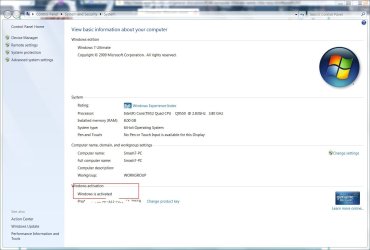
press WIN+Pause/break to open Control Panel\System and Security\System

and check to see if the copy is activated.

win+pause.JPG

Also type winver in the search bar on the start menu to see what version of the beta is installed an when it expires.

winver.JPG
 

My Computer

Computer type
PC/Desktop
Computer Manufacturer/Model Number
Systems by SmartEyeball
OS
8 Pro x64
CPU
i7 3770K 4.6GHz
Motherboard
ASUS P8Z77 WS
Memory
16GB G.Skill Trident X 2666mhz
Graphics Card(s)
x2 EVGA 780 Ti Superclocked SLI
Sound Card
SB X-FI Surround 5.1 PRO USB / ATH-AD900 Headphones
Monitor(s) Displays
x3 Dell U2410 / 58" Samsung
Screen Resolution
5760*1200/ 1920*1200
Hard Drives
2x Intel 520 240GB (RAID 0) * 2x WD Caviar Blacks 2TB (RAID 0) * 2TB WD Caviar Black * Sony Optirac DVD
PSU
Silverstone Strider Evolution 1200W
Case
Thermaltake Level 10 GT Snow Edition
Cooling
Noctua NH-D14
Keyboard
Topre Realforce // Ducky Shine MX Black // Filco Ninja TKL
Mouse
Thermaltake Theron (Highly Recommended) + Razer Imperator
Antivirus
MSE
Browser
IE, FF, WaterFox
Other Info
GT Extreme V2 Sim Racing Cockpit + 40" LCD and K/B Mouse stand ▼
Fanatec CSR Elite Wheel + Clubsport V1 Pedals + CSR shifter/7G-H ▼Saitek X52 Pro ▼ TrackIR 5 Pro
Buttkicker v2 Seat Rumbler with Dedicated 5.1 and Sub Woofer attached to frame ▼
=
Bloody Big Grin
not at all. which makes the fact that I can still open an on-line game/ ventrilio odd.
 

My Computer

OS
windows 7
Nica, try flushing your DNS Cache:
Most DNS clients cache the results of name resolution requests. This speeds up name resolution if multiple lookups are done to the same address, such as is common when browsing the web.
Sometimes a bad DNS entry will be cached and you will need to either flush the DNS cache to get rid of it, or wait up to 24 hours for it to be dropped from the cache automatically.

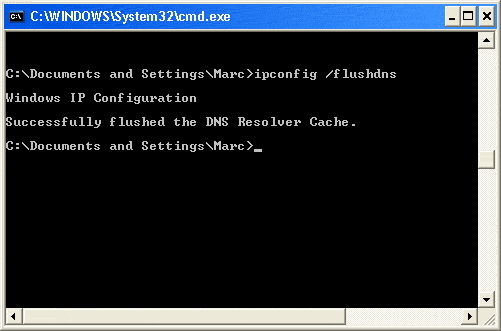
Open a command prompt....from the Start menu, select Run > In the box/"open field", enter cmd.exe
enter ipconfig /flushdns press 'enter'
flushdns.gif

Successful DNS Flush ^^^

Restart your computer and see if you can get IE8 to open now.
 

My Computer

Computer type
PC/Desktop
Computer Manufacturer/Model Number
Bruce ... somewhere in his 40's
OS
Windows 7 Ultimate 32bit SP1
CPU
Intel(R) Core(TM)2 Quad CPU @ 2.40GHz, 2400 MHz
Motherboard
INTEL/D975XBX2
Memory
4 GB
Graphics Card(s)
ATI Radeon HD 2600 Pro
Monitor(s) Displays
Samsung SyncMaster 914v
Screen Resolution
1280 x 1024
Hard Drives
2/500GB each ... ST3500630AS ATA Device.
One is not connected
PSU
Rocketfish 700 W
Case
G.Skill Gigabyte Chassis
Keyboard
Standard PS/2 Keyboard
Mouse
Microsoft PS/2 Mouse
Internet Speed
DSL
Antivirus
Avira Internet Security
Browser
IE 11
Other Info
ATI HDMI Audio
Has it always refused to open or just recently?

Are you trying to launch from the icon pinned to the taskbar?
 

My Computer

Computer type
PC/Desktop
Computer Manufacturer/Model Number
Systems by SmartEyeball
OS
8 Pro x64
CPU
i7 3770K 4.6GHz
Motherboard
ASUS P8Z77 WS
Memory
16GB G.Skill Trident X 2666mhz
Graphics Card(s)
x2 EVGA 780 Ti Superclocked SLI
Sound Card
SB X-FI Surround 5.1 PRO USB / ATH-AD900 Headphones
Monitor(s) Displays
x3 Dell U2410 / 58" Samsung
Screen Resolution
5760*1200/ 1920*1200
Hard Drives
2x Intel 520 240GB (RAID 0) * 2x WD Caviar Blacks 2TB (RAID 0) * 2TB WD Caviar Black * Sony Optirac DVD
PSU
Silverstone Strider Evolution 1200W
Case
Thermaltake Level 10 GT Snow Edition
Cooling
Noctua NH-D14
Keyboard
Topre Realforce // Ducky Shine MX Black // Filco Ninja TKL
Mouse
Thermaltake Theron (Highly Recommended) + Razer Imperator
Antivirus
MSE
Browser
IE, FF, WaterFox
Other Info
GT Extreme V2 Sim Racing Cockpit + 40" LCD and K/B Mouse stand ▼
Fanatec CSR Elite Wheel + Clubsport V1 Pedals + CSR shifter/7G-H ▼Saitek X52 Pro ▼ TrackIR 5 Pro
Buttkicker v2 Seat Rumbler with Dedicated 5.1 and Sub Woofer attached to frame ▼
=
Bloody Big Grin
First off I wanted to thank the multiple forum members for posting their wisdom. A nice touch of humanity in sometimes cold world !
My wife is able to log on her account and access the internet ( right from the icon) yet as the main account holder I am not. In the 3 weeks I have had the computer ( with this OS installed) I have had no problems. That would leave me to beleive that its not the OS, the connection and I'm even more perplexed than usual ( shocker !)
as to why it would be unique to just my account ?
 

My Computer

OS
windows 7
Hello Nica,

Welcome to the forums.

Have you installed any new add-ons. You could try opening IE with no add-ons (start/all programs/accessories/system tools. If it opens then an add-on is the prob. You could also try a reset of IE. Info here if needed: http://www.sevenforums.com/tutorials/1222-internet-explorer-reset.html

Hope this helps.

Gary
 

My Computer

Computer Manufacturer/Model Number
Dell XPS420
OS
Vista Ult 64 bit Seven Ult RTM x64
CPU
Intel Core2 Quad Q6600 2.40 gigahertz
Memory
Crucial Ballistix 4x2GB PC2 6400
Graphics Card(s)
NVIDIA GeForce 8600 GTS 256 MB
Sound Card
Creative SB X-Fi audio
Monitor(s) Displays
HP w2207 + HPvs15
Screen Resolution
1680x1050 + 1024x768
Hard Drives
2-WD5000AAKS-500 GB
WD5000AAV-500 GB external
Keyboard
Microsoft Comfort Curve
Mouse
MX Revolution
Other Info
Wacom Intuos 2 Graphics Tablet
Experience Index=5.5
Back
Top