
Computer Lag - High Physical Memory Usage

linny82

New member
Local time
9:16 PM
Messages
7
Hey,

Wondering if anyone of you more experience Windows 7 users can help me with the system lag problem I've got going on at the moment.

I did a Google search and found quite a few posts on this forum alone re: lag/high memory usage and for the last couple of days Ive been giving my system the once over but as you will see from the screen dumps below, I've still got unusually high memory usage.

Previous to the lag I have now, I was getting BSODs, so I ran GParted and it found some bad sectors and patched them up, it was running sweet as a nut for a few days then *bang*...laggy hell! So now, I've uninstalled a few hungry programs, currently my 120GB disk drive is 79GB free. I've cleaned my PC is spyware using Malwarebytes and SUPERAntiSpyware Free Edition and check for viruses with Avast! - It told me I didn't have any. I've also done a Windows Memory Diagnostic on startup which found no errors, cleared excess C:/program files folders that hadnt been removed by my earlier unistalls, ran disk clean up and defragmented. I also have selective start up via msconfig with just my bare necessities running.

I'm sorry for typing loads, I am a bit stuck, not really sure what more I can do - Any help would be very greatly appreciated as I work from home and my productivity is dismal lol!

Many thanks,
Linny

Screendumps:
LrT0qq

redir

http://sdrv.ms/NLtTOC
http://sdrv.ms/LrT0qq
 

My Computer

Computer Manufacturer/Model Number
Toshiba Satellite Pro L450D
OS
Microsoft Windows 7 Professional 32-bit 7601 Multiprocessor Free Service Pack 1
CPU
AMD Sempron(tm) SI-42 2.10Ghz
Motherboard
TOSHIBA NBWAE
Memory
1.00 GB (766.42 MB usable) DDR-2
Graphics Card(s)
ATI Radeon HD 3200 Graphics
Sound Card
(1) High Definition Audio Device (2) High Definition Audio
Hard Drives
Hitachi HTS545016B9A300 ATA Device (160GB)
Hello and welcome to the forums linny82,

It'd be helpful if you could post a screenshot of your Resource Monitor (Start|type in Resource Monitor|Enter) showing the Memory tab, and having the private(KB) memory sorted in descending order.

How to take the screenshot using the built in Snipping Tool in Windows:-

How to Use the Snipping Tool in Vista - Vista Forums

How to upload a screenshot on sevenforums:-

http://www.sevenforums.com/tutorials/9733-screenshots-files-upload-post-seven-forums.html

As an example, here's mine:-

Capture.PNG

Thanks for your cooperation.
 

My Computer

Computer Manufacturer/Model Number
DELL SXPS 1640
OS
Windows 7 x64 Professional SP1
CPU
Intel C2D T9550 2.66 GHz @ 2.793 GHz (Thanks ThrottleStop!!)
Motherboard
Intel PM45
Memory
8 GB DDR3
Graphics Card(s)
ATI MOBILITY RADEON 4670
Sound Card
CREATIVE XFI AUDIO NOTEBOOK
Monitor(s) Displays
16.1 WLED
Screen Resolution
1920x1080
Hard Drives
Seagate ST9500420AS 500GB (465GiBi) 7200 RPM Drive

External Drives:-
2 TB WD Essentials x 3
1 TB WD Mybook Gen 1
1 TB WD Mybook Gen 2
1 TB Seagate
1 TB Seagate
320 GB WD Scorpio Black (enclosed)
PSU
90W Dell Power Brick
Case
Dell Chassis
Cooling
Coolermaster Cooling Pad
Keyboard
Built-in backlighted Keyboard
Mouse
Logitech Wireless Mini Mouse
Internet Speed
4/0.5
How much RAM do you have? And in your first screenshot, the "processes" tab... if you click "show processes from all users" on the bottom that'll help.

No need to keep uninstalling and cleaning up your HDD man, this is all about your RAM. If you use it all it'll start dumping programs you're using onto your pagefile (on the hard drive), which slows even the simplest things down to a crawl.
 

My Computer

OS
Windows 7 Professional x64
Hey,

Thanks for the responses. I forgot the Resource Manager...I can do that processes from all users, i'll do that next, but for now here's the RM.

http://sdrv.ms/PYnZMC

All processes coming shortly...
 

My Computer

Computer Manufacturer/Model Number
Toshiba Satellite Pro L450D
OS
Microsoft Windows 7 Professional 32-bit 7601 Multiprocessor Free Service Pack 1
CPU
AMD Sempron(tm) SI-42 2.10Ghz
Motherboard
TOSHIBA NBWAE
Memory
1.00 GB (766.42 MB usable) DDR-2
Graphics Card(s)
ATI Radeon HD 3200 Graphics
Sound Card
(1) High Definition Audio Device (2) High Definition Audio
Hard Drives
Hitachi HTS545016B9A300 ATA Device (160GB)
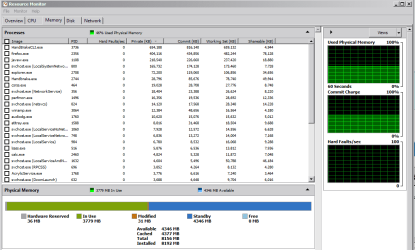
Here is the Processes from all users...Im unsure why I have more than 1 Google Chrome running when I just have the one...Hey ho!

http://sdrv.ms/Q1FooK

Loving the shorted link that SkyDrive gave me for this one - I kid you not!

Thanks again :-)
 

My Computer

Computer Manufacturer/Model Number
Toshiba Satellite Pro L450D
OS
Microsoft Windows 7 Professional 32-bit 7601 Multiprocessor Free Service Pack 1
CPU
AMD Sempron(tm) SI-42 2.10Ghz
Motherboard
TOSHIBA NBWAE
Memory
1.00 GB (766.42 MB usable) DDR-2
Graphics Card(s)
ATI Radeon HD 3200 Graphics
Sound Card
(1) High Definition Audio Device (2) High Definition Audio
Hard Drives
Hitachi HTS545016B9A300 ATA Device (160GB)
How much RAM do you have? And in your first screenshot, the "processes" tab... if you click "show processes from all users" on the bottom that'll help.

No need to keep uninstalling and cleaning up your HDD man, this is all about your RAM. If you use it all it'll start dumping programs you're using onto your pagefile (on the hard drive), which slows even the simplest things down to a crawl.
Hi Onesixski,

Sorry i overlooked your question about the RAM! I've just got the straight 1 GB :( Though I've never had this much lag before, which is why I'm trying to get back to my previous running speed, not super fast but able to do 2/3 tasks at a time

Thanks
 

My Computer

Computer Manufacturer/Model Number
Toshiba Satellite Pro L450D
OS
Microsoft Windows 7 Professional 32-bit 7601 Multiprocessor Free Service Pack 1
CPU
AMD Sempron(tm) SI-42 2.10Ghz
Motherboard
TOSHIBA NBWAE
Memory
1.00 GB (766.42 MB usable) DDR-2
Graphics Card(s)
ATI Radeon HD 3200 Graphics
Sound Card
(1) High Definition Audio Device (2) High Definition Audio
Hard Drives
Hitachi HTS545016B9A300 ATA Device (160GB)

My Computer

Computer Manufacturer/Model Number
DELL SXPS 1640
OS
Windows 7 x64 Professional SP1
CPU
Intel C2D T9550 2.66 GHz @ 2.793 GHz (Thanks ThrottleStop!!)
Motherboard
Intel PM45
Memory
8 GB DDR3
Graphics Card(s)
ATI MOBILITY RADEON 4670
Sound Card
CREATIVE XFI AUDIO NOTEBOOK
Monitor(s) Displays
16.1 WLED
Screen Resolution
1920x1080
Hard Drives
Seagate ST9500420AS 500GB (465GiBi) 7200 RPM Drive

External Drives:-
2 TB WD Essentials x 3
1 TB WD Mybook Gen 1
1 TB WD Mybook Gen 2
1 TB Seagate
1 TB Seagate
320 GB WD Scorpio Black (enclosed)
PSU
90W Dell Power Brick
Case
Dell Chassis
Cooling
Coolermaster Cooling Pad
Keyboard
Built-in backlighted Keyboard
Mouse
Logitech Wireless Mini Mouse
Internet Speed
4/0.5
There an abnormally large (258 MB) amount of Memory reserved by your hardware in the Resource Monitor screenshot you posted.

I notice you didn't state what graphics card you were using in your System Specs, could you please fill it up completely using this tutorial?

http://www.sevenforums.com/tutorials/180324-system-info-see-your-system-specs.html

Apologies Solarmystic,

That's all done now, graphics card is, ATI Radeon HD 3200 Graphics.

Unsure if that (memory reserved for hardware) could/should be changed and whether that would make a difference to my system speed.

Gratefully anticipating more knowledge :D
 

My Computer

Computer Manufacturer/Model Number
Toshiba Satellite Pro L450D
OS
Microsoft Windows 7 Professional 32-bit 7601 Multiprocessor Free Service Pack 1
CPU
AMD Sempron(tm) SI-42 2.10Ghz
Motherboard
TOSHIBA NBWAE
Memory
1.00 GB (766.42 MB usable) DDR-2
Graphics Card(s)
ATI Radeon HD 3200 Graphics
Sound Card
(1) High Definition Audio Device (2) High Definition Audio
Hard Drives
Hitachi HTS545016B9A300 ATA Device (160GB)
Well for Chrome, every extension installed and running looks like a separate "chrome.exe" process in the taskman. And every separate tab is its own process too. I have a good dozen on my system at any given time with multiple tabs always open.

And for your RAM, 1Gb is in DIRE need of an upgrade man. That'll literally help your speed jump a good 10x higher than it's at now, literally even for the 2-3 tasks you want to do because Win7 actually uses a pretty efficient version of 'SuperFetch' that caches your most used programs in memory so things load up and shut down quite fast.

But as for trying to work with what you've got now here are a couple things you can do: You can go into the wrench in chrome, then [tools>extensions] and turn off any extensions you've got for the time being.
You can search from the start bar for: services.msc, then click it and find "windows search", stop the process and set it to "manual" or "disabled". That should free up a little RAM and processing power for you.

That should help at least a little, but whatever system you're running... a RAM upgrade'll make that thing fly compared to what it does right now. Plus 2Gb/4Gb sticks are only like $15 for most RAM types
 

My Computer

OS
Windows 7 Professional x64
Thanks for your response.

Your graphics card (which is integrated and therefore requires system RAM) could be responsible for the high amounts of memory reserved by your system.

Your TOSHIBA laptop should have an option in its BIOS (the basic input output system) to change the allocated system memory given to the graphics card to something a little lower (say 128 MB or even 64 MB).

(You can access the BIOS using the following method:-

Boot the system up and hold down the‘Esc’ key, then press F1 when you get the check system message. You are then in the BIOS Setup and you can make your changes and save and exit by pressing the ‘End’ key.

or


Boot the system up and hold down the ‘F2’ key. You are then in the BIOS Setup and you can make your changes and save and exit by selecting the 'Save Changes' option.)


That being said, if the problems with the lag were only recently acquired and you've been trucking along with the default settings all this while, the graphics card situation could just be a red herring and the real problem could lie in a different location.
 

My Computer

Computer Manufacturer/Model Number
DELL SXPS 1640
OS
Windows 7 x64 Professional SP1
CPU
Intel C2D T9550 2.66 GHz @ 2.793 GHz (Thanks ThrottleStop!!)
Motherboard
Intel PM45
Memory
8 GB DDR3
Graphics Card(s)
ATI MOBILITY RADEON 4670
Sound Card
CREATIVE XFI AUDIO NOTEBOOK
Monitor(s) Displays
16.1 WLED
Screen Resolution
1920x1080
Hard Drives
Seagate ST9500420AS 500GB (465GiBi) 7200 RPM Drive

External Drives:-
2 TB WD Essentials x 3
1 TB WD Mybook Gen 1
1 TB WD Mybook Gen 2
1 TB Seagate
1 TB Seagate
320 GB WD Scorpio Black (enclosed)
PSU
90W Dell Power Brick
Case
Dell Chassis
Cooling
Coolermaster Cooling Pad
Keyboard
Built-in backlighted Keyboard
Mouse
Logitech Wireless Mini Mouse
Internet Speed
4/0.5
oh since you're using shared RAM too (as we're talking about with the GPU talk) you should definitely disable Windows Aero too, that should lighten up explorer plenty for you (especially if you lower the shared RAM to 64Mb like Solar's talking about).

If you just [right-click>personalize] on the desktop and switch it to Windows Basic, that'll do some good.
 

My Computer

OS
Windows 7 Professional x64
Hey,

Onesixski, thanks, I've done the above (only had the one extension in and that's off now, not something I would have used anyway). I have also 'stopped' Windows search until my RAM arrives (got another 2GB on order). Thanks a million for your input.

Solarmystic, thanks also, although i am having problems 'editting' the allocation of memory for hardware in my BIOS, of the BIOS's I've used through the years, this one looks fairly simplistic and the Main screen is mainly information on my system with another 3/4 tabs, which Ive had a look through, they all contain Enabled/Diabled options for various things, legacy USB etc - Nothing showing to do with memory - I feel like I'm doing something wrong? Is there another way to edit this?

Continued thanks...
 

My Computer

Computer Manufacturer/Model Number
Toshiba Satellite Pro L450D
OS
Microsoft Windows 7 Professional 32-bit 7601 Multiprocessor Free Service Pack 1
CPU
AMD Sempron(tm) SI-42 2.10Ghz
Motherboard
TOSHIBA NBWAE
Memory
1.00 GB (766.42 MB usable) DDR-2
Graphics Card(s)
ATI Radeon HD 3200 Graphics
Sound Card
(1) High Definition Audio Device (2) High Definition Audio
Hard Drives
Hitachi HTS545016B9A300 ATA Device (160GB)
TOSHIBA may have had their BIOS locked down to prevent such changes.

I had another quick look at your OP (opening post), and you mentioned that the trouble arose only a few days after you performed a GParted procedure on your Hard Disk, which patched up a few bad sectors.

(Like I alluded to earlier on, the graphics card and its RAM devouring maybe just a red herring to your laggy situation)

Have you considered scanning your drive again, this time using the manufacturer's (Hitachi's) tools for errors?

Hard Drive Diagnostics Tools and Utilities (Storage) - TACKtech Corp.

(The website i linked to has all of them)
 

My Computer

Computer Manufacturer/Model Number
DELL SXPS 1640
OS
Windows 7 x64 Professional SP1
CPU
Intel C2D T9550 2.66 GHz @ 2.793 GHz (Thanks ThrottleStop!!)
Motherboard
Intel PM45
Memory
8 GB DDR3
Graphics Card(s)
ATI MOBILITY RADEON 4670
Sound Card
CREATIVE XFI AUDIO NOTEBOOK
Monitor(s) Displays
16.1 WLED
Screen Resolution
1920x1080
Hard Drives
Seagate ST9500420AS 500GB (465GiBi) 7200 RPM Drive

External Drives:-
2 TB WD Essentials x 3
1 TB WD Mybook Gen 1
1 TB WD Mybook Gen 2
1 TB Seagate
1 TB Seagate
320 GB WD Scorpio Black (enclosed)
PSU
90W Dell Power Brick
Case
Dell Chassis
Cooling
Coolermaster Cooling Pad
Keyboard
Built-in backlighted Keyboard
Mouse
Logitech Wireless Mini Mouse
Internet Speed
4/0.5
TOSHIBA may have had their BIOS locked down to prevent such changes.

I had another quick look at your OP (opening post), and you mentioned that the trouble arose only a few days after you performed a GParted procedure on your Hard Disk, which patched up a few bad sectors.

(Like I alluded to earlier on, the graphics card and its RAM devouring maybe just a red herring to your laggy situation)

Have you considered scanning your drive again, this time using the manufacturer's (Hitachi's) tools for errors?

Hard Drive Diagnostics Tools and Utilities (Storage) - TACKtech Corp.

(The website i linked to has all of them)

Looks good, diving in now..

Report back later

Thanks again
 

My Computer

Computer Manufacturer/Model Number
Toshiba Satellite Pro L450D
OS
Microsoft Windows 7 Professional 32-bit 7601 Multiprocessor Free Service Pack 1
CPU
AMD Sempron(tm) SI-42 2.10Ghz
Motherboard
TOSHIBA NBWAE
Memory
1.00 GB (766.42 MB usable) DDR-2
Graphics Card(s)
ATI Radeon HD 3200 Graphics
Sound Card
(1) High Definition Audio Device (2) High Definition Audio
Hard Drives
Hitachi HTS545016B9A300 ATA Device (160GB)
You said it's good for 2-3 days then you see the lag, is your laptop getting really hot? I've had this problem with a dell laptop causing the CPU to go through the roof. I added more RAM, and it still uses more CPU than normal, but there is enough where the computer can keeep up with everything. Just throwing that out there.
 

My Computer

OS
64
Back
Top