Computer lags every couple seconds

crazlunatic

New member
Local time
2:06 PM
Messages
77
Hi. I am running Windows 7 x64 and I have a problem where the computer lags every few seconds. For example, while I am typing this message, every couple words, the line cursor freezes, and then after a second, everything I type appears on screen.

Another example would be switching tabs in Firefox, clicking a tab, it would take a few seconds to switch. Going to a different program would have the same effect.

I ran MemTest for about 14 hours or so and passed. I have 8GB of RAM.

Does anyone know why this is happening?
 

My Computer

Computer Manufacturer/Model Number
Custom
OS
Windows 7 Ultimate
CPU
Intel e6750 2.66GhZ
Motherboard
Gigabyte P35 DS3R
Memory
8GB Patriot DDR2 800MhZ Memory
Graphics Card(s)
320MB eVGA 8800 GTS
Sound Card
Bult-in
Monitor(s) Displays
Samsung Syncmaster 931C 19"
Screen Resolution
1280*1024
Hard Drives
Samsung HD642JJ - 640GB
PSU
Corsair 500W
Case
Antec 900
Cooling
Stock
try uninstalling all the anti-virus and male-ware software s installed:devil: in your system!! and also remove all the unnecessary start-up entry then restart your system ...let us know.. what is the result..
 

My Computer

Computer Manufacturer/Model Number
custom built
OS
windows 7 ultimate x64
CPU
i7 920
Motherboard
asus p6t
Memory
6gp dominator
Graphics Card(s)
ati 4870
Sound Card
onboard
Monitor(s) Displays
samsung 2494hs
Screen Resolution
1080p
Hard Drives
1.5tp seagate
PSU
650wt coolermaster
Case
thermaltake m9
Cooling
Nectua c12p-se14
Keyboard
logitech wave pro
Mouse
logitech m110
Internet Speed
adsl 2+
You would be better off if you had your system specs filled out. This would be a good start.

I would check running processes. See if something is taking all your CPU resources.
 

My Computer

Computer Manufacturer/Model Number
Keeps changing - (Custom)
OS
Windows 7 Professional x64
CPU
Intel Core i7 860
Motherboard
Gigabyte GA-P55-UD4P
Memory
4GB DDR3 Mushkin 1600Mhz @ 7-8-7-20
Graphics Card(s)
MSI GTS250 1GB DDR3 Twin Frozr
Sound Card
Onboard realtek
Monitor(s) Displays
Samsung SyncMaster 24" P2450 + Samsung 20" 2033
Screen Resolution
1920 X 1080 and 1600 X 900 (#2 system 1440 X 900)
Hard Drives
Patriot Inferno 120GB SSD + 3 WD Blue 640GB drives
PSU
Corsair 750 HX Modular
Case
Lancool PC-K62
Cooling
Cooler Master TX3 CPU cooler and 4-140mm and 1-120mm case
Keyboard
Gigabyte USB keyboard
Mouse
Microsoft wireless laser mouse 5000
Internet Speed
7 Mb down 1.5 up
Other Info
System #2: AMD Phenom II X6 1055T (Freezer 7 Pro cooler) - Gigabyte 880GMA-UD2H - WD 500GB Black - 9500GT (1GB) 500W OCZ modular PSU - Antec 200 case. System #3 (LapTop) Core 2 Duo T6670 - 320GB 7200RPM HD - 4GB DDR3 RAM.
nothing is hogging any CPU and this happens even after I reformat.
Specs:

CPU: Intel c2d e6750 2.66ghz
mobo: gigabyte p35-ds3r
ram: 8gb ddr2 patriot
vga: 320mb evga 8800gts
 

My Computer

Computer Manufacturer/Model Number
Custom
OS
Windows 7 Ultimate
CPU
Intel e6750 2.66GhZ
Motherboard
Gigabyte P35 DS3R
Memory
8GB Patriot DDR2 800MhZ Memory
Graphics Card(s)
320MB eVGA 8800 GTS
Sound Card
Bult-in
Monitor(s) Displays
Samsung Syncmaster 931C 19"
Screen Resolution
1280*1024
Hard Drives
Samsung HD642JJ - 640GB
PSU
Corsair 500W
Case
Antec 900
Cooling
Stock
Hi. I am running Windows 7 x64 and I have a problem where the computer lags every few seconds. For example, while I am typing this message, every couple words, the line cursor freezes, and then after a second, everything I type appears on screen.

Another example would be switching tabs in Firefox, clicking a tab, it would take a few seconds to switch. Going to a different program would have the same effect.

I ran MemTest for about 14 hours or so and passed. I have 8GB of RAM.

Does anyone know why this is happening?

Hi and welcome

We could use two things from you.

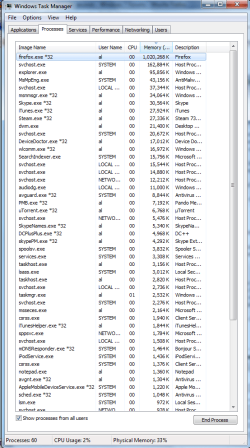
first a screen shot of task manager with the process tab showing, all users checked, and "memory" tab on top clicked so the highest memory processes are on top see pic.

Second

Type eventvwr in search. go to the windows log>application tab. Look for errors (they have red in the left hand column) that have app hang, or app crash, or the name of one of the apps that seem to freeze. There is alot of data so you might want to wait untill just after it happens. when y ou find them mak a screen shot and upload it using the attachement icon in the reply form

Use the snipping tool built in to win 7 for the screen shot, and the attachment icon to attach them see pics for all three

Ken J++
 
Last edited:

My Computer

Computer Manufacturer/Model Number
HP Pavillion dv-7 1005 Tx
OS
Win 8 Release candidate 8400
CPU
[email protected]
Memory
4 gigs
Graphics Card(s)
Nvidia 9600M
Sound Card
HD built-in
Monitor(s) Displays
17" Wxga
Screen Resolution
1440x900
Cooling
none
Internet Speed
45Mb down 5Mb up
Here are the snapshots.
 

Attachments

  • taskmanager.png
    taskmanager.png
    113.1 KB · Views: 949
  • eventvwr.PNG
    eventvwr.PNG
    178.2 KB · Views: 996

My Computer

Computer Manufacturer/Model Number
Custom
OS
Windows 7 Ultimate
CPU
Intel e6750 2.66GhZ
Motherboard
Gigabyte P35 DS3R
Memory
8GB Patriot DDR2 800MhZ Memory
Graphics Card(s)
320MB eVGA 8800 GTS
Sound Card
Bult-in
Monitor(s) Displays
Samsung Syncmaster 931C 19"
Screen Resolution
1280*1024
Hard Drives
Samsung HD642JJ - 640GB
PSU
Corsair 500W
Case
Antec 900
Cooling
Stock
I agree with Ken, the event viewer may show a problem although it may not be conclusive.

For intermittent freezing I would test the harddrive first.

The Op needs to post all system information for a more complete analyasis.
 

My Computer

Computer type
PC/Desktop
Computer Manufacturer/Model Number
Home built
OS
Windows 7 Ult, Windows 8.1 Pro,
CPU
Q9650-4.275GHz, E8600 4.5GHz, E6750-3.8GHz
Motherboard
Evga 780i FTW
Memory
G.Skill PC2 9600 1200Mhz 5 5 5 15 2T
Graphics Card(s)
GTX480
Sound Card
Asus Xonar D2
Monitor(s) Displays
HannsG
Screen Resolution
1680X1050
Hard Drives
GSkill Phoenix Pro 120GB SSD
PSU
ThermalTake Toughpower 1000Watt modular
Case
ThermalTake XaserV
Cooling
Xigmatek S1283
Keyboard
Logitech G15
Mouse
Logitech G9
Internet Speed
T1
I've posted some pictures above. Let me know if you need more information.
 

My Computer

Computer Manufacturer/Model Number
Custom
OS
Windows 7 Ultimate
CPU
Intel e6750 2.66GhZ
Motherboard
Gigabyte P35 DS3R
Memory
8GB Patriot DDR2 800MhZ Memory
Graphics Card(s)
320MB eVGA 8800 GTS
Sound Card
Bult-in
Monitor(s) Displays
Samsung Syncmaster 931C 19"
Screen Resolution
1280*1024
Hard Drives
Samsung HD642JJ - 640GB
PSU
Corsair 500W
Case
Antec 900
Cooling
Stock
Hi, yes they are looking for your System Specs.
 

My Computer

Computer Manufacturer/Model Number
Self Build 64bit
OS
Vista Ult64, Win7600
CPU
Intel Core 2 Quad Q6600 @ 2400 MHz 64bit OS
Motherboard
Asus P5E3 Deluxe WiFi @p 64 bit OS
Memory
4096 MB DDR3-SDRAM
Graphics Card(s)
ATI Radeon HD 3870 Series x2 Crossfired
Sound Card
Realtek on board
Monitor(s) Displays
Samsung SyncMaster - 23 inches
Screen Resolution
1680x1050 pixels at 60 Hz in True Colors
Hard Drives
Hitachi (250 GB)/Samsung 750 GB. /Barracuda 160 GB.
My Book 1 TB external..
PSU
Cooler Master 1000w
Case
Cooler Master Cosmos 1000.
Cooling
Fans and fresh air,
Keyboard
Wireless
Mouse
Wireless
Internet Speed
Never fast enough
Other Info
I use a Magnum.
Go to Start > > run an and type msconfig, click the statup tab and uncheck everything except your anti-virus software

T+You ac also disable services you don;t use.

Visit Black Viper's site here"

Windows 7 Service Configurations by Black Viper
 

My Computer

Computer Manufacturer/Model Number
Cheap $399.00 E-Machine
OS
Windows 7 Pro & Vista Home Premium
CPU
Athlon 64 3800+ (Orleans) 2.40GHz
Motherboard
Winfast
Memory
2GB DDR2 RAM DIMM
Graphics Card(s)
NVIDIA GeForce 8500 GT 512 MB memory HDMI out
Sound Card
creative X-Fi Exteme 7..1 channel
Monitor(s) Displays
Acer V223W 22" widescreen DVI
Screen Resolution
1680x1050
Hard Drives
WDC WD5 500GB
WDC WD25 250GB
PSU
OCZ 550 watt
Case
Gateway
Cooling
2 fans
Keyboard
Dell
Mouse
Sony Vaio
Internet Speed
18MB/s down - .72MB /s up
I've already posted my system specs. They are very powerful. Here they are again:
CPU: Intel c2d e6750 2.66ghz
mobo: gigabyte p35-ds3r
ram: 8gb ddr2 patriot
vga: 320mb evga 8800gts

I don't think I need to use black viper's configuration but I have disabled startup stuff and the problem still persists. Seems to worsen as I leave my computer on for longer periods of time.
 

My Computer

Computer Manufacturer/Model Number
Custom
OS
Windows 7 Ultimate
CPU
Intel e6750 2.66GhZ
Motherboard
Gigabyte P35 DS3R
Memory
8GB Patriot DDR2 800MhZ Memory
Graphics Card(s)
320MB eVGA 8800 GTS
Sound Card
Bult-in
Monitor(s) Displays
Samsung Syncmaster 931C 19"
Screen Resolution
1280*1024
Hard Drives
Samsung HD642JJ - 640GB
PSU
Corsair 500W
Case
Antec 900
Cooling
Stock
How about you shut down you computer,

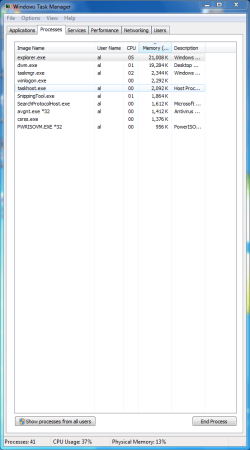
Restart,. open Task Manager and see how many processes in there.


The use the compiler as you normally would and look in Task Manager again to see how many processesa are running,. Click the Memory Coulumn to see which program is using the most anemone of memory
 

My Computer

Computer Manufacturer/Model Number
Cheap $399.00 E-Machine
OS
Windows 7 Pro & Vista Home Premium
CPU
Athlon 64 3800+ (Orleans) 2.40GHz
Motherboard
Winfast
Memory
2GB DDR2 RAM DIMM
Graphics Card(s)
NVIDIA GeForce 8500 GT 512 MB memory HDMI out
Sound Card
creative X-Fi Exteme 7..1 channel
Monitor(s) Displays
Acer V223W 22" widescreen DVI
Screen Resolution
1680x1050
Hard Drives
WDC WD5 500GB
WDC WD25 250GB
PSU
OCZ 550 watt
Case
Gateway
Cooling
2 fans
Keyboard
Dell
Mouse
Sony Vaio
Internet Speed
18MB/s down - .72MB /s up
Here is a screenshot of the next bootup. I also noticed that everytime I boot up, I have to do a disk scan.
 

Attachments

  • bootup.PNG
    bootup.PNG
    97.3 KB · Views: 421

My Computer

Computer Manufacturer/Model Number
Custom
OS
Windows 7 Ultimate
CPU
Intel e6750 2.66GhZ
Motherboard
Gigabyte P35 DS3R
Memory
8GB Patriot DDR2 800MhZ Memory
Graphics Card(s)
320MB eVGA 8800 GTS
Sound Card
Bult-in
Monitor(s) Displays
Samsung Syncmaster 931C 19"
Screen Resolution
1280*1024
Hard Drives
Samsung HD642JJ - 640GB
PSU
Corsair 500W
Case
Antec 900
Cooling
Stock

My Computer

Computer type
PC/Desktop
Computer Manufacturer/Model Number
Custom
OS
7 x64 Ultimate
CPU
AMD Ryzen 5
Motherboard
Gigabyte GA-AB350-Gaming
Memory
16GB DDR4
Graphics Card(s)
Radeon R7 360
Monitor(s) Displays
2 x Dell U2518D
Screen Resolution
2560x1440 2560x1440
Hard Drives
WD 500GB x2
Samsung SSD 128MB (OS)
XPG SX8200 Pro M.2 2280 1TB
PSU
Antec 500
Cooling
Hyper 212 EVO
Keyboard
Logitech cordless K800
Mouse
Logitech M510
Antivirus
Avira
Here is a screenshot of the next bootup. I also noticed that everytime I boot up, I have to do a disk scan.

That is because your hardrive is either corrupt or failing as I already mentioned, most likely you have corruption of your Op system or some files are missing. It's a fairly common problem.

Try typing cmd into start/search, then right click the little dos icon that appears and choose "run as admin" then type sfc/scannow into dos window and hit enter, let it run till it's done and see what it says at the end.
 
Last edited:

My Computer

Computer type
PC/Desktop
Computer Manufacturer/Model Number
Home built
OS
Windows 7 Ult, Windows 8.1 Pro,
CPU
Q9650-4.275GHz, E8600 4.5GHz, E6750-3.8GHz
Motherboard
Evga 780i FTW
Memory
G.Skill PC2 9600 1200Mhz 5 5 5 15 2T
Graphics Card(s)
GTX480
Sound Card
Asus Xonar D2
Monitor(s) Displays
HannsG
Screen Resolution
1680X1050
Hard Drives
GSkill Phoenix Pro 120GB SSD
PSU
ThermalTake Toughpower 1000Watt modular
Case
ThermalTake XaserV
Cooling
Xigmatek S1283
Keyboard
Logitech G15
Mouse
Logitech G9
Internet Speed
T1
Just did a scan and it says

Microsoft Windows [Version 6.1.7600]
Copyright (c) 2009 Microsoft Corporation. All rights reserved.

C:\Windows\system32>sfc/scannow

Beginning system scan. This process will take some time.

Beginning verification phase of system scan.
Verification 100% complete.

Windows Resource Protection did not find any integrity violations.

C:\Windows\system32>

I'm using FF 3.5.5. lol and this is a clean install
 

My Computer

Computer Manufacturer/Model Number
Custom
OS
Windows 7 Ultimate
CPU
Intel e6750 2.66GhZ
Motherboard
Gigabyte P35 DS3R
Memory
8GB Patriot DDR2 800MhZ Memory
Graphics Card(s)
320MB eVGA 8800 GTS
Sound Card
Bult-in
Monitor(s) Displays
Samsung Syncmaster 931C 19"
Screen Resolution
1280*1024
Hard Drives
Samsung HD642JJ - 640GB
PSU
Corsair 500W
Case
Antec 900
Cooling
Stock
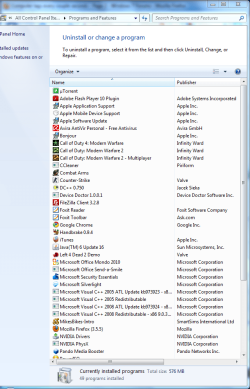
Don't touch services and try updating all your drivers. Then post a shot of your installed programs. What antivirus are you using? Schedule a disk check in the tools section when you right-click your hard drive and select properties. Also, that hardware is roughly average.
 

My Computer

Computer Manufacturer/Model Number
Sony Vaio Z46GDU
OS
Windows 7 Ultimate x86-64
CPU
[email protected] 1066MHz FSB
Motherboard
Sony branded
Memory
6GB DDR3 1066MHz
Graphics Card(s)
9300M GS 256MB Dedicated (Speed) + Intel4500MHD (Stamina)
Sound Card
Realtek HD Audio
Monitor(s) Displays
13.1' WXGA
Screen Resolution
1600x900
Hard Drives
320GB 7200RPM w/ 16MB cache
Internet Speed
1MB/s
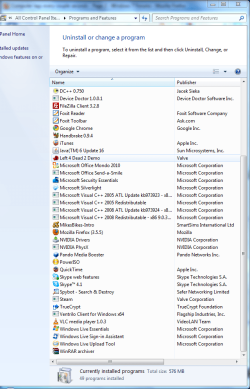
Disk check is already performed at bootup. Windows Update doesn't detect any necessary driver updates. Here's a list of my programs:
 

Attachments

  • prog1.PNG
    prog1.PNG
    179.4 KB · Views: 314
  • prog2.PNG
    prog2.PNG
    179.8 KB · Views: 225

My Computer

Computer Manufacturer/Model Number
Custom
OS
Windows 7 Ultimate
CPU
Intel e6750 2.66GhZ
Motherboard
Gigabyte P35 DS3R
Memory
8GB Patriot DDR2 800MhZ Memory
Graphics Card(s)
320MB eVGA 8800 GTS
Sound Card
Bult-in
Monitor(s) Displays
Samsung Syncmaster 931C 19"
Screen Resolution
1280*1024
Hard Drives
Samsung HD642JJ - 640GB
PSU
Corsair 500W
Case
Antec 900
Cooling
Stock
Get rid of the device app, the media booster, and spybot. Reboot.
 

My Computer

Computer Manufacturer/Model Number
Sony Vaio Z46GDU
OS
Windows 7 Ultimate x86-64
CPU
[email protected] 1066MHz FSB
Motherboard
Sony branded
Memory
6GB DDR3 1066MHz
Graphics Card(s)
9300M GS 256MB Dedicated (Speed) + Intel4500MHD (Stamina)
Sound Card
Realtek HD Audio
Monitor(s) Displays
13.1' WXGA
Screen Resolution
1600x900
Hard Drives
320GB 7200RPM w/ 16MB cache
Internet Speed
1MB/s
Also Device Doctor, DC++?

Did you uncheck everything from msconfig besides your MSE?
 

My Computer

Computer Manufacturer/Model Number
Cheap $399.00 E-Machine
OS
Windows 7 Pro & Vista Home Premium
CPU
Athlon 64 3800+ (Orleans) 2.40GHz
Motherboard
Winfast
Memory
2GB DDR2 RAM DIMM
Graphics Card(s)
NVIDIA GeForce 8500 GT 512 MB memory HDMI out
Sound Card
creative X-Fi Exteme 7..1 channel
Monitor(s) Displays
Acer V223W 22" widescreen DVI
Screen Resolution
1680x1050
Hard Drives
WDC WD5 500GB
WDC WD25 250GB
PSU
OCZ 550 watt
Case
Gateway
Cooling
2 fans
Keyboard
Dell
Mouse
Sony Vaio
Internet Speed
18MB/s down - .72MB /s up
Back
Top