Computer Running Hot when Idle

YeaYea

New member
Local time
9:23 PM
Messages
6
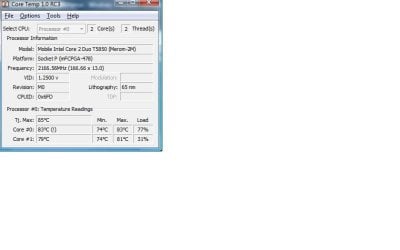
The fan sounds like a jet engine prepping for takeoff when the computer was sitting idle. So I downloaded Core Temp and it is telling me that the TJ max is 85C and my computer is running at 78-83C at that was when there was nothing going on.
My question is what is going on that is making it run that hot? Also, what should I do to stop it?

Some background: The hard drive is failing on this computer. I just reformatted and re-installed windows to factory settings, so I dont think there would be any viruses, malware, etc. But I am curious why it is running so hot. And now Im seeing the CPU cores are showing usage at 90-100%. All I have open is Firefox, Core Temp, Task managner.

This computer is an HP TouchSmart all in one with Vista Premium. (I know this is Win 7 forums. My other one has 7.) CPU is below, GeForce 9300M GS, hard drive is 500GB ST3500620AS.
 

Attachments
  • Core Temp.jpg
    Core Temp.jpg
    25.4 KB · Views: 87
Last edited:

My Computer

OS
Windows 7 Home Premium x64
These temperatures are way too hot for comfort.Prolonged use of computer at these temperatures will fry your MB.
First of all check your fan and heatsink for accumulated dust and clean them thoroughly.Open Task Manager-Performance Tab and select Resource Monitor.Check which programs are using most of the CPU.Post a screenshot of your Resource Monitor showing CPU usage.
 

My Computer

Computer Manufacturer/Model Number
DELL
OS
Windows 8 Pro
CPU
intel i3 2.40 Ghz
Motherboard
DELL inc
Memory
6 GB RAM
Graphics Card(s)
Integrated Intel HD
Sound Card
Realtek high definition SRS surround sound
Screen Resolution
1366*768
Hard Drives
320 GB
Internet Speed
1Mbps
I think a Touchsmart is one of those things where the monitor and case are in one unit that contains the hard drive, CPU, etc. Only the mouse and keyboard are separate?

In case CoreTemp is wrong, I would download another program such as Realtemp or HWInfo to evaluate temps.

Open Task Manager and look at the CPU and Processes tabs. Rank them in descending order. Post a picture of what you see.

Be sure to choose "show processes from all users".

How many processes total?

Confirm with your eyes if possible that any fans are actually spinning.
 

My Computer

Computer type
PC/Desktop
Computer Manufacturer/Model Number
Ignatz Special; 4 speed manual gearbox; factory air conditioning; one of one
OS
Windows 7 Home Premium SP1, 64-bit
CPU
Intel Skylake i5-6600K, not overclocked
Motherboard
AsRock Z170M Extreme 4, micro ATX
Memory
8 GB HyperX DDR4-2666 (2 x 4 GB)
Graphics Card(s)
none; graphics are integrated on CPU
Sound Card
onboard: Realtek ALC1150; external: USB Behringer UF0-202
Monitor(s) Displays
Dell S2340M 23 inch IPS
Screen Resolution
1600 x 900
Hard Drives
System: Crucial MX100 series SSD, 128 GB;
Data: Samsung Spinpoint 103SJ, 1 TB;
Backup: WD Caviar Green WD30EZRX-00D8PB0, 3 TB
PSU
Rosewill SilentNight 500 watt fanless, semi-modular
Case
Antec Solo II
Cooling
Noctua NH-U12S; Noctua F12 intake, Noctua S12A exhaust
Keyboard
Microsoft 200 6JH-00001 USB
Mouse
Dell or Microsoft optical wired; USB
Antivirus
Microsoft Security Essentials and Malwarebytes Premium
Browser
Pale Moon
Other Info
All fans PWM; speeds at idle: CPU circa 500 rpm; intake circa 600 rpm; exhaust circa 600 rpm; CPU temps 27 idle and 47 C load in a warm room (27 C/81 F) when running Intel Extreme Tuning Utility stress test.
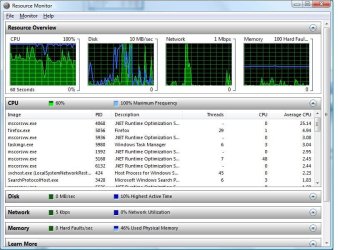
I haven't opened it up yet, but here is some screen shots from Resource monitor and Task Manager (they are from a few seconds later so they might not show the same info mentioned below).

After the first post, the computer went to sleep and when I woke it up the temps started at 35C then went up to 60C. I restarted it for some updates and as soon as I could get the Core Temp app open, the temps were around 80C & cpu at 100%. I attached the screen shots. From what I could tell of the processes running, the system was just running updates. Probably because I reinstalled Vista. It still seems like it should not be getting to 80C, but I'm not an expert.

Also, I downloaded Speedfan 4.45 and it is reading the same temps and tells me the fan is at 3000 rpm. The idle temp is 60-65c now and that seems high from what I have read.

Thoughts? & thanks for the replies

" I think a Touchsmart is one of those things where the monitor and case are in one unit that contains the hard drive, CPU, etc. Only the mouse and keyboard are separate?"

Yes, that is correct.
 

Attachments

  • Resource Monitor.jpg
    Resource Monitor.jpg
    86.3 KB · Views: 58
  • TaskManager.jpg
    TaskManager.jpg
    96 KB · Views: 56

My Computer

OS
Windows 7 Home Premium x64

My Computer

Computer type
PC/Desktop
Computer Manufacturer/Model Number
Ignatz Special; 4 speed manual gearbox; factory air conditioning; one of one
OS
Windows 7 Home Premium SP1, 64-bit
CPU
Intel Skylake i5-6600K, not overclocked
Motherboard
AsRock Z170M Extreme 4, micro ATX
Memory
8 GB HyperX DDR4-2666 (2 x 4 GB)
Graphics Card(s)
none; graphics are integrated on CPU
Sound Card
onboard: Realtek ALC1150; external: USB Behringer UF0-202
Monitor(s) Displays
Dell S2340M 23 inch IPS
Screen Resolution
1600 x 900
Hard Drives
System: Crucial MX100 series SSD, 128 GB;
Data: Samsung Spinpoint 103SJ, 1 TB;
Backup: WD Caviar Green WD30EZRX-00D8PB0, 3 TB
PSU
Rosewill SilentNight 500 watt fanless, semi-modular
Case
Antec Solo II
Cooling
Noctua NH-U12S; Noctua F12 intake, Noctua S12A exhaust
Keyboard
Microsoft 200 6JH-00001 USB
Mouse
Dell or Microsoft optical wired; USB
Antivirus
Microsoft Security Essentials and Malwarebytes Premium
Browser
Pale Moon
Other Info
All fans PWM; speeds at idle: CPU circa 500 rpm; intake circa 600 rpm; exhaust circa 600 rpm; CPU temps 27 idle and 47 C load in a warm room (27 C/81 F) when running Intel Extreme Tuning Utility stress test.
Back
Top