Computer Running Slower

How to fill in system specs. If you follow this your specs are available in each of your posts.
How to upload a snip, preferred way.

Obviously something happened just before you noticed the slow-down. If you are experiencing this online, it's an ISP issue. If programs on your PC are slow opening, such as Word, Notepad. etc, maybe your PC has the issue. In two hours you can't do a System Restore, Repair install and run Memory diagnostics.
The memory diagnostic should run at least several hours to eliminate it as a problem.
In my sig are links to Malwarebytes and SuperAntiSpyware, download both, update them, then run full scans with each. Disable any other security software during this step.
Use the CCleaner link to download it and run it to clean out old temp files, in options>advanced uncheck "Only delete temporary files older than 24 hours".
 

My Computer

Computer type
PC/Desktop
Computer Manufacturer/Model Number
Home Built Desktop By DataTech
OS
Windows 7 Ultimate X64 SP1
CPU
Intel i5-2550K, Differing ~4.4-4.8GHz No built in GPU
Motherboard
ASUS P8Z68-V PRO/GEN3
Memory
16GB G.Skill Sniper 1866MHz @ 2133MHz 2x8GB
Graphics Card(s)
ASUS GTX650TIB-DC2OC-2GD5, (650TI Boost)
Sound Card
Onboard Realtek 5-1
Monitor(s) Displays
Samsung P2570HD
Screen Resolution
1920x1080
Hard Drives
Samsung 840 Pro 256GB SSD for OS, 500GB Seagate Constellation (Enterprise drive) for Data
PSU
Corsair HX650W
Case
Inwin Dragon Rider
Cooling
Hyper 212 EVO w/two Noctua fans, push-pull, @1300 RPM
Keyboard
E-Z Eyes, bright yellow keys with large characters
Mouse
steelseries SENSEI Laser Pro Gaming
Internet Speed
48-51Mbs Mbs down, 11 Mbs up Xfinity Cable
Antivirus
Norton Internet Security 2013
Browser
IE 10, Opera, Pale Moon if needed
Other Info
4 case fans, LG BluRay-RE, ASUS DVD-RW, Mr. Fusion power supply, 1.21 gigawatts.
well, if you have spare parts from another computer, you could change them out with your current one.

that windows memory diagnostic will help with the RAM in testing it, or you can try Memtest86.com - Memory Diagnostic and click free download.

You can also try updating all of your drivers. Type device manager (also do a separate search for devices and printers) in the toolbar search and see if you get any yellow exclaimations that need a driver update. Search manufacturers online to download drivers (like gigabyte for a gigabyte motherboard, nvidia for an nvidia graphics card, etc), making sure that you download only the correct drivers (and they are supposed to be 64bit not 32 bit). IF you have old or incorrect drivers, uninstall them before installing new ones

You may just have to look up google or something for free hardware tests for graphics cards and/or whatever you have, being careful not to just download untrusted software. You could try a computer repair shop, and they will test it for you. you could keep asking here if someone would know the answer to your question (you might make a separate thread so people wont have to spend too long reading through).
 

My Computer

Computer type
PC/Desktop
Computer Manufacturer/Model Number
Custom Asus Build
OS
Microsoft Windows 8.1 Pro 64-bit
CPU
Intel(R) Core(TM) i3-4130 CPU @ 3.40GHz
Motherboard
B85M-E
Memory
8.00 GB
Graphics Card(s)
None
Sound Card
Realtek High Definition Audio
Monitor(s) Displays
Asus 23.6" Monitor
Screen Resolution
1920 x 1080 x 32 bits (4294967296 colors) @ 60 Hz
Hard Drives
INTEL SSDSC2BW180A4
Samsung SSD 840 PRO Series
PSU
Seasonic S12II-380Bronze
Case
Lian Li
Cooling
Fan, Passive
Keyboard
Logitech K120
Mouse
Microsoft Touch Mouse
Internet Speed
4ms Ping, 19.0 Mbps Download, 19.0 Mbps Upload
Antivirus
Eset Endpoint
Browser
Internet Explorer, Chrome

My Computer

Computer type
PC/Desktop
Computer Manufacturer/Model Number
Dell XPS 420
OS
Windows 10, Home Clean Install
CPU
Intel Core2 processsor Q8200(2.33Ghz 1333FSB) Quad Core Tech
Motherboard
Dell
Memory
6 gb
Graphics Card(s)
ATI Radeon 256MB HD3650
Sound Card
Intergrated 7.1 Channel Audio
Monitor(s) Displays
Dell SP2009W 20"
Hard Drives
640 GB Serial ATA Hard drive
Cooling
Fan
Keyboard
Dell USB Keyboard
Mouse
Dell Premium Optical USB
Internet Speed
DSL 2.85
How to fill in system specs. If you follow this your specs are available in each of your posts.
How to upload a snip, preferred way.

Obviously something happened just before you noticed the slow-down. If you are experiencing this online, it's an ISP issue. If programs on your PC are slow opening, such as Word, Notepad. etc, maybe your PC has the issue. In two hours you can't do a System Restore, Repair install and run Memory diagnostics.
The memory diagnostic should run at least several hours to eliminate it as a problem.
In my sig are links to Malwarebytes and SuperAntiSpyware, download both, update them, then run full scans with each. Disable any other security software during this step.
Use the CCleaner link to download it and run it to clean out old temp files, in options>advanced uncheck "Only delete temporary files older than 24 hours".

The memory diagnostics took 5 minutes. The system restore took 5 minutes. I don't know what the repair install is....

I dont understand how it can be an ISP issue... If the computer was fast a week ago, what could have taken place with the ISP that is slowing it down?
 

My Computer

OS
Windows 7 Home Premium 32bit
A repair install is putting in your Windows 7 installation disk and repairing your Windows filesystem using the files on the installation DVD.
Here is a guide of how to do it.
http://www.sevenforums.com/tutorials/3413-repair-install.html

And no memory diagnostics test only takes 5 minutes, unless you are running DDR7 RAM which means you are running a computer from 5 years into the future.
 

My Computer

Computer type
PC/Desktop
Computer Manufacturer/Model Number
Frankenstein PC
OS
Windows 7 Home Premium 64-bit SP1
CPU
Intel core i7 920 @ 2.67Ghz; Bloomfield 45nm Technology
Motherboard
Intel Corporation DX58SO (J1PR)
Memory
16GB Dual-Channel DDR3 @ 540MHz (7-7-7-19)
Graphics Card(s)
4095MB NVIDIA GeForce GTX 960 (EVGA)
Sound Card
N/A Integrated Audio
Monitor(s) Displays
Acer S231HLbid LED Monitor 23"
Screen Resolution
1920x1080 1080p 60Hz
Hard Drives
BOOT: 59GB ADATA SP900 (SSD)
STORAGE 1: 977GB Hitachi HDS721010CLA (SATA) @7200RPM;
STORAGE 2: 465GB Western Digital WDC WD5000AAKS-65YGA0 (SATA) @ 7200RPM;
PSU
EVGA SuperNOVA 750 G1 80+ Gold (120-G1-0750-XR)
Case
Cooler Master Elite Gaming Case Black 430
Cooling
Cooler Master Hyper 212 Heatsink. Front and rear 120mm fan
Keyboard
Rosewill RIKB-11003
Mouse
James Donkey 112S
Internet Speed
200/40
Antivirus
Avast! Antivirus Free
Browser
Cyberfox x64 / FireFox / PaleMoon x64; kept up-to-date
Other Info
Windows Installed on March 21, 2014
The memory diagnostics took 5 minutes. The system restore took 5 minutes. I don't know what the repair install is....
We're trying our best to help you out, but it really makes it hard when you say "did all that" and didn't actually do all of that. What if a repair install is exactly what your computer needed? If you don't know how to do something, we would love to help you and explain it, but you have to let us know. you really gotta do these things and not skip over them if you truely are interested in attempting to solve the problem. Don't half '@$$' it, as we like to say. Basically, don't do something halfway and say that it didn't work. I recommend going back to previous posts and making sure you've actually done everything

please don't think i'm angry or trying to inflame; my post sounds more upset than i actually am just by the way i typed it (im not angry). But you could really help us out with more communication
 

My Computer

Computer type
PC/Desktop
Computer Manufacturer/Model Number
Custom Asus Build
OS
Microsoft Windows 8.1 Pro 64-bit
CPU
Intel(R) Core(TM) i3-4130 CPU @ 3.40GHz
Motherboard
B85M-E
Memory
8.00 GB
Graphics Card(s)
None
Sound Card
Realtek High Definition Audio
Monitor(s) Displays
Asus 23.6" Monitor
Screen Resolution
1920 x 1080 x 32 bits (4294967296 colors) @ 60 Hz
Hard Drives
INTEL SSDSC2BW180A4
Samsung SSD 840 PRO Series
PSU
Seasonic S12II-380Bronze
Case
Lian Li
Cooling
Fan, Passive
Keyboard
Logitech K120
Mouse
Microsoft Touch Mouse
Internet Speed
4ms Ping, 19.0 Mbps Download, 19.0 Mbps Upload
Antivirus
Eset Endpoint
Browser
Internet Explorer, Chrome
And no memory diagnostics test only takes 5 minutes, unless you are running DDR7 RAM which means you are running a computer from 5 years into the future.
No, it is possible with faster computers (including my own, which I just tested) to have a 5 minute RAM test with the windows diagnostic.

but Giantsbran1227, there are options in that same screen that will allow you to do a longer, more thorough testing of your RAM, as well as MEMTEST86 as was mentioned. Memtest is a download, however, and something you may want to start late and keep going overnight, as it would take a really long time.

However, I doubt your RAM has much wrong with it if it passed that first test and quickly, but you can't rule it out completely without testing it to the core ;)
 

My Computer

Computer type
PC/Desktop
Computer Manufacturer/Model Number
Custom Asus Build
OS
Microsoft Windows 8.1 Pro 64-bit
CPU
Intel(R) Core(TM) i3-4130 CPU @ 3.40GHz
Motherboard
B85M-E
Memory
8.00 GB
Graphics Card(s)
None
Sound Card
Realtek High Definition Audio
Monitor(s) Displays
Asus 23.6" Monitor
Screen Resolution
1920 x 1080 x 32 bits (4294967296 colors) @ 60 Hz
Hard Drives
INTEL SSDSC2BW180A4
Samsung SSD 840 PRO Series
PSU
Seasonic S12II-380Bronze
Case
Lian Li
Cooling
Fan, Passive
Keyboard
Logitech K120
Mouse
Microsoft Touch Mouse
Internet Speed
4ms Ping, 19.0 Mbps Download, 19.0 Mbps Upload
Antivirus
Eset Endpoint
Browser
Internet Explorer, Chrome
Sorry dust. I will try to be clearer. The RAM test took 4 minutes and 24 seconds. Just timed it. It is a very fast computer so that may be why.

Now on to the repair install. I do not have the original Windows 7 disc. Will that prevent me from doing it?
 

My Computer

OS
Windows 7 Home Premium 32bit
Now on to the repair install. I do not have the original Windows 7 disc. Will that prevent me from doing it?
Yes, you will have to skip that one. Dont think theres a way to do it (unless you restore through the system restore) without the CD
 

My Computer

Computer type
PC/Desktop
Computer Manufacturer/Model Number
Custom Asus Build
OS
Microsoft Windows 8.1 Pro 64-bit
CPU
Intel(R) Core(TM) i3-4130 CPU @ 3.40GHz
Motherboard
B85M-E
Memory
8.00 GB
Graphics Card(s)
None
Sound Card
Realtek High Definition Audio
Monitor(s) Displays
Asus 23.6" Monitor
Screen Resolution
1920 x 1080 x 32 bits (4294967296 colors) @ 60 Hz
Hard Drives
INTEL SSDSC2BW180A4
Samsung SSD 840 PRO Series
PSU
Seasonic S12II-380Bronze
Case
Lian Li
Cooling
Fan, Passive
Keyboard
Logitech K120
Mouse
Microsoft Touch Mouse
Internet Speed
4ms Ping, 19.0 Mbps Download, 19.0 Mbps Upload
Antivirus
Eset Endpoint
Browser
Internet Explorer, Chrome
Are you sure you don't have a disk? It's only a 1 month old computer, so a there should be a restore disk included with your computer. And I thought all new computers came with 64-bit. . .

If you could fill in your Systems Specs that would help us with your problem.
 

My Computer

Computer type
PC/Desktop
Computer Manufacturer/Model Number
Frankenstein PC
OS
Windows 7 Home Premium 64-bit SP1
CPU
Intel core i7 920 @ 2.67Ghz; Bloomfield 45nm Technology
Motherboard
Intel Corporation DX58SO (J1PR)
Memory
16GB Dual-Channel DDR3 @ 540MHz (7-7-7-19)
Graphics Card(s)
4095MB NVIDIA GeForce GTX 960 (EVGA)
Sound Card
N/A Integrated Audio
Monitor(s) Displays
Acer S231HLbid LED Monitor 23"
Screen Resolution
1920x1080 1080p 60Hz
Hard Drives
BOOT: 59GB ADATA SP900 (SSD)
STORAGE 1: 977GB Hitachi HDS721010CLA (SATA) @7200RPM;
STORAGE 2: 465GB Western Digital WDC WD5000AAKS-65YGA0 (SATA) @ 7200RPM;
PSU
EVGA SuperNOVA 750 G1 80+ Gold (120-G1-0750-XR)
Case
Cooler Master Elite Gaming Case Black 430
Cooling
Cooler Master Hyper 212 Heatsink. Front and rear 120mm fan
Keyboard
Rosewill RIKB-11003
Mouse
James Donkey 112S
Internet Speed
200/40
Antivirus
Avast! Antivirus Free
Browser
Cyberfox x64 / FireFox / PaleMoon x64; kept up-to-date
Other Info
Windows Installed on March 21, 2014
just took this test and it said that my download speed was 5.7 mb/s. What does this suggest?
 

My Computer

OS
Windows 7 Home Premium 32bit
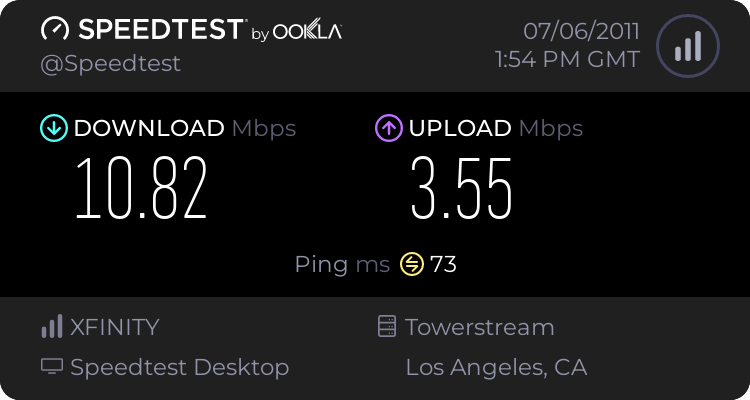
To test your internet speed, you could try this: Speedtest.net - The Global Broadband Speed Test

It will show you your upload and download speeds, along with ping. Mine is around that same download speed and my internet browsing is fine.
 

My Computer

Computer type
PC/Desktop
Computer Manufacturer/Model Number
Custom Asus Build
OS
Microsoft Windows 8.1 Pro 64-bit
CPU
Intel(R) Core(TM) i3-4130 CPU @ 3.40GHz
Motherboard
B85M-E
Memory
8.00 GB
Graphics Card(s)
None
Sound Card
Realtek High Definition Audio
Monitor(s) Displays
Asus 23.6" Monitor
Screen Resolution
1920 x 1080 x 32 bits (4294967296 colors) @ 60 Hz
Hard Drives
INTEL SSDSC2BW180A4
Samsung SSD 840 PRO Series
PSU
Seasonic S12II-380Bronze
Case
Lian Li
Cooling
Fan, Passive
Keyboard
Logitech K120
Mouse
Microsoft Touch Mouse
Internet Speed
4ms Ping, 19.0 Mbps Download, 19.0 Mbps Upload
Antivirus
Eset Endpoint
Browser
Internet Explorer, Chrome
1373623375.png

This is mine over a 1750 mile distance. Some ISP's throttle users after some arbitrary usage per month.
You should have the option of making a reinstall disk from within Win7. Since we still have no specs its really hard to help you any further.:confused:
 

My Computer

Computer type
PC/Desktop
Computer Manufacturer/Model Number
Home Built Desktop By DataTech
OS
Windows 7 Ultimate X64 SP1
CPU
Intel i5-2550K, Differing ~4.4-4.8GHz No built in GPU
Motherboard
ASUS P8Z68-V PRO/GEN3
Memory
16GB G.Skill Sniper 1866MHz @ 2133MHz 2x8GB
Graphics Card(s)
ASUS GTX650TIB-DC2OC-2GD5, (650TI Boost)
Sound Card
Onboard Realtek 5-1
Monitor(s) Displays
Samsung P2570HD
Screen Resolution
1920x1080
Hard Drives
Samsung 840 Pro 256GB SSD for OS, 500GB Seagate Constellation (Enterprise drive) for Data
PSU
Corsair HX650W
Case
Inwin Dragon Rider
Cooling
Hyper 212 EVO w/two Noctua fans, push-pull, @1300 RPM
Keyboard
E-Z Eyes, bright yellow keys with large characters
Mouse
steelseries SENSEI Laser Pro Gaming
Internet Speed
48-51Mbs Mbs down, 11 Mbs up Xfinity Cable
Antivirus
Norton Internet Security 2013
Browser
IE 10, Opera, Pale Moon if needed
Other Info
4 case fans, LG BluRay-RE, ASUS DVD-RW, Mr. Fusion power supply, 1.21 gigawatts.
Back
Top