Computer says I am not Admin but I am when updating

Tripptrip

New member
Local time
9:56 PM
Messages
4
I have a HP laptop (it's my home computer) Running Windows 7 64-bit I am the only user & I am Admin

So I have been trying to upgrade my computer from windows 7 to windows 10. My computer will not allow me to upgrade. I have read many post about it but all the problems other people are having and how they got it fixed doesn't work for me.

When I go to control panel - System & security - windows update
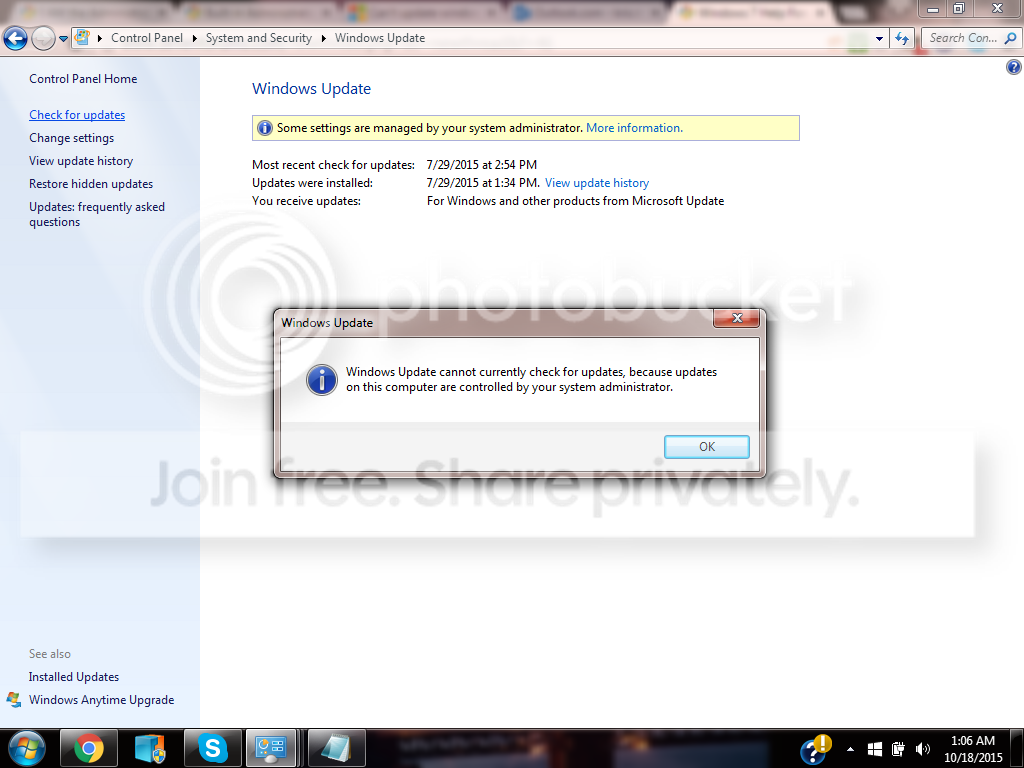
I click on the side where it says -Check for updates- and I get an error message that says

"Windows update cannot currently check for updates, because updates on this computer are
controlled by your system administrator"

I went to control panel - User account and Family Safety - User account
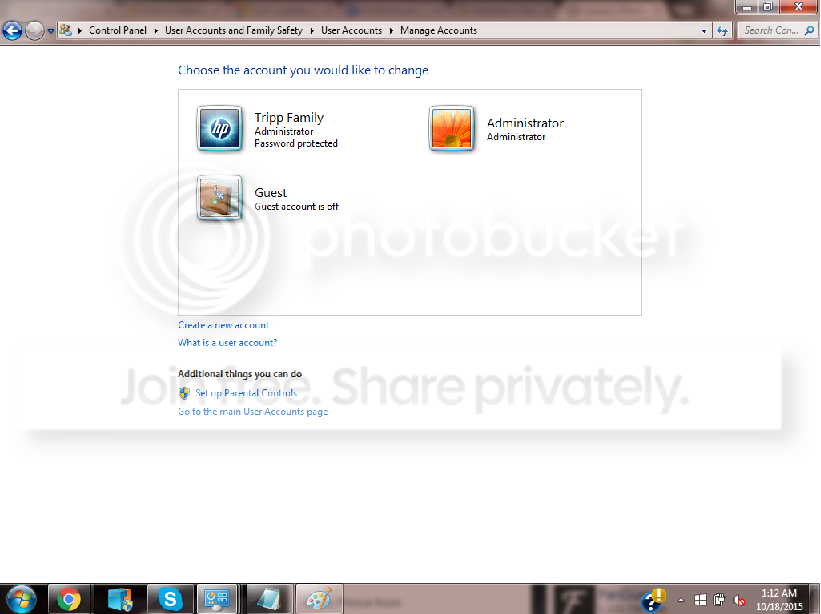
I am administrator & the only account this is my home laptop

Turned User Account Control (UAC) off - Reset my computer & tried still "cannot update, not admin"


The built-in "elevated" Administrator account
I went to Command prompt typed in "net user administrator /active:yes"
Log off, seen the built-in Administrator account log on icon added. Clicked it logged on.
Tried doing update. still same problem

I tried even creating a whole new account, giving it administrator rights, still same thing.

Whats weird is that whenever I am doing something that says "Need admin rights" Such as a
downloading or deleting a file, I am allowed it, I have no problem with it. A message pops up and it says "This action requires Admin" I click it and it allows it to happen.

but for some reason, ANY KIND OF UPDATE not just windows 10, it will not allow me to do it.
My computer hasn't been updated since July that's the last update to gone thru. Auto updates are
turned off too, I tried turning it back on. I cannot. "Need admin permission"

Someone also adv me to look for a update called KB2871389 and uninstall it. I searched my whole
update list and could not find "KB2871389"

I have no idea what else to do. I no longer even care about upgrading to windows 10, now i'm
just annoyed that I cannot access my updates all together. I am running Mcafee idk if that helps


Showing that I am Admin and have unlocked that hidden admin account but still will not work on either account
http://s1383.photobucket.com/user/kmtripp89/media/Admin_zpsajsv9cqd.png.html][/URL]
THIS IS THE EXACT MESSAGE I AM GETTING

I have not made any major changes to my computer. I used Mcafee & ccleaner. I ran scans on both & still not issue found.


Please help me.
 

My Computer My Computer

At a glance

Windows 7 home premium 64-bit
Computer type
Laptop
Computer Manufacturer/Model Number
HP
OS
Windows 7 home premium 64-bit
Please turn UAC back on ;)

This type of problem is often due to malware creating spurious Policy prohibitions.
Please download and install Malwarebytes Anti-malware (free version) from Malwarebytes | Free Anti-Malware Detection & Removal Software - UNtick 'Enable free trial of MBAM Premium' at the end of the installation - and update it, then run a full scan in your main account, and Quick scans in any other user accounts.

Quarantine everything it finds

Then...
Please download the Farbar Service Scanner from

Farbar Service Scanner Download

Right-click on the saved file and select 'Run as Administrator', and tick all the options, then click on the Scan button - copy and paste the report to your response.
 

My Computer My Computer

At a glance

Win 7 x64 Home Premium (and x86 VirtualBox VM...i3 370M/i7 6500U8GB - finally :)/8GBit's an i3, dude!/dual Intel&nVidia
Computer type
Laptop
Computer Manufacturer/Model Number
Asus K52F or Lenovo B51-80
OS
Win 7 x64 Home Premium (and x86 VirtualBox VM)/Win10
CPU
i3 370M/i7 6500U
Motherboard
Asus/Lenovo
Memory
8GB - finally :)/8GB
Graphics Card(s)
it's an i3, dude!/dual Intel&nVidia
Sound Card
onboard
Monitor(s) Displays
15.6" built-in
Screen Resolution
1366x768/1920x1080
Hard Drives
750GB Seagate internal
Sundry external drives attached to other computers on the local network
1TB SSD on the Lenovo
PSU
n/a
Internet Speed
as much as I can get - usually on a dongle/phone, so <1MB/s
Antivirus
MSE/Defender
Browser
IE11/12/Edge/Chrome/FF(if I must)
Ok cool, i'll try it out thank you!
 

My Computer My Computer

At a glance

Windows 7 home premium 64-bit
Computer type
Laptop
Computer Manufacturer/Model Number
HP
OS
Windows 7 home premium 64-bit
Farbar Service Scanner Version: 26-07-2015
Ran by Tripp (administrator) on 19-10-2015 at 22:03:51
Running from "C:\Users\Tripp\Downloads"
Microsoft Windows 7 Home Premium Service Pack 1 (X64)
Boot Mode: Normal
****************************************************************

Internet Services:
============

Connection Status:
==============
Localhost is accessible.
LAN connected.
Attempt to access Google IP returned error. Google IP is unreachable
Google.com is accessible.
Attempt to access Yahoo.com returned error: Yahoo.com is unreachable


Windows Firewall:
=============

Firewall Disabled Policy:
==================


System Restore:
============

System Restore Policy:
========================


Action Center:
============


Windows Update:
============

Windows Autoupdate Disabled Policy:
============================


Windows Defender:
==============
WinDefend Service is not running. Checking service configuration:
The start type of WinDefend service is set to Demand. The default start type is Auto.
The ImagePath of WinDefend service is OK.
The ServiceDll of WinDefend service is OK.


Windows Defender Disabled Policy:
==========================
[HKEY_LOCAL_MACHINE\SOFTWARE\Microsoft\Windows Defender]
"DisableAntiSpyware"=DWORD:1


Other Services:
==============


File Check:
========
C:\Windows\System32\nsisvc.dll => File is digitally signed
C:\Windows\System32\drivers\nsiproxy.sys => File is digitally signed
C:\Windows\System32\dhcpcore.dll => File is digitally signed
C:\Windows\System32\drivers\afd.sys => File is digitally signed
C:\Windows\System32\drivers\tdx.sys => File is digitally signed
C:\Windows\System32\Drivers\tcpip.sys => File is digitally signed
C:\Windows\System32\dnsrslvr.dll => File is digitally signed
C:\Windows\System32\mpssvc.dll => File is digitally signed
C:\Windows\System32\bfe.dll => File is digitally signed
C:\Windows\System32\drivers\mpsdrv.sys => File is digitally signed
C:\Windows\System32\SDRSVC.dll => File is digitally signed
C:\Windows\System32\vssvc.exe => File is digitally signed
C:\Windows\System32\wscsvc.dll => File is digitally signed
C:\Windows\System32\wbem\WMIsvc.dll => File is digitally signed
C:\Windows\System32\wuaueng.dll => File is digitally signed
C:\Windows\System32\qmgr.dll => File is digitally signed
C:\Windows\System32\es.dll => File is digitally signed
C:\Windows\System32\cryptsvc.dll => File is digitally signed
C:\Program Files\Windows Defender\MpSvc.dll => File is digitally signed
C:\Windows\System32\ipnathlp.dll => File is digitally signed
C:\Windows\System32\iphlpsvc.dll => File is digitally signed
C:\Windows\System32\svchost.exe => File is digitally signed
C:\Windows\System32\rpcss.dll => File is digitally signed


**** End of log ****
 

My Computer My Computer

At a glance

Windows 7 home premium 64-bit
Computer type
Laptop
Computer Manufacturer/Model Number
HP
OS
Windows 7 home premium 64-bit
Were you connected to the internet when you ran that?
What AV and Firewall are you running?
 

My Computer My Computer

At a glance

Win 7 x64 Home Premium (and x86 VirtualBox VM...i3 370M/i7 6500U8GB - finally :)/8GBit's an i3, dude!/dual Intel&nVidia
Computer type
Laptop
Computer Manufacturer/Model Number
Asus K52F or Lenovo B51-80
OS
Win 7 x64 Home Premium (and x86 VirtualBox VM)/Win10
CPU
i3 370M/i7 6500U
Motherboard
Asus/Lenovo
Memory
8GB - finally :)/8GB
Graphics Card(s)
it's an i3, dude!/dual Intel&nVidia
Sound Card
onboard
Monitor(s) Displays
15.6" built-in
Screen Resolution
1366x768/1920x1080
Hard Drives
750GB Seagate internal
Sundry external drives attached to other computers on the local network
1TB SSD on the Lenovo
PSU
n/a
Internet Speed
as much as I can get - usually on a dongle/phone, so <1MB/s
Antivirus
MSE/Defender
Browser
IE11/12/Edge/Chrome/FF(if I must)
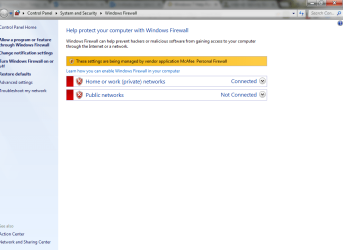
Yes I was connected to the internet when I ran that. I have Mcafee. For some reason all this is shut off. It will not allow me to turn it back on "ran by admin"
 

Attachments

  • Untitled.png
    Untitled.png
    35.2 KB · Views: 1

My Computer My Computer

At a glance

Windows 7 home premium 64-bit
Computer type
Laptop
Computer Manufacturer/Model Number
HP
OS
Windows 7 home premium 64-bit
I would uninstall McAfee, then run the MCPR tool -

Download the McAfee removal tool from:

http://download.mcafee.com/products/licensed/cust_support_patches/MCPR.exe

Click Save, and save the file to a folder on your computer.
Navigate to the folder where you saved the file.
right-click on MCPR.exe and select 'Run as Administrator' to run the removal tool.

when complete, reboot.

After the reboot, open an Elevated Command Prompt, and run the following command

NETSH WINSOCK RESET

You'll be advised to reboot - do so.

Check that Windows Firewall is switched on, and install MSE (at least temporarily) as your AV.

then see how things behave.
 

My Computer My Computer

At a glance

Win 7 x64 Home Premium (and x86 VirtualBox VM...i3 370M/i7 6500U8GB - finally :)/8GBit's an i3, dude!/dual Intel&nVidia
Computer type
Laptop
Computer Manufacturer/Model Number
Asus K52F or Lenovo B51-80
OS
Win 7 x64 Home Premium (and x86 VirtualBox VM)/Win10
CPU
i3 370M/i7 6500U
Motherboard
Asus/Lenovo
Memory
8GB - finally :)/8GB
Graphics Card(s)
it's an i3, dude!/dual Intel&nVidia
Sound Card
onboard
Monitor(s) Displays
15.6" built-in
Screen Resolution
1366x768/1920x1080
Hard Drives
750GB Seagate internal
Sundry external drives attached to other computers on the local network
1TB SSD on the Lenovo
PSU
n/a
Internet Speed
as much as I can get - usually on a dongle/phone, so <1MB/s
Antivirus
MSE/Defender
Browser
IE11/12/Edge/Chrome/FF(if I must)
Back
Top