Solved computer sluggish after bios set to default

Whadoosh

New member
Local time
10:04 PM
Messages
8
Hi Guys.

could someone help me please. I lost power and when it returned the computer started back up but I had no other option but to set all the default values on the bios as I could not pass the screen otherwise.

So I'm not quite sure if my memory is set at the correct speed as my computer has been awful sluggish since the bios has been set to default as everything on the bios has been set to Auto.

Any help would be much appreciated.

Thanks
 

Attachments
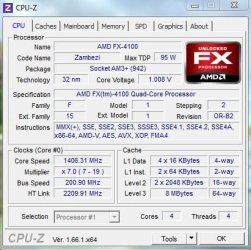
  • CPU.JPG
    CPU.JPG
    47.6 KB · Views: 31
  • Mainboard.JPG
    Mainboard.JPG
    32.3 KB · Views: 31
  • Memory.JPG
    Memory.JPG
    33.5 KB · Views: 31
  • SPD.JPG
    SPD.JPG
    39.5 KB · Views: 31

My Computer

Computer type
PC/Desktop
OS
Windows 7 Professional 64-bit SP1
CPU
AMD FX-4100 Zambezi 32nm Technology
Motherboard
ASUSTeK Computer INC. M5A78L-M LX V2 (AM3R2)
Memory
8.00GB Dual-Channel DDR3
One thought: Was your SATA controller set on AHCI previously, and now it is set on (default) IDE mode?
 

My Computer

Computer type
PC/Desktop
Computer Manufacturer/Model Number
Home Built - Jan 2013
OS
Windows 7 64 Bit Home Premium SP1
CPU
i7-3820
Motherboard
Asus P9X79-PRO - Bios 4608
Memory
GSkill F3-14900CL9Q - 16GB
Graphics Card(s)
EVGA GeForce GTX660 - Driver 352.86
Sound Card
On board Realtek ALC898
Monitor(s) Displays
Acer S271HL
Screen Resolution
1920 x 1080
Hard Drives
#1- Samsung 840 Pro Series
#2- Western Digital WD1002FAEX Sata3 Black
#3- Western Digital WD1002FAEX Sata3 Black
PSU
Corsair CMPSU-850TX-V2 - 850 watt (by Seasonic)
Case
Corsair Obsidian 550D
Cooling
Standard 3 120mm case fans, Cooler Master Hyper 212 EVO
Keyboard
MS KC-0405
Mouse
Intellimouse 5-button
Internet Speed
56 Mbits/Sec (on a good day)
Antivirus
Avast & Malwarebytes
Browser
Firefox
Other Info
Asus DVD - DRW-24B1ST 24X
Thanks for the reply.

I've always had it on IDE I remember checking not long after I got a new hard drive. so that can't be the problem sorry.

I have posted some pictures on my other post from Cpu z but for some reason they are not showing on my post
 

My Computer

Computer type
PC/Desktop
OS
Windows 7 Professional 64-bit SP1
CPU
AMD FX-4100 Zambezi 32nm Technology
Motherboard
ASUSTeK Computer INC. M5A78L-M LX V2 (AM3R2)
Memory
8.00GB Dual-Channel DDR3
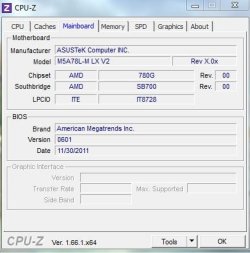
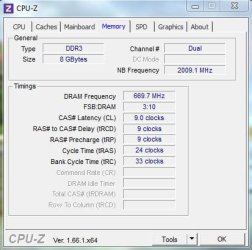
I can see your CPU-Z pics here. Your RAM is running normally (1333MHz, 8GB) at the system level.

What does Windows Say?
Start > Computer > System Properties.

You can also type "Windows Memory Diagnostic" at the Start menu and run that to see if Windows reports any problems.
 

My Computer

Computer type
PC/Desktop
Computer Manufacturer/Model Number
Home Built - Jan 2013
OS
Windows 7 64 Bit Home Premium SP1
CPU
i7-3820
Motherboard
Asus P9X79-PRO - Bios 4608
Memory
GSkill F3-14900CL9Q - 16GB
Graphics Card(s)
EVGA GeForce GTX660 - Driver 352.86
Sound Card
On board Realtek ALC898
Monitor(s) Displays
Acer S271HL
Screen Resolution
1920 x 1080
Hard Drives
#1- Samsung 840 Pro Series
#2- Western Digital WD1002FAEX Sata3 Black
#3- Western Digital WD1002FAEX Sata3 Black
PSU
Corsair CMPSU-850TX-V2 - 850 watt (by Seasonic)
Case
Corsair Obsidian 550D
Cooling
Standard 3 120mm case fans, Cooler Master Hyper 212 EVO
Keyboard
MS KC-0405
Mouse
Intellimouse 5-button
Internet Speed
56 Mbits/Sec (on a good day)
Antivirus
Avast & Malwarebytes
Browser
Firefox
Other Info
Asus DVD - DRW-24B1ST 24X
Hi Tveblen.

Thanks for the reply. My System Properties says 8.00GB (7.73GB usable)
I haven't had time to run the Windows Memory Diagnostic but I shall soon and post back.
 

My Computer

Computer type
PC/Desktop
OS
Windows 7 Professional 64-bit SP1
CPU
AMD FX-4100 Zambezi 32nm Technology
Motherboard
ASUSTeK Computer INC. M5A78L-M LX V2 (AM3R2)
Memory
8.00GB Dual-Channel DDR3
Thanks for the reply.

I've always had it on IDE I remember checking not long after I got a new hard drive. so that can't be the problem sorry.

I have posted some pictures on my other post from Cpu z but for some reason they are not showing on my post

Is there a reason for running IDE mode? Much better performance in AHCI mode.

Did you set the BIOS to "Defaults" or "Optimized Defaults"?
 

My Computer

Computer type
PC/Desktop
Computer Manufacturer/Model Number
Custom, Dell and Lenono LT's
OS
Win8/8.1,Win7-U64, Vista U64, uncounted Linux distor's
CPU
AMD and Intell, 9590, 8350, i5 3570k
Motherboard
CFVFZ, GA990FXA, Z77e-itx
Memory
Corsair G Skill
Graphics Card(s)
Crossfired Sapphire HD 7950 Vapor-X, ASUS R9 280X TOP
Sound Card
Realtek ALC889
Monitor(s) Displays
ViewSonic VX2770SMH 27" / ViewSonic VX2433 LCD 24"
Screen Resolution
1080i HD
Hard Drives
Samsung SSD 840 Pro
OCZ Agility 3's
OCZ Vector's
WD's Blue, red, green, Velociraptors
Seagate USB3 & Hybrid's
ASUS Blu-Ray
ASUS DVD
PSU
Corsair AX1200i, Seasonice 850 Gold
Case
Cooler Master HAF 922 & HAF 932, Lian Li Train case.
Cooling
Air, Glacer 240L expanded, custom EK loop with duel D5's
Keyboard
Microsoft SideWinder X4 USB Keyboard / Logitech 250 PS2
Mouse
Logitech G500 / MS wireless 5000
Internet Speed
Best of 5ms / 75+ dn / 12+ up More or less.
Antivirus
MS esentials-MalwareBytes
Browser
Firefox Chromebook
Hi madcratebuilder

No there is no reason for it being on IDE it always has been on that since I bought the computer.
so rater than mess with it I left it alone but when I reinstall wndows I'll switch it over to AHCI.

I don't see the option on the motherboard for optimizes defaults, only one I see is "Load setup defaults"

I have run the windows memory diagnostic and it passes the 1st test but the 2nd test it comes up with " hardware problems were detected" so I guess there must be something wrong with my memory :confused:
 
Last edited:

My Computer

Computer type
PC/Desktop
OS
Windows 7 Professional 64-bit SP1
CPU
AMD FX-4100 Zambezi 32nm Technology
Motherboard
ASUSTeK Computer INC. M5A78L-M LX V2 (AM3R2)
Memory
8.00GB Dual-Channel DDR3
Try running MemTest86+. Create a bootable disk with the program and let it run on startup for at least ten passes.
 

My Computer

Computer type
PC/Desktop
Computer Manufacturer/Model Number
Custom Build
OS
W7 Pro x64 SP1 | W10 Pro IP x64 | W8.1 Pro x64 VM | Linux Mint VM
CPU
i7-4790k @ 4GHz (4.4GHz Boost)
Motherboard
ASUS Sabertooth Z87 (BIOS Rev 2004)
Memory
16GB DDR3 Kingston HyperX Fury @ 1600MHz CL 9-9-9-27
Graphics Card(s)
EVGA GTX 980 Classified
Sound Card
Realtek Onboard
Monitor(s) Displays
Samsung S27D390
Screen Resolution
1920 x 1080
Hard Drives
240GB Intel 520 Series SSD |
Samsung 850 EVO 120GB SSD |
2TB WD Caviar Black |
2TB WD Caviar Green
PSU
Corsair HX850-80 Gold Modular
Case
Cooler Master Silencio 650
Cooling
Corsair H80i w/2 x Corsair SP120 | 2 x 120mm Noctua NF-S12B
Keyboard
Microsoft Sidewinder X4
Mouse
Gigabyte M6900 optical
Internet Speed
152mb
Antivirus
F-Secure
Browser
Firefox 38.0
Other Info
Backup Rig: Win 7 Pro 64-bit | AMD A10-5800k | ASUS F2A85-V Pro | 8GB Samsung DDR3 @1600MHz | 120GB Toshiba SDD | 2TB Seagate HDD | Cooler Master Silencio 550
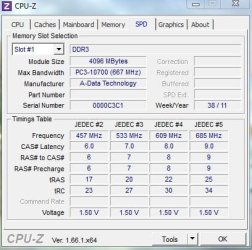
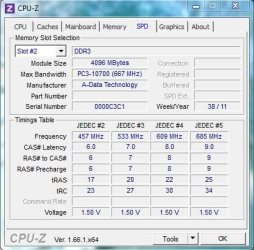
Do you just have 2 sticks of A-DATA 10700 RAM in the machine?
I can see Slot 1 populated in your pic above, is the second stick in Slot 3 (as it should be)?

I usually start Memtest before I go to bed and check it when I wake up in the morning. It might have only done 3 or 4 passes by then, but that is a decent enough test.
The only acceptable result is zero errors. Report back what you find.
 

My Computer

Computer type
PC/Desktop
Computer Manufacturer/Model Number
Home Built - Jan 2013
OS
Windows 7 64 Bit Home Premium SP1
CPU
i7-3820
Motherboard
Asus P9X79-PRO - Bios 4608
Memory
GSkill F3-14900CL9Q - 16GB
Graphics Card(s)
EVGA GeForce GTX660 - Driver 352.86
Sound Card
On board Realtek ALC898
Monitor(s) Displays
Acer S271HL
Screen Resolution
1920 x 1080
Hard Drives
#1- Samsung 840 Pro Series
#2- Western Digital WD1002FAEX Sata3 Black
#3- Western Digital WD1002FAEX Sata3 Black
PSU
Corsair CMPSU-850TX-V2 - 850 watt (by Seasonic)
Case
Corsair Obsidian 550D
Cooling
Standard 3 120mm case fans, Cooler Master Hyper 212 EVO
Keyboard
MS KC-0405
Mouse
Intellimouse 5-button
Internet Speed
56 Mbits/Sec (on a good day)
Antivirus
Avast & Malwarebytes
Browser
Firefox
Other Info
Asus DVD - DRW-24B1ST 24X
Hi Thanks for the help :)

while I was waiting I took both ram sticks and run one at a time in the same slot and both ram sticks passed with windows memory diagnostic.

I will download the MemTest and give it a run over night and see if that finds any problems.

The motherboard only had two slots and both of them has the same kind of memory in it as far as i'm aware

Thanks :)
 

My Computer

Computer type
PC/Desktop
OS
Windows 7 Professional 64-bit SP1
CPU
AMD FX-4100 Zambezi 32nm Technology
Motherboard
ASUSTeK Computer INC. M5A78L-M LX V2 (AM3R2)
Memory
8.00GB Dual-Channel DDR3
Hi,

I done the Memtest overnight and it found errors within the fist 6 minutes of it running.
So I tested each stick of ram seperate and I think I have found the faulty ram stick so just running with one stick of ram and my computer is working much faster than it was before.

Not quite sure if i can buy another stick of ram to pair up with the one I have got or I might be better off buying the set as it would be less less hassle.

thanks very much for all your help it was much appreciated.
 

My Computer

Computer type
PC/Desktop
OS
Windows 7 Professional 64-bit SP1
CPU
AMD FX-4100 Zambezi 32nm Technology
Motherboard
ASUSTeK Computer INC. M5A78L-M LX V2 (AM3R2)
Memory
8.00GB Dual-Channel DDR3
sorry forgot to post these pictures of the ram sticks in both slots before i removed one.
 

Attachments

  • SPD slots 1.JPG
    SPD slots 1.JPG
    39.5 KB · Views: 7
  • SPD slots 2.JPG
    SPD slots 2.JPG
    41.6 KB · Views: 7

My Computer

Computer type
PC/Desktop
OS
Windows 7 Professional 64-bit SP1
CPU
AMD FX-4100 Zambezi 32nm Technology
Motherboard
ASUSTeK Computer INC. M5A78L-M LX V2 (AM3R2)
Memory
8.00GB Dual-Channel DDR3
Good diagnosis. You got it.

If you can afford it, it is always better to buy a matched set of RAM. Not that it is necessary, just, as you said, it avoids potential hassles with mix and match sticks.
 

My Computer

Computer type
PC/Desktop
Computer Manufacturer/Model Number
Home Built - Jan 2013
OS
Windows 7 64 Bit Home Premium SP1
CPU
i7-3820
Motherboard
Asus P9X79-PRO - Bios 4608
Memory
GSkill F3-14900CL9Q - 16GB
Graphics Card(s)
EVGA GeForce GTX660 - Driver 352.86
Sound Card
On board Realtek ALC898
Monitor(s) Displays
Acer S271HL
Screen Resolution
1920 x 1080
Hard Drives
#1- Samsung 840 Pro Series
#2- Western Digital WD1002FAEX Sata3 Black
#3- Western Digital WD1002FAEX Sata3 Black
PSU
Corsair CMPSU-850TX-V2 - 850 watt (by Seasonic)
Case
Corsair Obsidian 550D
Cooling
Standard 3 120mm case fans, Cooler Master Hyper 212 EVO
Keyboard
MS KC-0405
Mouse
Intellimouse 5-button
Internet Speed
56 Mbits/Sec (on a good day)
Antivirus
Avast & Malwarebytes
Browser
Firefox
Other Info
Asus DVD - DRW-24B1ST 24X
Good diagnosis. You got it.

If you can afford it, it is always better to buy a matched set of RAM. Not that it is necessary, just, as you said, it avoids potential hassles with mix and match sticks.


Ok cheers,

I'll keep that in mind when I get round to buying the memory
 

My Computer

Computer type
PC/Desktop
OS
Windows 7 Professional 64-bit SP1
CPU
AMD FX-4100 Zambezi 32nm Technology
Motherboard
ASUSTeK Computer INC. M5A78L-M LX V2 (AM3R2)
Memory
8.00GB Dual-Channel DDR3
Back
Top