Solved computer sounds like plugging and unplugging external device

vonhaase9

New member
Local time
7:49 AM
Messages
6
Computer is constantly making sounds like an external device is being plugged in and unplugged. No matter what program (mostly DOS games) but even as I type this. I tried everything I can think of: unplugged internet, reset all Microsoft settings in Windows, e.g. sharing, or letting another person access my computer, etc.. Scanned for Trojuns, viruses, everything using Avast, ESET, and Kaspersky, nothing works.
 

My Computer

Computer type
PC/Desktop
Computer Manufacturer/Model Number
Asus
OS
Windows 7 Ultimate SP1
CPU
i5
Motherboard
Asus
Graphics Card(s)
GTX 460
Hard Drives
W/D
Antivirus
Avast
Browser
Firefox
Hi vonhaase9,
Welcome to SevenForums!
Here's a free tool from Microsoft
Process Explorer
Run the program and see what's working/running on your computer. Screenshot or snippet would be good for you to upload and we can have a look-see!
 

My Computer

Computer type
PC/Desktop
Computer Manufacturer/Model Number
HP Desktop & Compaq Laptop
OS
Win 10 x64, Linux Lite, Win 7 x64, BlackArch, & Kali
Hard Drives
Samsung 850 Pro 256Gb,
Hitachi HDD 1Tb,
Crucial MX SSD 250Gb
Segate 3Tb USB 3.0 Ext. Backup HDD
Internet Speed
150Mbps dn, 20Mbps up
Antivirus
Avast Free, Malwarebytes Anti-Exploit & Anti-Ransomware
Browser
Firefox, Chrome, Opera, & VPN
You wouldn't happen to have a virtual drive of some kind installed, would you? Like something that can mount ISOs, etc? Such programs are Alcohol, Daemon Tools, WinCDEmu, MagicISO, PowerISO, etc, etc.

Maybe even a RAM drive?
 

My Computer

Computer type
PC/Desktop
OS
Windows 7 Ultimate x64
A bit off topic, but...

Many years ago there was a quite long thread here about pcs making the 'USB unplug' sound when you walked away from the computer. I thought folk were imagining it, until one day I got up to make a cup of tea and as I filled the kettle, I heard the familiar 'biddle-ip, biddle-ip' USB sound. I never found out the cause, and one day it just went away - but the discussion continued here on Seven Forums.

Why would leaving your workstation be detected by the pc ? AFAIK, the mystery was never solved.

BTW, several pcs later, it's come back. About 15 seconds after I go to make a cuppa - 'biddle-ip, biddle-ip' ...
 

My Computer

Computer type
PC/Desktop
Computer Manufacturer/Model Number
self build
OS
Windows 7 Pro x64 sp1
CPU
i7 4770K
Motherboard
MSI B85M-E45
Memory
8GB Corsair Vengeance 1600MHz
Graphics Card(s)
onboard
Monitor(s) Displays
LG 27MP35
Screen Resolution
1920-1080
Hard Drives
Seagate 2TB
PSU
Cooler Master GX 750
Case
Antec 300
Cooling
Seidon 120V
Internet Speed
60/18
Antivirus
MSE
Browser
Firefox
Hello,

Did you know that the Sounds the Windows OS makes can be customised? In the Sounds Settings Control Panel item, it is possible to customise the sound Windows makes after an identified Program Event occurs.
By Default, some of the Program Events are pre-assigned with sounds, while other Program Events are left unassigned with no Sound.

By chance, one of the Program Events may have been assigned a new Sound, causing this occurrence of the "External Device Sound" to be triggered.

You can check yourself if this is the case.

Open Control Panel\Hardware and Sounds, then click on Sounds icon, followed by clicking on the Sounds Tab.

Navigate down to the sub-window under Program Events.

Click on each Program Event in turn and see if a sound has been assigned to the Event.

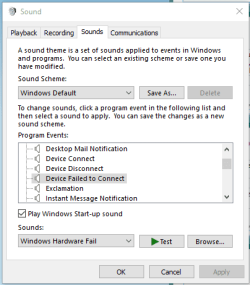
If the Event has an assigned Sound to it, then the Window looks like this:
Sound Scheme (with Sound Event).png
In which case click on the Test button with the Green arrow head, to see if the sound matches the one you are experiencing.

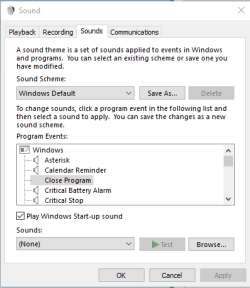
If the Event has no Sound assigned to it, then the Window looks like this:
Sound Scheme (wout Sound).png
In which case these Program Events can be ignored, as they produce no Sound when the Event occurs.

Proceeding in this Manner, selecting all Program Events one at a time, will eventually lead you to discover if any Program Event has been re-assigned to the "External Device Sound", that you are experiencing in such an annoyance.

Hope that Helps.

 

My Computer

Computer type
PC/Desktop
OS
Windows 7 x64, Vista x64, 8.1 smartphone
CPU
Intel E8400 65W 64-bit
Motherboard
Gigabyte EP45-UD3LR
Memory
DDR2 2 x 2GB, 1GB x 2
Graphics Card(s)
XFX Radeon HD5750
Sound Card
AMD High Definition Audio; Realtek High Definition Audio
Monitor(s) Displays
iiyama prolite X2377HDS
Screen Resolution
1920 x 1080
Hard Drives
500GB 7200 rpm Seagate ST3500413AS 16MB, 500GB 5400 rpm Toshiba MQ02ABF050H 32MB, 200GB 7200 rpm Seagate ST3200820AS 8MB, 2TB 7200 rpm Western Digital WD20EZRX 64MB
PSU
Enermax Liberty Modular
Case
Antec P193 Midi Tower
Keyboard
Mionix ZIBAL 60
Mouse
Razer USB 2.0 Diamondback Mouse or Huion Graphics Tablet
Browser
Internet Explorer, Lunascape, Firefox, Opera, Avast Safezone
computer sounds like plugged and unolugged

Thank you all, but I neglected to tell you that the mouse temporarily freezes with the sounds.


SNIK: Process Explorer didn't seem to work. I couldn't see any program going off when sounds happened.


F22SimPilot: Uninstalled my VPN and ISO programs. No good.


iko22: I muted all of the sounds, still freezes without sound. No good.


I'm at a loss.
 

My Computer

Computer type
PC/Desktop
Computer Manufacturer/Model Number
Asus
OS
Windows 7 Ultimate SP1
CPU
i5
Motherboard
Asus
Graphics Card(s)
GTX 460
Hard Drives
W/D
Antivirus
Avast
Browser
Firefox
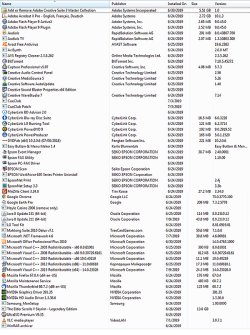
Here is a list of all programs on my computer:
 

Attachments

  • Programs.png
    Programs.png
    378.6 KB · Views: 2

My Computer

Computer type
PC/Desktop
Computer Manufacturer/Model Number
Asus
OS
Windows 7 Ultimate SP1
CPU
i5
Motherboard
Asus
Graphics Card(s)
GTX 460
Hard Drives
W/D
Antivirus
Avast
Browser
Firefox
Thank you all, but I neglected to tell you that the mouse temporarily freezes with the sounds.


...


iko22: I muted all of the sounds, still freezes without sound. No good.


I'm at a loss.

Maybe that is telling you something? What sort of mouse are you using, wired or wireless? Would it be possible to try a different mouse, and see if that alleviates the freezing (with or without the sound warnings)?
 

My Computer

Computer type
PC/Desktop
OS
Windows 7 x64, Vista x64, 8.1 smartphone
CPU
Intel E8400 65W 64-bit
Motherboard
Gigabyte EP45-UD3LR
Memory
DDR2 2 x 2GB, 1GB x 2
Graphics Card(s)
XFX Radeon HD5750
Sound Card
AMD High Definition Audio; Realtek High Definition Audio
Monitor(s) Displays
iiyama prolite X2377HDS
Screen Resolution
1920 x 1080
Hard Drives
500GB 7200 rpm Seagate ST3500413AS 16MB, 500GB 5400 rpm Toshiba MQ02ABF050H 32MB, 200GB 7200 rpm Seagate ST3200820AS 8MB, 2TB 7200 rpm Western Digital WD20EZRX 64MB
PSU
Enermax Liberty Modular
Case
Antec P193 Midi Tower
Keyboard
Mionix ZIBAL 60
Mouse
Razer USB 2.0 Diamondback Mouse or Huion Graphics Tablet
Browser
Internet Explorer, Lunascape, Firefox, Opera, Avast Safezone
My thoughts too. I tried both wired wan wireless, both Logitech.
 

My Computer

Computer type
PC/Desktop
Computer Manufacturer/Model Number
Asus
OS
Windows 7 Ultimate SP1
CPU
i5
Motherboard
Asus
Graphics Card(s)
GTX 460
Hard Drives
W/D
Antivirus
Avast
Browser
Firefox

My Computer

Computer type
PC/Desktop
OS
Windows 7 Ultimate x64
OT/
You can copy sound files from games or collections on the web, and you can drop any .wav sound you want into the Windows\Media folder. When PC's were still new, and I was learning on a friend's computer, I would program it to do a train whistle or a fit of coughing when it turned off. It was a cause of much merriment. I still ahve my own little collection of sounds that I move from computer to computer.
/OT
 

My Computer

Computer type
PC/Desktop
Computer Manufacturer/Model Number
HP p6-2020t
OS
Win 7 Ult 64-bit
CPU
G620 2.6GHZ Pentium R
Memory
6 GB
Monitor(s) Displays
25" HPLV2311
Screen Resolution
1920 x 1200
Hard Drives
1 SATA, 1 exterior SATA
Case
HP
Cooling
PSU
Antivirus
Glasswire
Browser
Waterfox; Firefox; Chrome for work
Other Info
Firewall--Glasswire
Similar specs in Gateway DX4200
Verizon FIOS Wired network

1 other Win7 computer-- has SSD
Picture was taken before deleting several programs. Sorry for no context.
 

My Computer

Computer type
PC/Desktop
Computer Manufacturer/Model Number
Asus
OS
Windows 7 Ultimate SP1
CPU
i5
Motherboard
Asus
Graphics Card(s)
GTX 460
Hard Drives
W/D
Antivirus
Avast
Browser
Firefox
You have yet to establish whether the problem is a faulty device, or if the problem is a background program.

To further diagnose if there is a problem device on the computer, you can check Device Manager for Problem Devices.

To diagnose if there is a background program causing the freeze/sound then you can perform a Clean Startup (Clean Boot), and use that procedure to diagnose which program, if any, is the cause of the problem. If the freezing/sound stops after performing a clean boot, then you are on your way to diagnosing that a background program is the main issue.
 

My Computer

Computer type
PC/Desktop
OS
Windows 7 x64, Vista x64, 8.1 smartphone
CPU
Intel E8400 65W 64-bit
Motherboard
Gigabyte EP45-UD3LR
Memory
DDR2 2 x 2GB, 1GB x 2
Graphics Card(s)
XFX Radeon HD5750
Sound Card
AMD High Definition Audio; Realtek High Definition Audio
Monitor(s) Displays
iiyama prolite X2377HDS
Screen Resolution
1920 x 1080
Hard Drives
500GB 7200 rpm Seagate ST3500413AS 16MB, 500GB 5400 rpm Toshiba MQ02ABF050H 32MB, 200GB 7200 rpm Seagate ST3200820AS 8MB, 2TB 7200 rpm Western Digital WD20EZRX 64MB
PSU
Enermax Liberty Modular
Case
Antec P193 Midi Tower
Keyboard
Mionix ZIBAL 60
Mouse
Razer USB 2.0 Diamondback Mouse or Huion Graphics Tablet
Browser
Internet Explorer, Lunascape, Firefox, Opera, Avast Safezone
computer sounds like plugging and unplugging

Got so fed up with this thing that I reformatted the HD and am starting over. Different HD, mouse, keyboard, video card, and sound card.
But thank all of you for your help. Couldn't find the problem, but we tried.
Thank you.
vonhaase9 < :-) #
 

My Computer

Computer type
PC/Desktop
Computer Manufacturer/Model Number
Asus
OS
Windows 7 Ultimate SP1
CPU
i5
Motherboard
Asus
Graphics Card(s)
GTX 460
Hard Drives
W/D
Antivirus
Avast
Browser
Firefox
vonhaase9, I would have tried a Repair Install before all that!
 

My Computer

Computer type
PC/Desktop
Computer Manufacturer/Model Number
HP Desktop & Compaq Laptop
OS
Win 10 x64, Linux Lite, Win 7 x64, BlackArch, & Kali
Hard Drives
Samsung 850 Pro 256Gb,
Hitachi HDD 1Tb,
Crucial MX SSD 250Gb
Segate 3Tb USB 3.0 Ext. Backup HDD
Internet Speed
150Mbps dn, 20Mbps up
Antivirus
Avast Free, Malwarebytes Anti-Exploit & Anti-Ransomware
Browser
Firefox, Chrome, Opera, & VPN
A Repair Install could fix it but there is nothing like a Clean Install.
 

My Computers

System One System Two

  • Computer type
    PC/Desktop
    Computer Manufacturer/Model Number
    custom build
    OS
    Windows 7 HP 64
    CPU
    i5 6600K - 800MHz to 4200MHz
    Motherboard
    GA-Z170-HD3P
    Memory
    4+4G GSkill DDR4 3000
    Graphics Card(s)
    IG - Intel 530
    Monitor(s) Displays
    Samsung 226BW
    Screen Resolution
    1680x1050
    Hard Drives
    (1) -1 SM951 – 128GB M.2 AHCI PCIe SSD drive for Windows 7 and Lubuntu
    (2) -1 WD SATA 3 - 1T for Data
    (3) -1 WD SATA 3 - 1T for backup
    PSU
    Thermaltake 450W TR2 gold
    Keyboard
    Old and good Chicony mechanical keyboard
    Mouse
    Logitech mX performance - 9 buttons (had to disable some)
    Internet Speed
    500Mb/s
    Browser
    Firefox 64
    Other Info
    TinyWall firewall
  • Computer type
    Laptop
    System Manufacturer/Model Number
    Asus Q550LF
    OS
    Windows 7 Pro
    CPU
    i7-4500U 800MHz to 3.0GHz
    Motherboard
    Asus Q550LF
    Memory
    (4+4)G DDR3 1600
    Graphics Card(s)
    IG intel 4400 + NVIDIA GeForce GT 745M
    Sound Card
    Realtek
    Monitor(s) Displays
    LG Display LP156WF4-SPH1
    Screen Resolution
    1920 x 1080
    Hard Drives
    BX500 120G SSD for Windows and programs +
    1T HDD for data
    Internet Speed
    500 Mb/s
    Browser
    Firefox
    Other Info
    TinyWall firewall
I recently experienced this issue and the culprit was a failing dvd drive : un/deconnecting it solved it.
 

My Computer

OS
7ven ultimate
Back
Top