Hello,
Did you know that the Sounds the Windows OS makes can be customised? In the
Sounds Settings Control Panel item, it is possible to customise the sound Windows makes after an identified
Program Event occurs.
By Default, some of the
Program Events are pre-assigned with sounds, while other
Program Events are left unassigned with no Sound.
By chance, one of the
Program Events may have been assigned a new Sound, causing this occurrence of the "External Device Sound" to be triggered.
You can check yourself if this is the case.
Open Control Panel\Hardware and Sounds, then click on
Sounds icon, followed by clicking on the
Sounds Tab.
Navigate down to the sub-window under
Program Events.
Click on each Program Event in turn and see if a sound has been assigned to the Event.
If the
Event has an assigned Sound to it, then the Window looks like this:
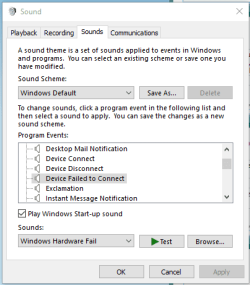
In which case click on the Test button with the Green arrow head, to see if the sound matches the one you are experiencing.
If the Event has no Sound assigned to it, then the Window looks like this:
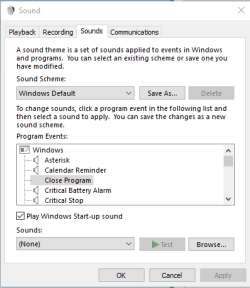
In which case these Program Events can be ignored, as they produce no Sound when the Event occurs.
Proceeding in this Manner, selecting all Program Events one at a time, will eventually lead you to discover if any Program Event has been re-assigned to the "External Device Sound", that you are experiencing in such an annoyance.
Hope that Helps.



 #
#
