Computer suddenly started running very slow

Klamfyr

New member
Member
Local time
2:26 PM
Messages
60
Location
Denmark
Okey guys, I really hope you can help me out here cause I seem to be lost.
A week ago I just bought and installed a new SSD and it worked perfectly up until now. I went out and when I came back 1 hour later I booted my pc and everything just started running really slow. OBS! It's opening folders, games and just browsing the web which is just really slow, especially loading graphics. However when first loaded it runs perfectly.
Also I noticed the pc freezes a really long time when booting (at the image where you can choose between POST menu and BIOS settings)
Here's what I tried:

* Updating all drivers including chipset
* System Restore - nothing changed
* chkdsk /R
* Power On Self Test
* Tested RAM, even took them out/put them in again
* Checked all cooling fans
* Scanned my computer with several different virus software, nothing found
* Discfragmentation/Clean up + removing every program I don't use frequently

So please, help me god :)

Specs:
CPU - Intel(R) Core(TM)2 QUad CPU Q6600 2,4ghz
Ram - 4GB DDR2
Graphic Card: Nvidia GeForce 9800 GT
SSD: Integral SATA Z-series 128 GB
Motherboard: Can find out if needed, but the chip is Intel
 

My Computer

OS
Windows Ultimate x64
CPU
Intel(R) Core(TM) i5 CPU Q 3,3Ghz
Motherboard
Asus P67 B3 Revision (New)
Memory
8 GB DDR3 RAM
Graphics Card(s)
Nvidia GeForce 9800 GT SLI
Monitor(s) Displays
2
Screen Resolution
Double Monitor 1920x1080
Hard Drives
SSD
HDD
Mouse
Logitech Mx518
What is the make/model of the SSD - if it is an OCZ, I have seen similar trouble before.
 

My Computer

Computer Manufacturer/Model Number
HP, Dell, Gateway, Toshiba - 4 laptops and 2 desktops
OS
Vista, Windows7, Mint Mate, Zorin, Windows 8
CPU
from 1.6GHz Duo to i7
Monitor(s) Displays
2x HP w2207
Hard Drives
5x HDD, 7x SSD, 12x Externals
Keyboard
with trackball - no mices
Mouse
Trackball mice
Internet Speed
DSL 6000

My Computer

OS
Windows Ultimate x64
CPU
Intel(R) Core(TM) i5 CPU Q 3,3Ghz
Motherboard
Asus P67 B3 Revision (New)
Memory
8 GB DDR3 RAM
Graphics Card(s)
Nvidia GeForce 9800 GT SLI
Monitor(s) Displays
2
Screen Resolution
Double Monitor 1920x1080
Hard Drives
SSD
HDD
Mouse
Logitech Mx518
It sounds like the SSD is not very happy.

Are you able to contact your reseller with a view to getting the drive replaced?
 

My Computer

Computer Manufacturer/Model Number
HP Pavilion Elite 495UK
OS
Windows 7 Ultimate SP1 64-Bit
CPU
Intel Core i7 870 @ 2.93GHz
Motherboard
MSI 2A9C (CPU1)
Memory
8Gb Dual-Channel DDR3 @ 664MHz
Graphics Card(s)
nVidia GeForce GTX 460 1024MB dedicated RAM
Sound Card
Realtek HD Audio
Monitor(s) Displays
HP2310i
Screen Resolution
1920 x 1080
Hard Drives
1x1954GB Hitachi HDS22020ALA 330 (RAID), 1x1954GB Hitachi External for backup and storage
PSU
460W
Case
HP Elite
Cooling
Air cooled
Keyboard
Logitech K750 solar-powered keyboard
Mouse
Logitech Wireless M180 mouse
Internet Speed
2Mb
Other Info
Pure Avanti Flow Internet Radio with iPod Dock, 64Gb iPod, HP USB Speakers, Sony MDR-V500 Headphones, Sony Vaio F-Series Laptop
This SSD I have never heard about. But it sounds like an SSD problem. Can you RMA it.
 

My Computer

Computer Manufacturer/Model Number
HP, Dell, Gateway, Toshiba - 4 laptops and 2 desktops
OS
Vista, Windows7, Mint Mate, Zorin, Windows 8
CPU
from 1.6GHz Duo to i7
Monitor(s) Displays
2x HP w2207
Hard Drives
5x HDD, 7x SSD, 12x Externals
Keyboard
with trackball - no mices
Mouse
Trackball mice
Internet Speed
DSL 6000
It seems like the problem stopped except my pc is still booting really slowly :S And it seems like its working perfecly, the chkdsk /r also indicated that no problems was detected ...
 

My Computer

OS
Windows Ultimate x64
CPU
Intel(R) Core(TM) i5 CPU Q 3,3Ghz
Motherboard
Asus P67 B3 Revision (New)
Memory
8 GB DDR3 RAM
Graphics Card(s)
Nvidia GeForce 9800 GT SLI
Monitor(s) Displays
2
Screen Resolution
Double Monitor 1920x1080
Hard Drives
SSD
HDD
Mouse
Logitech Mx518
Klamfyr,
Wlecome to SF. I would watch that SSD like a hawk. Back up data or image the drive to another spinner and then contact the manufacturer for any firmware updates and the like and at least file the incident with them in case this happens again.
 

My Computer

Computer type
PC/Desktop
Computer Manufacturer/Model Number
A blend of brains, brawn and dumb luck.
OS
Windows 7 Ultimate 64
CPU
i7 3770k OC'd 4.6 @ 1.17v, also FX 8120 & i5 miniITX
Motherboard
MSI P67A-GD80 b3
Memory
32 gb G.Skill Sniper DDR3 10-12-12-31 @ 2133
Graphics Card(s)
XFX Radeon 7870 2GB DDR5
Sound Card
Sound Blaster Z Series Card
Monitor(s) Displays
(2) LG LED 23" 1920 x 1080 2ms Monitors via mini d-port
Screen Resolution
1680 X 1050 p
Hard Drives
Samsung 256 gb 830 SSD sata III
(1) 1 tb WD Black
(2) 1 tb Hitachi deskmates/sata II
(2) 1 tb WD green/sata II
(2) 3 tb Seagate Barracuda
(1) 120 gb OCZ Vertex SS
(1) Drobo 5N w/5 Seagate 3tb
PSU
EVGA modular 1000G2 80% gold rating & APC 1200 RS
Case
CoolerMaster Storm Styker
Cooling
7 case fans 140mm & 120mm, NZXT Kraken X60
Keyboard
(2) Logitech Illuminated Keyboards (1) usb (1) wireless
Mouse
Logitech G700 & T-BC21 - nano nx for the laptop
Internet Speed
Basic 120mbps down
Antivirus
Trend Micro Titanium Max Security & Malwarebytes Premium
Browser
Chrome and IE 10
Other Info
5 Noctua case fans + 3 Noctua in p/p on NZXT cooler
Integrated hot swap drive bays for 2.5" Drives
(2) Lite-on dvd/cd/Blu Ray optical 22X
Integrated fan controller and led on/off
HP Officejet Pro 8630 all-n-one
Hot-swappable 3.5" hard drive bay
Netgear Nighthawk router
Asus USB 3 & sata 6 PCIe card
Vantec IDE to sata adptr./Ultra sata adptr
Lenovo L420 i5 lappy with m sata
Drobo 5N advanced NAS
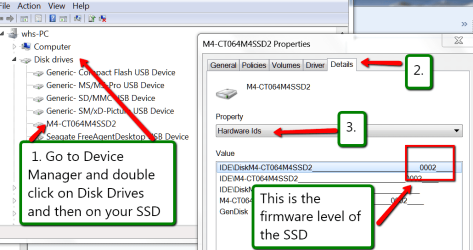
chkdsk would not detect a possible problem which is generally with the SSD controller. The suggestion to check for firmware updats is very good.

You can check your current firmware level here:
 

Attachments

  • 2012-01-11_1350.png
    2012-01-11_1350.png
    38.1 KB · Views: 369

My Computer

Computer Manufacturer/Model Number
HP, Dell, Gateway, Toshiba - 4 laptops and 2 desktops
OS
Vista, Windows7, Mint Mate, Zorin, Windows 8
CPU
from 1.6GHz Duo to i7
Monitor(s) Displays
2x HP w2207
Hard Drives
5x HDD, 7x SSD, 12x Externals
Keyboard
with trackball - no mices
Mouse
Trackball mice
Internet Speed
DSL 6000
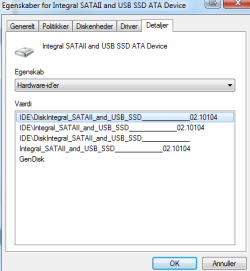
The firmware is this:
 

Attachments

  • W7.png
    W7.png
    9.4 KB · Views: 48

My Computer

OS
Windows Ultimate x64
CPU
Intel(R) Core(TM) i5 CPU Q 3,3Ghz
Motherboard
Asus P67 B3 Revision (New)
Memory
8 GB DDR3 RAM
Graphics Card(s)
Nvidia GeForce 9800 GT SLI
Monitor(s) Displays
2
Screen Resolution
Double Monitor 1920x1080
Hard Drives
SSD
HDD
Mouse
Logitech Mx518
So, is this the latest update.
 

My Computer

Computer Manufacturer/Model Number
HP, Dell, Gateway, Toshiba - 4 laptops and 2 desktops
OS
Vista, Windows7, Mint Mate, Zorin, Windows 8
CPU
from 1.6GHz Duo to i7
Monitor(s) Displays
2x HP w2207
Hard Drives
5x HDD, 7x SSD, 12x Externals
Keyboard
with trackball - no mices
Mouse
Trackball mice
Internet Speed
DSL 6000
How do I check that? Couldn't google it, or do I have to contact the manufacturer? Or should I go to the firmwares website (cause I have no idea what that is)
 

My Computer

OS
Windows Ultimate x64
CPU
Intel(R) Core(TM) i5 CPU Q 3,3Ghz
Motherboard
Asus P67 B3 Revision (New)
Memory
8 GB DDR3 RAM
Graphics Card(s)
Nvidia GeForce 9800 GT SLI
Monitor(s) Displays
2
Screen Resolution
Double Monitor 1920x1080
Hard Drives
SSD
HDD
Mouse
Logitech Mx518
It should be somewhere on the manufacturers website (which I am not familiar with). Else send them a note asking what they recommend. For flashing the firmware every manufacturer has their own procedures. But before you do, make sure you image your systrem first - just in case.
 

My Computer

Computer Manufacturer/Model Number
HP, Dell, Gateway, Toshiba - 4 laptops and 2 desktops
OS
Vista, Windows7, Mint Mate, Zorin, Windows 8
CPU
from 1.6GHz Duo to i7
Monitor(s) Displays
2x HP w2207
Hard Drives
5x HDD, 7x SSD, 12x Externals
Keyboard
with trackball - no mices
Mouse
Trackball mice
Internet Speed
DSL 6000
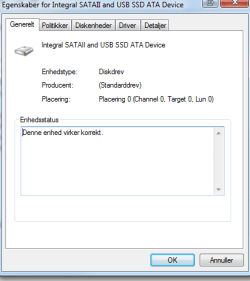
It says Standard Drive
Producent (Manufacturer): Standarddrev (Standarddrive)
 

Attachments

  • W71.png
    W71.png
    8.9 KB · Views: 6

My Computer

OS
Windows Ultimate x64
CPU
Intel(R) Core(TM) i5 CPU Q 3,3Ghz
Motherboard
Asus P67 B3 Revision (New)
Memory
8 GB DDR3 RAM
Graphics Card(s)
Nvidia GeForce 9800 GT SLI
Monitor(s) Displays
2
Screen Resolution
Double Monitor 1920x1080
Hard Drives
SSD
HDD
Mouse
Logitech Mx518
Go to the 'Details' tab. There you find a lot more info. Did you check the manufacturers website.
 

My Computer

Computer Manufacturer/Model Number
HP, Dell, Gateway, Toshiba - 4 laptops and 2 desktops
OS
Vista, Windows7, Mint Mate, Zorin, Windows 8
CPU
from 1.6GHz Duo to i7
Monitor(s) Displays
2x HP w2207
Hard Drives
5x HDD, 7x SSD, 12x Externals
Keyboard
with trackball - no mices
Mouse
Trackball mice
Internet Speed
DSL 6000
Already checked it just says standard drive there as well
 

My Computer

OS
Windows Ultimate x64
CPU
Intel(R) Core(TM) i5 CPU Q 3,3Ghz
Motherboard
Asus P67 B3 Revision (New)
Memory
8 GB DDR3 RAM
Graphics Card(s)
Nvidia GeForce 9800 GT SLI
Monitor(s) Displays
2
Screen Resolution
Double Monitor 1920x1080
Hard Drives
SSD
HDD
Mouse
Logitech Mx518
You are not answering my questions. So I am off.
 

My Computer

Computer Manufacturer/Model Number
HP, Dell, Gateway, Toshiba - 4 laptops and 2 desktops
OS
Vista, Windows7, Mint Mate, Zorin, Windows 8
CPU
from 1.6GHz Duo to i7
Monitor(s) Displays
2x HP w2207
Hard Drives
5x HDD, 7x SSD, 12x Externals
Keyboard
with trackball - no mices
Mouse
Trackball mice
Internet Speed
DSL 6000
Klamfyr,
Reading over the original post you mention at the bottom that you did a drive defrag. Just FYI this is a function on a SSD drive to be avoided as it doesn't benefit the drives performance in the least little bit and in fact the action of defraging actually can lead to premature failure if done on a regular basis. Please make sure that the defrag feature is turned off in W7 and don't manually defrag this or any flash memory drive. As far as where you go from here, please back up and or image your SSD drive to another drive of equal or greater size of any make or type. I would call the place where you bought this and ask for info about the manufacturer and then call/email them with what's happening.
 

My Computer

Computer type
PC/Desktop
Computer Manufacturer/Model Number
A blend of brains, brawn and dumb luck.
OS
Windows 7 Ultimate 64
CPU
i7 3770k OC'd 4.6 @ 1.17v, also FX 8120 & i5 miniITX
Motherboard
MSI P67A-GD80 b3
Memory
32 gb G.Skill Sniper DDR3 10-12-12-31 @ 2133
Graphics Card(s)
XFX Radeon 7870 2GB DDR5
Sound Card
Sound Blaster Z Series Card
Monitor(s) Displays
(2) LG LED 23" 1920 x 1080 2ms Monitors via mini d-port
Screen Resolution
1680 X 1050 p
Hard Drives
Samsung 256 gb 830 SSD sata III
(1) 1 tb WD Black
(2) 1 tb Hitachi deskmates/sata II
(2) 1 tb WD green/sata II
(2) 3 tb Seagate Barracuda
(1) 120 gb OCZ Vertex SS
(1) Drobo 5N w/5 Seagate 3tb
PSU
EVGA modular 1000G2 80% gold rating & APC 1200 RS
Case
CoolerMaster Storm Styker
Cooling
7 case fans 140mm & 120mm, NZXT Kraken X60
Keyboard
(2) Logitech Illuminated Keyboards (1) usb (1) wireless
Mouse
Logitech G700 & T-BC21 - nano nx for the laptop
Internet Speed
Basic 120mbps down
Antivirus
Trend Micro Titanium Max Security & Malwarebytes Premium
Browser
Chrome and IE 10
Other Info
5 Noctua case fans + 3 Noctua in p/p on NZXT cooler
Integrated hot swap drive bays for 2.5" Drives
(2) Lite-on dvd/cd/Blu Ray optical 22X
Integrated fan controller and led on/off
HP Officejet Pro 8630 all-n-one
Hot-swappable 3.5" hard drive bay
Netgear Nighthawk router
Asus USB 3 & sata 6 PCIe card
Vantec IDE to sata adptr./Ultra sata adptr
Lenovo L420 i5 lappy with m sata
Drobo 5N advanced NAS
I think I figured it out :) Thanks so much and whs, my problem was I couldn't work out who the manucfacturer was, so couldn't get to their website :)
 
Last edited:

My Computer

OS
Windows Ultimate x64
CPU
Intel(R) Core(TM) i5 CPU Q 3,3Ghz
Motherboard
Asus P67 B3 Revision (New)
Memory
8 GB DDR3 RAM
Graphics Card(s)
Nvidia GeForce 9800 GT SLI
Monitor(s) Displays
2
Screen Resolution
Double Monitor 1920x1080
Hard Drives
SSD
HDD
Mouse
Logitech Mx518
Klamfyr,
Excellent, but we would appreciate some details as to what you sorted out. Was it a firmware update or other issue?
Either way good work and glad your system is back to peak performance or on it's way.
 

My Computer

Computer type
PC/Desktop
Computer Manufacturer/Model Number
A blend of brains, brawn and dumb luck.
OS
Windows 7 Ultimate 64
CPU
i7 3770k OC'd 4.6 @ 1.17v, also FX 8120 & i5 miniITX
Motherboard
MSI P67A-GD80 b3
Memory
32 gb G.Skill Sniper DDR3 10-12-12-31 @ 2133
Graphics Card(s)
XFX Radeon 7870 2GB DDR5
Sound Card
Sound Blaster Z Series Card
Monitor(s) Displays
(2) LG LED 23" 1920 x 1080 2ms Monitors via mini d-port
Screen Resolution
1680 X 1050 p
Hard Drives
Samsung 256 gb 830 SSD sata III
(1) 1 tb WD Black
(2) 1 tb Hitachi deskmates/sata II
(2) 1 tb WD green/sata II
(2) 3 tb Seagate Barracuda
(1) 120 gb OCZ Vertex SS
(1) Drobo 5N w/5 Seagate 3tb
PSU
EVGA modular 1000G2 80% gold rating & APC 1200 RS
Case
CoolerMaster Storm Styker
Cooling
7 case fans 140mm & 120mm, NZXT Kraken X60
Keyboard
(2) Logitech Illuminated Keyboards (1) usb (1) wireless
Mouse
Logitech G700 & T-BC21 - nano nx for the laptop
Internet Speed
Basic 120mbps down
Antivirus
Trend Micro Titanium Max Security & Malwarebytes Premium
Browser
Chrome and IE 10
Other Info
5 Noctua case fans + 3 Noctua in p/p on NZXT cooler
Integrated hot swap drive bays for 2.5" Drives
(2) Lite-on dvd/cd/Blu Ray optical 22X
Integrated fan controller and led on/off
HP Officejet Pro 8630 all-n-one
Hot-swappable 3.5" hard drive bay
Netgear Nighthawk router
Asus USB 3 & sata 6 PCIe card
Vantec IDE to sata adptr./Ultra sata adptr
Lenovo L420 i5 lappy with m sata
Drobo 5N advanced NAS
Hello, it seems like the problem has returned. I have no idea why it suddenly stopped being slow and why it started again. I contacted the manufacturer, which was Integral, and they just told me
"Unfortunately we do not offer firmware out to the end user and attempting firmware upgrades or using 3rd party firmware by the user can invalidate the warranty."....
So mailed them back that I just needed to know if it was the last firmware update already installed, no response yet -
 

My Computer

OS
Windows Ultimate x64
CPU
Intel(R) Core(TM) i5 CPU Q 3,3Ghz
Motherboard
Asus P67 B3 Revision (New)
Memory
8 GB DDR3 RAM
Graphics Card(s)
Nvidia GeForce 9800 GT SLI
Monitor(s) Displays
2
Screen Resolution
Double Monitor 1920x1080
Hard Drives
SSD
HDD
Mouse
Logitech Mx518
Back
Top