Solved Computer turns back on after pressing and holding the power button

nckfrtg28

New member
Member
VIP
Local time
2:08 PM
Messages
219
Hello I been fighting with a computer for about a month. Here the problem. When the computer is on and most of the times I always shut it down by pressing the power button. But after about a minute it turns it self back on. I've replaced the power supply. changed hard drives out. Also changed the settings in Windows XP to shutdown when pressing the power button. So what do I need to do to fix this little problem?
 

My Computer My Computer

At a glance

Mac OS X 10.9Intel i7 Ivy Bridge (2.3Ghz)8GB's DDR3 (1333 MHz)Intel 4000 (1024MB)
Computer type
PC/Desktop
Computer Manufacturer/Model Number
Apple 2012 Mac Mini
OS
Mac OS X 10.9
CPU
Intel i7 Ivy Bridge (2.3Ghz)
Motherboard
Apple
Memory
8GB's DDR3 (1333 MHz)
Graphics Card(s)
Intel 4000 (1024MB)
Monitor(s) Displays
HP 23inch LED
Screen Resolution
1920 x 1080
Hard Drives
1TB
Case
Mac Mini Case
Keyboard
Mac Logitech Solar Powered
Mouse
Magic Touch Pad
Internet Speed
About 3.00 MBps
Browser
Chrome
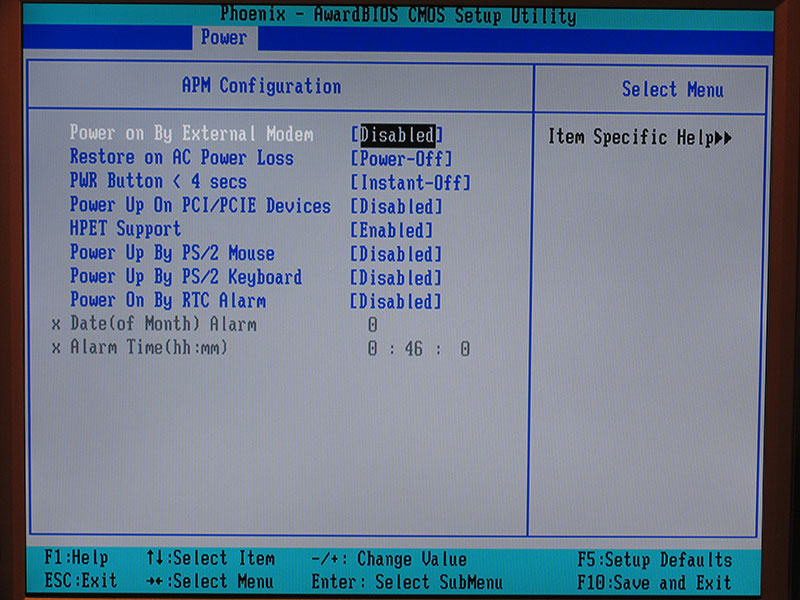
Have a looky in your Bios and make sure that there is no "power on" after AC power loss or something to this effect (it differs from pc to pc)

b_apm.jpg
 

My Computer My Computer

At a glance

Windows 7 Ultimate 64bitAMD Phenom Quad core 9950 black edition16Gb2x XFX Radeon 5850
Computer type
PC/Desktop
Computer Manufacturer/Model Number
Self Built
OS
Windows 7 Ultimate 64bit
CPU
AMD Phenom Quad core 9950 black edition
Motherboard
Gigabyte
Memory
16Gb
Graphics Card(s)
2x XFX Radeon 5850
Sound Card
PCI Express X-Fi Titanium / Logitech G35
Monitor(s) Displays
2x HP 2410i
Screen Resolution
1920x1080
Hard Drives
2x 500Gb Seagate
1x 300Gb Seagate
1x 1Tb Seagate
2x 1Tb Hitatchi
PSU
Jean Tech Storm 700W
Case
Cooler Master COSMOS S
Cooling
Akasa Evo Blue Pro
Keyboard
Logitech G15
Mouse
Mad Catz M.M.O. 7
Internet Speed
12mb
Your thread title says "pressing and holding the power button". So are you just momentarily pressing it or pressing and holding it down? You should only need a quick press and release for Windows to do a graceful shutdown. Assuming the BIOS is set correctly and windows is setup correctly. Most BIOS can be set to "instant off" or "4 second delay" for shut down when the power button is pressed. You want it set to 4 second delay. Otherwise the power supply will instantly shut down when you press the power button and Windows won't get a chance to shut down normally. If Windows locks up and won't shut down, then you hold the button in for 4 seconds and the power supply will turn off anyway.
 

My Computer My Computer

At a glance

Windows 10 Education 64 bitAMD Phenom II X4 980 Black Edition Deneb 3.7GHz8GB 4GBx2 Kingston PC10600 DDR3 1333 MemoryZotac NVIDIA Geforce GT640 2 Gig DDR3 PCIe
Computer type
PC/Desktop
Computer Manufacturer/Model Number
Home Built
OS
Windows 10 Education 64 bit
CPU
AMD Phenom II X4 980 Black Edition Deneb 3.7GHz
Motherboard
Asus M4N68T-M V2 µATX Motherboard
Memory
8GB 4GBx2 Kingston PC10600 DDR3 1333 Memory
Graphics Card(s)
Zotac NVIDIA Geforce GT640 2 Gig DDR3 PCIe
Sound Card
VIA VT1708s High Definition Audio 8-channel Onboard
Monitor(s) Displays
22" LG E2242 1080p and 2 19" I-INC AG191D
Screen Resolution
1280x1024 - 1920x1080 - 1280x1024
Hard Drives
Crucial M100 256 GB SSD and 500 GB WD Blue SATA
PSU
Thermaltake TR 620
Case
Power Up Black ATX Mid-Tower Case
Cooling
Stock heatsink and fan
Keyboard
Logitech Wireless K350 Wave
Mouse
Logitech Wireless M570 Trackman Wheel
Internet Speed
80 Mbps Down 30 Mbps Up
Antivirus
Windows Defender
Browser
Internet Explorer 11
Other Info
HP DVD1040e Lightscribe - External USB2
Have a looky in your Bios and make sure that there is no "power on" after AC power loss or something to this effect (it differs from pc to pc)

b_apm.jpg

Yes I have changed that and it still dose it.
 

My Computer My Computer

At a glance

Mac OS X 10.9Intel i7 Ivy Bridge (2.3Ghz)8GB's DDR3 (1333 MHz)Intel 4000 (1024MB)
Computer type
PC/Desktop
Computer Manufacturer/Model Number
Apple 2012 Mac Mini
OS
Mac OS X 10.9
CPU
Intel i7 Ivy Bridge (2.3Ghz)
Motherboard
Apple
Memory
8GB's DDR3 (1333 MHz)
Graphics Card(s)
Intel 4000 (1024MB)
Monitor(s) Displays
HP 23inch LED
Screen Resolution
1920 x 1080
Hard Drives
1TB
Case
Mac Mini Case
Keyboard
Mac Logitech Solar Powered
Mouse
Magic Touch Pad
Internet Speed
About 3.00 MBps
Browser
Chrome
Is the power button actually connected to the correct pins of the front panel connector on the motherboard? The symptom you are describing is pretty much what I would expect if the reset button was pressed instead.
 

My Computer My Computer

At a glance

Windows 8.1 Pro RTM x64Intel Core-i5-3570K 4-core @ 3.4GHz (Ivy Brid...4 x 4GB DDR3-1600 Corsair Vengeance CMZ8GX3M2...MSI GeForce GTX770 Gaming OC 2GB
Computer type
PC/Desktop
Computer Manufacturer/Model Number
Dwarf Dwf/11/2012 r09/2013
OS
Windows 8.1 Pro RTM x64
CPU
Intel Core-i5-3570K 4-core @ 3.4GHz (Ivy Bridge) (OC 4.4GHz)
Motherboard
ASRock Z77 Extreme4-M
Memory
4 x 4GB DDR3-1600 Corsair Vengeance CMZ8GX3M2A1600C9B (16GB)
Graphics Card(s)
MSI GeForce GTX770 Gaming OC 2GB
Sound Card
Realtek High Definition on board solution (ALC 898)
Monitor(s) Displays
ViewSonic VA1912w Widescreen (VGA)
Screen Resolution
1440x900
Hard Drives
OCZ Agility 3 SSD 120GB SATA III x2 (RAID 0)
Samsung HD501LJ 500GB SATA II x2
Hitachi HDS721010CLA332 1TB SATA II
Iomega 1.5TB Ext USB 2.0
WD 2.0TB Ext USB 3.0
PSU
XFX Pro Series 850W Semi-Modular
Case
Gigabyte IF233
Cooling
1 x 120mm Front Inlet 1 x 120mm Rear Exhaust
Keyboard
Microsoft Comfort Curve Keyboard 3000 (USB)
Mouse
Microsoft Comfort Mouse 3000 for Business (USB)
Internet Speed
NetGear DG834Gv3 ADSL Modem/Router (Ethernet) ~4.0 Mb/s (O2)
Antivirus
Avast! 8.0.1497
Browser
IE 11
Other Info
Optical Drive: HL-DT-ST BD-RE BH10LS30 SATA Bluray
Lexmark S305 Printer/Scanner/Copier (USB)
WEI Score: 8.1/8.1/8.5/8.5/8.25
Asus Eee PC 1011PX Netbook (Windows 7 x86 Starter)
Is the power button actually connected to the correct pins of the front panel connector on the motherboard? The symptom you are describing is pretty much what I would expect if the reset button was pressed instead.

Okay I'll take a look into that and see. I think the motherboard been replaced in it so maybe I put it in the wrong place.
 

My Computer My Computer

At a glance

Mac OS X 10.9Intel i7 Ivy Bridge (2.3Ghz)8GB's DDR3 (1333 MHz)Intel 4000 (1024MB)
Computer type
PC/Desktop
Computer Manufacturer/Model Number
Apple 2012 Mac Mini
OS
Mac OS X 10.9
CPU
Intel i7 Ivy Bridge (2.3Ghz)
Motherboard
Apple
Memory
8GB's DDR3 (1333 MHz)
Graphics Card(s)
Intel 4000 (1024MB)
Monitor(s) Displays
HP 23inch LED
Screen Resolution
1920 x 1080
Hard Drives
1TB
Case
Mac Mini Case
Keyboard
Mac Logitech Solar Powered
Mouse
Magic Touch Pad
Internet Speed
About 3.00 MBps
Browser
Chrome
Also today I found out that the computer will restart when you click shutdown in windows.
 

My Computer My Computer

At a glance

Mac OS X 10.9Intel i7 Ivy Bridge (2.3Ghz)8GB's DDR3 (1333 MHz)Intel 4000 (1024MB)
Computer type
PC/Desktop
Computer Manufacturer/Model Number
Apple 2012 Mac Mini
OS
Mac OS X 10.9
CPU
Intel i7 Ivy Bridge (2.3Ghz)
Motherboard
Apple
Memory
8GB's DDR3 (1333 MHz)
Graphics Card(s)
Intel 4000 (1024MB)
Monitor(s) Displays
HP 23inch LED
Screen Resolution
1920 x 1080
Hard Drives
1TB
Case
Mac Mini Case
Keyboard
Mac Logitech Solar Powered
Mouse
Magic Touch Pad
Internet Speed
About 3.00 MBps
Browser
Chrome

My Computer My Computer

At a glance

Windows 7 Ultimate 64bitAMD Phenom Quad core 9950 black edition16Gb2x XFX Radeon 5850
Computer type
PC/Desktop
Computer Manufacturer/Model Number
Self Built
OS
Windows 7 Ultimate 64bit
CPU
AMD Phenom Quad core 9950 black edition
Motherboard
Gigabyte
Memory
16Gb
Graphics Card(s)
2x XFX Radeon 5850
Sound Card
PCI Express X-Fi Titanium / Logitech G35
Monitor(s) Displays
2x HP 2410i
Screen Resolution
1920x1080
Hard Drives
2x 500Gb Seagate
1x 300Gb Seagate
1x 1Tb Seagate
2x 1Tb Hitatchi
PSU
Jean Tech Storm 700W
Case
Cooler Master COSMOS S
Cooling
Akasa Evo Blue Pro
Keyboard
Logitech G15
Mouse
Mad Catz M.M.O. 7
Internet Speed
12mb
The problem was the motherboard. I replaced it with the same kind of motherboard and it seems to work just find now. So I guess it was the motherboard going out.
 

My Computer My Computer

At a glance

Mac OS X 10.9Intel i7 Ivy Bridge (2.3Ghz)8GB's DDR3 (1333 MHz)Intel 4000 (1024MB)
Computer type
PC/Desktop
Computer Manufacturer/Model Number
Apple 2012 Mac Mini
OS
Mac OS X 10.9
CPU
Intel i7 Ivy Bridge (2.3Ghz)
Motherboard
Apple
Memory
8GB's DDR3 (1333 MHz)
Graphics Card(s)
Intel 4000 (1024MB)
Monitor(s) Displays
HP 23inch LED
Screen Resolution
1920 x 1080
Hard Drives
1TB
Case
Mac Mini Case
Keyboard
Mac Logitech Solar Powered
Mouse
Magic Touch Pad
Internet Speed
About 3.00 MBps
Browser
Chrome
Back
Top