Solved Computer waking from sleep

bug67

Hazard Avoidance
Pro User
VIP
Local time
1:32 PM
Messages
262
Location
Eagle River, AK
I have my computer set to go to sleep after 30 minutes of inactivity which it does. However, after about 15 minutes of being asleep, it wakes itself up. Then, after 30 minutes of inactivity, it goes back to sleep. And so on and on.

How do I find out what is causing the machine to wake up so I can fix this endless loop of waking and sleeping?
 

My Computer

Computer Manufacturer/Model Number
Dell XPS 400
OS
Windows 7 X64 Professional
CPU
Intel® Pentium D Dual Core 3.6GHZ
Motherboard
DELL Dimension 9150 MotherBoard DXP051 XPS400 FJ030
Memory
4GB DDR2 PC2-5300
Graphics Card(s)
GeForce GT 440 (Fermi) 2GB 128-bit DDR3 PCI Express 2.0 x16
Sound Card
ASUS XONAR DG 5.1 Channels PCI Interface Xonar DG
Monitor(s) Displays
2 X 23" Apple Cinema Display
Screen Resolution
1920 X 1200p
Hard Drives
250GB Intel® 510 Series SSD SATA 6G (w/TRIM) [500MB/s Reads]
1.0TB Western Digital Caviar Black SATA 6G 7200rpm 64MB Cache
PSU
375 Watt Dell
Case
Dell XPS 400 BTX Case
Cooling
Dell XPS 400 Air Cooling
Keyboard
Logitech Illuminated Keyboard
Mouse
Logitech M705 Marathon
Internet Speed
+/- 9929 Kbps
Other Info
This machine was given to me when my dad bought a new computer. I keep throwing upgrades at it and it keeps on ticking. Think I've done everything to it that can be done outside a PSU upgrade so I can run an even BETTER GPU.
In the Event Viewer, under Windows logs > System, there will be entries relating to the power off/on of the computer.

http://www.sevenforums.com/tutorials/179257-wake-source-read-event-viewer-log.html

Look for entries with the source, "Power-Troubleshooter". There should be one that will say "The system has resumed from sleep", along with a timestamp. It should also have a "Wake Source" - that is where you will hopefully see what caused the wake-up.

I attached a little screen shot to demonstrate.
 

Attachments

  • Capture.PNG
    Capture.PNG
    15.1 KB · Views: 630
Last edited by a moderator:

My Computer

Computer Manufacturer/Model Number
CreepinJesus Mk. IV
OS
Windows 7 Ultimate x64
CPU
Intel Core i5-2500 3.3GHz
Motherboard
Asus P8H67-M PRO
Memory
8GB DDR3 1333MHz
Graphics Card(s)
On-board
Sound Card
On-board
Monitor(s) Displays
Samsung SyncMaster BX2250 22.5" LED-backlit LCD
Screen Resolution
1920 * 1080
Hard Drives
OCZ Agility 3 120GB, SATA-III
PSU
Thermaltake Toughpower Grand TPG-650M
Case
Lian-Li PC-A04
Cooling
Standard fans. They blow.
Keyboard
Logitech K360
Mouse
Generic Logitech from the bargain-bin by the checkout
Internet Speed
Over 9000! ...Mbps.
Other Info
Chocolate digestives are my favourite biscuit.
Thanks for the quick response. After following your instruction, I came up with this:

Wake Source: Device -Intel(R) 82579V Gigabit Network Connection

So, it appears my network is somehow waking the machine from sleep? What next? Thanks.
 

My Computer

Computer Manufacturer/Model Number
Dell XPS 400
OS
Windows 7 X64 Professional
CPU
Intel® Pentium D Dual Core 3.6GHZ
Motherboard
DELL Dimension 9150 MotherBoard DXP051 XPS400 FJ030
Memory
4GB DDR2 PC2-5300
Graphics Card(s)
GeForce GT 440 (Fermi) 2GB 128-bit DDR3 PCI Express 2.0 x16
Sound Card
ASUS XONAR DG 5.1 Channels PCI Interface Xonar DG
Monitor(s) Displays
2 X 23" Apple Cinema Display
Screen Resolution
1920 X 1200p
Hard Drives
250GB Intel® 510 Series SSD SATA 6G (w/TRIM) [500MB/s Reads]
1.0TB Western Digital Caviar Black SATA 6G 7200rpm 64MB Cache
PSU
375 Watt Dell
Case
Dell XPS 400 BTX Case
Cooling
Dell XPS 400 Air Cooling
Keyboard
Logitech Illuminated Keyboard
Mouse
Logitech M705 Marathon
Internet Speed
+/- 9929 Kbps
Other Info
This machine was given to me when my dad bought a new computer. I keep throwing upgrades at it and it keeps on ticking. Think I've done everything to it that can be done outside a PSU upgrade so I can run an even BETTER GPU.
This would be a Wake-On-Lan (WOL) feature. You can either disable this in the BIOS, or set it to only wake up after receiving what's called a "magic packet".

In Device Manager, doulble-click on the network device in question to bring up the properties. On the Power Management tab, you should see a checkbox called "Allow this device to wake the computer". Un-tick this to disable WOL altogether, or make sure the checkbox underneath ("Allow only a magic packet...") is also ticked.

Other devices, such as the mouse and keyboard, will also have this setting (but without the magic packet option), so if you're still having issues with random wake-ups after this, it'll probably be one of those.
 

My Computer

Computer Manufacturer/Model Number
CreepinJesus Mk. IV
OS
Windows 7 Ultimate x64
CPU
Intel Core i5-2500 3.3GHz
Motherboard
Asus P8H67-M PRO
Memory
8GB DDR3 1333MHz
Graphics Card(s)
On-board
Sound Card
On-board
Monitor(s) Displays
Samsung SyncMaster BX2250 22.5" LED-backlit LCD
Screen Resolution
1920 * 1080
Hard Drives
OCZ Agility 3 120GB, SATA-III
PSU
Thermaltake Toughpower Grand TPG-650M
Case
Lian-Li PC-A04
Cooling
Standard fans. They blow.
Keyboard
Logitech K360
Mouse
Generic Logitech from the bargain-bin by the checkout
Internet Speed
Over 9000! ...Mbps.
Other Info
Chocolate digestives are my favourite biscuit.
I have turned it off in the BIOS. I didn't see any such setting as "Allow this device to wake the computer". I only had the setting shown in the attached image. So, I turned it off in the BIOS. Haven't reached a sleep cycle yet so, I don't know if it has worked yet or not. Please stand by...

EDIT:

OK, turning off Wake on LAN in BIOS worked. Machine now stays asleep 'till I wake it up.
 

Attachments

  • NDPowerSetting.PNG
    NDPowerSetting.PNG
    36.6 KB · Views: 502
Last edited:

My Computer

Computer Manufacturer/Model Number
Dell XPS 400
OS
Windows 7 X64 Professional
CPU
Intel® Pentium D Dual Core 3.6GHZ
Motherboard
DELL Dimension 9150 MotherBoard DXP051 XPS400 FJ030
Memory
4GB DDR2 PC2-5300
Graphics Card(s)
GeForce GT 440 (Fermi) 2GB 128-bit DDR3 PCI Express 2.0 x16
Sound Card
ASUS XONAR DG 5.1 Channels PCI Interface Xonar DG
Monitor(s) Displays
2 X 23" Apple Cinema Display
Screen Resolution
1920 X 1200p
Hard Drives
250GB Intel® 510 Series SSD SATA 6G (w/TRIM) [500MB/s Reads]
1.0TB Western Digital Caviar Black SATA 6G 7200rpm 64MB Cache
PSU
375 Watt Dell
Case
Dell XPS 400 BTX Case
Cooling
Dell XPS 400 Air Cooling
Keyboard
Logitech Illuminated Keyboard
Mouse
Logitech M705 Marathon
Internet Speed
+/- 9929 Kbps
Other Info
This machine was given to me when my dad bought a new computer. I keep throwing upgrades at it and it keeps on ticking. Think I've done everything to it that can be done outside a PSU upgrade so I can run an even BETTER GPU.
UN-solved

OK. I had originally marked this thread as solved but, it is far, far from solved. This has become an on going issue that seems to have no resolution whatsoever. If anybody could please help, I would much appreciate it.

Thanks to CreepinJesus for pointing me in some sort of direction.

Things I have tried so far:

1. Turned of the Wake on LAN feature in the BIOS. This has absolutely no effect whatsoever. The machine completely ignores this.

2. Disabled Wake on LAN feature for NIC in Device Manager.

3. Set keyboard and mouse to NOT be allowed to wake computer in Device Manager.

In the Event Viewer, I was seeing events from Google Update and Windows Sidebar occurring at the same time the network device was waking the machine up. so,

4. I disabled Google Update Services

5. Disabled Windows Sidebar Platform.

None of these things have worked!

I have been in e-mail contact with MAINGEAR tech-support and as well as the above, they have suggested the following:

1. Download the latest and greatest NIC driver from the motherboard manufactures website and completely uninstall and reinstall the NIC dr[FONT=&quot]iver.[/FONT]
[FONT=&quot]

[/FONT]
Computer says I have the latest NIC driver. Intel's "Auto check" says the NIC driver I have installed is not recognized. Weird considering it's an Intel NIC!

2. Go into BIOS and in the power settings, change the suspend type to its opposite. If its S1, make it S3 and vice versa.
There is no such setting to change suspend types in BIOS


3. Possibly contact Microsoft and see if there is a hotfix or known knowledge base article they can point you towards.
Nothing from Microsoft that I haven't already tried.


I've been at this all week (my week off work) and am at my wits end. I thought I had it semi solved as it went 16 hours without waking up. Today, however, It started waking, sleeping, waking, sleeping again. The event viewer shows nothing except that the network device is what's waking the machine. Why is this happening? I have Wake on LAN turned off in BIOS. The machine is ignoring this completely. I don't understand.


I want to think this is some software "phoning home" or something but, the Event Viewer is showing nothing. If the Wake on LAN feature is off in the BIOS, nothing should be able to wake the machine up, right? I don't know, Please help.


:confused::banghead::picnic:


[FONT=&quot]
[/FONT]
 
Last edited:

My Computer

Computer Manufacturer/Model Number
Dell XPS 400
OS
Windows 7 X64 Professional
CPU
Intel® Pentium D Dual Core 3.6GHZ
Motherboard
DELL Dimension 9150 MotherBoard DXP051 XPS400 FJ030
Memory
4GB DDR2 PC2-5300
Graphics Card(s)
GeForce GT 440 (Fermi) 2GB 128-bit DDR3 PCI Express 2.0 x16
Sound Card
ASUS XONAR DG 5.1 Channels PCI Interface Xonar DG
Monitor(s) Displays
2 X 23" Apple Cinema Display
Screen Resolution
1920 X 1200p
Hard Drives
250GB Intel® 510 Series SSD SATA 6G (w/TRIM) [500MB/s Reads]
1.0TB Western Digital Caviar Black SATA 6G 7200rpm 64MB Cache
PSU
375 Watt Dell
Case
Dell XPS 400 BTX Case
Cooling
Dell XPS 400 Air Cooling
Keyboard
Logitech Illuminated Keyboard
Mouse
Logitech M705 Marathon
Internet Speed
+/- 9929 Kbps
Other Info
This machine was given to me when my dad bought a new computer. I keep throwing upgrades at it and it keeps on ticking. Think I've done everything to it that can be done outside a PSU upgrade so I can run an even BETTER GPU.
It may be media streaming settings, but I'm pretty sure this actually prevents sleep altogether, rather than waking it up after a few minutes.


You can have a look anyway:
  1. In Power Options, click on Change plan settings next to the plan you're using
  2. Click Change advanced power settings
  3. Scroll down to Multimedia settings
  4. Check the two options in there allow the computer to sleep
 

My Computer

Computer Manufacturer/Model Number
CreepinJesus Mk. IV
OS
Windows 7 Ultimate x64
CPU
Intel Core i5-2500 3.3GHz
Motherboard
Asus P8H67-M PRO
Memory
8GB DDR3 1333MHz
Graphics Card(s)
On-board
Sound Card
On-board
Monitor(s) Displays
Samsung SyncMaster BX2250 22.5" LED-backlit LCD
Screen Resolution
1920 * 1080
Hard Drives
OCZ Agility 3 120GB, SATA-III
PSU
Thermaltake Toughpower Grand TPG-650M
Case
Lian-Li PC-A04
Cooling
Standard fans. They blow.
Keyboard
Logitech K360
Mouse
Generic Logitech from the bargain-bin by the checkout
Internet Speed
Over 9000! ...Mbps.
Other Info
Chocolate digestives are my favourite biscuit.
Yes. I forgot to mention. I did check the media settings at one point. They were set to allow the computer to sleep.

This is really becoming frustrating. I'm thinking about backing up and formatting. Something I have installed at some point is causing this. I have no idea what it is or how to track it down. At least not with the tools that Windows has provided. A "start over" is beginning to look like my only solution to ensure I get what ever it is that's causing this. :confused:
 

My Computer

Computer Manufacturer/Model Number
Dell XPS 400
OS
Windows 7 X64 Professional
CPU
Intel® Pentium D Dual Core 3.6GHZ
Motherboard
DELL Dimension 9150 MotherBoard DXP051 XPS400 FJ030
Memory
4GB DDR2 PC2-5300
Graphics Card(s)
GeForce GT 440 (Fermi) 2GB 128-bit DDR3 PCI Express 2.0 x16
Sound Card
ASUS XONAR DG 5.1 Channels PCI Interface Xonar DG
Monitor(s) Displays
2 X 23" Apple Cinema Display
Screen Resolution
1920 X 1200p
Hard Drives
250GB Intel® 510 Series SSD SATA 6G (w/TRIM) [500MB/s Reads]
1.0TB Western Digital Caviar Black SATA 6G 7200rpm 64MB Cache
PSU
375 Watt Dell
Case
Dell XPS 400 BTX Case
Cooling
Dell XPS 400 Air Cooling
Keyboard
Logitech Illuminated Keyboard
Mouse
Logitech M705 Marathon
Internet Speed
+/- 9929 Kbps
Other Info
This machine was given to me when my dad bought a new computer. I keep throwing upgrades at it and it keeps on ticking. Think I've done everything to it that can be done outside a PSU upgrade so I can run an even BETTER GPU.
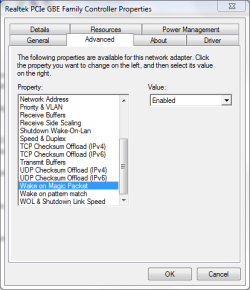
Have you checked the three power management network adapter settings under the Advanced tab as well as the Power Management tab?

Wake.PNG
 

My Computer

Computer Manufacturer/Model Number
HP Pavilion Elite 495UK
OS
Windows 7 Ultimate SP1 64-Bit
CPU
Intel Core i7 870 @ 2.93GHz
Motherboard
MSI 2A9C (CPU1)
Memory
8Gb Dual-Channel DDR3 @ 664MHz
Graphics Card(s)
nVidia GeForce GTX 460 1024MB dedicated RAM
Sound Card
Realtek HD Audio
Monitor(s) Displays
HP2310i
Screen Resolution
1920 x 1080
Hard Drives
1x1954GB Hitachi HDS22020ALA 330 (RAID), 1x1954GB Hitachi External for backup and storage
PSU
460W
Case
HP Elite
Cooling
Air cooled
Keyboard
Logitech K750 solar-powered keyboard
Mouse
Logitech Wireless M180 mouse
Internet Speed
2Mb
Other Info
Pure Avanti Flow Internet Radio with iPod Dock, 64Gb iPod, HP USB Speakers, Sony MDR-V500 Headphones, Sony Vaio F-Series Laptop
Have you checked the three power management network adapter settings under the Advanced tab as well as the Power Management tab?

I don't have that setting under the Advanced tab. Only under Power Management. :huh:
 

My Computer

Computer Manufacturer/Model Number
Dell XPS 400
OS
Windows 7 X64 Professional
CPU
Intel® Pentium D Dual Core 3.6GHZ
Motherboard
DELL Dimension 9150 MotherBoard DXP051 XPS400 FJ030
Memory
4GB DDR2 PC2-5300
Graphics Card(s)
GeForce GT 440 (Fermi) 2GB 128-bit DDR3 PCI Express 2.0 x16
Sound Card
ASUS XONAR DG 5.1 Channels PCI Interface Xonar DG
Monitor(s) Displays
2 X 23" Apple Cinema Display
Screen Resolution
1920 X 1200p
Hard Drives
250GB Intel® 510 Series SSD SATA 6G (w/TRIM) [500MB/s Reads]
1.0TB Western Digital Caviar Black SATA 6G 7200rpm 64MB Cache
PSU
375 Watt Dell
Case
Dell XPS 400 BTX Case
Cooling
Dell XPS 400 Air Cooling
Keyboard
Logitech Illuminated Keyboard
Mouse
Logitech M705 Marathon
Internet Speed
+/- 9929 Kbps
Other Info
This machine was given to me when my dad bought a new computer. I keep throwing upgrades at it and it keeps on ticking. Think I've done everything to it that can be done outside a PSU upgrade so I can run an even BETTER GPU.
Have you checked the three power management network adapter settings under the Advanced tab as well as the Power Management tab?

I don't have that setting under the Advanced tab. Only under Power Management. :huh:

I should have pointed out the screenshot was relating to an ethernet network adapter and not a wireless one.
 

My Computer

Computer Manufacturer/Model Number
HP Pavilion Elite 495UK
OS
Windows 7 Ultimate SP1 64-Bit
CPU
Intel Core i7 870 @ 2.93GHz
Motherboard
MSI 2A9C (CPU1)
Memory
8Gb Dual-Channel DDR3 @ 664MHz
Graphics Card(s)
nVidia GeForce GTX 460 1024MB dedicated RAM
Sound Card
Realtek HD Audio
Monitor(s) Displays
HP2310i
Screen Resolution
1920 x 1080
Hard Drives
1x1954GB Hitachi HDS22020ALA 330 (RAID), 1x1954GB Hitachi External for backup and storage
PSU
460W
Case
HP Elite
Cooling
Air cooled
Keyboard
Logitech K750 solar-powered keyboard
Mouse
Logitech Wireless M180 mouse
Internet Speed
2Mb
Other Info
Pure Avanti Flow Internet Radio with iPod Dock, 64Gb iPod, HP USB Speakers, Sony MDR-V500 Headphones, Sony Vaio F-Series Laptop
I should have pointed out the screenshot was relating to an ethernet network adapter and not a wireless one.

Yes, "wired" network adapter, not wireless. :)
 

My Computer

Computer Manufacturer/Model Number
Dell XPS 400
OS
Windows 7 X64 Professional
CPU
Intel® Pentium D Dual Core 3.6GHZ
Motherboard
DELL Dimension 9150 MotherBoard DXP051 XPS400 FJ030
Memory
4GB DDR2 PC2-5300
Graphics Card(s)
GeForce GT 440 (Fermi) 2GB 128-bit DDR3 PCI Express 2.0 x16
Sound Card
ASUS XONAR DG 5.1 Channels PCI Interface Xonar DG
Monitor(s) Displays
2 X 23" Apple Cinema Display
Screen Resolution
1920 X 1200p
Hard Drives
250GB Intel® 510 Series SSD SATA 6G (w/TRIM) [500MB/s Reads]
1.0TB Western Digital Caviar Black SATA 6G 7200rpm 64MB Cache
PSU
375 Watt Dell
Case
Dell XPS 400 BTX Case
Cooling
Dell XPS 400 Air Cooling
Keyboard
Logitech Illuminated Keyboard
Mouse
Logitech M705 Marathon
Internet Speed
+/- 9929 Kbps
Other Info
This machine was given to me when my dad bought a new computer. I keep throwing upgrades at it and it keeps on ticking. Think I've done everything to it that can be done outside a PSU upgrade so I can run an even BETTER GPU.
I should have pointed out the screenshot was relating to an ethernet network adapter and not a wireless one.

Yes, "wired" network adapter, not wireless. :)

In that case, it might be worthwhile updating your network adapter drivers, and then check if the option under the Advanced tab shows up.
 

My Computer

Computer Manufacturer/Model Number
HP Pavilion Elite 495UK
OS
Windows 7 Ultimate SP1 64-Bit
CPU
Intel Core i7 870 @ 2.93GHz
Motherboard
MSI 2A9C (CPU1)
Memory
8Gb Dual-Channel DDR3 @ 664MHz
Graphics Card(s)
nVidia GeForce GTX 460 1024MB dedicated RAM
Sound Card
Realtek HD Audio
Monitor(s) Displays
HP2310i
Screen Resolution
1920 x 1080
Hard Drives
1x1954GB Hitachi HDS22020ALA 330 (RAID), 1x1954GB Hitachi External for backup and storage
PSU
460W
Case
HP Elite
Cooling
Air cooled
Keyboard
Logitech K750 solar-powered keyboard
Mouse
Logitech Wireless M180 mouse
Internet Speed
2Mb
Other Info
Pure Avanti Flow Internet Radio with iPod Dock, 64Gb iPod, HP USB Speakers, Sony MDR-V500 Headphones, Sony Vaio F-Series Laptop
  • Like
Reactions: JMH
Computer says I have the latest drivers. Intel (the NIC OEM) says my NIC is "unknown".
 

My Computer

Computer Manufacturer/Model Number
Dell XPS 400
OS
Windows 7 X64 Professional
CPU
Intel® Pentium D Dual Core 3.6GHZ
Motherboard
DELL Dimension 9150 MotherBoard DXP051 XPS400 FJ030
Memory
4GB DDR2 PC2-5300
Graphics Card(s)
GeForce GT 440 (Fermi) 2GB 128-bit DDR3 PCI Express 2.0 x16
Sound Card
ASUS XONAR DG 5.1 Channels PCI Interface Xonar DG
Monitor(s) Displays
2 X 23" Apple Cinema Display
Screen Resolution
1920 X 1200p
Hard Drives
250GB Intel® 510 Series SSD SATA 6G (w/TRIM) [500MB/s Reads]
1.0TB Western Digital Caviar Black SATA 6G 7200rpm 64MB Cache
PSU
375 Watt Dell
Case
Dell XPS 400 BTX Case
Cooling
Dell XPS 400 Air Cooling
Keyboard
Logitech Illuminated Keyboard
Mouse
Logitech M705 Marathon
Internet Speed
+/- 9929 Kbps
Other Info
This machine was given to me when my dad bought a new computer. I keep throwing upgrades at it and it keeps on ticking. Think I've done everything to it that can be done outside a PSU upgrade so I can run an even BETTER GPU.
What are the entries in Event Viewer saying for these most recent wake-ups? Still blaming the network adapter?
 

My Computer

Computer Manufacturer/Model Number
CreepinJesus Mk. IV
OS
Windows 7 Ultimate x64
CPU
Intel Core i5-2500 3.3GHz
Motherboard
Asus P8H67-M PRO
Memory
8GB DDR3 1333MHz
Graphics Card(s)
On-board
Sound Card
On-board
Monitor(s) Displays
Samsung SyncMaster BX2250 22.5" LED-backlit LCD
Screen Resolution
1920 * 1080
Hard Drives
OCZ Agility 3 120GB, SATA-III
PSU
Thermaltake Toughpower Grand TPG-650M
Case
Lian-Li PC-A04
Cooling
Standard fans. They blow.
Keyboard
Logitech K360
Mouse
Generic Logitech from the bargain-bin by the checkout
Internet Speed
Over 9000! ...Mbps.
Other Info
Chocolate digestives are my favourite biscuit.
What are the entries in Event Viewer saying for these most recent wake-ups? Still blaming the network adapter?

Yes.

Wake Source: Device -Intel(R) 82579V Gigabit Network Connection

No other info I can discern as far as what software may be at the source. I sent MAINGEAR a copy of one of the event logs for one of the wake events. I don't know if they looked at them or not.

At this point (so I can get on with my life) I have set the computer to NOT go to sleep. The screen still goes dark at the prescribed 30 minutes but, the computer does not go to sleep. I'm OK with this for now I guess. The case fans can be heard but no where near the level of my previous Apple G5 jet plane.
 

My Computer

Computer Manufacturer/Model Number
Dell XPS 400
OS
Windows 7 X64 Professional
CPU
Intel® Pentium D Dual Core 3.6GHZ
Motherboard
DELL Dimension 9150 MotherBoard DXP051 XPS400 FJ030
Memory
4GB DDR2 PC2-5300
Graphics Card(s)
GeForce GT 440 (Fermi) 2GB 128-bit DDR3 PCI Express 2.0 x16
Sound Card
ASUS XONAR DG 5.1 Channels PCI Interface Xonar DG
Monitor(s) Displays
2 X 23" Apple Cinema Display
Screen Resolution
1920 X 1200p
Hard Drives
250GB Intel® 510 Series SSD SATA 6G (w/TRIM) [500MB/s Reads]
1.0TB Western Digital Caviar Black SATA 6G 7200rpm 64MB Cache
PSU
375 Watt Dell
Case
Dell XPS 400 BTX Case
Cooling
Dell XPS 400 Air Cooling
Keyboard
Logitech Illuminated Keyboard
Mouse
Logitech M705 Marathon
Internet Speed
+/- 9929 Kbps
Other Info
This machine was given to me when my dad bought a new computer. I keep throwing upgrades at it and it keeps on ticking. Think I've done everything to it that can be done outside a PSU upgrade so I can run an even BETTER GPU.
Well,

I did download the latest NIC driver, uninstalled the old one and installed the new one. So far, I've gone 11 hours without a WOL issue. This appears to have solved things. I say appears because I had thought I had fixed it before. Awaiting further testing. Please stand by... :p

EDIT:

I'm marking this as solved as, for the moment, it appears to be. :D
 
Last edited:

My Computer

Computer Manufacturer/Model Number
Dell XPS 400
OS
Windows 7 X64 Professional
CPU
Intel® Pentium D Dual Core 3.6GHZ
Motherboard
DELL Dimension 9150 MotherBoard DXP051 XPS400 FJ030
Memory
4GB DDR2 PC2-5300
Graphics Card(s)
GeForce GT 440 (Fermi) 2GB 128-bit DDR3 PCI Express 2.0 x16
Sound Card
ASUS XONAR DG 5.1 Channels PCI Interface Xonar DG
Monitor(s) Displays
2 X 23" Apple Cinema Display
Screen Resolution
1920 X 1200p
Hard Drives
250GB Intel® 510 Series SSD SATA 6G (w/TRIM) [500MB/s Reads]
1.0TB Western Digital Caviar Black SATA 6G 7200rpm 64MB Cache
PSU
375 Watt Dell
Case
Dell XPS 400 BTX Case
Cooling
Dell XPS 400 Air Cooling
Keyboard
Logitech Illuminated Keyboard
Mouse
Logitech M705 Marathon
Internet Speed
+/- 9929 Kbps
Other Info
This machine was given to me when my dad bought a new computer. I keep throwing upgrades at it and it keeps on ticking. Think I've done everything to it that can be done outside a PSU upgrade so I can run an even BETTER GPU.
SOLVED: Laptop wakes itself up from sleep

No BIOS / network adapter settings helped for me.
I found a forum elsewhere fingering the laptop lid.

Sure enough, when I closed the lid on my customer's laptop immediately after telling it to go to sleep and had the lid closed before it had finished going to sleep, it stayed asleep where it had previously only stayed sleeping for a minute, tops.

I went into power options control panel and selected "Change what happens when closing the lid".
I changed it from "sleep" to "Do nothing".
I kept the power switch at "sleep"

Then I kept it open and set it to sleep.
It stayed asleep like a well fed baby.

I closed the lid and opened it. It woke up.
Uh huh.

With the lid open, I put it to sleep again and left it overnight.
Still asleep in the morning.

Hope this helps some of you.

Looks like a defective hardware lid closure switch is at fault. FWIW, this model has a lid without a clasp/hook/latch. This may result in touchier sensitivity. These switches may be more likely to think they are open that a latch that has actual physical, mechanical movement of a full half centimeter to engage and disengage.
 

My Computer

OS
Windows 7 Enterprise 64-bit
Back
Top