Computer will not go into sleep automatically

Tizzy1963

New member
Local time
11:39 AM
Messages
1
Hi can some one help me on this matter, it seems I can go to start and put my computer to sleep manually but it will not do this on its own when not is use, I tried evey setting the screen will automatically turn off but my tower will not power down. Any help would be great. Thanks
 

My Computer

OS
Windows 7
Hello and welcome to Seven Forums,

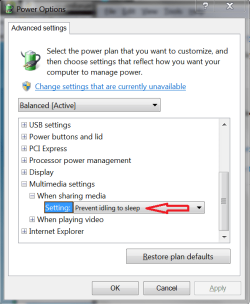
In Power Options > Advanced Settings make sure you do NOT have Prevent idling to sleep.

Some programs prevent idling to sleep no matter what the Windows setting is.
I use Arcsoft TME and that is one such program.

PwrOpt SP 01.PNG
 

My Computer

Computer type
PC/Desktop
Computer Manufacturer/Model Number
home built
OS
Multi-Boot W7_Pro_x64 W8.1_Pro_x64 W10_Pro_x64 +Linux_VMs +Chromium_VM
CPU
AMD Athlon II x4 620
Motherboard
Gigabyte GA-MA785G-UD3H
Memory
6GB GSkill DDR2 800
Graphics Card(s)
AMD 4670 GPU + AMD 4200 IGP
Sound Card
on board Realtek ALC889A
Monitor(s) Displays
RCA 40" LCD TV, Insignia 32" LCD TV, HP 15" LCD monitor
Screen Resolution
1680 x 1050
Hard Drives
OCZ Vertex 3 120GB,
Samsung F3 1TB (3),
Several others - WD, Seagate, Hitachi, ...
PSU
Corsair 500 W
Case
Rosewill mid tower
Cooling
CM 90mm rifle
Keyboard
Gyration wireless, Logitech wireless, Dell USB wired
Mouse
Gyration wireless, Logitech wireless, V7 USB wired
Internet Speed
Spectrum - 100Mbps D / 10Mbps U
Antivirus
Avast, MBAM3, EMET, WinPatrol
Browser
Pale Moon, Firefox, IE
Other Info
2 multi-boot PC's
Mainly HTPC/Office/Gen purpose (no gaming).
Trendnet USB KVM.
LG DVD burner/Blue Ray Player.
Tray system for removable SATA backup drives.

Not currently OCd, under-volted.
I use Hybrid sleep, rarely re-boot or shutdown.

Hauppauge HD-PVR, Avermedia PCIe TV Tuner, Hauppauge PCI TV Tuner.
In addition make sure you have the latest Display driver that Win7 provides via optional Updates, or try the latest on the maker's Support Downloads webpage for both the computer model and Display device model. Sometimes you may need to fall back to a slightly earlier driver.

Did it ever sleep? If so and you have a Restore point before this happened then try it. System Restore

In addition check the Performance log to see what might be interfering with sleep at the time it fails: Troubleshooting Steps for Windows 7 - Windows 7 Forums. I would also establish a Clean Boot so no program can interfere which is freeloading in the background.

If nothing else helps you can try Gathering a Startup, Shutdown, Sleep, Hibernate, or Reboot Trace - Windows 7 Forums
 
Back
Top