PrintPower Publisher details

Issues found
Hibernation file is not large enoughHibernation file is not large enough
Hibernation may fail if the file is not large enough for the current memory contents Fixed Fixed
Increase maximum size of hibernation file Completed

Repair Critical battery actionRepair Critical battery action
For more information please see Microsoft Knowledge Base article 977147 Fixed Fixed
Portable computer shuts down when you try to resume after a critical battery state Completed

Potential issues that were checked
Time before hard disk goes to sleep is too longTime before hard disk goes to sleep is too long
The period of time before a hard disk enters sleep mode is longer than the default setting and might affect power usage. Issue not present
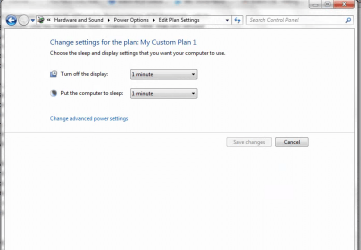
Time before display goes to sleep is too longTime before display goes to sleep is too long
The period of time before a display turns off is longer than the default setting and might affect power usage. Issue not present
Power plan set to High PerformancePower plan set to High Performance
High Performance uses additional power and might prevent the computer from entering sleep mode. Issue not present
Time before computer goes to sleep is too longTime before computer goes to sleep is too long
The period of time before your computer enters sleep mode is longer than the default setting and might affect power usage. Issue not present
Minimum processor state is set too highMinimum processor state is set too high
When this value is set higher than the default setting, the processor uses additional power. Issue not present
Screen saver is enabledScreen saver is enabled
Using a screen saver instead of having the display go to sleep uses more power. Issue not present
USB Selective Suspend is disabledUSB Selective Suspend is disabled
USB Selective Suspend allows the hub driver to suspend an individual port without affecting the operation of the other ports on the hub. This feature is useful for reducing power usage. Issue not present

Issues found Detection details

6 Hibernation file is not large enough Fixed Fixed

Hibernation may fail if the file is not large enough for the current memory contents
Increase maximum size of hibernation file Completed

Set the hibernation file size to maximum allowed

6 Repair Critical battery action Fixed Fixed

For more information please see Microsoft Knowledge Base article 977147
Portable computer shuts down when you try to resume after a critical battery state Completed

Registry settings are preventing the Critical battery action from working as expected


Potential issues that were checked Detection details

 Time before hard disk goes to sleep is too long Issue not present

The period of time before a hard disk enters sleep mode is longer than the default setting and might affect power usage.

 Time before display goes to sleep is too long Issue not present

The period of time before a display turns off is longer than the default setting and might affect power usage.

 Power plan set to High Performance Issue not present

High Performance uses additional power and might prevent the computer from entering sleep mode.

 Time before computer goes to sleep is too long Issue not present

The period of time before your computer enters sleep mode is longer than the default setting and might affect power usage.

 Minimum processor state is set too high Issue not present

When this value is set higher than the default setting, the processor uses additional power.

 Screen saver is enabled Issue not present

Using a screen saver instead of having the display go to sleep uses more power.

 USB Selective Suspend is disabled Issue not present

USB Selective Suspend allows the hub driver to suspend an individual port without affecting the operation of the other ports on the hub. This feature is useful for reducing power usage.


Detection details Expand

Collection information
Computer Name:  TRICIA-PC
Windows Version: 6.1
Architecture: x86
Time: Friday, March 07, 2014 2:28:01 PM

Publisher details Expand

Power
Adjust power settings to help improve battery life and reduce power usage.
Package Version: 2.2.2.20121101
Publisher: Microsoft Corporation