
Solved Computer will not start after putting it to Sleep..

eXtremist

New member
Local time
3:08 PM
Messages
3
SOLVED: Computer will not start after putting it to Sleep..

The motherboard I'm using is a 'Gigabyte X48-DS4' with a 'Q9450' Processor with 'Windows 7 Professional' installed from fresh, not updated.

The operating system is completely updated automatically with all required updates and patches from Microsoft.

The problem I'm having is very weird, I've never seen it before.

If I put the computer to 'Sleep', it will go to 'Sleep' but when I come back and press the power button on the computer, it will continuously cycle, the computer powers on, and then powers off, and keeps doing that until I either hold the power button down (or switch it off at the power supply) and then power it back on. However, if I do this, its like a normal boot, no longer resuming from its Sleep.

Please help! Thanks!
 
Last edited:

My Computer My Computer

Computer Manufacturer/Model Number
Home-made
OS
Windwos 7 Professional
CPU
Q9450
Motherboard
Gigabyte X48-DS4
Memory
GSkill 4GB DDR2
Graphics Card(s)
Radeon 4850
Sound Card
Built into motherboard
Monitor(s) Displays
1 x 21"
Hard Drives
1 x 500GB SATA
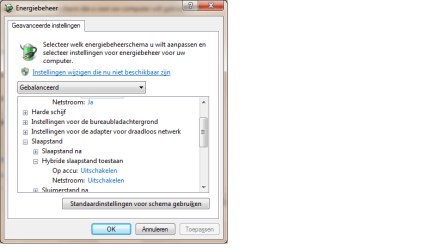
What happens if you turn off hybrid sleep mode :p it's in dutch but Uitschakelen means 'disable'
 

Attachments

  • help.png
    help.png
    15.9 KB · Views: 101

My Computer My Computer

Computer Manufacturer/Model Number
Homebuilt
OS
Windows 7 Home Premium x64
CPU
Core i7 2600K
Motherboard
Asus P8Z77-V LX
Memory
4GB DDR3 Kingston HyperX
Graphics Card(s)
Gigabyte GTX 670
Sound Card
Realtek HD Audio
Monitor(s) Displays
Delium Monitor
Screen Resolution
1360 x 768
Hard Drives
C: (500GB)
PSU
Corsair 620W
Case
Antec
Cooling
Cooling Master
Keyboard
Logitech
Mouse
Logitech wireless mouse M 505
Internet Speed
60MBPS
I made that change and then tried putting my computer to sleep but it didn't make any difference, do I have to restart for that change to take effect?
 

My Computer My Computer

Computer Manufacturer/Model Number
Home-made
OS
Windwos 7 Professional
CPU
Q9450
Motherboard
Gigabyte X48-DS4
Memory
GSkill 4GB DDR2
Graphics Card(s)
Radeon 4850
Sound Card
Built into motherboard
Monitor(s) Displays
1 x 21"
Hard Drives
1 x 500GB SATA
I've solved the issue by changing the ACPI Suspend Type setting within CMOS to S1.

I've noticed that other people need to change their setting to S3 to resolve the problem.

A few things I noticed..

S3 + Sleep will cause the computer to turn off when put into sleep. Pressing the power button will cause the computer to power on for 2 seconds and then switch off, a constant cycle until switched off from the power supply. The power light will turn off, does not flash like it should.

S1 + Sleep will cause the computer to properly sleep. The power light will flash on and off, and then when pressing the power button, the computer will directly resume from where it left off.
 

My Computer My Computer

Computer Manufacturer/Model Number
Home-made
OS
Windwos 7 Professional
CPU
Q9450
Motherboard
Gigabyte X48-DS4
Memory
GSkill 4GB DDR2
Graphics Card(s)
Radeon 4850
Sound Card
Built into motherboard
Monitor(s) Displays
1 x 21"
Hard Drives
1 x 500GB SATA
I've solved the issue by changing the ACPI Suspend Type setting within CMOS to S1.

I've noticed that other people need to change their setting to S3 to resolve the problem.

A few things I noticed..

S3 + Sleep will cause the computer to turn off when put into sleep. Pressing the power button will cause the computer to power on for 2 seconds and then switch off, a constant cycle until switched off from the power supply. The power light will turn off, does not flash like it should.

S1 + Sleep will cause the computer to properly sleep. The power light will flash on and off, and then when pressing the power button, the computer will directly resume from where it left off.

Can you give instructions on how to check this?
 

My Computer My Computer

Computer Manufacturer/Model Number
Intel(R) Core(TM) i7-2620M CPU @ 2.70GHz 2.69 GHz
OS
Dual boot-Mac/Lion and Windows 7 Professional Service Pack 1 64-bit
Memory
4.00GB
I've solved the issue by changing the ACPI Suspend Type setting within CMOS to S1.

I've noticed that other people need to change their setting to S3 to resolve the problem.

A few things I noticed..

S3 + Sleep will cause the computer to turn off when put into sleep. Pressing the power button will cause the computer to power on for 2 seconds and then switch off, a constant cycle until switched off from the power supply. The power light will turn off, does not flash like it should.

S1 + Sleep will cause the computer to properly sleep. The power light will flash on and off, and then when pressing the power button, the computer will directly resume from where it left off.

Can you give instructions on how to check this?

Take a look at this thread, it might help you
http://www.sevenforums.com/general-...nly-sleep-command-leads-windows-shutdown.html

Based on your specs, you have a dual boot with Mac/Lion.
I never had that, so take my help with a grain of salt...:rolleyes:
 

My Computer My Computer

Computer type
PC/Desktop
Computer Manufacturer/Model Number
home built
OS
Multi-Boot W7_Pro_x64 W8.1_Pro_x64 W10_Pro_x64 +Linux_VMs +Chromium_VM
CPU
AMD Athlon II x4 620
Motherboard
Gigabyte GA-MA785G-UD3H
Memory
6GB GSkill DDR2 800
Graphics Card(s)
AMD 4670 GPU + AMD 4200 IGP
Sound Card
on board Realtek ALC889A
Monitor(s) Displays
RCA 40" LCD TV, Insignia 32" LCD TV, HP 15" LCD monitor
Screen Resolution
1680 x 1050
Hard Drives
OCZ Vertex 3 120GB,
Samsung F3 1TB (3),
Several others - WD, Seagate, Hitachi, ...
PSU
Corsair 500 W
Case
Rosewill mid tower
Cooling
CM 90mm rifle
Keyboard
Gyration wireless, Logitech wireless, Dell USB wired
Mouse
Gyration wireless, Logitech wireless, V7 USB wired
Internet Speed
Spectrum - 100Mbps D / 10Mbps U
Antivirus
Avast, MBAM3, EMET, WinPatrol
Browser
Pale Moon, Firefox, IE
Other Info
2 multi-boot PC's
Mainly HTPC/Office/Gen purpose (no gaming).
Trendnet USB KVM.
LG DVD burner/Blue Ray Player.
Tray system for removable SATA backup drives.

Not currently OCd, under-volted.
I use Hybrid sleep, rarely re-boot or shutdown.

Hauppauge HD-PVR, Avermedia PCIe TV Tuner, Hauppauge PCI TV Tuner.
Back
Top