Computer won't create restore point

gkamer

New member
Local time
2:32 PM
Messages
2
Location
Ritzville, Wa
I am running Win 7 64bit OS on my computer. When I try to create a restore point, the computer goes through the process and displays a message saying the restore point was created. But then when I try to use the restore point, I get an error telling me there are no restore points on my computer.

As far as I can tell, all the config settings are correct and my drive has 853 gig of free disk space so I don't think thats the problem. Any thoughts?
 

My Computer

OS
Win 7 64bit
Hello Greg, and welcome to Seven Forums.

Do you dual boot with XP, or have defragged the HDD before trying to use the restore point? Some defrag programs have been known to delete restore points, and dual booting with XP causes Windows 7 restore points to deleted each time XP is started.

In addition, double check using the tutorial below to make sure that you have enough maximum HDD space set to be used for storing restore points.
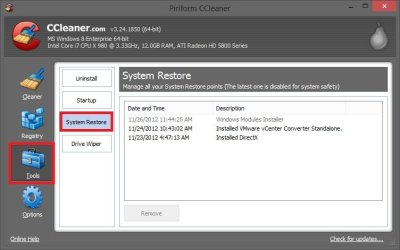
As a test, create a restore point, then check a few minutes later with CCleaner to see if the restore point is listed.
CCleaner.jpg
Hope this helps, :)
Shawn
 

My Computer

Computer type
PC/Desktop
Computer Manufacturer/Model Number
Self built custom
OS
64-bit Windows 11 Pro for Workstations
CPU
Intel i7-8700K OC'd to 5 GHz
Motherboard
ASUS ROG Maximus XI Formula Z390
Memory
64 GB (4x16GB) G.SKILL TridentZ RGB DDR4 3600 MHz
Graphics Card(s)
ASUS ROG-STRIX-GTX1080TI-O11G-GAMING
Sound Card
Integrated
Monitor(s) Displays
2 x Samsung Odyssey G7 27"
Screen Resolution
2560x1440
Hard Drives
1TB Samsung 990 PRO M.2,
4TB Samsung 990 PRO PRO M.2,
TerraMaster F8 SSD Plus NAS
PSU
Seasonic Prime Titanium 850W
Case
Thermaltake Core P3
Cooling
Corsair Hydro H115i
Keyboard
Logitech wireless K800
Mouse
Logitech MX Master 4
Internet Speed
2 Gb/s Download and 100 Mb/s Upload
Antivirus
Malwarebyte Anti-Malware Premium
Browser
Google Chrome
Other Info
Logitech Z625 speaker system,
Logitech BRIO 4K Pro webcam,
HP Color LaserJet Pro MFP M477fdn,
APC SMART-UPS RT 1000 XL - SURT1000XLI,
Galaxy S23 Plus phone
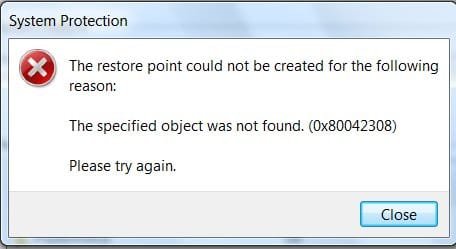
This is the message I get

This is the error message I get, I have my storage setting set at 230gb

error.jpg
 

My Computer

OS
Win 7 64bit
You might see if running a sfc /scannow command may be able to sort this for you afterwards.
 

My Computer

Computer type
PC/Desktop
Computer Manufacturer/Model Number
Self built custom
OS
64-bit Windows 11 Pro for Workstations
CPU
Intel i7-8700K OC'd to 5 GHz
Motherboard
ASUS ROG Maximus XI Formula Z390
Memory
64 GB (4x16GB) G.SKILL TridentZ RGB DDR4 3600 MHz
Graphics Card(s)
ASUS ROG-STRIX-GTX1080TI-O11G-GAMING
Sound Card
Integrated
Monitor(s) Displays
2 x Samsung Odyssey G7 27"
Screen Resolution
2560x1440
Hard Drives
1TB Samsung 990 PRO M.2,
4TB Samsung 990 PRO PRO M.2,
TerraMaster F8 SSD Plus NAS
PSU
Seasonic Prime Titanium 850W
Case
Thermaltake Core P3
Cooling
Corsair Hydro H115i
Keyboard
Logitech wireless K800
Mouse
Logitech MX Master 4
Internet Speed
2 Gb/s Download and 100 Mb/s Upload
Antivirus
Malwarebyte Anti-Malware Premium
Browser
Google Chrome
Other Info
Logitech Z625 speaker system,
Logitech BRIO 4K Pro webcam,
HP Color LaserJet Pro MFP M477fdn,
APC SMART-UPS RT 1000 XL - SURT1000XLI,
Galaxy S23 Plus phone
Possible malware, maybe?
Could try clean boot support.microsoft.com/kb/929135 find offender if not then download malware bytes
 

My Computer

OS
Window 7 ult x64
To eventually eliminate one source of problems, System Restore is highly dependent on having the correct services running (how do I know ;O) Anything been disabled? If in any doubt whatsoever about any service, at least set it to manual.
 

My Computer

Computer type
Laptop
Computer Manufacturer/Model Number
Dell \ Lenovo\ HP \ Toshiba
OS
W7, W8.1
Antivirus
MSE, Malwarebytes
Browser
FF
Back
Top