@ computers networked, can't print from one of them???

flycaster

New member
Member
VIP
Local time
11:14 AM
Messages
472
Location
Boynton Beach, FL
I have two networked computers (they are also Homegrouped). When printing from my desktop, there is no problem (the printer is connected to the desktop, it is not directly connected to the laptop). However, I don't know how to print from the laptop.
 

My Computer My Computer

Computer Manufacturer/Model Number
Gateway DX4720-03/HP Pavilion dv6
OS
Windows 7 HP 64-bit
Memory
4GB/4GB
Antivirus
Avast Pro
Browser
Firefox, the latest
Hi flycaster. This is easily fixed, but need a couple of answers first:

Presumably, as they are homegrouped both machines are running 7?
Can you share files and folders between them?
What is the printers make and model?
Under "OS" in your system specs you list Windows 7 HP 64 bit twice, I assume this means both machines are 64 bit?
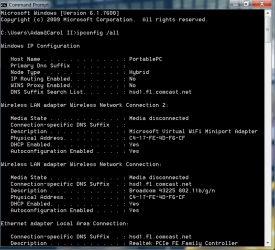
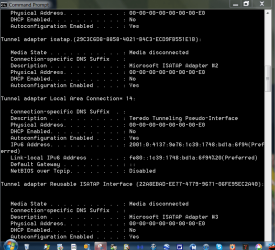
Lastly, from the desktop, please open command prompt and type
Code:
ipconfig /all
and post back the results.
 

My Computer My Computer

Computer type
PC/Desktop
Computer Manufacturer/Model Number
Medion Erazer (note to self: insert model number) - with custom additions
OS
Windows 10 Pro x64
CPU
Intel Core i5 7400 @ 3.00GHz
Motherboard
OEM supllied with PC
Memory
8GB 2133Mhz DDR4 (OEM supplied)
Graphics Card(s)
Gygabyte Windforce GTX 1050Ti (Factory Overclocked)
Sound Card
Realtek
Monitor(s) Displays
Acer Al1980 + HKC
Screen Resolution
1360*768(HKC) / 1280*1024(Acer)
Hard Drives
1TB Toshiba
1TB WD Caviar Green
120GB Samsung Evo 840
PSU
OEM supplied (no power rating on case)
Case
OEM Supplied
Cooling
Stock
Keyboard
Logitech Wireless
Mouse
Logitect Wireless
Internet Speed
40Mb/s Down 10Mb/s Up
Antivirus
Defender
Browser
Firefox
Hi flycaster. This is easily fixed, but need a couple of answers first:

Presumably, as they are homegrouped both machines are running 7?
Can you share files and folders between them?
What is the printers make and model?
Under "OS" in your system specs you list Windows 7 HP 64 bit twice, I assume this means both machines are 64 bit?
Lastly, from the desktop, please open command prompt and type
Code:
ipconfig /all
and post back the results.

Both computers are HomeGrouped, both running Win7 HP 64-bit, can share folders between them, printer is HP C6180. And, I might add, I'm almost certain that I was able to print from the laptop in the past...but as I don't do it all that often, I forgot the pathways...

As for the IPconfig, I have copied it (via snipping tool), but not sure how to add to this post. Do I first have to deliver the snips to something like Photobucket and put the link in here, or can I automatically place the snips here?

EDIT:
 

Attachments

  • IPconfig1.PNG
    IPconfig1.PNG
    25.4 KB · Views: 5
  • IPconfig2.PNG
    IPconfig2.PNG
    21.3 KB · Views: 5
  • IPconfig3.PNG
    IPconfig3.PNG
    29.7 KB · Views: 4

My Computer My Computer

Computer Manufacturer/Model Number
Gateway DX4720-03/HP Pavilion dv6
OS
Windows 7 HP 64-bit
Memory
4GB/4GB
Antivirus
Avast Pro
Browser
Firefox, the latest
Either way is good, if you click the "Paperclip" at the top of the reply box it will open a new window allowing you to attach images. Those images will be attached to the bottom of your post. All I'm really interested in is the IP address of the desktop, so I can give you the right settings.
 

My Computer My Computer

Computer type
PC/Desktop
Computer Manufacturer/Model Number
Medion Erazer (note to self: insert model number) - with custom additions
OS
Windows 10 Pro x64
CPU
Intel Core i5 7400 @ 3.00GHz
Motherboard
OEM supllied with PC
Memory
8GB 2133Mhz DDR4 (OEM supplied)
Graphics Card(s)
Gygabyte Windforce GTX 1050Ti (Factory Overclocked)
Sound Card
Realtek
Monitor(s) Displays
Acer Al1980 + HKC
Screen Resolution
1360*768(HKC) / 1280*1024(Acer)
Hard Drives
1TB Toshiba
1TB WD Caviar Green
120GB Samsung Evo 840
PSU
OEM supplied (no power rating on case)
Case
OEM Supplied
Cooling
Stock
Keyboard
Logitech Wireless
Mouse
Logitect Wireless
Internet Speed
40Mb/s Down 10Mb/s Up
Antivirus
Defender
Browser
Firefox
Have you installed the software (from CD) that came with your printer on the lap top?
Once you do, select it to be the default on your laptop. Make sure sharing is turned on, on both computers ... also, turn Windows Firewall on, to see if you can now use it to print from.
For some reason, my Avira wouldn't let me share my printer (same set-up, laptop to desktop)... so I turned on Windows Firewall and, voila! :geek:
 

My Computer My Computer

Computer type
PC/Desktop
Computer Manufacturer/Model Number
Bruce ... somewhere in his 40's
OS
Windows 7 Ultimate 32bit SP1
CPU
Intel(R) Core(TM)2 Quad CPU @ 2.40GHz, 2400 MHz
Motherboard
INTEL/D975XBX2
Memory
4 GB
Graphics Card(s)
ATI Radeon HD 2600 Pro
Monitor(s) Displays
Samsung SyncMaster 914v
Screen Resolution
1280 x 1024
Hard Drives
2/500GB each ... ST3500630AS ATA Device.
One is not connected
PSU
Rocketfish 700 W
Case
G.Skill Gigabyte Chassis
Keyboard
Standard PS/2 Keyboard
Mouse
Microsoft PS/2 Mouse
Internet Speed
DSL
Antivirus
Avira Internet Security
Browser
IE 11
Other Info
ATI HDMI Audio
Thanks, all, got it to work. Don't think (but not sure) that I needed to download the printer's driver into the laptop. I did it before i think I found the quickest solution, though. In my laptop's Windows Explorer, selected Network, then Add a Printer from the menu bar above, then Add a Network...etc, and followed the wizard.
 

My Computer My Computer

Computer Manufacturer/Model Number
Gateway DX4720-03/HP Pavilion dv6
OS
Windows 7 HP 64-bit
Memory
4GB/4GB
Antivirus
Avast Pro
Browser
Firefox, the latest
Thanks for reporting back and I'm glad you got it solved! :geek:
 

My Computer My Computer

Computer type
PC/Desktop
Computer Manufacturer/Model Number
Bruce ... somewhere in his 40's
OS
Windows 7 Ultimate 32bit SP1
CPU
Intel(R) Core(TM)2 Quad CPU @ 2.40GHz, 2400 MHz
Motherboard
INTEL/D975XBX2
Memory
4 GB
Graphics Card(s)
ATI Radeon HD 2600 Pro
Monitor(s) Displays
Samsung SyncMaster 914v
Screen Resolution
1280 x 1024
Hard Drives
2/500GB each ... ST3500630AS ATA Device.
One is not connected
PSU
Rocketfish 700 W
Case
G.Skill Gigabyte Chassis
Keyboard
Standard PS/2 Keyboard
Mouse
Microsoft PS/2 Mouse
Internet Speed
DSL
Antivirus
Avira Internet Security
Browser
IE 11
Other Info
ATI HDMI Audio
Back
Top