Hi everyone hopefully one of you can help!
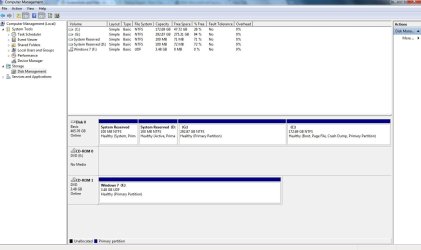
I had 2 Windows 7 installations on a single hardrive spilt into two partitions, one for work and one for family etc. The primary partition i.e the one with the most disk space became corrupt and I decided to format that and reinstall Windows 7 onto it. Now I'm having some trouble configuring the boot menu to display both o/s on start up. The computer will boot into the existing smaller partition automatically and I thought it would just be a case of downloading EasyBCD and configure dual boot. However this doesn't seem to work. Here are some Screen shots of bcdedit.exe from cmd prompt and Disk Management.

I also noticed the boot manager has D: drive as device id?? Not sure if that has any relevance.
Does any one know how I could resolve this?
Any help would be much appreciated.
I had 2 Windows 7 installations on a single hardrive spilt into two partitions, one for work and one for family etc. The primary partition i.e the one with the most disk space became corrupt and I decided to format that and reinstall Windows 7 onto it. Now I'm having some trouble configuring the boot menu to display both o/s on start up. The computer will boot into the existing smaller partition automatically and I thought it would just be a case of downloading EasyBCD and configure dual boot. However this doesn't seem to work. Here are some Screen shots of bcdedit.exe from cmd prompt and Disk Management.

I also noticed the boot manager has D: drive as device id??
Not sure if that has any relevance.Does any one know how I could resolve this?
Any help would be much appreciated.
My Computer
At a glance
Windows 7 Ultimate x64
- OS
- Windows 7 Ultimate x64