Connected to net but does not connect

patriceltic

New member
Member
Local time
11:43 AM
Messages
91
I am using a very old compaq laptop - I am receiving cannot connect to host message when I try to load anything on my browser. I am connected on a wireless internet connection but nothing is reaching the net.

I ran the network diagnostic troubleshooter which came up zero.

Pls help. Thank you.
 

My Computer

Computer type
PC/Desktop
Computer Manufacturer/Model Number
Dell Inspiron One
OS
Windows7 home premium 64 bit sp1
Antivirus
avast
Browser
chrome
Is this your home internet or someone else's? What model laptop and router? When you open My Computer/Network you should see some other devices present including your router.
 

My Computer

Computer type
PC/Desktop
OS
Windows 7 Pro x64
Hi. Thank you for responding. It is my home internet - PC is Compaq Presario -- router just says Verizon. I cannot understand why it doesn't connect - obviously. I look at the network conf on my windows 7 desktop and everything is there, including my pc. Would it help to reset the router. As in turn it off and back on. Thanks again.
When I look at computer/network, I am listed twice. Should there only be one? I am really bad at this stuff as you may have noticed,
 

My Computer

Computer type
PC/Desktop
Computer Manufacturer/Model Number
Dell Inspiron One
OS
Windows7 home premium 64 bit sp1
Antivirus
avast
Browser
chrome
Goto Control Panel -> Network and Internet -> Network and Sharing Center. Tell us what you see. Also how are you posting here if you can't get on the internet?

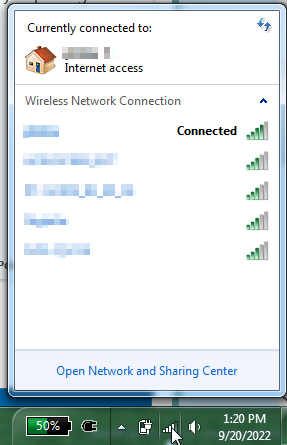
Also, when you click on the wifi icon in the system tray, does it show as connected to your network with internet access?

image.png
 

My Computer

Computer type
PC/Desktop
OS
Windows 7 Pro x64
Oh sorry - I am on a chromebook that I resurrected -- I see basic: pvn-hp (this computer) --Fios (my access #)--- internet

Scroll down I see Home network Fios -- Access type: Internet..Connections: wireless network connection (fios-my access #) --

That's it. Thank you.
 

My Computer

Computer type
PC/Desktop
Computer Manufacturer/Model Number
Dell Inspiron One
OS
Windows7 home premium 64 bit sp1
Antivirus
avast
Browser
chrome
What browser are you using? Try a different browser. Try different websites in case the one you are trying to access is offline/having problems.
 

My Computer

Computer type
PC/Desktop
OS
Windows 7 Pro x64
Yep it says connected. That's what I can't figure out. I mean this old compaq is old and slow but it should be able to load chrome and it just sits and twirls. When I tried to update my virus program or mwb, or download stuff from the library -- no deal. When I look at the screen for virus update, it says, connection established. It shows a green progress line. I'm watching it slowly move -- it says "updating" -- it did not get this far this morning and I have not changed anything i.e. connection-- oops -- it just stopped and now says:
HOST UNREACHABLE
 

My Computer

Computer type
PC/Desktop
Computer Manufacturer/Model Number
Dell Inspiron One
OS
Windows7 home premium 64 bit sp1
Antivirus
avast
Browser
chrome
Try Internet Explorer, it's built-in. Chrome is too heavy for old systems with limited RAM.
 

My Computer

Computer type
PC/Desktop
OS
Windows 7 Pro x64
Wow - IE did it. Who knew?? So I should be able to update virus defs, etc. Thank you. I will give you a good rep.
 

My Computer

Computer type
PC/Desktop
Computer Manufacturer/Model Number
Dell Inspiron One
OS
Windows7 home premium 64 bit sp1
Antivirus
avast
Browser
chrome
Since you got it working with IE, try downloading Pale Moon or SeaMonkey web browsers. They are Mozilla browsers that are suited to older PCs with limited RAM.

The Pale Moon Project homepage
The SeaMonkey(R) Project

IE is full of security holes so not recommended for daily browsing. Chrome is better for newer machines with minimum 4 GB RAM.
 

My Computer

Computer type
PC/Desktop
OS
Windows 7 Pro x64
Hi - well it got me on line but still raggy - AVG anti virus still says server unreachable. I will try your other suggestions --thanks again. It did update the definitions tho...no deal for the program. I guess I just won't have newer features. NBD. I am going to try seamonkey -- love the name!

- - - Updated - - -

I think that we solved getting me online but nothing really seems to work anyway. If I try to go to ccleaner site, fails. If I try to update avg program, fails. I am not bothered by the avg thing but would like ccleaner to get updated. It is just choking on itself. If I look at cpu usage - 100% so that's probably the reason everything is slow but nonetheless, can't get programs to update. Any thoughts?
 

My Computer

Computer type
PC/Desktop
Computer Manufacturer/Model Number
Dell Inspiron One
OS
Windows7 home premium 64 bit sp1
Antivirus
avast
Browser
chrome
Well there's your problem - older PCs don't do so well with several background processes that choke your CPU. I don't use any AV, they are resource hogs. CCleaner? Meh, another resource hog. I've had PCs like yours that would lock up completely for a few minutes (not even CTRL-ALT-DELETE) because of so many background programs. My thoughts? Clean install time, it'll bring new life to that old PC.
 

My Computer

Computer type
PC/Desktop
OS
Windows 7 Pro x64
If its a chrome book get rid of avg its known to give connection problems generally you dont need AV on chrome book

It can be a dns issue change dns Fix DNS errors - Chromebook Help
 

My Computer

Computer type
PC/Desktop
OS
win 8 32 bit
Back
Top