Connected to Network, No Internet Access

jmhc33

New member
Local time
6:01 AM
Messages
5
Dear Friends,

I'm sure you've seen this post ump-thousand times, but I no previous threads were able to guide me to a solution, so here we go once again.

I moved to Mexico City a month ago and the apartment that I am renting came with wireless internet installed. Until two days ago, the internet ran smoothly. The modem is a Huawei device. The laptop from which I am trying to connect is is a Toshiba NB505, running Windows 7 Starter 32-bit. It has never given me problems in my sixteen months of ownership.

The solution that usually works for me in this situation (resetting the modem and waiting 10 seconds) has not worked, neither have a random battery of other tests, like disabling the network adapters, removing the network in question from my wireless networks, fiddling with my IPv4 and IPv6 settings (they are both on Automatic acquire), and one command function.

I am providing some of my details below. Any advice that leads to a solution would be most welcome. Thanks!


Windows IP Configuration

Host Name . . . . . . . . . . . . : jmhc-PC
Primary Dns Suffix . . . . . . . :
Node Type . . . . . . . . . . . . : Hybrid
IP Routing Enabled. . . . . . . . : No
WINS Proxy Enabled. . . . . . . . : No

Ethernet adapter Local Area Connection* 9:

Media State . . . . . . . . . . . : Media disconnected
Connection-specific DNS Suffix . :
Description . . . . . . . . . . . : Juniper Network Connect Virtual Adapter
Physical Address. . . . . . . . . : 00-FF-98-5C-37-92
DHCP Enabled. . . . . . . . . . . : Yes
Autoconfiguration Enabled . . . . : Yes

Ethernet adapter Local Area Connection:

Media State . . . . . . . . . . . : Media disconnected
Connection-specific DNS Suffix . :
Description . . . . . . . . . . . : Realtek PCIe FE Family Controller
Physical Address. . . . . . . . . : B8-70-F4-53-7D-1D
DHCP Enabled. . . . . . . . . . . : No
Autoconfiguration Enabled . . . . : Yes

Wireless LAN adapter Wireless Network Connection:

Connection-specific DNS Suffix . :
Description . . . . . . . . . . . : Realtek RTL8188CE Wireless LAN 802.11n PCI-E NIC
Physical Address. . . . . . . . . : 68-A3-C4-55-BA-A9
DHCP Enabled. . . . . . . . . . . : Yes
Autoconfiguration Enabled . . . . : Yes
Link-local IPv6 Address . . . . . : fe80::8c44:ae66:aabb:5020%11(Preferred)
IPv4 Address. . . . . . . . . . . : 192.168.100.2(Preferred)
Subnet Mask . . . . . . . . . . . : 255.255.255.0
Lease Obtained. . . . . . . . . . : Monday, October 01, 2012 6:49:57 PM
Lease Expires . . . . . . . . . . : Tuesday, October 02, 2012 10:38:18 PM
Default Gateway . . . . . . . . . : 192.168.100.1
DHCP Server . . . . . . . . . . . : 192.168.100.1
DHCPv6 IAID . . . . . . . . . . . : 241738692
DHCPv6 Client DUID. . . . . . . . : 00-01-00-01-15-1D-D2-1A-68-A3-C4-55-BA-A9
DNS Servers . . . . . . . . . . . : 192.168.100.1
198.41.0.4
NetBIOS over Tcpip. . . . . . . . : Enabled

Tunnel adapter isatap.{74595DB8-B7CF-40B8-AAF1-CDB129803172}:

Media State . . . . . . . . . . . : Media disconnected
Connection-specific DNS Suffix . :
Description . . . . . . . . . . . : Microsoft ISATAP Adapter
Physical Address. . . . . . . . . : 00-00-00-00-00-00-00-E0
DHCP Enabled. . . . . . . . . . . : No
Autoconfiguration Enabled . . . . : Yes

Tunnel adapter isatap.{D811EBB2-1684-4454-BED4-461DBE094849}:

Media State . . . . . . . . . . . : Media disconnected
Connection-specific DNS Suffix . :
Description . . . . . . . . . . . : Microsoft ISATAP Adapter #2
Physical Address. . . . . . . . . : 00-00-00-00-00-00-00-E0
DHCP Enabled. . . . . . . . . . . : No
Autoconfiguration Enabled . . . . : Yes

Tunnel adapter Teredo Tunneling Pseudo-Interface:

Media State . . . . . . . . . . . : Media disconnected
Connection-specific DNS Suffix . :
Description . . . . . . . . . . . : Teredo Tunneling Pseudo-Interface
Physical Address. . . . . . . . . : 00-00-00-00-00-00-00-E0
DHCP Enabled. . . . . . . . . . . : No
Autoconfiguration Enabled . . . . : Yes

Tunnel adapter isatap.{986FD0EF-970B-46C9-AC2C-954F403EC90D}:

Media State . . . . . . . . . . . : Media disconnected
Connection-specific DNS Suffix . :
Description . . . . . . . . . . . : Microsoft ISATAP Adapter #3
Physical Address. . . . . . . . . : 00-00-00-00-00-00-00-E0
DHCP Enabled. . . . . . . . . . . : No
Autoconfiguration Enabled . . . . : Yes
Ping request could not find host yahoo.com. Please check the name and try again.
 

My Computer

OS
Windows 7 Starter 32-bit
I forgot to mention, the Huawei device is an EchoLife HG8247.

Thanks.

JMHC
 

My Computer

OS
Windows 7 Starter 32-bit
looks like the DNS server for the adapter is listing a second address other than the gateway device...
 

My Computer

Computer type
Laptop
Computer Manufacturer/Model Number
HP 17-ak0xx, dv7 3173nr
OS
Win7 Home Premium x64 W10Pro&Home
CPU
A12 9720p 4+8 TurionII M520
Motherboard
HP 3839
Memory
6GB 8GB
Graphics Card(s)
R7
Monitor(s) Displays
24" sa550
Screen Resolution
1600x900 1920x1080
Mouse
Logitechx2
Internet Speed
120Mb/s down 12up
I fiddled with that and still have no internet access. Now, however, I am reading this:

Wireless LAN adapter Wireless Network Connection:

Connection-specific DNS Suffix . :
Description . . . . . . . . . . . : Realtek RTL8188CE Wireless LAN 802.11n PCI-E NIC
Physical Address. . . . . . . . . : 68-A3-C4-55-BA-A9
DHCP Enabled. . . . . . . . . . . : Yes
Autoconfiguration Enabled . . . . : Yes
Link-local IPv6 Address . . . . . : fe80::8c44:ae66:aabb:5020%11(Preferred)
IPv4 Address. . . . . . . . . . . : 192.168.100.5(Preferred)
Subnet Mask . . . . . . . . . . . : 255.255.255.0
Lease Obtained. . . . . . . . . . : Monday, October 01, 2012 8:12:57 PM
Lease Expires . . . . . . . . . . : Thursday, October 04, 2012 8:12:58 PM
Default Gateway . . . . . . . . . : 192.168.100.1
DHCP Server . . . . . . . . . . . : 192.168.100.1
DHCPv6 IAID . . . . . . . . . . . : 241738692
DHCPv6 Client DUID. . . . . . . . : 00-01-00-01-15-1D-D2-1A-68-A3-C4-55-BA-A9
DNS Servers . . . . . . . . . . . : 192.168.100.1
NetBIOS over Tcpip. . . . . . . . : Enabled

I should also add that I am not the savviest person in the world when it comes to computers, so it is completely possible that there is some element of human error here...
 

My Computer

OS
Windows 7 Starter 32-bit
Test your modem connection using an Ethernet cable and post an ipconfig /all
 

My Computer

Computer type
Laptop
Computer Manufacturer/Model Number
HP 17-ak0xx, dv7 3173nr
OS
Win7 Home Premium x64 W10Pro&Home
CPU
A12 9720p 4+8 TurionII M520
Motherboard
HP 3839
Memory
6GB 8GB
Graphics Card(s)
R7
Monitor(s) Displays
24" sa550
Screen Resolution
1600x900 1920x1080
Mouse
Logitechx2
Internet Speed
120Mb/s down 12up
This is what I get:

C:\Users\jmhc>ipconfig/all

Windows IP Configuration

Host Name . . . . . . . . . . . . : jmhc-PC
Primary Dns Suffix . . . . . . . :
Node Type . . . . . . . . . . . . : Hybrid
IP Routing Enabled. . . . . . . . : No
WINS Proxy Enabled. . . . . . . . : No

Ethernet adapter Local Area Connection* 9:

Media State . . . . . . . . . . . : Media disconnected
Connection-specific DNS Suffix . :
Description . . . . . . . . . . . : Juniper Network Connect Virtual Adapter
Physical Address. . . . . . . . . : 00-FF-98-5C-37-92
DHCP Enabled. . . . . . . . . . . : Yes
Autoconfiguration Enabled . . . . : Yes

Ethernet adapter Local Area Connection:

Connection-specific DNS Suffix . :
Description . . . . . . . . . . . : Realtek PCIe FE Family Controller
Physical Address. . . . . . . . . : B8-70-F4-53-7D-1D
DHCP Enabled. . . . . . . . . . . : No
Autoconfiguration Enabled . . . . : Yes
Link-local IPv6 Address . . . . . : fe80::40c8:6bf4:582b:4d02%12(Preferred)
Autoconfiguration IPv4 Address. . : 169.254.77.2(Preferred)
Subnet Mask . . . . . . . . . . . : 255.255.0.0
Default Gateway . . . . . . . . . :
DHCPv6 IAID . . . . . . . . . . . : 347631860
DHCPv6 Client DUID. . . . . . . . : 00-01-00-01-15-1D-D2-1A-68-A3-C4-55-BA-A9

DNS Servers . . . . . . . . . . . : fec0:0:0:ffff::1%1
fec0:0:0:ffff::2%1
fec0:0:0:ffff::3%1
NetBIOS over Tcpip. . . . . . . . : Enabled

Wireless LAN adapter Wireless Network Connection:

Media State . . . . . . . . . . . : Media disconnected
Connection-specific DNS Suffix . :
Description . . . . . . . . . . . : Realtek RTL8188CE Wireless LAN 802.11n PC
I-E NIC
Physical Address. . . . . . . . . : 68-A3-C4-55-BA-A9
DHCP Enabled. . . . . . . . . . . : Yes
Autoconfiguration Enabled . . . . : Yes

Tunnel adapter isatap.{74595DB8-B7CF-40B8-AAF1-CDB129803172}:

Media State . . . . . . . . . . . : Media disconnected
Connection-specific DNS Suffix . :
Description . . . . . . . . . . . : Microsoft ISATAP Adapter
Physical Address. . . . . . . . . : 00-00-00-00-00-00-00-E0
DHCP Enabled. . . . . . . . . . . : No
Autoconfiguration Enabled . . . . : Yes

Tunnel adapter isatap.{D811EBB2-1684-4454-BED4-461DBE094849}:

Media State . . . . . . . . . . . : Media disconnected
Connection-specific DNS Suffix . :
Description . . . . . . . . . . . : Microsoft ISATAP Adapter #2
Physical Address. . . . . . . . . : 00-00-00-00-00-00-00-E0
DHCP Enabled. . . . . . . . . . . : No
Autoconfiguration Enabled . . . . : Yes

Tunnel adapter Teredo Tunneling Pseudo-Interface:

Media State . . . . . . . . . . . : Media disconnected
Connection-specific DNS Suffix . :
Description . . . . . . . . . . . : Teredo Tunneling Pseudo-Interface
Physical Address. . . . . . . . . : 00-00-00-00-00-00-00-E0
DHCP Enabled. . . . . . . . . . . : No
Autoconfiguration Enabled . . . . : Yes

Tunnel adapter isatap.{986FD0EF-970B-46C9-AC2C-954F403EC90D}:

Media State . . . . . . . . . . . : Media disconnected
Connection-specific DNS Suffix . :
Description . . . . . . . . . . . : Microsoft ISATAP Adapter #3
Physical Address. . . . . . . . . : 00-00-00-00-00-00-00-E0
DHCP Enabled. . . . . . . . . . . : No
Autoconfiguration Enabled . . . . : Yes

Tunnel adapter Reusable ISATAP Interface {FCFE888F-CB49-4064-8C15-CF4F21AC0D48}:


Media State . . . . . . . . . . . : Media disconnected
Connection-specific DNS Suffix . :
Description . . . . . . . . . . . : Microsoft ISATAP Adapter #4
Physical Address. . . . . . . . . : 00-00-00-00-00-00-00-E0
DHCP Enabled. . . . . . . . . . . : No
Autoconfiguration Enabled . . . . : Yes
 

My Computer

OS
Windows 7 Starter 32-bit
jmhc3: The HG8247 ONT is in your apartment right?

I'm guessing that you get phone, TV, Internet through this device. Taking the next step might affect those services, but that's up to you. I've done this on Verizon devices without more than a minor interruption in service while the device resets - most of the time that's all it takes.

HG8247 quick user manual
HG8247 quick user guide
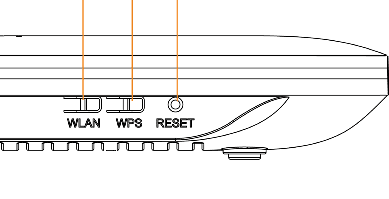
Reset the ONT: insert a paper clip into the reset hole.

Sometimes a bigger hammer is needed - you might have to reset the device to default values. It's best to write done the existing values before resetting the defaults. Log into the ONT following the instruction in the manual
192.168.100.1 is the management console address you need to type into a browser address bar
login: root
pw: admin
that is of course if you can get to the device and the default login/pw wasn't changed.


Make sure you have known values before you default the device. There shouldn't bee too many - check them against the doc to see what might have been set differently than the default.

If you're sure you have the information needed - go ahead and give it a shot.

How to Reset the ONT to defaults: insert a paper clip into the reset hole and hold for 10-20 seconds
 

Attachments

  • ont.png
    ont.png
    2.9 KB · Views: 6
Last edited:

My Computer

Computer type
Laptop
Computer Manufacturer/Model Number
HP Pavilion dv6-6c10us
OS
x64 (6.3.9600) Win8.1 Pro & soon dual boot x64 (6.1.7601) Win7_SP1 HomePrem
CPU
AMD A6-3420M APU with Radeon(tm) HD Graphics
Motherboard
Hewlett-Packard 1805
Memory
6.00 GB
Graphics Card(s)
AMD Radeon(TM) HD 6520G
Sound Card
(1) AMD High Definition Audio Device (2) IDT High Definiti
Monitor(s) Displays
HP W2072a 20" LCD (1600 x 900) @ 60 Hz
Screen Resolution
1366 x 768 x 32 bits (4294967296 colors) @ 60 Hz
Hard Drives
ST640LM0 00 HM641JI SATA Disk Device
Keyboard
Logitech k520 wireless KB
Mouse
Logitech m320 wireless mouse (bundled with KB)
Internet Speed
15/5 | 54 MB Wireless 'n'
Antivirus
Realtime: Defender or Avast | On-demand: Malwarebytes, ESET
Browser
IE 11 on Win8, IE 10 on win 7
Other Info
Media: [Gimp, Audacity, VLC] || Comm: [WEmail 2012, Skype] || Productivity: [OpenOffice,| Textpad] || Utils: [Sysinternals, cCleaner, Speccy, Defraggler]
I would try the paper clip theory, but, unfortunately, I don't think I can since the modem serves other residents. I suppose I should just inform the landlady if there isn't a quick fix that I can achieve from my computer.

Thanks for your help!

JMHC
 

My Computer

OS
Windows 7 Starter 32-bit
Ok, that's why I asked if the ONT was in your apartment.

I think the device could be shared but a more likely scenario is that each apartment has it's own device since it provides TV, Interent, and Plain Old Telephone System (POTS).
I could be wrong ;)

good luck.
 

My Computer

Computer type
Laptop
Computer Manufacturer/Model Number
HP Pavilion dv6-6c10us
OS
x64 (6.3.9600) Win8.1 Pro & soon dual boot x64 (6.1.7601) Win7_SP1 HomePrem
CPU
AMD A6-3420M APU with Radeon(tm) HD Graphics
Motherboard
Hewlett-Packard 1805
Memory
6.00 GB
Graphics Card(s)
AMD Radeon(TM) HD 6520G
Sound Card
(1) AMD High Definition Audio Device (2) IDT High Definiti
Monitor(s) Displays
HP W2072a 20" LCD (1600 x 900) @ 60 Hz
Screen Resolution
1366 x 768 x 32 bits (4294967296 colors) @ 60 Hz
Hard Drives
ST640LM0 00 HM641JI SATA Disk Device
Keyboard
Logitech k520 wireless KB
Mouse
Logitech m320 wireless mouse (bundled with KB)
Internet Speed
15/5 | 54 MB Wireless 'n'
Antivirus
Realtime: Defender or Avast | On-demand: Malwarebytes, ESET
Browser
IE 11 on Win8, IE 10 on win 7
Other Info
Media: [Gimp, Audacity, VLC] || Comm: [WEmail 2012, Skype] || Productivity: [OpenOffice,| Textpad] || Utils: [Sysinternals, cCleaner, Speccy, Defraggler]
I'm not familiar with the Juniper Network Connect Virtual Adapter, but if you see it in
Control Panel\Network and Internet\Network Connections
-> try disabling it.

Reconfigure all connections to obtain IP and DNS information automatically, and try connecting both wireless (post ipconfig /all) and then wired (post ipconfig /all) .

The IPv4 address reported in your wired attempt, 169.254.77.2(Preferred), might be in the address range from the service provider to your ONT.
iana.org said:
Special-Use Addresses
Several address ranges are reserved for "Special Use". These addresses all have restrictions of some sort placed on their use, and in general should not appear in normal use on the public Internet. The overview below briefly explains the purpose of these addresses – in general they are used in specialized technical contexts. They are described in more detail in RFC 5735.

"Private Use" IP addresses:
10.0.0.0 - 10.255.255.255
172.16.0.0 - 172.31.255.255
192.168.0.0 - 192.168.255.255

These address blocks are reserved for use on private networks, and should never appear in the public Internet. There are millions of private networks (for example home firewalls often use them). People can use these address blocks without informing us, so we have no record of who uses which of these addresses.

The point of private address space is to allow many organizations in different places to use the same addresses, and as long as these disconnected or self-contained islands of IP-speaking computers (private networks) are not connected, there is no problem. If you see an apparent attack, or spam, coming from one of these address ranges, then either it is coming from your local environment, your ISP, or the address has been "spoofed".

The Private addresses are documented in RFC 1918. If you have further questions about RFC 1918 usage, please contact your ISP.

"Autoconfiguration" IP Addresses: 169.254.0.0 - 169.254.255.255

Addresses in the range 169.254.0.0 to 169.254.255.255 are used automatically by most network devices when they are configured to use IP, do not have a static IP Address assigned and are unable to obtain an IP address using DHCP.

This traffic is intended to be confined to the local network, so the administrator of the local network should look for misconfigured hosts. Some ISPs inadvertently also permit this traffic, so you may also want to contact your ISP. This is documented in RFC 5735.
Your ipconfig in post# 6 (wired connection attempt) shows IPv6 DNS servers, not IPv4 DNS servers. That might be normal where you are or it might be something the Juniper virtual adapter is doing.

Thanks.
 

My Computer

Computer type
Laptop
Computer Manufacturer/Model Number
HP Pavilion dv6-6c10us
OS
x64 (6.3.9600) Win8.1 Pro & soon dual boot x64 (6.1.7601) Win7_SP1 HomePrem
CPU
AMD A6-3420M APU with Radeon(tm) HD Graphics
Motherboard
Hewlett-Packard 1805
Memory
6.00 GB
Graphics Card(s)
AMD Radeon(TM) HD 6520G
Sound Card
(1) AMD High Definition Audio Device (2) IDT High Definiti
Monitor(s) Displays
HP W2072a 20" LCD (1600 x 900) @ 60 Hz
Screen Resolution
1366 x 768 x 32 bits (4294967296 colors) @ 60 Hz
Hard Drives
ST640LM0 00 HM641JI SATA Disk Device
Keyboard
Logitech k520 wireless KB
Mouse
Logitech m320 wireless mouse (bundled with KB)
Internet Speed
15/5 | 54 MB Wireless 'n'
Antivirus
Realtime: Defender or Avast | On-demand: Malwarebytes, ESET
Browser
IE 11 on Win8, IE 10 on win 7
Other Info
Media: [Gimp, Audacity, VLC] || Comm: [WEmail 2012, Skype] || Productivity: [OpenOffice,| Textpad] || Utils: [Sysinternals, cCleaner, Speccy, Defraggler]
The Op should disable the Juniper Virtual adaptor by going into Device Manager and disable it, as a secondary network interface can sometimes confuse Windows on which connection is supposed to be the active one.

I would definitely go into the IPv4 properties of the wireless connection and type in two usable DNS servers like Google's DNS > 8.8.8.8 and 8.8.4.4

The IP shown for the wired connection is what you get where there is no internet "Auto Configuration".
 

My Computer

Computer type
PC/Desktop
Computer Manufacturer/Model Number
Home built
OS
Windows 7 Ult, Windows 8.1 Pro,
CPU
Q9650-4.275GHz, E8600 4.5GHz, E6750-3.8GHz
Motherboard
Evga 780i FTW
Memory
G.Skill PC2 9600 1200Mhz 5 5 5 15 2T
Graphics Card(s)
GTX480
Sound Card
Asus Xonar D2
Monitor(s) Displays
HannsG
Screen Resolution
1680X1050
Hard Drives
GSkill Phoenix Pro 120GB SSD
PSU
ThermalTake Toughpower 1000Watt modular
Case
ThermalTake XaserV
Cooling
Xigmatek S1283
Keyboard
Logitech G15
Mouse
Logitech G9
Internet Speed
T1
Thanks chev,

This leads me back to believing the HG8247 ONT needs refreshing. After you sort through the changes made in attempt to fix the issue - everything else looks fairly straight forward.

jmhc33 is reluctant to reset it - thinks it might serve other residents, would check with the landlady.

Suggest OP follows your advice and try connecting at a public hotspot. If successful, it's more than likely the ONT or ISP.

Static IP for DNS is a good suggestion.
.....The IP shown for the wired connection is what you get where there is no internet "Auto Configuration".
 

My Computer

Computer type
Laptop
Computer Manufacturer/Model Number
HP Pavilion dv6-6c10us
OS
x64 (6.3.9600) Win8.1 Pro & soon dual boot x64 (6.1.7601) Win7_SP1 HomePrem
CPU
AMD A6-3420M APU with Radeon(tm) HD Graphics
Motherboard
Hewlett-Packard 1805
Memory
6.00 GB
Graphics Card(s)
AMD Radeon(TM) HD 6520G
Sound Card
(1) AMD High Definition Audio Device (2) IDT High Definiti
Monitor(s) Displays
HP W2072a 20" LCD (1600 x 900) @ 60 Hz
Screen Resolution
1366 x 768 x 32 bits (4294967296 colors) @ 60 Hz
Hard Drives
ST640LM0 00 HM641JI SATA Disk Device
Keyboard
Logitech k520 wireless KB
Mouse
Logitech m320 wireless mouse (bundled with KB)
Internet Speed
15/5 | 54 MB Wireless 'n'
Antivirus
Realtime: Defender or Avast | On-demand: Malwarebytes, ESET
Browser
IE 11 on Win8, IE 10 on win 7
Other Info
Media: [Gimp, Audacity, VLC] || Comm: [WEmail 2012, Skype] || Productivity: [OpenOffice,| Textpad] || Utils: [Sysinternals, cCleaner, Speccy, Defraggler]
jmhc33,

Try giving your ethernet controller a hard coded address.

Go to Control Panel -> Device Manager
Dbl click on your etherent controller to open properties
Go to the Advanced tab
Select Network Address
try the following values one at a time. since it's hardware you might have to restart the machine, but try just changing the address.
004854537D1D
00E04C537D1D
525405537D1D

I'm still looking for a wireless fix.

Please update where the issue stands and post a current ipconfig /all - thanks
 

My Computer

Computer type
Laptop
Computer Manufacturer/Model Number
HP Pavilion dv6-6c10us
OS
x64 (6.3.9600) Win8.1 Pro & soon dual boot x64 (6.1.7601) Win7_SP1 HomePrem
CPU
AMD A6-3420M APU with Radeon(tm) HD Graphics
Motherboard
Hewlett-Packard 1805
Memory
6.00 GB
Graphics Card(s)
AMD Radeon(TM) HD 6520G
Sound Card
(1) AMD High Definition Audio Device (2) IDT High Definiti
Monitor(s) Displays
HP W2072a 20" LCD (1600 x 900) @ 60 Hz
Screen Resolution
1366 x 768 x 32 bits (4294967296 colors) @ 60 Hz
Hard Drives
ST640LM0 00 HM641JI SATA Disk Device
Keyboard
Logitech k520 wireless KB
Mouse
Logitech m320 wireless mouse (bundled with KB)
Internet Speed
15/5 | 54 MB Wireless 'n'
Antivirus
Realtime: Defender or Avast | On-demand: Malwarebytes, ESET
Browser
IE 11 on Win8, IE 10 on win 7
Other Info
Media: [Gimp, Audacity, VLC] || Comm: [WEmail 2012, Skype] || Productivity: [OpenOffice,| Textpad] || Utils: [Sysinternals, cCleaner, Speccy, Defraggler]
It was quite a chore, but Wireless on my machine is working again. Still using the hardcoded workaround for ehternet.

What didn't work for me:
unticking IPv6 on the controller

netsh int ip reset %userprofile%\downloads\Rest_ip.txt
netsh int ipv4 reset %userprofile%\downloads\Rest_ipv4.txt
netsh int ipv6 reset %userprofile%\downloads\Rest_ipv6.txt
netsh winsock reset

You might want to try the above (run netsh commands in an elevated command prompt ...right click - run as administrator)

Stopped and disabled IP Helper service

What finally "solved" my issue was uninstalling the wireless adapter in device manager, removing software as well. Finding an updated driver (neither Windows or HP made this easy), selected the best match from HP (Atheros 5007, x64) and installing it. third time was the charm - that's when i realized the install package used the incorrect inf file (x86 intstead of x64).

anyway, check your dirver version, if you recently updated, try rolling it back. Otherwise try updating the driver.

Something i should have asked: were there any upates to your machine that might have caused this problem? you originally said that connectivity and then stopped working.

One last note: in post# 6, the subnet mask reads
255.255.0.0 - I don't think your running a class B network
255.255.255.0 - correct mask for a class C network.
 

My Computer

Computer type
Laptop
Computer Manufacturer/Model Number
HP Pavilion dv6-6c10us
OS
x64 (6.3.9600) Win8.1 Pro & soon dual boot x64 (6.1.7601) Win7_SP1 HomePrem
CPU
AMD A6-3420M APU with Radeon(tm) HD Graphics
Motherboard
Hewlett-Packard 1805
Memory
6.00 GB
Graphics Card(s)
AMD Radeon(TM) HD 6520G
Sound Card
(1) AMD High Definition Audio Device (2) IDT High Definiti
Monitor(s) Displays
HP W2072a 20" LCD (1600 x 900) @ 60 Hz
Screen Resolution
1366 x 768 x 32 bits (4294967296 colors) @ 60 Hz
Hard Drives
ST640LM0 00 HM641JI SATA Disk Device
Keyboard
Logitech k520 wireless KB
Mouse
Logitech m320 wireless mouse (bundled with KB)
Internet Speed
15/5 | 54 MB Wireless 'n'
Antivirus
Realtime: Defender or Avast | On-demand: Malwarebytes, ESET
Browser
IE 11 on Win8, IE 10 on win 7
Other Info
Media: [Gimp, Audacity, VLC] || Comm: [WEmail 2012, Skype] || Productivity: [OpenOffice,| Textpad] || Utils: [Sysinternals, cCleaner, Speccy, Defraggler]
Back
Top